0:33
Explore
00:00:00 / 01:00:01
- Length
- 1:00
- Scenes
- 27 · 2.2 s avg
- Product on screen
- 0:29
- Features shown
- 3
- Voiceover
- Yes
- Views
- 319 on YouTube
as of November 23, 2026
RowFlow’s 1:00 launch film runs 27 scenes, about 2.2 s each. The product shows up at 0:29 and 3 features are revealed. There is no explicit call to action; a voiceover carries the film. A two-act structure: a black-and-white, black-screen live-action problem act cut on hard cuts and blank frames, then a flat green-and-mint product act built from locked-off type cards interleaved with screen recordings. Pacing is steady at about 97 bpm with one cut per second; the signature moves are the typewriter text on black, the zoom-into-button screen moves, and the recurring green caption cards that announce each feature over the dimmed interface.
Footage neededEstimated needs: 3 capture groups — your screens or recordings · 1 official logo — reused across the film · 8 filmed passages — shoot, supply or replace
Is this your launch? to your site or press kit.
More like this

1:29

Tenera Podcast-Style Launch Video (a16z speedrun) | Unveil Studio
Tenera · Oct 2026
1:00
Meet IRIS
Overeasy · B2B · Aug 2024
Similar soundtrack
Films whose music sounds like this one, voice left out
1:16


A first look at Pitch
Pitch · Modern electronic dance music with global, tropical, and synth-pop influences
1:09

introducing EP/BC–1 professional CD player
Teenage Engineering · Electronic
3:48


Introducing the NEW Discord Game Overlay
Discord · Corporate tech launch video with electronic dance music
RowFlow - Break up with your form., scene by scene
· 27 scenes as text
01 · Hook · 0:00–0:04
A black frame holds a single line of white bold text that types on character by character behind a thin vertical cursor, then clears to black.
On-screen text: “It's not you. It's your toxic web form.”
Techniques: Kinetic type
Camera: Static
02 · Problem · 0:04–0:04
A woman in a kitchen leans on a white counter, speaking with an open mouth and gesturing with her right hand toward the right side of the frame.
Camera: Static
03 · Problem · 0:04–0:06
A woman in a t-shirt leans on a kitchen island, filmed in black and white. She gestures with open hands while speaking off camera, then presses her clasped hands to the counter with a frustrated look. A folded white towel sits in the foreground.
Camera: Static
04 · Problem · 0:06–0:07
A solid black frame fills the entire screen and holds still, with no visible content, text, or motion.
Camera: Static
05 · Problem · 0:07–0:10
A black and white medium close-up shows a woman crying in a dim bedroom, hands clasped in front of her. A lit table lamp glows blurred in the background. She sobs, then bows her head slowly.
Camera: Pull out
06 · Problem · 0:10–0:11
A solid black frame holds for the full duration of the clip. No text, logo, shape, or motion appears on screen.
Camera: Static
07 · Problem · 0:11–0:13
A black-and-white medium shot of a man in a dark suit and tie sitting at a table with a lit candle, his face lit and expression wary as he looks off-camera. Blurred figures and a lamp sit in the background. The frame fades up from black.
Camera: Static
08 · Problem · 0:13–0:15
Black and white medium close-up of a suited man at a candlelit dinner table. He furrows his brow, glances aside, then breaks into a skeptical grimace. Blurred guests sit behind him; a hand gestures at the left edge. A lit candle burns in the foreground.
Camera: Static
09 · Problem · 0:15–0:16
A dark shot of a man in a suit at a dinner table cuts to a close-up of an older woman crying on a couch.
Camera: Static
10 · Problem · 0:16–0:17
A black-and-white medium close-up holds on an elderly woman with curly white hair in a knit sweater, seated on a couch. She weeps, tears streaking her cheeks, her brow furrowed in distress. The background stays soft and out of focus.
Camera: Static
11 · Problem · 0:17–0:21
On a black field, a bold white sentence types itself out letter by letter behind a thin blinking cursor, then the whole line fades to black.
On-screen text: “It doesn't have to be this way.”
Techniques: Kinetic type
Camera: Static
12 · Other · 0:21–0:26
A woman in a green knit cardigan sits in a warm home interior, speaking to camera. She smiles, then her expression turns thoughtful as the shot slowly tightens on her face. Soft natural light, shallow depth of field.
Camera: Push in
13 · Other · 0:26–0:26
The frame holds on a solid black screen for the full duration, a blank cut with no elements, text, or movement.
Camera: Static
14 · Other · 0:26–0:29
A pale mint background holds two lines of green bold sans-serif text, left of center. The frame is locked off and the copy stays perfectly still for the full duration.
On-screen text: “Break up with your form.”, “Your users deserve better.”
Camera: Static
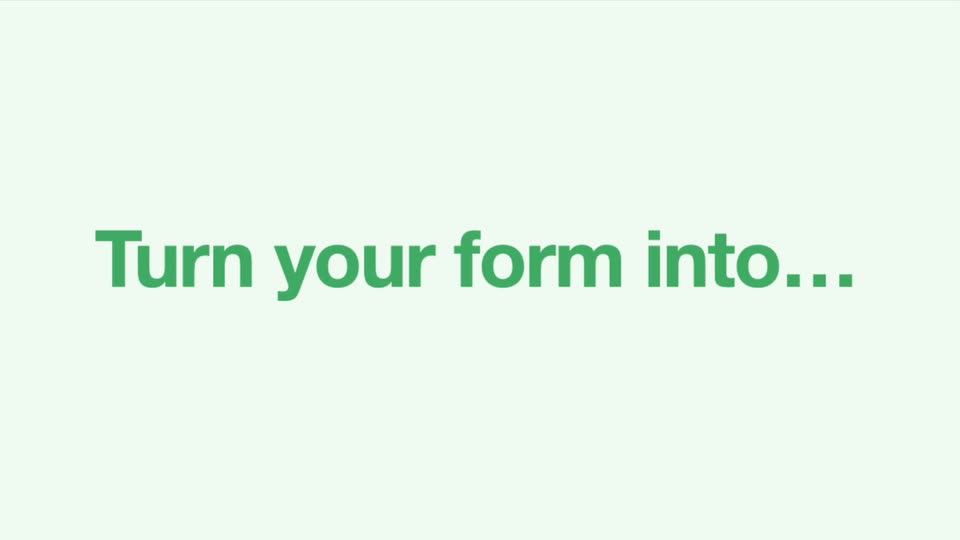
15 · Feature reveal · 0:29–0:31
A flat mint-green background holds one centered line of green text, 'Turn your form into...', which remains static and locked off for the full shot.
On-screen text: “Turn your form into...”
Camera: Static
16 · Feature reveal · 0:31–0:32
A light feedback form titled RowFlow Feedback Form fills the frame, its star-rating and text fields scrolling slowly upward while a cursor hovers at the top right near the copy link. A static headline reads Turn your form into... over the locked-off interface.
On-screen text: “Turn your form into...”
Techniques: Cursor demo
Camera: Push in
17 · Feature reveal · 0:32–0:34
A Google Forms screen shows a feedback form with star ratings beside a copy responder link dialog. The view zooms in on the dialog, blurring the form behind, while a cursor hovers over the Copy button.
Techniques: Cursor demo, UI zoom
Camera: Push in
18 · Feature reveal · 0:34–0:35
A white screen shows a bold headline over two cards. The view zooms into the left card, where a Google Form URL fills the input field and a cursor hovers the green Make it talk button.
On-screen text: “Give your stupid form a brain.”
Techniques: UI zoom, Cursor demo
Camera: Push in
19 · Feature reveal · 0:35–0:36
A light web form with a pasted URL and a green button. The frame zooms in toward the green 'Make it talk!' button as a cursor arrow hovers over it.
Techniques: UI zoom, Cursor demo
Camera: Push in
20 · Feature reveal · 0:36–0:39
A flat green background fills the frame while the white line ...an AI conversation. sits centered and motionless. The shot holds on this single static caption for the full duration, with no movement or reframing.
On-screen text: “...an AI conversation.”
Camera: Static
21 · Feature reveal · 0:39–0:44
A flat rowflow chat screen runs a live demo: user messages and bot replies stack in the left panel while the right-hand Collected Data panel ticks its progress and fills fields in real time. The interface dims as a large white headline, Text. Slack. Email. Embed Anywhere., appears over it.
On-screen text: “Text. Slack. Email. Embed Anywhere.”
Camera: Static
22 · Feature reveal · 0:44–0:46
A flat green field holds two lines of white text, 'Text. Slack. Email.' above 'Embed Anywhere.' The frame is locked off and the type stays still for the full duration.
On-screen text: “Text. Slack. Email.”, “Embed Anywhere.”
Camera: Static
23 · Feature reveal · 0:46–0:48
A Slack channel view fills the frame while a cursor types a reply in the input box, then the camera zooms out to reveal two side panels flanking the chat window.
On-screen text: “Text. Slack. Email.”, “Embed Anywhere.”
Techniques: Cursor demo, UI zoom
Camera: Pull out
24 · Feature reveal · 0:48–0:51
A Slack channel and a phone chat sit side by side on a green background. The phone slides in from the right as messages type out in both panels, with an iOS keyboard at the bottom of the phone.
Techniques: Split screen
Camera: Pull out
25 · Feature reveal · 0:51–0:54
A solid green field holds two lines of bold white text, left-aligned and centered vertically. The lines read 'Zero chasing.' and 'Double your responses.' and remain completely still on a locked-off frame for the full duration.
On-screen text: “Zero chasing.”, “Double your responses.”
Camera: Static
26 · Feature reveal · 0:54–0:55
A spreadsheet-style survey table with a green header row fills in on a white screen. Colored status dots mark each name in the left column as the response cells populate and settle into aligned rows.
On-screen text: “Zero chasing.”, “Double your responses.”
Techniques: UI zoom
Camera: Static
27 · Outro · 0:55–1:00
A static logo lockup holds on a white background: a dark gray curved stem with three green speech-bubble leaves, the wordmark rowflow.ai in dark gray, and the tagline beneath it. The frame stays locked-off with no motion throughout.
On-screen text: “rowflow.ai”, “the modern form is no form at all”
Camera: Static