1:35

Hue (YC F26) Launch Video
Hue · B2B · Oct 2026
Sol · Sep 2026 · 1:44 · AI-annotated
Sol’s 1:44 launch film runs 64 scenes, about 1.6 s each. The product shows up at 0:59. The call to action lands at 1:38 (94% in), over a voiceover. The video opens on a fast-cut thesis that everything we make evolves, using locked-off archival stills under giant white category words, then pivots to email and the pain of work that never starts. It resolves into a calm pastel UI tour of Sol loops, closing with a 3D gallery and a white-field early access card.
Is this your launch? to your site or press kit.
Hue · B2B · Oct 2026
Finary · Finance · Sep 2026
Visually · Oct 2026
A dotted emblem, a radial ring of small loop shapes around a central circle, glows into view at the center of a black screen.
Camera: Static
A thin white wave of grainy light undulates across a black field, growing brighter as it moves, then the frame cuts to a dark red textured surface holding a diagonal row of glowing white oval shapes.
Camera: Static
On a black field, the white line 'Everything we make evolves.' holds center, then is replaced by 'It's not a choice.', which scales up from small to full size while tilting, its words staggered at different heights.
On-screen text: “Everything we make evolves.”, “It's not a choice.”
Techniques: Kinetic type
Camera: Static
A full-bleed painting of muscular prehistoric men with hammers and tools holds still; the word Light sits centered in large white type over the scene, the frame locked off.
On-screen text: “It's not a choice.”, “Light”
Camera: Pull out
A vintage illustration shows a woman in a headscarf holding a lit oil lamp over a wounded soldier, set against a dark muted background. The word Light sits centered in large white type over the scene, held on a locked-off frame.
On-screen text: “Light”
Camera: Static
A black and white archival still shows an elderly man in a suit and bow tie standing beside a large glowing glass sphere with internal coils. The word Light sits centered in white over the image, static on a locked-off frame.
On-screen text: “Light”
Camera: Static
An illustrated night cityscape with warm window lights and two blue-glowing street lamps holds a locked-off frame. The word Light sits centered in large white type.
On-screen text: “Light”
Camera: Static
A black-and-white still shows a hand holding a drafting tool over a technical map, with a ruler and compass resting on the paper. The word Maps sits centered in white over the image. The frame is locked off with no motion.
On-screen text: “Maps”
Camera: Static
On a black background, the word Maps holds the center in white while four tilted map tiles fan out behind it. A red route line draws across the tiles, linking the grayscale, satellite and street views into one continuous path.
On-screen text: “Maps”
Camera: Static
A close-up of a phone screen shows a street view of a Gothic building in London, with the word Maps centered in white. A finger swipes across the lower edge, panning the map to a street with passing cars.
On-screen text: “Maps”
Camera: Static
A grayscale ancient coin with a profile and laurel wreath sits centered on black. The word Maps holds, then Money scales across the coin in a locked-off frame.
On-screen text: “Maps”, “Money”
Techniques: Kinetic type
Camera: Static
A black and white archival photo shows a person holding a one dollar bill over their eyes like a mask, a child's head resting in the foreground. The word Money in white sans sits centered over the image and scales in. The frame stays locked off.
On-screen text: “Money”
Techniques: Kinetic type
Camera: Static
Two hands hold iPhones facing each other on a white background. The left screen sparks from a Ready to Send state to Sending $20, the right screen shifts from a 9:41 lock screen to a $20 transfer, while the white word Money scales across the center.
On-screen text: “Money”
Techniques: Kinetic type, Particles
Camera: Static
A pixel-art white Charmeleon silhouette sits centered as the background darkens and white dots ring it, with a gold-bordered game text box at the bottom reading the evolution message. The word Money scales up large over the frame.
On-screen text: “Money”
Techniques: Particles
Camera: Static
A gray pixel-art screen shows a white dragon silhouette that fills in with color as small white plus-shaped sparkles pop up around it. A gold-bordered dialog box at the bottom holds two lines of white pixel text.
Techniques: Particles
Camera: Static
A pixel-art dragon with spread blue wings stands centered on a horizontally striped background that shifts from green to mint. A gold-bordered dialogue box with white pixel text sits at the bottom. The frame stays locked-off throughout.
On-screen text: “What?”, “CHARMELEON is evolving!”
Camera: Static
Top-down locked-off shot of a black turntable on a wooden desk, a translucent blue vinyl record spinning under a resting tonearm, vinyl sleeves and a pen framing the edges. A yellow caption reads Music. at the bottom.
On-screen text: “Music.”
Camera: Static
A close-up of a cassette tape reel spins, the beige wheel blurred with motion inside a dark translucent shell. The word Music. sits in yellow at the bottom center, static throughout the shot.
On-screen text: “Music.”
Camera: Static
A compact disc spins clockwise on a black surface, its printed design showing pink bubble letters reading House Party 1999 above a red flame and a cartoon devil face. A small yellow caption reading Music. stays fixed at the bottom of the frame.
On-screen text: “Music.”
Camera: Pan
A dark teal music player fills the frame, with a progress bar at 1:22 of 1:51, a row of white playback controls, and a centered pause button ringed in glowing green. A yellow caption reading Music. sits at the bottom edge.
On-screen text: “Music.”
Camera: Static
A static black-and-white photo of a tall mechanical machine with vertical rods and side handles fills the frame. The word “Computers” in large white sans-serif type scales up across the center over the machine.
On-screen text: “Music.”, “Computers”
Techniques: Kinetic type
Camera: Static
A faded archival photo shows two women seated at a console facing a wall of early computer components and wiring. The word Computers scales in large across the center of the locked-off frame.
On-screen text: “Computers”
Techniques: Kinetic type
Camera: Static
A black and white archival photo of a vintage computer room, two men working at UNIVAC consoles, sits static as the word Computers scales up across the center of the frame.
On-screen text: “Computers”
Techniques: Kinetic type
Camera: Static
A black-and-white archival photo shows a person in a lab coat, seen from behind, facing an old computer terminal in a cluttered lab. The word Computers scales up across the lower frame while the image stays locked off.
On-screen text: “Computers”
Techniques: Kinetic type
Camera: Static
A beige vintage IBM PC sits on a white surface, its CRT monitor showing a pixelated IBM logo. The word Computers in large white letters overlays the machine and scales gently. The camera stays locked off.
On-screen text: “Computers”
Techniques: Kinetic type
Camera: Static
A close-up angled view of three glossy translucent computer mice in orange, purple and teal, each bearing a small Apple logo, sits on a pale surface. The white word Computers scales up across the center of the frame as a category label over the product.
On-screen text: “Computers”, “IBM”
Techniques: Kinetic type, 3D mockup
Camera: Static
A silver laptop with a purple desktop and app dock sits centered on a light gray background, overlaid by the white word Computers. The laptop and the word scale down together across the short clip.
On-screen text: “Computers”
Techniques: Kinetic type, 3D mockup
Camera: Static
A silver MacBook renders in 3D on a gray backdrop, its screen filled with a purple geometric wallpaper and a dock of app icons. The camera pushes in on the dock, enlarging the icons and the wallpaper blocks behind them.
Techniques: 3D mockup, UI zoom
Camera: Push in
The iPhone home-screen dock slides into center as the Mail badge ticks from 6 to 7 and a white phone badge shrinks on the green FaceTime icon. A yellow caption “and this?” holds below the dock over a purple grid wallpaper.
On-screen text: “and this?”
Camera: Static
A close-up of a tablet dock with app icons and magenta-bordered panels shows the word “Oh”, then cuts to black as the line completes to “Oh it evolved. Constantly.” while a highlighted legal document slides up from the bottom.
On-screen text: “Oh it evolved. Constantly.”
Techniques: Kinetic type
Camera: Pull out
Tilted screenshots of early email interfaces and a black-and-white computer room photo scatter around a black background. In the center, the white headline builds word by word into the full sentence while the surrounding panels slide into place.
On-screen text: “Oh it evolved. Constantly.”
Techniques: Kinetic type
Camera: Static
A dark, heavily motion-blurred globe spins fast on a black background, crossed by thin curved light trails. A yellow caption sits at the bottom center of the locked-off frame.
On-screen text: “It learned to cross the world in a second”
Camera: Static
A dark 3D globe spins fast with heavy motion blur, its white latitude lines and scattered city lights streaking across a black void. A yellow caption holds at the bottom of the locked-off frame.
On-screen text: “It learned to cross the world in a second”
Camera: Static
A dark etched globe of North America rotates in 3D against black, the engraved map lines and state borders sharpening into focus as the sphere turns. A yellow caption sits locked at the bottom.
On-screen text: “It learned to cross the world in a second”
Camera: Static
A tight close-up of an email thread on a phone screen, the body scrolling upward past a Docs.zip attachment and the line Please find the attached documents. The word attached stays highlighted in yellow, and a yellow caption to hold attachments, sits locked at the bottom.
On-screen text: “to hold attachments,”
Camera: Static
A close-up of an email composer on a paper-like background crossfades between two drafts, the word attached highlighted in yellow as attachment chips appear at the top.
On-screen text: “to hold attachments,”
Techniques: Morph
Camera: Static
A person in a yellow knit sweater holds a phone with a pale case, its back and camera ring angled toward camera. The thumb rests along the side edge while the blurred plants and warm room stay still behind.
On-screen text: “to reach your pocket,”
Camera: Push in
Close-up of a mail app sidebar. A hand cursor hovers over the More row as the label list scrolls up, revealing Updates, Forums, Promotions and manage rows. A yellow caption at the bottom switches from to reach your pocket, to to sort itself
On-screen text: “to reach your pocket,”, “to sort itself,”
Techniques: Cursor demo
Camera: Static
A tilted close-up of a spam inbox list fills the frame, each row showing a star, a yellow envelope, the sender '[*** Spam Mail ***]' and a subject line, with a search bar on top. A yellow caption 'defend itself.' rests at the bottom as the list holds still.
On-screen text: “defend itself.”
Camera: Static
A tight close-up of an inbox list shows rows of starred yellow envelopes tagged [*** Spam Mail ***] with promo subject lines. The list scrolls down a few lines as the frame sharpens from a soft blur, and a small yellow caption sits at the bottom.
On-screen text: “defend itself.”
Camera: Static
On a black field, a blue Mail icon with a white envelope sits centered as its red badge counts up from 8 to 99, then the icon scales up. A yellow caption at the bottom reads “Every one of those steps,” then “made mail...”.
On-screen text: “Every one of those steps”, “made mail...”
Camera: Static
A blue mail app icon with a red 99 badge and the yellow caption “made mail...” on black zooms in to fill the frame, revealing scattered white 3D envelopes on a blue field. The white line “better at arriving.” appears centered over the envelopes.
On-screen text: “made mail...”, “better at arriving.”
Techniques: UI zoom
Camera: Static
A blue gradient background holds a centered white headline while a pile of white 3D envelope icons tumbles and reshuffles along the bottom edge.
On-screen text: “better at arriving.”
Techniques: Particles
Camera: Static
A grainy black-and-white clip, letterboxed on black, shows a man in a white shirt at a cubicle desk with a CRT monitor and printer, shuffling papers under a locked-off camera. Yellow subtitle lines swap at the bottom.
On-screen text: “Not one”, “in fifty years,”, “made getting started”, “any easier.”
Camera: Static
A tilted phone screen on a purple gradient shows inbox notification cards stacking up one by one, then reframes to the opened email view. A yellow caption sits at the bottom, reading the line then swapping to its last words.
On-screen text: “Your inbox watches your work arrive”, “all day.”
Techniques: 3D mockup, UI zoom
Camera: Pull out
A close-up of an email from Oleg V starts blurred, then pulls into focus and zooms into the body as the message scrolls up. A white headline sits at the top and a yellow caption appears at the bottom over the highlighted text.
On-screen text: “Board update – need your section by EOD”, “It knows what's being asked.”
Techniques: UI zoom
Camera: Pan
Close-up of an email body with several phrases highlighted in yellow. The camera slowly pushes in on the text while yellow caption lines fade in at the bottom, one replacing the other.
On-screen text: “It knows what's being requested.”, “It has everything it needs.”
Techniques: UI zoom
Camera: Static
Close-up of an email draft on a light interface. The view scrolls down past the body paragraphs and a red PDF attachment chip, settling on the bottom toolbar where a blue Send button sits. A yellow caption holds across the lower edge.
On-screen text: “And it waits for you anyway.”
Camera: Push in
A blurred chat composer with a heavy vignette fills the frame, the white headline “Until now.” centered and a yellow caption “And it waits for you anyway.” below. The shot cuts to black, where a white ring and a curved metallic arc begin to form.
On-screen text: “Until now.”, “And it waits for you anyway.”
Camera: Static
Twelve metallic 3D tubes fly in from a scattered field and rotate into a radial burst of curved hooks around a central silver ring on a black background, the motion easing to a static logo.
Camera: Pull out
A 3D metallic emblem with a central ring and looped petals sits on black. It flashes into a flat black icon on a white disc ringed by colorful blur, then the disc expands into a white browser window with three colored dots at the top left.
Techniques: Morph, 3D mockup
Camera: Static
A flat cream browser window with the black Arc sun mark and the word Sol in dark serif sits over a peach field. The window pans, the mark slides out to the left, and Sol scales into the center above a Home tab bar.
On-screen text: “Sol”
Techniques: Kinetic type
Camera: Pull out
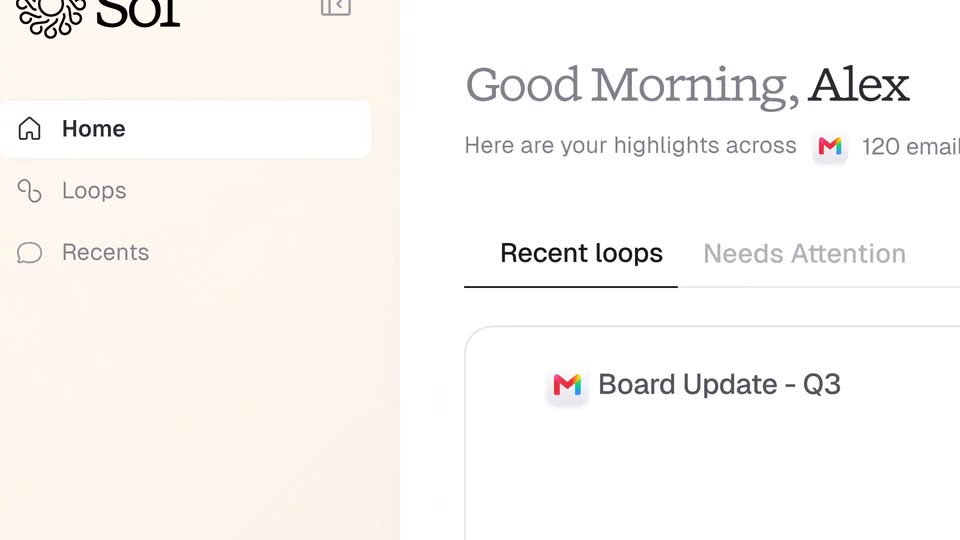
A light cream interface with a left sidebar showing the Sol logo and Home, Loops, Recents items. The view zooms out from the sidebar to reveal the main panel with a Good Morning, Alex greeting and a Board Update card.
Techniques: UI zoom
Camera: Pull out
An inbox list of task loops shows rows with senders, subjects and “Sol is working” spinners that flip to black pills like “Google Doc is ready” and “Approve invite”. It cuts to one task card centered on white, ringed by a soft purple-blue glow.
Camera: Pull out
A white document card floats on a soft blue-pink gradient blob. It shows a doc header with avatars and a 'Loop created from' row, then an orange-icon block. A nested preview types in line by line, settling on a black 'Open in Google Docs' pill and gray body copy.
Camera: Static
A white task card floats on a soft pastel gradient with a glowing ring behind it. The card first shows a PR doc task with a Google Docs link, then shrinks and swaps to a Closure meet task with a Sol is working row.
Techniques: UI zoom
Camera: Push in
A white UI card sits on a soft pastel glow. The meeting title slides in at the top as a 'Sol is working' status holds below; the card then expands to show a list of proposed times and a Send invite button.
Camera: Static
A white UI task card on a plain background crossfades from a larger Closure meet card with a Send invite button into a smaller centered Share next steps card, which blooms with a soft pink and cyan glow.
Camera: Push in
A white task card holding a drafted email scales up from the center against a soft pink and blue glow. The card lists a feedback title, a status note, recipient chips and a Send button as it grows to fill the frame.
Camera: Static
A tilted 3D email card sits over a blue-pink gradient with the black line All of it ready. overlaid. The card fades out, leaving the centered line, which swaps to None of it sent. The gradient clears to white and the card slides in from the left beside a cursor.
On-screen text: “All of it ready.”, “None of it sent.”
Techniques: 3D mockup
Camera: Pan
A pixelated cursor glides down a light task list and clicks a black Send button, which flips to a Sending state. The view then scrolls down through the reply text and pulls back to reveal the screen standing on a floor in 3D space.
Techniques: Cursor demo, 3D mockup
Camera: Pan
A rendered white gallery displays a gramophone, cameras, a rotary phone, a film projector, speakers, an orange iMac and a Charizard figure on pedestals. The camera dollies forward between the rows and settles on a blue Mail icon on a central pedestal, with yellow captions below.
On-screen text: “Everything we make finds it's next form.”, “Half your inbox took fifty years,”, “the other half”
Techniques: 3D mockup, Parallax
Camera: Push in
In a plain gray 3D room, a red rounded-square app icon with a white radial loop pattern unfolds from a thin vertical sliver into its full shape on a white pedestal. A yellow caption at the bottom reads the closing line.
On-screen text: “the other half”, “starts today.”
Techniques: Morph
Camera: Static
A rounded app icon with a white sunburst on a red gradient sits centered on a white field, its surface shifting from flat red to a metallic sheen and back. The phrases “Get early access” and “hellosol.app” fade in on either side, an orange underline draws beneath the URL then fades, and a small gray note about Gmail, Outlook and Slack appears below.
On-screen text: “Get early access”, “hellosol.app”, “Sol works with Gmail today.”, “Support for Outlook and Slack is coming soon.”
Camera: Static