1:15
Explore
RivianOS 2 | Rivian
RivianOS · Sep 2026 · 0:46 · Full motion · AI-annotated
- Length
- 0:46
- Scenes
- 39 · 1.2 s avg
- Product on screen
- 0:00
- Features shown
- 11
- Voiceover
- No
- Views
- 117K on YouTube
as of November 26, 2026
00:00:00 / 00:46:11
- Length
- 0:46
- Scenes
- 39 · 1.2 s avg
- Product on screen
- 0:00
- Features shown
- 11
- Voiceover
- No
- Views
- 117K on YouTube
as of November 26, 2026
RivianOS’s 0:46 launch film runs 39 scenes, about 1.2 s each. The product is on screen from the first frame and 11 features are revealed. There is no explicit call to action. A 46 second product tour built as a rapid cut montage of isolated UI widgets, each feature isolated on a flat field and animated in place before the next snaps in. The style is defined by a strict white, charcoal and orange palette, a single bold geometric sans, flat rounded cards with one accent color, and a recurring signature move of zooming into a tile and morphing it into the next screen.
No filming indicatedEstimated needs: 10 capture groups — your screens or recordings · 1 official logo — reused across the film · 5 graphic passages — draw or supply · 6 3D passages — build or supply
Is this your launch? to your site or press kit.
More like this
1:31

Claude - Introducing Personal Finance in Claude, in beta in the US. Connect t
Anthropic · AI · Nov 2026
0:43

Similar soundtrack
Films whose music sounds like this one, voice left out
0:58


Simplex Launch Video
Simplex · Funk, hip-hop, and electronic dance music
0:34


Rainbow - 🌈 Meet Rainbow's Token Launcher! No more clunky launchpads. You can
Rainbow · R&B, hip-hop, funk, soul
1:16

Introducing Fitbit Charge 3
Fitbit · Electronic dance music
RivianOS 2 | Rivian, scene by scene
· 39 scenes as text
01 · Product intro · 0:00–0:01
The black Rivian wordmark sits centered on a plain white field, then the frame switches to the black OS wordmark in the same centered position. Both marks hold static with no motion.
On-screen text: “Rivian”, “OS”
Camera: Pull out
02 · Product intro · 0:01–0:01
On a white field, an orange circle holding a white 2 stretches into a rounded pill while the dark gray Rivian OS wordmark settles to its left, locking into the centered brand mark.
On-screen text: “Rivian OS 2”
Techniques: Morph
Camera: Static
03 · Product intro · 0:01–0:02
A dark navy field holds the title Rivian OS in light gray bold sans, paired with an orange rounded badge holding a dark numeral 2. The frame is locked off with no motion.
On-screen text: “Rivian OS”, “2”
Camera: Static
04 · Product intro · 0:02–0:02
The white “Rivian OS 2” wordmark holds centered on a flat orange field, then its opacity drops until it ghosts out over the half second.
On-screen text: “Rivian OS”, “2”
Camera: Static
05 · Product intro · 0:02–0:03
The Rivian OS 2 wordmark, dark bold sans with a white 2 in an orange rounded square, holds centered on white. A cut brings the orange diamond logo inside a white rounded tile on a flat gray field.
Camera: Static
06 · Demo · 0:03–0:04
A flat phone mockup sits centered on a gray-green field. The orange diamond app icon dissolves to reveal the app dashboard: a large number, a white SUV, three round controls, and orange and green cards at the base. The camera stays locked off.
Camera: Static
07 · Demo · 0:04–0:05
A front-view phone mockup displays a car app with a white SUV and a 390 range figure. The view zooms into the green Energy card, then a dark green circle expands to reveal a black circular lock button.
Techniques: UI zoom, Masking
Camera: Static
08 · Demo · 0:05–0:06
A yellow cartoon bear in a red puffer jacket holds a camcorder at the left of an orange gradient. It slides off frame as the headline swaps from Gear Guard to Climate and the dark badge icon changes from camera to fan.
On-screen text: “Energy”, “95% • 100% limit”, “Gear Guard”, “Video: Cam 72°”, “Climate”, “Cabin 97° - 72°”
Techniques: Kinetic type, Morph
Camera: Static
09 · Feature reveal · 0:06–0:07
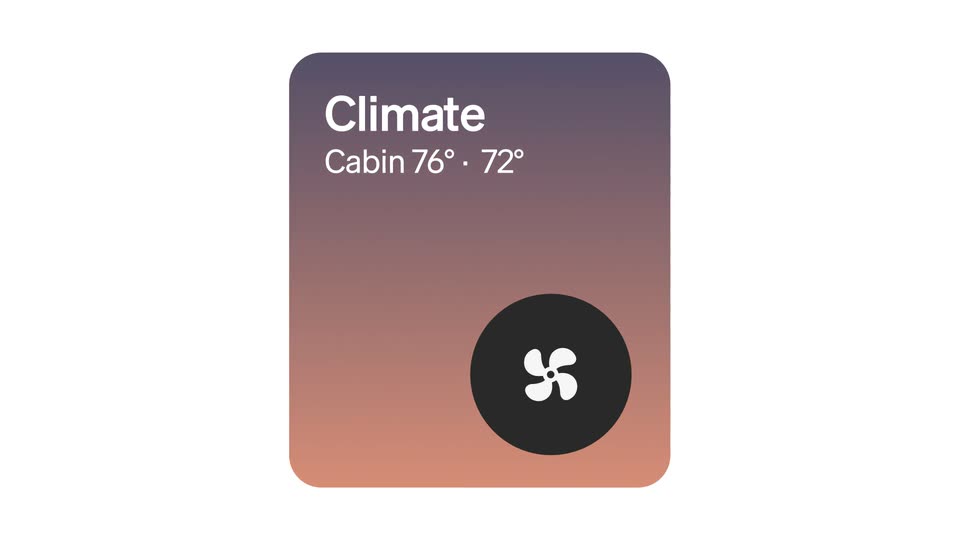
On a white background, a rounded orange-to-brown gradient card animates from a wide rectangle into a portrait shape. A white Climate title and Cabin 97° - 72° line sit top-left, and a dark circular fan button sits lower-right.
Camera: Static
10 · Feature reveal · 0:07–0:08
A rounded card with a blue-to-peach gradient sits centered on a white field. The bold white Climate title slides in at the top left above a cabin temperature line, while a dark circle holding a white six-blade fan icon rests in the lower right.
Techniques: Kinetic type
Camera: Static
11 · Feature reveal · 0:08–0:11
A flat phone screen shows a trip planner. The view zooms in on the itinerary list as a second stop card, Tuolumne Meadows Campground, slides in below the vehicle location row, leaving the dashed Add stop box at the bottom.
On-screen text: “Climate”, “Cabin 97° . 72°”
Techniques: UI zoom
Camera: Push in
12 · Feature reveal · 0:11–0:12
A white route-planning screen shows a dashed Add stop field above a pill button with a car icon. The view reframes onto the button as the field slides up and out; the button shifts from a black fill with white text to a light gray fill with dark text reading Send to vehicle.
Techniques: UI zoom
Camera: Static
13 · Demo · 0:12–0:14
A car infotainment screen on a white background. The interface reflows: the music player tile slides from the right to the left, the navigation card updates to a closer destination, and the map switches from a regional 2D view to a 3D street view.
Camera: Push in
14 · Demo · 0:14–0:14
A blue music player card dissolves in at center while a car navigation screen and a SUBSCRIBE overlay fade out to white. The player shows album art with a 3D blue and orange fruit, the title Bad Slushie by Violet VA, a progress bar and playback controls, then holds static.
On-screen text: “SUBSCRIBE”
Camera: Push in
15 · Demo · 0:14–0:15
A dark phone mockup in 3D perspective slides right off frame. A white music card with a waveform and a black tablet showing a top-down car slide in from the left and right edges on a white background.
Techniques: 3D mockup
Camera: Pull out
16 · Demo · 0:15–0:16
A wide in-car display on white shows a top-down white car, a P gear indicator and a music card. The screen scales down toward center as the music card slides right into its final spot.
Camera: Static
17 · Demo · 0:16–0:17
On a light gray field, a black circle with a white letter sits among the dark letters R, N and D. The letters swap slots around the circle, P and N trading the center for the outer positions.
On-screen text: “R”, “N”, “P”, “D”
Techniques: Morph
Camera: Static
18 · Feature reveal · 0:17–0:18
Top-down 3D view of a silver car driving along a glowing blue lane on a grid road, other cars fading in around it. A dark rounded caption with a blue hands-on-wheel icon sits at the bottom.
On-screen text: “Universal Hands-Free on”, “Stay attentive.”
Techniques: 3D mockup
Camera: Static
19 · Feature reveal · 0:18–0:20
A 3D top-down view of a highway follows a white car along a highlighted blue lane, with gray cars and a cyclist beside it. A dark rounded card at the bottom holds a blue steering-wheel icon and a two-line caption. The frame stays locked-off.
On-screen text: “Universal Hands-Free on”, “Stay attentive.”
Techniques: 3D mockup
Camera: Static
20 · Feature reveal · 0:20–0:21
A circular speedometer with blue and orange arcs sits on a light gray field; the center number counts up from 52 to 60 mph under a small 65 mph box. The flat graphic fades as a 3D car dashboard and steering wheel emerge around it.
Techniques: 3D mockup
Camera: Pull out
21 · Feature reveal · 0:21–0:24
A line-art hand presses a mode button on the steering wheel. On the right, a vertical list of driving modes with icons (All Purpose, Sport, Conserve, Snow) slides and the highlight jumps between entries, then the list collapses to a single dark pill reading Sport.
On-screen text: “All Purpose”, “Sport”, “Conserve”, “Snow”
Techniques: Kinetic type
Camera: Pull out
22 · Feature reveal · 0:24–0:27
A pale street map fills the frame with a white rounded card centered on it. The query text fades in from a faint gray ghost to solid black while the card drifts slowly upward. A black band with a wavy orange line runs along the bottom.
On-screen text: “Hey Rivian, where can I charge the car and get some good breakfast burritos around here?”
Camera: Static
23 · Feature reveal · 0:27–0:28
A light map holds a white restaurant card with photos and a Go button, then pulls back to show a yellow route line and a pin. A pill with a green bolt and 23 min floats by the pin, and a black, orange, teal wave lines the bottom edge.
Techniques: UI zoom
Camera: Pull out
24 · Feature reveal · 0:28–0:30
A rounded white card on a street map holds a charge slider: the green fill grows and the percentage counts up from 47% to 80% while the end label shifts from 23 min to 90%. The map and card frame fade to plain white, leaving the light green slider centered.
Camera: Static
25 · Feature reveal · 0:30–0:31
A white dashboard panel with three tabs fades in. Green bars rise from the baseline beneath a dark line that draws itself, and a dark rounded tooltip with a percentage sits at the line's end.
Camera: Pull out
26 · Feature reveal · 0:31–0:32
A flat charging-schedule graph with yellow bars, a black line and an 80% tooltip holds, then cuts to a static weather card: a striped orange sun behind white clouds with location, temperature and condition text centered.
Camera: Static
27 · Feature reveal · 0:32–0:33
A flat weather view on a gray field: a striped yellow sun morphs into a crescent moon while white clouds drift across, the temperature falls from 58°F to 46°F and the condition label switches from Partly cloudy to Clear.
Techniques: Morph
Camera: Static
28 · Feature reveal · 0:33–0:34
A circular weather widget reading Yosemite, CA, 41°F, Clear sits on a dark gray field, then the circle opens and the view becomes a full-screen dark map with a blue route, a Tioga Rd. turn card and a bottom trip bar.
Techniques: Morph, Masking
Camera: Static
29 · Feature reveal · 0:34–0:34
A dark map view holds a blue route line running vertically, a centered location marker with a soft glow, a top card showing a right-turn arrow and distance, and a bottom panel with trip stats and an End button. The frame stays static.
Camera: Static
30 · Feature reveal · 0:34–0:36
A dark car interface on black shows a centered search field where the word Lighting is typed, then a dropdown of options slides in below it with Lighting highlighted, then the menu collapses leaving the search bar alone.
Camera: Static
31 · Feature reveal · 0:36–0:37
A dark car settings screen. The left menu column fades out as the accent lighting panel reflows: the green forest illustration labeled Forest Valley enlarges and centers above the row of color swatches, with a speaker icon beside it.
Camera: Pan
32 · Feature reveal · 0:37–0:38
A rounded card on black holds a flat landscape illustration that dissolves from a teal daytime view with a sun and mountain reflection into a purple night view with a crescent moon, then back. A white-ringed circle at the lower left shifts from green to purple in sync.
Techniques: Morph
Camera: Static
33 · Feature reveal · 0:38–0:39
A dark rounded widget on black shows an elevation readout. A large light-gray number counts down from 8,549 to 8,539 at center right, while a vertical tick scale on the left shifts and two stats, Lowest and Highest, sit at the bottom.
Camera: Static
34 · Feature reveal · 0:39–0:41
A dark rounded card holds a circular horizon gauge with a white aircraft icon. The roll figure counts down from 35° to 6° as the tilted blue-and-gray horizon levels out, then the whole gauge shrinks to a point, leaving only the title.
Techniques: Morph
Camera: Static
35 · Feature reveal · 0:41–0:42
A dark map shows a rounded status card with a pin icon above a blue arrow on a road line. The view zooms in, enlarging the card and pin until the card's top edge leaves the frame.
Techniques: UI zoom
Camera: Static
36 · Demo · 0:42–0:42
A white SUV front view scales up to fill the center of a black field of floating app cards, including a map pin, an orange dial and a blue speedometer arc.
Techniques: 3D mockup
Camera: Pull out
37 · Demo · 0:42–0:43
A 3D smartphone mockup displaying a car interface scales down in the center. A collage of floating UI widgets, including a music player, climate controls, and a 3D character, expands outward on a black background.
Techniques: 3D mockup
Camera: Pull out
38 · Other · 0:43–0:45
A light gray circle on a black field holds a thin line-drawn padlock. The open shackle swings down to close the lock, then the circle fades out to black.
Techniques: Morph
Camera: Static
39 · Outro · 0:45–0:46
The RIVIAN wordmark holds centered on a pure black field, white sans-serif letters, fully static and locked off for the entire shot as a closing sign-off.
On-screen text: “RIVIAN”
Camera: Static