1:44

Avoice | The AI Workspace For Architects
Avoice · B2B · Feb 2026
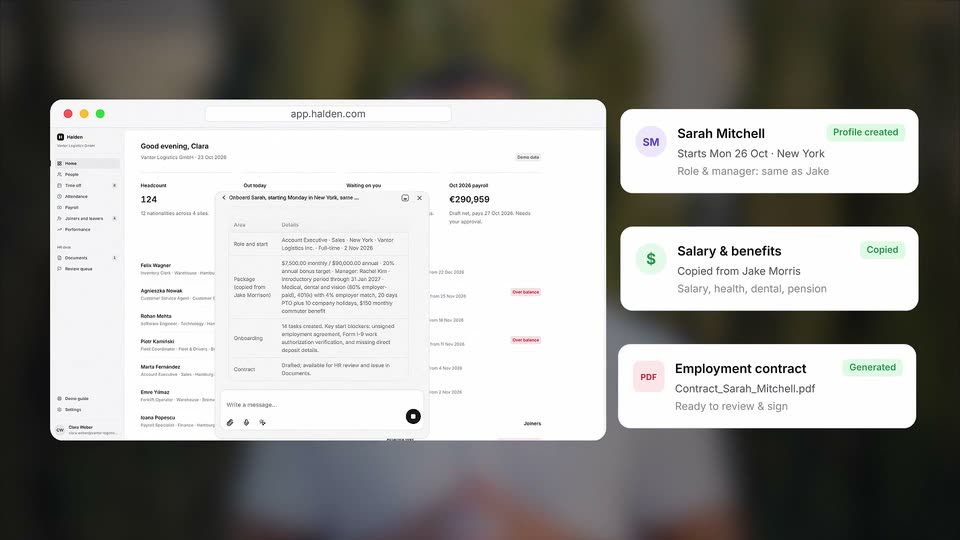
Rippling’s 0:58 launch film runs 21 scenes, about 2.8 s each. The product is on screen from the first frame and 4 features are revealed. The call to action lands at 0:53 (92% in), over a voiceover. A deep-maroon, paper-cut 3D world alternates with flat UI panels and warm live-action inserts, each feature announced by a single typed headline and demoed with counting numbers, popping pill badges, and a recurring yellow cursor. The pacing is steady at about 113 BPM with a soft ambient bed, building a logo ripple open, a problem globe, four feature blocks, and a logo end card with a CTA button.
Is this your launch? to your site or press kit.
Films whose music sounds like this one, voice left out
Open · Upbeat electronic
StoreTrack · Upbeat electronic
Fitbit · Modern electronic
On a dark maroon field, the 3D Rippling logo sits extruded at the left edge, then multiplies into concentric offset layers that ripple outward, filling the frame with deepening depth.
Camera: Pan
On a dark maroon field with layered 3D paper shapes, a cream ripple mark scales up and the wordmark RIPPLING IT builds in letter by letter. A rounded tagline pill fades in below, then a circular mask wipes the frame to black.
On-screen text: “Device Lifecycle Management”
Techniques: Kinetic type, Masking
Camera: Static
A small circular avatar of a smiling man hovers at the center of a near-black background, drifting slowly upward. The large headline and smaller subhead sit still on the frame while a faint arc with a small dot rises into view at the bottom edge.
On-screen text: “RIPPLING IT”, “Device Lifecycle Management”
Camera: Static
A dark maroon globe with grid lines floats in 3D perspective, scattered with avatar chips and yellow dots. A purple card above expands from one avatar to reveal a name and role, a yellow bell badge popping at its corner. Label tags slide in around the sphere.
Techniques: 3D mockup
Camera: Static
A dark 3D globe of user avatars sits below a highlighted card for James Carter, Administrator, with a yellow bell badge counting up. Notification labels tag individual avatars. The camera pulls back to reveal the whole scene on a laptop screen resting on a desk.
Techniques: 3D mockup
Camera: Pull out
A 3D laptop on a desk shows a Device Management screen while floating cards (an MDM panel, a delayed shipment card, a shipment tracking card, a timeline) pop in around it, numbers counting up and yellow alert pills sliding in. The scene cuts to a flat Devices overview.
Techniques: 3D mockup
Camera: Pull out
A mauve laptop on a cream ledge displays a Devices dashboard; its metric cards and donut charts count up as the headline types in above. The camera pulls back to a three-quarter angle of the open laptop.
On-screen text: “Automate the full device lifecycle”
Techniques: Kinetic type, 3D mockup
Camera: Pull out
A rose-gold laptop rests at an angle on a cream ledge, its screen showing a devices dashboard with four stat cards and three donut charts. The caption “on one platform” fades in on the plain wall to the left.
On-screen text: “on one platform”
Techniques: 3D mockup
Camera: Static
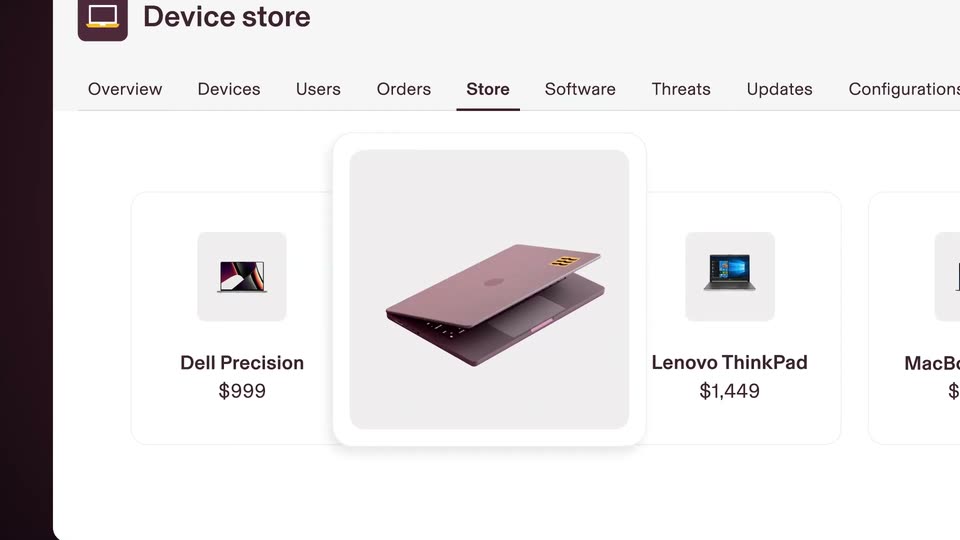
On a dark maroon background, the headline fades in word by word above a Device store panel that slides up into frame. The view then zooms into the store grid as the MacBook Pro card enlarges and its 3D laptop rotates.
On-screen text: “Top 10 Apple Reseller”
Techniques: Kinetic type, UI zoom, 3D mockup
Camera: Push in
An isometric gold box holding a gray tablet sits center on a dark maroon field, flanked by 'Ship to' and 'new hires'. The box closes, then morphs into a truck that travels a path between two yellow map pins as an 'Automatically!' bubble and a checkmark badge pop in.
On-screen text: “Ship to”, “new hires”, “Automatically!”
Techniques: 3D mockup, Morph
Camera: Static
A man in a cream T-shirt types on a laptop at a kitchen table. White pill badges with maroon icon chips pop in around him, listing security checks. The icons flip to checkmarks and he looks up, smiling at the camera.
On-screen text: “SOC 2”, “MDM enrolled”, “Software installed”, “OS updated”, “Encryption”, “CIS Level 2”, “MFA enforced”
Techniques: Kinetic type
Camera: Static
A 3D profile card for Dominique Martin, Engineering Lead, fades in at center on a dark maroon background, flanked by a bell pill whose count climbs and a Task Assigned pill. The captions Ready to work and Day one fade in on either side.
On-screen text: “Ready to work”, “Day one”
Techniques: 3D mockup
Camera: Static
A rounded video-call window sits centered on a dark maroon field, showing a man in a denim shirt smiling and waving in an office. A yellow cursor arrow points at the 'Offboard employee' pill at the window's lower right corner.
On-screen text: “42”
Camera: Static
A white employee dashboard sits on a dark maroon background. A large photo of a waving man and a floating offboard button fade out as the button state cycles to offboarding and offboarded. Status rows for locked device, suspended apps, and retrieved device appear in sequence below.
On-screen text: “Automatic retrieval & inspection”
Techniques: UI zoom
Camera: Pull out
A light UI panel showing a device offboarding timeline (locked, app access suspended, retrieved, cleaned and stored) slides up and to the right off a dark maroon background as the words Global inventory system appear at the lower left; the warehouse flag switches from US to Australia.
On-screen text: “Global inventory system”
Techniques: UI zoom, Kinetic type
Camera: Pan
A tilted 3D view of an Inventory Management dashboard floats on a dark maroon backdrop. A small yellow 3D tag shape pops in beside the search box and tilts as the frame reframes slightly onto the table.
Techniques: 3D mockup, UI zoom
Camera: Static
A white settings panel slides left out of frame, reframing onto a centered Manage devices button that a yellow cursor taps. A dropdown with Purchase devices opens and closes beneath it while the headline Built-in device buyback scales in at the top.
On-screen text: “Built-in device buyback”
Techniques: UI zoom, Cursor demo
Camera: Static
A dark maroon backdrop holds a centered “Manage devices” dropdown with a white menu of four items. An orange cursor arrow glides from the button down to “Sell devices,” which highlights, while the gray words “One” and “click” sit either side of the menu.
On-screen text: “One click”
Techniques: Cursor demo
Camera: Push in
A white Total Credits card floats in 3D on a dark plum background, its dollar figure counting up as a Payment received chip pops at its corner. Gold coins with dollar signs tumble in from the edges while 'turns into credits' scales in under the 'One click' headline.
On-screen text: “One click”, “turns into credits”
Techniques: 3D mockup, Kinetic type
Camera: Pull out
Two white-framed clips of people typing on laptops slide together on a dark maroon field. Between them, a flat credits card reading One click morphs into a James Carter profile card, an Onboarding completed bubble pops above, and a card counter ticks up.
On-screen text: “One click”, “turns into credits”
Techniques: Morph
Camera: Pull out
On a dark maroon field with faint curved 3D shapes at the upper right, the RIPPLING IT wordmark scales in at center as the tagline Identity · Access · Devices appears below. A dark pill button reading Try Rippling IT today fades in beneath.
On-screen text: “Identity · Access · Devices”, “RIPPLING IT”, “Try Rippling IT today”
Techniques: Kinetic type
Camera: Static