1:24
Rovo at Work: New ways to move work forward with AI
Rovo · Apr 2026
Retool’s 2:49 launch film runs 14 scenes, about 12 s each. The product is on screen from the first frame and 1 feature is revealed. The call to action lands at 2:31 (89% in), over a voiceover. The video is a single-feature explainer built on a flat-color and white slide system: a brand card, a use-case tile row, a title slide, then long full-screen product demos with the narrator pinned in a circular lower-left inset, ending on a cross-sell call to action and a fade to black. Pacing is slow with long holds on the UI, and the signature moves are the persistent circular presenter inset, simple pop-in rounded tiles, and sequential arrow bullets on white.
Is this your launch? to your site or press kit.
Rovo · Apr 2026
Superhuman · Productivity · Dec 2024
GitHub · Developer tools · Nov 2024
A flat yellow field holds the black Retool wordmark and icon centered. In the lower-left corner, a circular inset frames a woman with long dark hair in a red patterned top, talking against a teal wall. The shot stays static throughout.
Camera: Static
A woman talks in a circular inset at the lower left while a Retool builder window displays a PharmaCo orders app. A code panel on the right types an expression, opens a field dropdown, and resolves to a formatted date, then collapses to reveal the full app.
Techniques: Cursor demo
Camera: Pull out
A flat browser window of a PharmaCo orders screen sits centered on white, showing a patient table and a right-side properties panel. A circular headshot of a woman anchors the lower left and the Retool logo sits top right. All elements hold still.
Camera: Static
A circular video of a woman speaking sits in the lower left. Three purple rounded tiles pop in one by one, labeled Customer Onboarding, Merchant Portals, Franchisee Dashboard, then +more fades in. The tiles hold, fade out, and a Retool Embed title appears.
On-screen text: “Customer Onboarding”, “Merchant Portals”, “Franchisee Dashboard”, “+more”, “Retool Embed”
Techniques: Kinetic type
Camera: Static
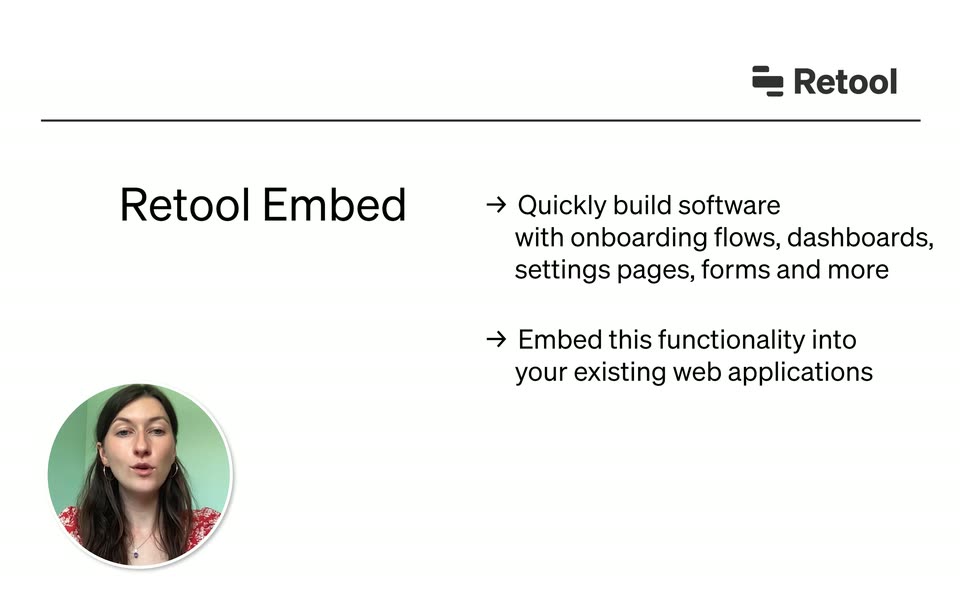
A white slide shows the Retool logo top right and a black headline “Retool Embed” on the left, with a circular video of a woman speaking in the lower left. Two arrow bullets fade in on the right in sequence.
On-screen text: “Retool Embed”, “→ Quickly build software with onboarding flows, dashboards, settings pages, forms and more”, “→ Embed this functionality into your existing web applications”
Camera: Static
A browser window shows the ShopCo login card over a 3D storefront with a TAKE OUT sign, with a circular presenter video in the corner. An intro overlay with the Retool Embed headline fades out, then a cursor moves to the LOG IN button and clicks it.
On-screen text: “Retool Embed”, “Quickly build software with onboarding flows, dashboards, settings pages, forms and more”, “Embed this functionality into your existing web applications”
Techniques: Cursor demo
Camera: Static
A browser window shows the Shopco login card centered on black, with a circular webcam of a presenter in the lower left. The email and password fields fill in, then the cursor clicks Continue and the tab reloads.
On-screen text: “dev-Iekm7di5.us.auth0.com/u/login?state=hKFo2SAyOWZydkVOVTdKOGFEb3BSamRseDdFNV9WY1ZrZXZRT6Fur3VuaXZIcnNhbC1sb2dpbqN0aWTZIHphSWRxSFIMeFVueDJLMIBVNU5zZEF1X0pzcXc2”
Techniques: Cursor demo
Camera: Static
The Shopco merchant dashboard, with a Houston map and three line charts, fills the frame behind a circular webcam of a woman in the lower left. The cursor clicks the top-right avatar to open a role menu, then hovers over the See Reviews button and the Order history link.
Techniques: Cursor demo
Camera: Static
The Shopco Merchant Portal orders page fills in as it loads: table rows gain status labels and amounts, the customer panel shows totals, and a gray Mapbox box appears. A circular video-call avatar of a woman overlays the lower left while the cursor drifts down the dark sidebar.
Techniques: Cursor demo
Camera: Static
A browser screen shows the Shopco Coupon manager dashboard with stat cards, a coupon table and a sales bar chart, while a circular webcam of a woman speaks in the lower left. The cursor slides up the dark sidebar and clicks Store manager.
Techniques: Cursor demo
Camera: Static
The Shopco Merchant portal fills the browser: a dark sidebar, a Houston store overview, and a map that loads from a blank box to a street map with a car marker. Metric cards line the right, and a circular webcam of a speaking woman overlays the bottom-left corner.
On-screen text: “shopco.partners”
Techniques: Cursor demo
Camera: Static
A washed-out merchant dashboard fades into a crisp browser window of the PharmaCo Orders hub, showing a patient search table and a patient details card. A circular live headshot of a presenter stays pinned to the lower-left corner.
Camera: Static
A locked-off browser view of the PharmaCo Orders hub shows a cursor adding a Form component to a modal and generating a patient form from a data table, with an editor panel on the right tracking the selection. A circular talking-head of a woman overlaps the lower-left corner.
Techniques: Cursor demo
Camera: Static
A screen recording of the PharmaCo Orders hub shows a form dialog open over a patient table, with a circular presenter facecam in the lower-left corner. The view zooms in on the Orders hub heading, then fades to black.
Techniques: UI zoom
Camera: Static