
1:23
Explore
Vibe coded apps meet enterprise security in Retool
Retool · Jun 2026 · 1:08 · AI-annotated
- Length
- 1:08
- Scenes
- 31 · 2.2 s avg
- Product on screen
- 0:08
- Features shown
- 4
- Voiceover
- Yes
00:00:00 / 01:08:01
Retool’s 1:08 launch film runs 31 scenes, about 2.2 s each. The product shows up at 0:08 and 4 features are revealed. There is no explicit call to action; a voiceover carries the film. The film alternates short live-action shots of people working with fast UI motion: typed prompt cards, sliding dashboard panels, and 3D screens that settle into grids. Signature moves are the logo-mask wipe into footage, the self-typing prompt card, and the pull-back to a wall of app screens.
Footage neededEstimated needs: 6 capture groups — your screens or recordings · 1 official logo — reused across the film · 7 filmed passages — shoot, supply or replace · 1 graphic passage — draw or supply · 4 3D passages — build or supply
Is this your launch? to your site or press kit.
More like this


Vibe coded apps meet enterprise security in Retool, scene by scene
· 31 scenes as text
01 · Hook · 0:00–0:00
A white geometric logo mark, two interlocking rounded bars shaped like a three, fades in at the center of a dark background that gradients from black at the top to purple at the bottom.
Camera: Static
02 · Hook · 0:00–0:01
A cream pixel logo sits centered on a dark purple gradient, then scales up rapidly. Its rounded blocks act as a mask, wiping away to reveal a blurred live-action shot of a blonde woman in a light top.
Techniques: Masking
Camera: Static
03 · Problem · 0:01–0:02
Close-up of a blonde woman with round glasses seated at a desk, her face lit by a screen whose dark edge sits at the right of frame. She blinks and lowers her gaze, lips slightly parted, as soft daylight fills the blurred office background.
Camera: Static
04 · Problem · 0:02–0:03
A woman with short blonde hair in an orange zip-up sits at a desk, typing on a laptop in a sunlit room with a large window. She watches the screen as her hands move across the keyboard. The shot holds steady in a medium frame.
Camera: Static
05 · Problem · 0:03–0:04
A man in a dark blazer sits at a desk in a sunlit office, gesturing at a monitor while a laptop and blurred screens fill the foreground. The camera holds a static low angle as a large numeral scales in over the frame.
On-screen text: “1”
Techniques: Kinetic type
Camera: Static
06 · Problem · 0:04–0:08
On a dark red gradient, a vertical stack of notification cards scrolls upward. New cards with avatars and security-related messages slide in from the bottom as the older ones exit the top.
Camera: Pan
07 · Product intro · 0:08–0:09
The Retool wordmark and square icon start soft and blurred on a cream-to-blue gradient, then come into focus and scale up to center before holding.
Camera: Static
08 · Demo · 0:09–0:12
A Retool app window slides and scales into the center of a pale gradient backdrop, trailing a ghosted echo. Inside, the chat pane swaps from starter prompts to a pasted screenshot request, a Cooking status appears, and the preview pane keeps a large Retool watermark.
Camera: Pull out
09 · Demo · 0:12–0:14
A dark treasury dashboard card, tilted in 3D, floats over a code editor window. The editor fades out as the card rotates to face front and its large cash figure counts up. A green line chart and a bar chart animate inside the card.
Techniques: 3D mockup
Camera: Push in
10 · Demo · 0:14–0:15
A dark treasury dashboard card sits center-left as a row of product screens slides in from the right, a white sales report and a purple deployments panel overlapping it, with a green panel peeking at the edge.
Camera: Pull out
11 · Demo · 0:15–0:16
Two flat dashboard cards sit on a soft pink-purple gradient. The dark FinDash deployments panel holds the left side while the light RouteOptix overview panel slides in from the right and overlaps it. The motion is a quick horizontal settle that layers the two interfaces.
Techniques: Parallax
Camera: Pull out
12 · Demo · 0:16–0:17
A flat white RouteOptix dashboard card fills the center of a dark purple gradient. It scales down while two smaller app panels slide in from the left and right edges, leaving the dashboard as the middle of a three-panel row.
Techniques: UI zoom, Split screen
Camera: Pull out
13 · Demo · 0:17–0:20
A dark grid of product interface cards drifts slowly downward. The central RouteOptix report card stays bright and in focus while the surrounding dashboards are dimmed.
Camera: Pull out
14 · Feature reveal · 0:20–0:20
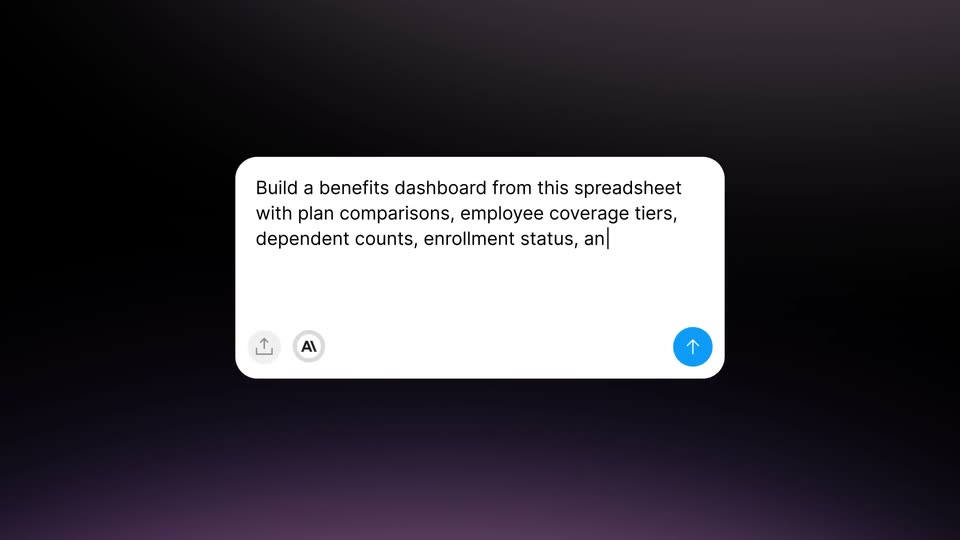
A white rounded prompt card is centered on a dark purple background. A grid of blurred dashboard mockups behind it fades out to plain dark as the prompt text types itself out with a blinking caret.
Techniques: Cursor demo
Camera: Static
15 · Feature reveal · 0:20–0:22
A white rounded prompt card sits on a dark purple gradient. Instruction text types out line by line beside a CSV file chip, while a cursor hovers over the file and the blue send button.
Techniques: Cursor demo
Camera: Static
16 · Feature reveal · 0:22–0:23
A flat BenefitsDesk dashboard sits on a light gray backdrop. The view zooms out slightly to reveal the full interface: a dark header with plan tabs, three plan cards, and an employee enrollment table with colored status pills, settling on the totals footer.
Techniques: UI zoom
Camera: Pull out
17 · Feature reveal · 0:23–0:25
A white rounded prompt box on a dark background types out a request to rebuild a dashboard, then a small dashboard screenshot thumbnail drops in at the right as a cursor hovers over it, and the box edge glows teal.
Techniques: Kinetic type, Cursor demo
Camera: Static
18 · Feature reveal · 0:25–0:26
The dark green Forecast analytics dashboard opens full-bleed, then reframes into a rounded card floating on a pale green field. A caption overlay scales in, reading as an AI prompt to rebuild the dashboard with editable assumptions, pipeline alerts, and weekly snapshots.
On-screen text: “Rebuild this old revenue forecasting dashboard,”, “↑”, “AI”, “but add editable assumptions, pipeline alerts, and”, “weekly forecast snapshots|”
Camera: Pull out
19 · Feature reveal · 0:26–0:28
A white import card with a pink upload icon sits centered on a dark background. A zipped file icon and cursor drag in from the lower right and stop inside the card, which lights up with a blue border glow as the file hovers over it.
Techniques: Cursor demo
Camera: Static
20 · Feature reveal · 0:28–0:31
A supply dashboard mockup eases from a tilted 3D angle to a flat front view as its line chart and order table draw in, then the camera pushes in as a white prompt pill with a hexagon icon and the line What would you like to build? slides up at lower left.
On-screen text: “Import React code”, “Drop a file or click to browse”
Techniques: 3D mockup, UI zoom
Camera: Push in
21 · Feature reveal · 0:31–0:35
The Astro Supply dashboard floats over a soft gradient. A prompt box types 'Add +/- trend captions to each stat' while the cursor clicks send; green and red trend captions pop in under the stat cards, then the box shows 'Tinkering with the details...' as the screen dims.
Techniques: Kinetic type, Cursor demo
Camera: Static
22 · Feature reveal · 0:35–0:36
Five app icons in dark rounded tiles fade in on a dark maroon gradient, a soft light sweep crosses the row.
Techniques: Light sweep
Camera: Static
23 · Feature reveal · 0:36–0:41
A vertical flow links a Retool dashboard, a center node and a dark terminal. The dashboard line chart draws in, fills its area and adds red incident ticks. The center diamond morphs into a circle tagged MCP, then into a checkmark, while the terminal types out tool calls.
On-screen text: “MCP”
Techniques: Morph
Camera: Pull out
24 · Feature reveal · 0:41–0:43
A woman in a black blazer smiles and looks down in a train seat, a man in a white shirt blurred in the foreground. A floating toolbar with a blue Publish button, link and clock icons hovers at left, a cursor resting on the button. The frame is locked off.
Techniques: Cursor demo
Camera: Static
25 · Feature reveal · 0:43–0:45
A man in a mauve t-shirt types on a laptop in a sunlit brick loft. A Tag release dialog fades in on the right, listing version radio options and a blue Create a Pull Request button, while a cursor glides to the button.
On-screen text: “Publish”
Techniques: Cursor demo
Camera: Static
26 · Feature reveal · 0:45–0:47
A woman with curly hair and glasses looks at a screen in a soft-lit home office. On the left, a white Audit Logs list builds as three log rows fade in one after another. The camera stays locked off.
On-screen text: “Audit Logs”
Camera: Static
27 · Feature reveal · 0:47–0:50
A bearded man in glasses looks down at a laptop in a bright office as a flat Databricks Permissions panel fades in on the left. A cursor moves to the Sales row and clicks the Edit checkbox, filling it blue.
Techniques: Cursor demo
Camera: Static
28 · Other · 0:50–0:56
A dimmed grid of product dashboard interfaces brightens as the camera pulls back, revealing rows of flat UI screens arranged in a wall layout against a dark brown background.
Camera: Pull out
29 · Other · 0:56–0:57
A cluster of dashboard and report screens floats in 3D perspective against a dark maroon backdrop. The panels drift and rotate through space with motion blur, spreading apart as the camera pulls back.
Techniques: 3D mockup
Camera: Static
30 · Other · 0:57–0:57
A cluster of tilted dashboard mockups floats in 3D space over a dark red gradient. The group rotates slowly, shifting each screen's position and depth as the camera orbits, so charts, tables and kanban boards pass in and out of focus.
Techniques: 3D mockup, Parallax
Camera: Static
31 · Outro · 0:57–1:08
A blurred white mark at the center of a dark maroon gradient sharpens into the Retool logo. The tagline fades in beneath it in two phrases, and the warm glow in the background drifts slowly.
On-screen text: “Retool”, “Build anywhere.”, “Ship in Retool.”
Techniques: Kinetic type
Camera: Static