0:18
Explore
00:00:00 / 01:02:15
- Length
- 1:02
- Scenes
- 38 · 1.6 s avg
- Product on screen
- 0:04
- Features shown
- 3
- Voiceover
- Yes
- Views
- 1.4M on X
as of November 15, 2026
Renoise’s 1:02 launch film runs 38 scenes, about 1.6 s each. The product shows up at 0:04 and 3 features are revealed. There is no explicit call to action; a voiceover carries the film. The video opens on the pain of manual editing, pivots with a blur-to-focus card, then chains typewriter terminal prompts to their generated 3D or live-action output, closing on a locked tagline card. Pacing runs at 120 bpm with fast cuts, and the signature moves are letter-by-letter prompt typing, blur-in text cards, and glossy phone renders on a dotted black grid.
Footage neededEstimated needs: 5 capture groups — your screens or recordings · 5 filmed passages — shoot, supply or replace · 11 3D passages — build or supply
Is this your launch? to your site or press kit.
More like this

Renoise - Don't make videos — program them. Introducing Renoise = Claude Code, scene by scene
· 38 scenes as text
01 · Problem · 0:00–0:02
A black dotted backdrop shows the centered title Earlier video editing. The title scales while a dark video-editor interface with media browser and timeline fades in behind it, then the text clears.
On-screen text: “Earlier video editing”
Techniques: Kinetic type
Camera: Pan
02 · Problem · 0:02–0:04
A dimmed video editor window set in 3D perspective brightens to full opacity. The left panel switches from a thumbnail grid to a text list, a caption drops into the preview, and red text clips fill the timeline as a cursor clicks them.
Techniques: 3D mockup, Cursor demo
Camera: Static
03 · Problem · 0:04–0:04
A dark video editor window floats on a dotted black field. The view pushes in toward the timeline while a cursor hovers the media panel and a green circular control pops up over the track.
Techniques: UI zoom, Cursor demo
Camera: Pan
04 · Product intro · 0:04–0:06
On a black dotted-grid background, the centered line But Now... begins out of focus and snaps into sharp clarity over the clip, with no camera or position movement.
On-screen text: “But Now...”
Camera: Pan
05 · Product intro · 0:06–0:08
A light file-manager window and a dark terminal sit side by side on a dotted dark backdrop. The terminal types a prompt line character by character while a green plus badge stays fixed at the center seam, and a cursor rests on the file thumbnail.
Techniques: Split screen, Cursor demo
Camera: Static
06 · Product intro · 0:08–0:10
On a dotted black background, a macOS Finder window and a Claude Code terminal sit side by side. The terminal streams lines of text, a green icon pulses, and a progress bar fills at the bottom while a hand cursor hovers over the prompt.
Techniques: Split screen, Cursor demo
Camera: Static
07 · Product intro · 0:10–0:12
Two windows sit side by side on a dotted black grid: a light file browser on the left and a dark Claude Code terminal on the right. A video file fades in next to a phone image, and a cursor hovers over it while the terminal logs scroll.
Techniques: Split screen, Cursor demo
Camera: Static
08 · Product intro · 0:12–0:13
A macro 3D render of a smartphone's rounded corner on a black background. The camera glides down the polished silver edge, a bright glint riding the rim, until the rear camera lens comes into view.
Techniques: Light sweep
Camera: Push in
09 · Product intro · 0:13–0:14
A smartphone floats against a black background and rotates slowly, turning from a side profile to a near-front view and back to the opposite edge. A diagonal light streak glides across the dark screen as it turns.
Techniques: 3D mockup
Camera: Static
10 · Product intro · 0:14–0:16
On a black background, a silver phone rotates slowly from a side-on view toward its back. The large camera module comes into view, and its right circular element displays a small pattern of white pixels that changes shape.
Techniques: 3D mockup
Camera: Static
11 · Product intro · 0:16–0:17
A silver phone rotates in 3D against a black background. It starts on the back, where a circular LED dot display shows a white waveform, then turns to reveal the side buttons and the dark front screen.
Techniques: 3D mockup
Camera: Push in
12 · Product intro · 0:17–0:20
A dark phone mockup rotates in 3D space, starting on its bottom edge, tilting up to a front lock screen with an orange abstract wallpaper, then spinning to reveal the back with the Nothing logo. A cursor arrow appears on the screen.
Techniques: 3D mockup, Cursor demo
Camera: Pull out
13 · Feature reveal · 0:20–0:21
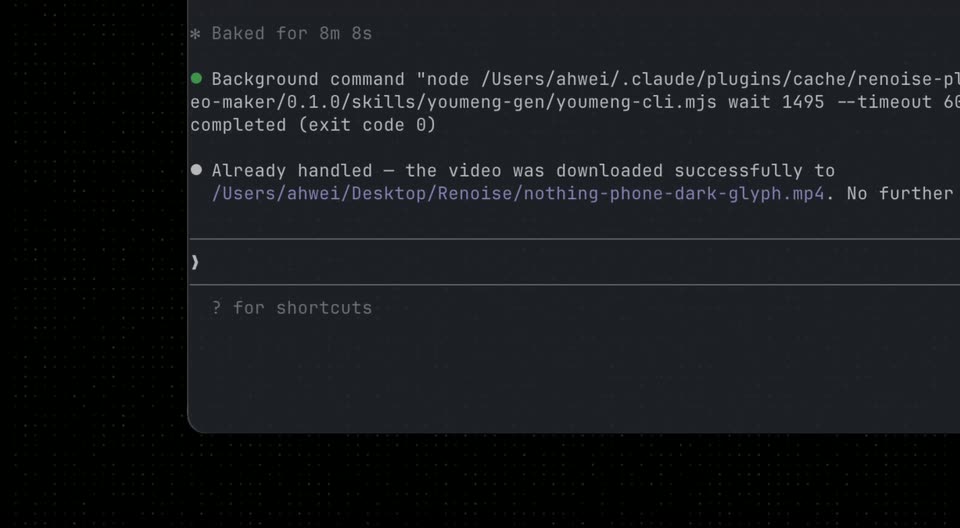
A dark terminal window sits on a black dotted grid, filled with monospace CLI log lines. The camera zooms into the lower half, reframing on the completed-command and download-path lines.
Techniques: UI zoom
Camera: Push in
14 · Feature reveal · 0:21–0:22
A dark terminal panel fills the frame, dimmed log lines stacked above a prompt line. A command types itself out letter by letter, stopping mid-word with a solid block cursor at the end.
Techniques: Kinetic type
Camera: Static
15 · Feature reveal · 0:22–0:23
A dark rounded terminal panel sits on a faint dotted grid. Gray monospaced log lines fill the top, while a highlighted input row holds a typed prompt ending in a blinking block cursor. The panel drifts upward over the grid.
Techniques: Parallax
Camera: Static
16 · Feature reveal · 0:23–0:24
A phone lock screen mockup glows on black, its date and 10:20 time sliding in over an orange abstract wallpaper. The frame tightens from a left code panel to center the device.
Techniques: Split screen
Camera: Pan
17 · Feature reveal · 0:24–0:24
A front-facing phone mockup with an orange abstract lock screen wallpaper and a white play button floats on a black background with a warm glow. The device scales down and drifts to the right, carrying the 10:20 time and date with it.
Techniques: 3D mockup
Camera: Static
18 · Feature reveal · 0:24–0:24
On a black background, a phone shows an orange abstract lock screen with a play button, while its white back with a triple camera and a small waveform display sits below. The shot tracks across the device as the front tilts into 3D perspective.
Techniques: 3D mockup
Camera: Pull out
19 · Feature reveal · 0:24–0:25
A black background holds a grid of panels, each showing an iPhone front or back, several fitted with a camera accessory whose round screen displays a pixel arrow or waveform. The panels rearrange as the clip runs.
Techniques: Split screen
Camera: Pull out
20 · Feature reveal · 0:25–0:27
A grid of twelve clips plays at once, each framing a white phone's camera module in 3D, its pixel LED panel flashing waveforms, crosses and rings. The cells pan and reframe at different speeds against a black background.
Techniques: Split screen
Camera: Static
21 · Feature reveal · 0:27–0:28
A grid of silver phone renders on a dotted black field cuts to a dark terminal window. Monospace log lines fill the screen, ending on a typed prompt with a solid block cursor.
Camera: Pan
22 · Feature reveal · 0:28–0:30
A dark terminal panel fills the frame, dimmed log lines above a prompt row. The line “I need someone to introduce this product” types out character by character behind a blinking block caret, then settles. The view holds still.
Techniques: Kinetic type
Camera: Static
23 · Feature reveal · 0:30–0:32
A black dotted grid fills the frame as a vertical rounded window opens in the center, revealing a man in a leather jacket smiling and holding a white phone toward the camera, its back showing a waveform icon.
Techniques: Masking
Camera: Static
24 · Feature reveal · 0:32–0:34
A man in a black leather jacket holds a white phone toward the camera, tilting it to show the back and a white bat graphic on the camera module. The clip sits in a vertical rounded frame on a black dotted background.
Camera: Static
25 · Feature reveal · 0:34–0:36
A presenter in a black leather jacket holds a white phone with a clear case in a centered vertical card. The card slides left, opening a dark panel with faint text on the right, while a white waveform glyph animates across the phone's camera lenses.
On-screen text: “? for.shortcuts”
Techniques: Split screen
Camera: Pan
26 · Feature reveal · 0:36–0:38
Left: a vertical video of a man in a black leather jacket holds a white phone toward the camera. Right: a dark terminal with a dot grid types a prompt line character by character, a block cursor at the end.
Techniques: Split screen, Kinetic type
Camera: Static
27 · Feature reveal · 0:38–0:39
A man in a rounded left card holds a white phone while a dark list UI occupies the right. The right UI clears and a bottom row of small portrait cards appears.
Techniques: Split screen
Camera: Pull out
28 · Feature reveal · 0:39–0:42
A full-screen mosaic of portrait tiles, each a different person holding a white iPhone up to the camera, fills the frame. The tiles stay fixed while the people shift and present the device, and small white particles drift across the whole grid.
Techniques: Particles
Camera: Pull out
29 · Feature reveal · 0:42–0:43
White text on a black dotted grid starts blurred and cropped, then sharpens and scales to full size as the phrase resolves in the center.
On-screen text: “And you can...”
Techniques: Kinetic type
Camera: Pan
30 · Feature reveal · 0:43–0:44
A dark command bar fills in as the phrase “Give me a sci-fi mystery comic” types out letter by letter behind a block cursor. A blurred keyboard sits above and a faint shortcuts hint below.
Techniques: Kinetic type
Camera: Static
31 · Feature reveal · 0:44–0:45
Close-up of a dark prompt bar over a blurred keyboard. The monospace line “Give me a sci-fi mystery comic” is typed character by character with a block cursor, above the gray hint “? for shortcuts”.
Camera: Static
32 · Feature reveal · 0:45–0:46
A dark command interface with the typed prompt sits over a white grid floor. The dark panel slides right, uncovering an illustration of a man in white lying on his back, mouth open, one arm stretched out with a black wristband.
Techniques: Masking
Camera: Pan
33 · Feature reveal · 0:46–0:48
A 3D rendered man in a white tee, white pants and a backwards cap lies flat on a white tiled floor in a grid-lined room. He sits up on his hands, then crouches as the view shrinks into a letterboxed window with black bars.
Camera: Pull out
34 · Feature reveal · 0:48–0:50
A 3D male character in a white room sits at left while a dark terminal panel on the right prints commands. The character image shrinks to the top-left corner as the terminal expands and a new line types out.
Techniques: 3D mockup, UI zoom
Camera: Pull out
35 · Feature reveal · 0:50–0:54
A dark terminal panel on the right prints commands and a thinking status line, while a column of 3D renders of a man in a white room stacks up on the left, each new frame sliding in below the last over a dotted grid.
Camera: Static
36 · Feature reveal · 0:54–0:58
A vertical filmstrip of 3D frames on the left cycles through shots of a man in a cap, while a dark terminal on the right prints a command and status lines as the render runs.
Techniques: Split screen
Camera: Pull out
37 · Outro · 0:58–1:00
On a black field with a faint dot grid, two centered lines of white monospace type appear and hold: 'Don't make videos' over 'Program them'. The frame stays locked and the text remains static for the rest of the shot.
On-screen text: “Don't make videos”, “Program them”
Camera: Static
38 · Outro · 1:00–1:02
Two lines of white monospace text sit centered on a black field covered in a faint dot grid. The frame is locked off and the type holds still for the full duration.
On-screen text: “Don't make videos”, “Program them”
Camera: Static