0:50
Explore
Abdellatif - Introducing the Qaf MCP and API! Use Qaf’s Islamic Library and sear
Qaf MCP and API · Nov 2026 · 0:50 · AI-annotated
- Length
- 0:50
- Scenes
- 20 · 2.5 s avg
- Product on screen
- 0:00
- Features shown
- 3
- Call to action
- 0:45 · 90%
- Voiceover
- Yes
- Views
- 71K on X
as of November 27, 2026
00:00:00 / 00:50:15
- Length
- 0:50
- Scenes
- 20 · 2.5 s avg
- Product on screen
- 0:00
- Features shown
- 3
- Call to action
- 0:45 · 90%
- Voiceover
- Yes
- Views
- 71K on X
as of November 27, 2026
Qaf MCP and API’s 0:50 launch film runs 20 scenes, about 2.5 s each. The product is on screen from the first frame and 3 features are revealed. The call to action lands at 0:45 (90% in), over a voiceover. The video is built as a talking-head founder intro that hands off to a numbered three-part feature list, each feature pairing a live-action announcement with a tight UI or 3D phone demo. Signature moves are the crescent logo node linking the phone to a sources panel, icon-swap pills, and letter-by-letter typed prompts on plain cards.
Footage neededEstimated needs: 4 capture groups — your screens or recordings · 7 filmed passages — shoot, supply or replace · 2 3D passages — build or supply
Is this your launch? to your site or press kit.
More like this
1:20
ProjectDiscovery - Introducing SecurityContext 2.0 When a CVE drops, the hard part is k
ProjectDiscovery · Nov 2026
0:53

Devin Developers - Introducing Windsurf 2.0. Manage all your agents from one place and
Windsurf · Developer tools · Apr 2026
Abdellatif - Introducing the Qaf MCP and API! Use Qaf’s Islamic Library and sear, scene by scene
· 20 scenes as text
01 · Product intro · 0:00–0:03
A man with glasses in an olive shirt speaks to camera in a warm cafe interior. A white lower-third with his name and title reveals at bottom left, then a black circular logo with a white crescent and the word MCP pops in at center.
On-screen text: “Abdellatif Abdelfattah”, “CEO & Founder”, “MCP”
Techniques: Kinetic type
Camera: Static
02 · Product intro · 0:03–0:06
A dark chat interface types a query into its search bar while a circular mask opens and the app zooms out, revealing a blurred café background around the frame.
On-screen text: “Abdellatif Abdelfattah”, “CEO & Founder”
Techniques: UI zoom, Masking
Camera: Pull out
03 · Feature reveal · 0:06–0:14
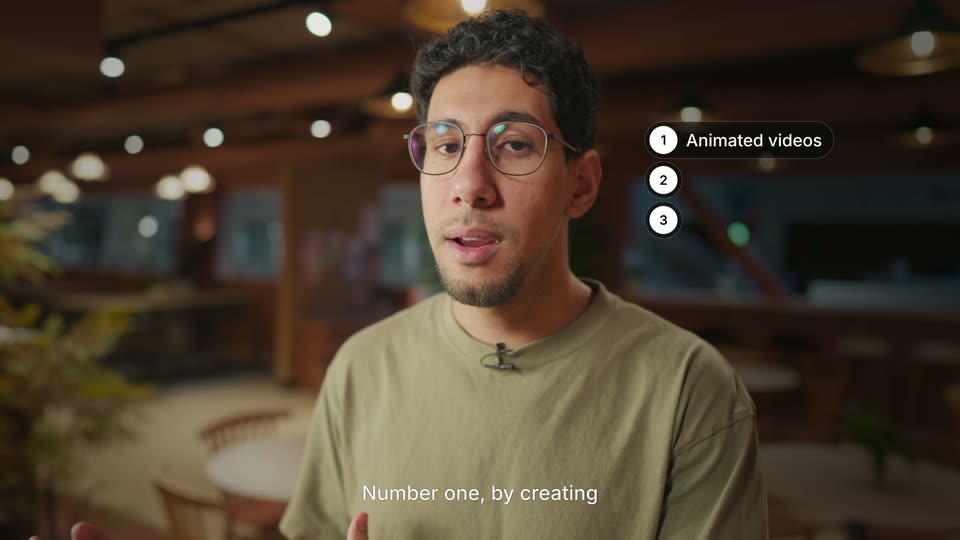
A bespectacled man in an olive tee speaks to camera in a warm, blurred café, locked-off frame. Top right, logo circles swap icons, then morph into a vertical 1-2-3 list; a dark pill with “Animated videos” slides in beside 1. White subtitles line the bottom.
On-screen text: “and now, you can use it”, “in your own tools”, “Here are three ways you can”, “use the Qaf MCP”, “1”, “2”, “3”, “Animated videos”, “Number one, by creating”, “high quality animated videos”
Techniques: Morph
Camera: Static
04 · Feature reveal · 0:14–0:15
A black smartphone floats in 3D perspective over a dark background tiled with faint eight-pointed star outlines. Its screen plays an Instagram Reel: an orange sunset illustration where a white stick figure walks toward a glowing sun, the drawing completing as the clip runs.
Techniques: 3D mockup
Camera: Static
05 · Feature reveal · 0:15–0:17
A flat-front iPhone mockup is centered on a dark background with a faint octagonal line pattern. Inside the screen, an Instagram Reel plays an orange sunset illustration where a white stick figure walks, then holds a large red heart as the feed header shifts.
Techniques: 3D mockup
Camera: Static
06 · Feature reveal · 0:17–0:18
A flat iPhone mockup displaying an Instagram Reels screen sits left of a dark Sources panel on a black geometric-pattern background. The panel lists a single checked entry. The two elements drift slightly toward each other.
Camera: Static
07 · Feature reveal · 0:18–0:21
On a dark tiled background, a phone mockup on the left plays a stick-figure Reels video while a Sources panel on the right fills with a list of references. A small logo node with thin connecting lines sits between the two.
Techniques: Split screen
Camera: Static
08 · Feature reveal · 0:21–0:23
A phone mockup on the left plays a Reels clip with Arabic text and animated stick figures. On the right, a Sources panel scrolls a list of book titles. A crescent logo sits between them, linked by thin lines, over a dark geometric pattern.
Techniques: Split screen
Camera: Static
09 · Feature reveal · 0:23–0:24
A bespectacled man in a green shirt speaks to camera in a warm, out-of-focus office. A numbered list on the right shifts its highlight from item one to item two as he talks, while a caption reads along the bottom.
On-screen text: “Animated videos”, “Deep research in Claude”, “3”, “Number two, you can use deep”
Camera: Static
10 · Feature reveal · 0:24–0:27
A dark product interface: a cursor opens a menu, types qaf into a plugin search and flips the toggle on. The frame then reframes onto a large prompt box where Ar- is typed, with an orange spark logo and You text at top right.
On-screen text: “Deep research in Claude”, “3”, “Animated videos”
Techniques: Cursor demo
Camera: Static
11 · Feature reveal · 0:27–0:28
Dark product interface on a locked-off frame. It starts as a close-up of a rounded result card reading the Ar-Rahman question, then reframes wider to reveal a search bar with the query and a 'Research plan created' status line above the card. The coral starburst and You wordmark sit top right.
Techniques: UI zoom
Camera: Static
12 · Feature reveal · 0:28–0:29
A dark research panel shows a query header and a status line whose source count ticks up from 6 to 15. Source rows fade in one by one below, each with a label, a count, and a thin progress bar filling left to right.
Camera: Static
13 · Feature reveal · 0:29–0:32
A dimmed document view brightens and scrolls up, revealing a research report on Ar-Rahmān vs. Ar-Rahīm. The screen crossfades to a man with glasses speaking in a cafe, while a numbered list overlay appears on the right, highlighting 'Deep research in Claude'.
On-screen text: “1 Animated videos”, “2 Deep research in Claude”, “3”
Camera: Static
14 · Feature reveal · 0:32–0:34
A man in a green shirt speaks to camera in a warm cafe interior. On the right, a three-item numbered list highlights item three as its badge scales, while a caption pill with the subtitle slides up at the bottom.
On-screen text: “Animated videos”, “Deep research in Claude”, “Khutbah & lecture review”, “Number three, you can paste in”
Camera: Static
15 · Feature reveal · 0:34–0:35
A man in glasses and a green tee speaks to camera in a warm, lamp-lit cafe. A white pill input bar sits at the bottom, the prompt text types out letter by letter, ending with an up-arrow button on the right.
On-screen text: “Khutbah & lecture review”, “Review my khutbah and flag any weak hadith”
Camera: Static
16 · Feature reveal · 0:35–0:36
A bespectacled man in an olive shirt speaks to camera in a warm wooden room. A white rounded prompt bar at the bottom shows a typed query with an up-arrow button, then the bar empties as he closes his eyes.
Camera: Static
17 · Feature reveal · 0:36–0:40
On a plain off-white background, a chat bubble and a PDF chip fade in at center right. A spinner and status line appear beneath, then the layout shifts up to reveal a left-aligned reply paragraph.
Camera: Static
18 · Feature reveal · 0:40–0:41
A light chat interface lists three hadith quotes with green Keep and red Remove pills at right and a PDF icon top right. The plain background cross-fades to a blurred photo of a suited man with bokeh lights, the UI text held in place.
Camera: Static
19 · Pricing · 0:41–0:45
A bespectacled man in an olive tee speaks to camera in a warm wooden cafe. Large white “Free for” scales in at left as “60 days” counts up at right; a small caption slides in at the end.
On-screen text: “Free for”, “60 days”, “Review my khutbah and flag any weak hadith”
Techniques: Kinetic type
Camera: Static
20 · CTA · 0:45–0:50
On a plain off-white background, the line “Get started today on qaf.ai/mcp” types out letter by letter from left to right. The lead-in words sit in light gray while the URL is bold black, and the newest character briefly flashes in a gold or blue accent as it lands.
On-screen text: “Get started today on qaf.ai/mcp”
Techniques: Kinetic type
Camera: Static