1:16

See Odin Robotics (YC F26)’s activity on LinkedIn
Odin Robotics · Industrials
PLAN0 AI’s 4:09 launch film runs 56 scenes, about 4.5 s each. The product shows up at 0:08 and 9 features are revealed. There is no explicit call to action; a voiceover carries the film. The video is built as a problem statement, a product reveal with an isometric city build, a long continuous UI walkthrough of the estimating pipeline, a predictive-analytics beat, and a wordmark close. Its signature look is a dark charcoal field with drifting blurred blue bars, isometric 3D city motifs, and screen recordings framed on a light marbled backdrop.
Is this your launch? to your site or press kit.
Odin Robotics · Industrials
Boston Dynamics · Oct 2022
Films whose music sounds like this one, voice left out
Decagon · Corporate Tech
SynScience · Modern, upbeat electronic music with a mid-tempo beat, synthesized bass, and atmospheric pads.
Paraform AI · Modern corporate electronic
Short video clips of business people are clipped into small geometric shapes, a hexagon and two circles, that drift slowly apart on a plain dark background.
Techniques: Masking
Camera: Pull out
A woman in a dark blue shirt holds a small model inside a rounded hexagon mask at center, with a white pill reading Developer attached to its right edge. Blurred hexagon clips of other people and a blue bar drift in the dark background while the frame stays locked.
On-screen text: “Developer”
Techniques: Masking, Parallax
Camera: Static
A dark 3D field of rounded video tiles drifts slowly, most out of focus, as the camera racks focus onto a center tile showing a man in a white hard hat and hi-vis vest. Blue text bars blur at the edges.
Techniques: 3D mockup, Parallax
Camera: Push in
On a dark field of drifting blurred circles, a masked clip of a man in a hard hat sits in a diamond that morphs into a circle showing a suited man, while a white pill label reading Contractor slides off to the right.
On-screen text: “Contractor”
Techniques: Morph, Parallax
Camera: Static
A circular window in the center shows a man in a dark suit and glasses resting his chin on his hand, looking at a laptop. A white pill label reading Investor overlaps the circle's lower right, while blurred blue bars and small circular avatars drift in the dark background.
On-screen text: “Investor”
Camera: Static
A blurred video-call layout with three circular participant windows resolves into a sharp white analog clock centered on a dark field. The clock hands jump from near twelve to 2:30 while the caption letters p and eeks sit below the dial.
On-screen text: “p eeks”
Techniques: Masking, Kinetic type
Camera: Static
A white analog clock with blue hands spins on a dark background while blurred blue bars drift behind it. Below, the caption scales up, with 'Spending' in white and 'Weeks..' in blue.
On-screen text: “Spending Weeks..”
Techniques: Kinetic type
Camera: Static
A white clock face with blue hands sits on a dark field above the caption Spending Weeks.. The frame accelerates into radial blur streaks, lifting the clock and scaling the text.
On-screen text: “Spending Weeks..”
Techniques: Kinetic type, Speed ramp
Camera: Pull out
A man in a blue jacket stands on a glowing isometric platform while a miniature city builds itself: wireframe towers rise with cranes, fill in as glass, then turn to brick. Orange question cards slide in. The view blurs out and the PLANO.AI logo scales in on black.
On-screen text: “What's the final building cost?”, “How does a facade material change impact cost?”, “What if we change the ceiling height?”, “PLANO.AI”
Techniques: 3D mockup, Morph, Kinetic type
Camera: Pan
A 3D isometric construction site with cranes rests on a glowing blue server layer, a man holds a tablet. The model slides right as two white icon tiles with labels slide in left, then it cuts to hands with a tablet over blueprints as PLANO.AI scales in.
On-screen text: “Automated Real Time”, “Cost Estimation”, “Data & Predictive”, “Analytics”, “PLANO.AI”
Techniques: 3D mockup
Camera: Pull out
Split screen: on the left, a top-down shot of hands drawing on an architectural floor plan with a ruler and pencil; on the right, a dark panel where “Design” in white and “Iterations” in blue sharpen in from a blur.
On-screen text: “Data & Predictive”, “Analytics”, “Design”, “Iterations”
Techniques: Split screen
Camera: Static
A split screen pairs a close-up of hands marking a floor plan with a dark panel reading Design Iterations in white and blue. The panels slide horizontally, the text blurs and drifts, and a second shot of two men reviewing documents slides in from the right.
On-screen text: “Design”, “Iterations”
Techniques: Split screen
Camera: Static
A split screen holds a dark panel on the left and a filmed pair of executives reviewing papers on the right. On the left, the words Investment and Decisions resolve from scrambled letters, white over blue, then hold still.
On-screen text: “Investment”, “Decisions”
Techniques: Split screen, Kinetic type
Camera: Static
Split layout: a dark left panel holds the headline while the right shows two professionals in suits reviewing papers at a table against a brick wall. The right footage reframes tighter as the headline letters shift on the left.
On-screen text: “Investment”, “Decisions”
Techniques: Split screen, Kinetic type
Camera: Static
A slow push-in frames a desk with two monitors, the left running a blue CAD interface with a 3D building model, the right a dark data table. A person in a blue shirt works at the desk, hands and headphones in view, against a blurred office.
Camera: Static
Two monitors sit on a desk: the left runs a 3D design tool with a blue panel, the right shows a dark data table and a small building render. A hand rests on the keyboard at the bottom edge. The shot holds steady with only faint hand motion.
Camera: Static
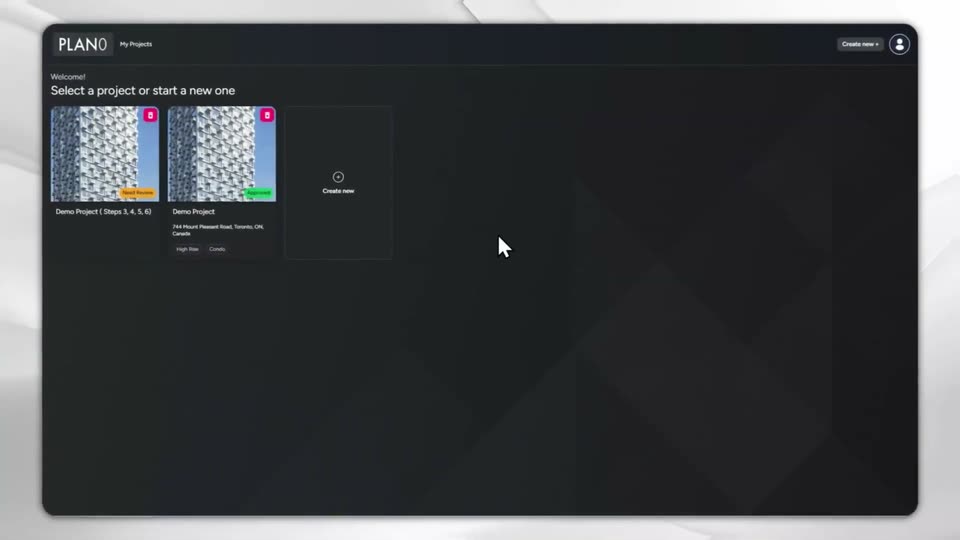
A desk with two monitors displays the PLANO project screen; the camera zooms into the monitor until the interface fills the frame, revealing two demo project cards and a Create new tile on a dark background. A cursor hovers mid-screen.
Techniques: UI zoom
Camera: Push in
A dark project-creation screen sits on a light marbled backdrop. A text cursor types a project name into the form, then a hand pointer clicks Create; the panel switches to a PDF upload area showing a loading spinner.
Techniques: Cursor demo
Camera: Static
A Windows file explorer list shows one selected PDF row, highlighted blue, with two arrow cursors drifting left across the date column. The frame stays locked on the list while the row remains highlighted.
On-screen text: “PLANO”, “New Project”
Techniques: Kinetic type, Cursor demo
Camera: Static
A PDF viewer window shows architectural drawings flipping through pages at speed. A red circular progress ring with an incrementing number and the word Scanning stays fixed at the bottom center of the frame.
Camera: Pan
A PDF viewer window displays an architectural elevation drawing that scrolls down from page six to seven. A red circular ring with an incrementing number and the underlined word Scanning sits at the lower center of the page.
On-screen text: “Scanning”
Camera: Pan
A white architectural plan panel slides off to the left, revealing a dark New Project screen. A green checkmark confirms the PDF was processed above a blue Continue button, while a white cursor rests in the lower right.
Techniques: Masking
Camera: Static
A dark project setup screen shows a cursor typing an address into a field, selecting a suggestion from a dropdown, then the map zooms to a highlighted parcel. The cursor clicks the parcel, a properties popup appears, and the cursor moves to the Save and Continue button.
Techniques: Cursor demo, UI zoom
Camera: Static
In a dark project-setup interface, the cursor selects the High Rise Condo card and clicks Save and Continue, and the form crossfades to the Building Information step. The view zooms in as fields fill with numbers and typed floor notes, then pulls back to the full window.
Techniques: Cursor demo, UI zoom
Camera: Static
A dark PLANO interface shows a floor plan beside a setup sidebar. The cursor clicks the sheet grid, then rotates the north compass to 29 degrees and approves the scale, flipping orange badges to green as the view zooms into the panel and back.
Techniques: UI zoom, Cursor demo
Camera: Static
The interface displays an architectural elevation drawing with orange height markers aligned to floor levels. The view zooms in to focus on the drawing area, cropping out the surrounding tool panels and headers.
Techniques: UI zoom
Camera: Push in
A tight crop of a building elevation drawing with orange height labels zooms out to the full tool window with zoom and status panels. A cursor moves to the Save Changes button and clicks it, and a Saving changes toast appears at the top.
Techniques: UI zoom, Cursor demo
Camera: Pull out
A dark app window frames a black-and-white architectural floor plan. A cursor clicks the save icon, then teal, red and orange regions fill the plan's rooms before fading out. The Floor Area row in the left sidebar lights up.
Techniques: Cursor demo
Camera: Static
A labeling tool shows an architectural elevation on a white sheet beside a dark sidebar. A cursor checks the predictions box, blue detection outlines appear over the facade, the cursor hovers a window box to reveal a tooltip, then clicks next.
Techniques: Cursor demo
Camera: Static
A dark labeling app shows an architectural blueprint beside a side panel. A cursor checks the predictions box, blue bounding boxes pop over the towers, a hover reveals a detection tooltip, then the cursor clicks Show detections.
Techniques: Cursor demo
Camera: Static
A dark annotation tool shows two architectural floor plans on a white canvas beside a right panel of tags, metadata and labels. A cursor clicks the predictions checkbox, and the orange detection boxes on the plans switch to solid blue.
Techniques: Cursor demo
Camera: Static
A dark interface displays an architectural drawing on a canvas and a settings panel. A cursor clicks the predictions checkbox, revealing a blue bounding box over the building.
Techniques: Cursor demo
Camera: Static
A cursor clicks a toolbar button in the PLAN0 app and the building elevation's materials fill with green, blue, and pink. The view zooms in on the colored facade, then back out to the full sheet.
Techniques: Cursor demo, UI zoom
Camera: Push in
A tilted screen mockup of the PLANO app shows a building elevation with a green grid facade on a white 3D background. A cursor checks a facade layer and the grid recolors red, then the view zooms to a color-coded legend as the cursor clicks a chip.
Techniques: Cursor demo, UI zoom
Camera: Pull out
A white PLANO workspace opens on a building elevation drawing marked with red and green cost lines. Gray blocks clear from the top bar to reveal the page selector and Submit/Update buttons, then a cursor rests beside the right toolbar.
Techniques: Masking
Camera: Static
A dark PLANO interface shows an aerial satellite view of a dense city. A perforated tower model fades in and materializes in the view, then the camera pulls back as the screen tilts into 3D perspective.
Techniques: UI zoom, 3D mockup
Camera: Pull out
A dark PLAN0 dashboard shows a Build Properties list beside a white tower elevation. The camera zooms into the property rows and scrolls down the figures, then pulls back and scrolls the page to reveal Foundation, map and 3D Model tiles, ending on the Foundation card.
Techniques: UI zoom, Cursor demo
Camera: Push in
A dark dashboard shows a wireframe tower with its foundation above a green ground line, beside a soil reading panel and a street map with a blue pin. The camera slowly pushes in, reframing from the full screen to the soil data and map at the bottom.
Techniques: UI zoom
Camera: Push in
A close-up of the soil-reading panel beside a street map with a blue pin and dashed route drifts, then the camera pulls back to the full PLANO app window on a white backdrop and pushes into the wireframe tower elevation with ground and sea level lines.
Techniques: UI zoom
Camera: Pull out
A dark viewport zooms out from a white wireframe high-rise with height markers to reveal the full application screen, with a left navigation panel and a foundation recommendation header.
Techniques: UI zoom
Camera: Pull out
A dark PLANO interface holds a locked frame on the Foundation view. A 3D wireframe tower sits on a black canvas, with a soil-reading data panel and a street map showing a red dashed route below.
Camera: Static
A dark cost-report panel sits centered on a light diagonal-striped background, showing an address, a total construction cost, two component boxes, a multi-row table of figures and a small building render at the top right. The frame is static.
Camera: Static
A dark rounded panel shows a 16-row construction cost table with a white header bar and a small 3D building render, on a light abstract background. The locked-off frame holds, then cuts to a Concrete detail view with a back arrow and a second itemized table.
Camera: Push in
A dark cost table titled Concrete dissolves in over a light angular background. The cursor clicks a rate cell and the view zooms in; the value is retyped from 305 to 310, then the view zooms back to the full list. The panel dissolves out.
Techniques: UI zoom, Cursor demo
Camera: Pull out
A presenter in a dark blazer stands at a conference table, gesturing toward a wall screen showing a dashboard, as a team works on laptops. The shot opens with a ghosted double-exposure of the man before resolving into a steady frame.
Camera: Static
A bearded man in a dark blazer stands at a conference table, gesturing to a seated team in a glass-walled office. A dashboard with bar and donut charts glows on the wall screen. The shot dissolves in from a soft blur and blurs out at the end.
Camera: Pull out
On a dark background with soft blurred blue and white shapes, the centered headline keeps “Future Cost of” in white while the blue word changes from “Drywall?” to “Electrical?”.
On-screen text: “Future Cost of Drywall?”, “Future Cost of Electrical?”
Camera: Static
A centered headline reads “Future Cost of Drywall?” in white with “Drywall?” in blue, held static on a near-black background. Out-of-focus blue rectangles drift slowly behind the text, shifting between the corners over the clip.
On-screen text: “Future Cost of Drywall?”
Techniques: Parallax
Camera: Static
Scattered letters shuffle together to form the headline Predictive Analytics, white and blue, glowing on a dark field. A line-chart card titled Gypsum Board Material Costs scales in beneath it while gradient star shapes drift at the edges.
On-screen text: “Predictive Analytics”
Techniques: Kinetic type
Camera: Static
A dark chart card sits centered while its line graph draws out a rising forecast. Above it, a bold headline blurs and swaps from Predictive Analytics to Forecast Material & Labor Prices, with purple sparkles at the corner and soft blue bokeh drifting behind.
On-screen text: “Predictive Analytics”, “Forecast Material & Labor Prices”
Techniques: Kinetic type, Parallax
Camera: Static
A dark screen holds the headline above two overlapping line-graph chart cards. The cards whip left and out of frame, leaving a row of glowing rounded-square outlines on the right.
On-screen text: “Forecast Material & Labor Prices”
Camera: Pan
Three rounded-square frames sit on a dark background. Thin white line icons draw in and resolve into a blueprint, a receipt with a dollar sign, and a hand holding a coin. Blue pill labels read Plan, Budget, Invest beneath each. Soft blue bokeh shapes drift in the background.
On-screen text: “Plan”, “Budget”, “Invest”
Techniques: Morph
Camera: Static
Three white line icons in rounded tiles, tagged Plan, Budget, Invest in blue pills, glow on a dark background, then cut to a dim office where a man in a suit stands at a table with seated colleagues.
On-screen text: “Plan”, “Budget”, “Invest”
Camera: Pan
A bearded man in a suit stands at the head of a dark conference table, hands spread, as a holographic city of blue particle towers and green trees rises from the glowing surface. Seated colleagues watch, one holding a tablet showing a matching city map.
Techniques: Particles
Camera: Static
A white rounded-top icon holds center on a near-black background. Gray pixel squares fill its internal grid from bottom to top while the icon scales up, and blurred blue bars drift behind it.
Techniques: Parallax
Camera: Static
The white wordmark PLANO.AI forms at the center of a dark charcoal field as its letters converge from a loose offset spread, then locks in. Blurred blue pill shapes drift slowly behind it.
On-screen text: “PLANO.AI”
Techniques: Kinetic type
Camera: Static