0:34

Pulse Local: budgeting that never leaves your machine
Pulse Local · Finance · Nov 2026
Decagon AI · Sep 2026 · 1:05 · AI-annotated
Decagon AI’s 1:05 launch film runs 13 scenes, about 5.0 s each. The product is on screen from the first frame and 3 features are revealed. The call to action lands at 0:54 (84% in), over a voiceover. The video opens and closes on a single-camera talking head, with the middle built as a screen-recorded walkthrough where the presenter stays pinned in a small bottom-right inset over light, near-white interface screens. Pacing is steady and explanatory, cutting between short UI states at a moderate rate, and the signature move is the persistent picture-in-picture presenter that keeps a human anchor over otherwise static product demos.
Is this your launch? to your site or press kit.
Pulse Local · Finance · Nov 2026
Pulse Local · Finance · Nov 2026
A woman in a black sleeveless top sits at a wooden table behind a closed laptop, speaking to camera in front of a bright window with trees and office buildings. She gestures with her hands while talking. A white lower-third caption with her name and title fades in and out.
On-screen text: “Bihan Jiang”, “Decagon // Director of Product”
Camera: Static
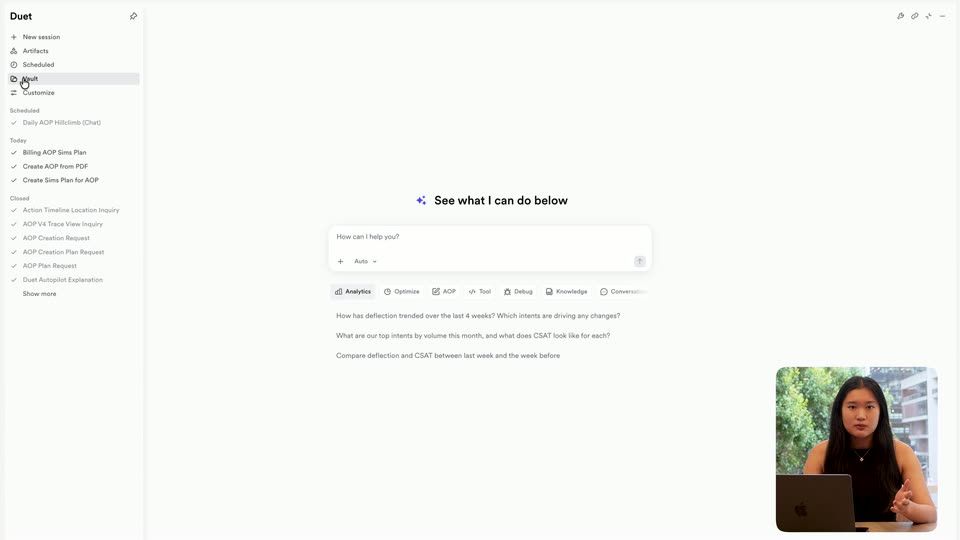
A product interface fills the frame, with a collapsed icon sidebar on the left and a centered prompt panel. A cursor clicks the list icon, expanding the sidebar into a text menu with Vault highlighted. A small live-action clip of a presenter at a laptop sits bottom-right.
Techniques: Cursor demo
Camera: Static
A light file-vault screen fills the frame as a cursor clicks from the top-level list into the Analytics Team folder, swapping the rows for two markdown files. A small video of a woman talking at a laptop stays pinned in the bottom-right corner.
Techniques: Cursor demo
Camera: Static
A light-themed file manager fills the frame, with a small video of a woman speaking pinned in the bottom right corner. A cursor climbs the folder tree, expands folders, and opens AGENTS.md, swapping the right panel from a CSAT line chart to a guidelines page.
Techniques: Cursor demo
Camera: Static
A screen recording of the Vault app fills the frame, a file list on the left and an open markdown document on the right. A small video of a presenter at a laptop sits in the bottom-right corner while a cursor drifts over the file list.
Techniques: Cursor demo
Camera: Static
A Notion-style page titled SimplePay Customer SOPs scrolls down through a table of support workflows with colored category and priority tags, then back to the top. A video call inset in the bottom right shows a woman talking at a laptop.
Techniques: Cursor demo
Camera: Pan
A light vault interface fills the frame. A cursor moves across the file list, then clicks the vault icon, collapsing the sidebar into an icon rail with a settings panel. A small inset video in the lower right shows a woman speaking at a laptop.
Techniques: Cursor demo
Camera: Static
The product window opens on an AGENTS.md document beside a Connectors panel, then the document column collapses so the Notion connector row fills the screen as the cursor moves to the Connect button. A presenter's video stays pinned in the lower-right corner.
Techniques: Cursor demo
Camera: Static
A white Notion MCP connection card sits centered on a pale gray field, listing the workspace, permission checks and a callback URL, while a small inset video in the bottom right shows a woman gesturing at a laptop. The frame is locked and the interface stays static.
Camera: Static
A light Customize screen fills the frame, its Connectors list holding one Notion row with a Connect button at the right. A small rounded video inset in the lower right shows a woman at a laptop, talking and gesturing. The layout stays locked off.
On-screen text: “Connect with Notion MCP”
Camera: Static
A screen capture shows the Autopilot review list on the left and the AGENTS.md vault document on the right, with a small video of a woman at a laptop in the lower right. A cursor moves to the Accepted tab and clicks it, swapping the cards.
Techniques: Cursor demo
Camera: Static
A woman with long dark hair in a black sleeveless top sits at a wooden table, a closed laptop in front of her, and speaks to camera while gesturing with her hands. The static medium shot frames her against a window view of trees and city buildings.
Camera: Static
A black isometric hexagon mark assembles from a small sliver at center on a white field, expanding into the cube logo. The wordmark Decagon fades in to its right, shifting from gray to black, then the lockup holds static.
On-screen text: “Decagon”
Techniques: Morph
Camera: Static