0:34

Reason Machines (YC F26) - Coding in the IDE is over, Introducing the New Reason Desktop App A
Reason Machines · B2B · Nov 2026
Pinokio · Nov 2026 · 2:20 · AI-annotated
Pinokio’s 2:20 launch film runs 27 scenes, about 5.2 s each. The product is on screen from the first frame and 2 features are revealed. The call to action lands at 1:59 (86% in), over a voiceover. The video alternates clean device mockups with flat network diagrams, using a persistent blue connector line to show how local machines stream apps to phones, tablets, and laptops. Its pacing is steady and explanatory, relying on sliding caption bars, slow zooms, and simple icon cards to walk through each remote workflow.
Is this your launch? to your site or press kit.
Reason Machines · B2B · Nov 2026
Notte · B2B · Sep 2025
Films whose music sounds like this one, voice left out
Tepali · Corporate Tech / SaaS
ObsessionDB · Modern electronic
ElevenLabs · Electronic, Tech
A front-facing phone mockup on a pale background shows a browser list of AI apps with specs and Launch, Stop, Open buttons. The list scrolls up to reveal more entries while dark caption bars swap in at the bottom.
On-screen text: “This is pinokio.co,”, “in my phone's browser.”, “It shows me all kinds of AI apps.”, “But these aren't cloud services.”, “They're running on my own computers—”
Camera: Pan
A light-gray diagram links a computer card on the left to a front-facing phone on the right with a blue line, the phone showing the app list. A dark navy caption bar at the bottom swaps from the first line to the second, then the phone and caption fade out.
On-screen text: “They're running on my own computers—”, “Your computer”, “Runs your AI apps”, “Your phone”, “and streaming privately to my phone.”
Camera: Pull out
A blue line links the 'Your computer' desktop list to a 'Your phone' mockup. The view zooms into the desktop list, a cursor clicks the Open button on the Maestro row, then a dark pill caption 'Let's make a video.' fades in.
On-screen text: “Your computer”, “Runs your AI apps”, “Your phone”, “Let's make a video.”
Techniques: Split screen, UI zoom, Cursor demo
Camera: Push in
A centered phone mockup on a white field with a blue line shows the app's prompt field typing a sentence, then a generation queue with a progress bar, then the finished image of orange robots in flowers. Navy caption bars appear below the phone.
On-screen text: “4m 10s wait · shortened”, “My computer generates the video-”, “and streams the result”
Camera: Pull out
A 3D phone mockup on a white background shows the Maestro app feed playing a clip of orange robots in a flower field, with a blue line to the left. Caption boxes read “and streams the result” then “straight to my phone.” as the phone eases smaller and drifts right.
On-screen text: “and streams the result”, “straight to my phone.”
Techniques: 3D mockup
Camera: Static
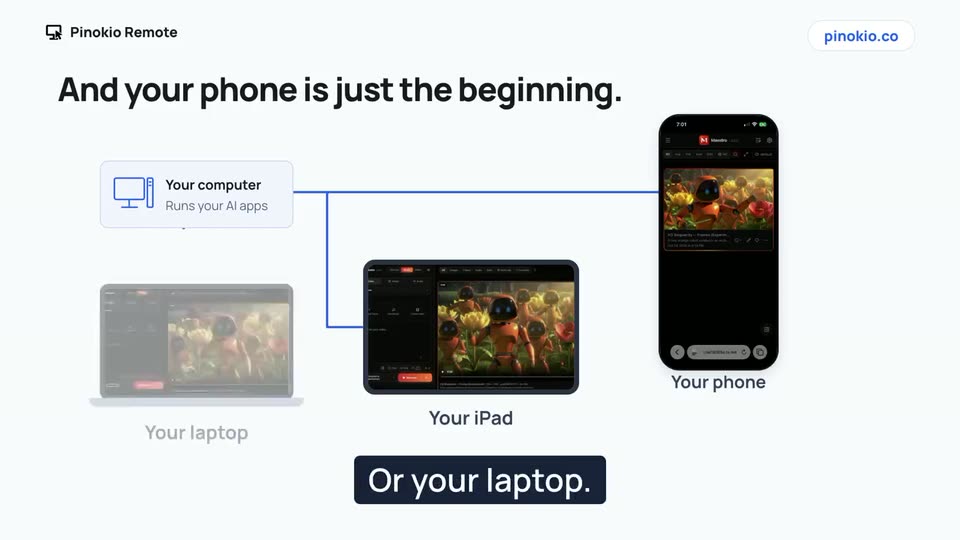
A pale gray diagram under a bold headline: a 'Your computer' card connects by a blue line to a phone mockup, then an iPad and a laptop fade in with branching lines, each labeled. A navy caption bar at the bottom swaps its line to match the voiceover.
On-screen text: “pinokio.co”, “And your phone is just the beginning.”, “Your computer”, “Runs your AI apps”, “Your phone”, “And your phone is just the beginning.”, “Your iPad”, “Use your computer's apps from your iPad.”, “Or your laptop.”, “Your laptop”
Camera: Pull out
A white explainer diagram links a 'Your computer' card to laptop, tablet, and phone mockups with thin blue lines. The tablet ghost fades upward while the laptop slides to center, and a dark pill caption 'But that laptop' holds at the bottom.
On-screen text: “Your laptop has its own apps, too.”, “Your computer”, “Runs your AI apps”, “Your laptop”, “Your iPad”, “Your phone”, “But that laptop”, “pinokio.co”
Techniques: 3D mockup
Camera: Static
A flat diagram links a computer card, a laptop, and a phone with green lines as their screens switch to a speech app; a dark caption bar updates phrase by phrase, then the diagram shrinks as a new headline fades in.
On-screen text: “pinokio.co”, “Your laptop has its own apps, too.”, “has its own AI apps, too.”, “And you can use those from your phone—”, “or from your other computer.”, “Your computers become your own”, “Your computers become your own private network of AI apps.”
Camera: Static
A white diagram links a computer, iPad, laptop, and phone with teal and blue lines under a black headline. The center devices fade in, and a dark caption bar at the bottom swaps phrases in sync with the voiceover.
On-screen text: “Your own private network of AI apps.”, “pinokio.co”, “Your computers become your own”, “private network of AI apps.”, “You can use them from any of”, “your connected devices—”, “from anywhere.”
Techniques: Kinetic type
Camera: Static
A light explainer diagram of four devices linked by teal arrows fades out as a 3D browser window on a laptop base fades in at center. A dark caption bar with white text stays fixed at the bottom through the transition.
On-screen text: “Your own private network of AI apps.”, “And you use them right in your browser.”
Techniques: 3D mockup
Camera: Push in
A flat front-view Mac laptop mockup shows a dark browser UI with three input cards, a blue line linking in from the left. A file picker dialog opens over the browser with an image selected, and the bottom caption switches text.
On-screen text: “Pinokio Remote”, “Maestro in my Mac browser”, “pinokio.co”, “And you use them right in your browser.”, “For example, I upload a photo”
Camera: Static
A centered laptop mockup on a light background shows a browser file-picker dialog with a selected image thumbnail. A blue line enters from the left; a dark caption bar at the bottom and a header title with a URL pill frame the screen.
On-screen text: “Pinokio Remote”, “Choose a photo on my Mac”, “pinokio.co”, “For example, I upload a photo”
Techniques: 3D mockup
Camera: Static
A flat laptop illustration holds a browser window running the Maestro app; the interface switches from an inputs panel with a sailboat photo to a generating panel with a progress bar, while a top headline and a bottom caption swap to match the voiceover.
On-screen text: “Pinokio Remote”, “Choose a photo on my Mac”, “pinokio.co”, “straight from my Mac,”, “the app turns it into a video.”, “and the app turns it into a video.”
Camera: Static
A static flat laptop illustration on white shows a browser with a dark interface: a film icon and a Generating progress bar. A blue line runs from the left edge. A dark caption bar at the bottom reads and the app turns it into a video.
On-screen text: “Pinokio Remote”, “Generation wait shortened”, “pinokio.co”, “and the app turns it into a video.”
Camera: Static
A flat laptop mockup holds a browser showing a red-sail boat video that slowly pushes in on the sail. White captions in dark boxes appear at the bottom, while small labels and a URL sit along the top edge.
On-screen text: “Pinokio Remote”, “The generated clip”, “pinokio.co”, “and the app turns it into a video.”, “When it's ready, I download the clip”
Camera: Pull out
A laptop mockup in 3D perspective shows a browser with an open context menu, the Download row outlined in blue. A thin blue line enters from the left. A dark caption bar sits at the bottom; a top bar holds the headline and a URL pill.
On-screen text: “Download to my Mac”, “pinokio.co”, “When it's ready, I download the clip”
Techniques: 3D mockup
Camera: Static
A flat laptop mockup holds static, showing a browser save dialog over a sailboat image. A dark caption below reads 'right back to my Mac', and a top header carries the Pinokio Remote label and pinokio.co.
On-screen text: “Pinokio Remote”, “Download to my Mac”, “pinokio.co”, “right back to my Mac”
Camera: Static
A flat front view of a MacBook shows iMovie playing a sailboat clip in its preview window, the timeline playhead advancing right. A navy caption box sits at the bottom and fades out; a gray title and a blue URL pill sit at the top.
On-screen text: “iMovie on my Mac”, “and open it in iMovie.”, “pinokio.co”
Camera: Static
A front-facing laptop mockup sits on a light background. Its screen cuts from an iMovie window playing a red-sail boat clip to a browser tab of the same clip, with the top caption fading out.
On-screen text: “Pinokio Remote”, “iMovie on my Mac”, “pinokio.co”, “pinokio-1.tail18305e.ts.net:43000”
Techniques: 3D mockup
Camera: Pull out
A card with a blue monitor icon, My Windows machine, slides in from the left, linked by a blue line to a laptop mockup, My Mac, showing a browser with a red-sail video. The card gains subtext and a sailboat thumbnail, the Mac gains a caption, subtitle lines swap below.
On-screen text: “pinokio.co”, “My Windows machine”, “My Mac”, “The whole thing feels just like”, “using a regular website.”, “But that whole time,”, “Runs the video generator”, “the app was running”, “on my own Windows machine.”, “That’s where the video was generated. So my Mac doesn’t need a powerful GPU to use this generator. Only my Windows machine does. Runs the app on its GPU Uses in”
Techniques: Kinetic type
Camera: Pull out
A light-background diagram links a Windows machine card to a laptop and phone mockup running the same app. The phone slides in with a drawn connector line, then exits as the layout reflows to a photo, prompt, video row, with caption phrases swapping below.
On-screen text: “pinokio.co”, “My Windows machine”, “Runs the app on its GPU”, “My Mac”, “Uses the app in a browser”, “My phone”, “And it works the same way on my phone.”, “I couldn't run this generator”, “on the phone itself,”, “but I can open it in my phone's browser and make a video while I'm out for a walk.”
Camera: Static
A light diagram connects a 'My Windows machine' card to a flat laptop mockup ('My Mac') with a blue line; a padlock fades onto the line while navy caption bars cycle across the bottom, then the frame dissolves into an app catalog.
On-screen text: “Public website. Private connections.”, “POWERED BY TAILSCALE”, “Powered by Tailscale,”, “Pinokio Remote encrypts the connection”, “between my devices”, “Your apps stay off the public internet.”, “without exposing my apps”, “to the public internet.”
Camera: Static
A flat mockup of the Pinokio apps catalog sits on a light gray field, with a 'Pinokio Remote' label top-left and a 'pinokio.co' pill top-right. The grid of app cards scrolls down the list while a dark caption bar at the bottom cycles through four phrases.
On-screen text: “Pinokio Remote”, “pinokio.co”, “Start at pinokio.co.”, “Browse a whole catalog of AI apps,”, “and install the ones you want”, “on your computer with one click.”
Camera: Pan
A flat phone mockup on a light background shows the Pinokio app's Remote tab listing machines with Launch buttons, then switches to an Add a machine panel with a blue Scan QR code button. A bottom caption reads 'Then open the Remote tab,' then 'and connect your computers.'
On-screen text: “Pinokio Remote”, “pinokio.co”, “Then open the Remote tab”, “and connect your computers.”
Camera: Static
A flat phone mockup holds a Pinokio pairing screen on a light gray field, showing a Mac device card and a blue Scan QR code button. A black logo sits top-left, a pinokio.co pill top-right, and a dark caption bar reads and connect your computers. The frame stays static.
On-screen text: “Pinokio Remote”, “pinokio.co”, “and connect your computers.”
Camera: Static
A centered phone mockup of a machine-pairing screen expands into a full desktop dashboard, revealing a pinned AI app feed on the left and a machines panel on the right. A dark caption bar with white text sits at the bottom.
On-screen text: “Now you've got a personal portal”
Techniques: Morph
Camera: Pull out
Phone, tablet and laptop mockups of the Pinokio app slide apart from an overlapping cluster into a row on a light background, each captioned below. A dark navy banner at the bottom swaps through the tagline phrases in sync with the voiceover.
On-screen text: “Pinokio Remote”, “pinokio.co”, “On your phone”, “On your iPad”, “On your computer”, “Now you've got a personal portal”, “to all the AI apps”, “installed on your computers.”
Techniques: Kinetic type
Camera: Static