1:40
Windsurf Wave 9: Introducing SWE-1, Our Frontier Models
Windsurf · Developer tools · May 2025
ElevenLabs Developers · Sep 2026 · 1:40 · AI-annotated
ElevenLabs Developers’s 1:40 launch film runs 10 scenes, about 10 s each. The product shows up at 0:22 and 4 features are revealed. The call to action lands at 1:25 (85% in), over a voiceover. One unbroken UI take: the dark chat window holds center while prompts type in, tool rows expand, and waveforms fill, with slow zooms and blur wipes marking each step. Signature moves are the staggered monospace pill lists, the filling waveform, and the final pull-back from the dark chat to the light flow board.
Is this your launch? to your site or press kit.
Windsurf · Developer tools · May 2025
Matic Robots · Aug 2026
Input Systems · Oct 2026
A dark Assistant chat window shows a voiceover prompt; the status switches from Composing to creative_generate_speech, then an audio player with a filling waveform appears. A blue-and-red fluid orb on the right shrinks and fades as a bracketed list of monospace pills appears one by one while the UI dims.
On-screen text: “speech”, “transcripts”, “dubs”, “music”, “sound effects”, “images”, “video”
Techniques: UI zoom, Kinetic type
Camera: Static
A dark chat window titled Assistant sits on black, with faint lowercase feature labels listed on the right. A Claude.ai connector card slides into the empty window, then the whole window scales up and drifts right to center the card.
On-screen text: “speech”, “transcripts”, “dubs”, “music”, “sound effects”, “images”, “video”
Techniques: UI zoom
Camera: Static
A dark Assistant window frames a Connectors panel showing an ElevenLabs row with a white Connect pill. Two gray caption lines fade in beneath the name, then the pill's label swaps to Connected as the panel settles.
Camera: Static
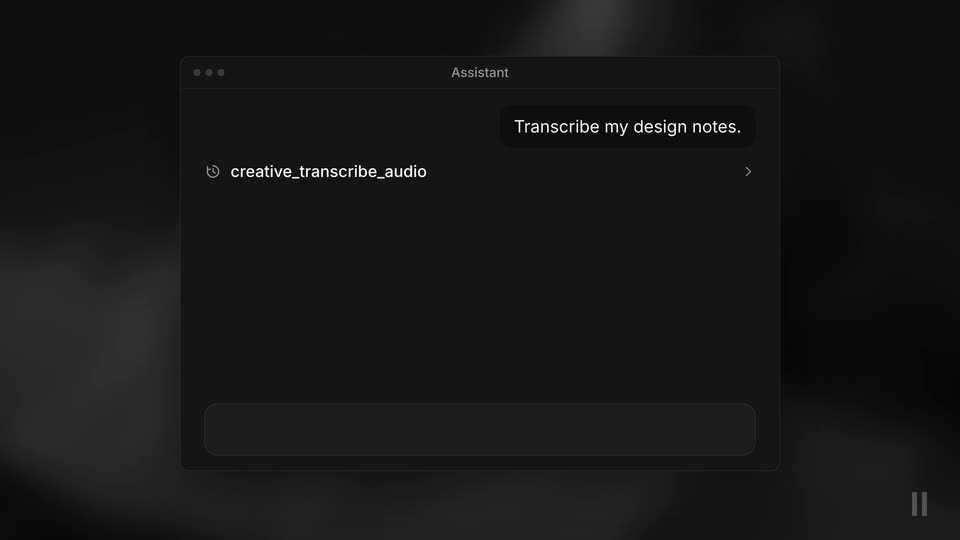
A dark Assistant chat window sits on a blurred background. An audio file chip slides from the top right into the input, the request Transcribe my design notes. types out and sends, then a response card expands with three transcript lines appearing one by one.
Camera: Static
A dark Assistant chat window sits flat on a blurred black background. A prompt is typed and sent as a bubble, then a tool row and a new audio card appear, its waveform growing from dots into bars. A second prompt starts typing as the frame blurs.
Camera: Static
A dark chat window titled Assistant eases in around a prompt bubble; a Painting status swaps to a tool label as a moonlit stone-gate image fades in, then a new prompt is typed into the bottom input field.
Camera: Push in
A dark Assistant chat window sits centered on a blurred black background. A right-aligned prompt bubble states the brief. A left-aligned step list fades in line by line, with a serif italic quote between the first two rows. A small blue gate thumbnail appears above the input bar.
Techniques: Kinetic type
Camera: Static
A dark Assistant window shows a task list that scrolls up, leaving a video preview of a moonlit stone gate with a glowing door slit. A white caption fades in, then a spaced title scales in over the gate, and the window pulls back to reveal a light flow view.
Techniques: UI zoom
Camera: Static
A pale workspace window floats on a near-black backdrop, its node graph linking three dark fantasy gate images to a video panel on the right. The whole board slowly scales up, tightening the view. A faint NIGHTGATE title sits centered above the window.
On-screen text: “NIGHTGATE”
Camera: Static
A dark smoky background holds a center chip with an MCP badge and the URL api.elevenlabs.io/v1/mcp. A row of seven monospace pills fades in below it, then everything fades out and elevenlabs.io/mcp appears large in white.
On-screen text: “MCP”, “api.elevenlabs.io/v1/mcp”, “speech”, “transcripts”, “dubs”, “music”, “sound effects”, “images”, “video”, “elevenlabs.io/mcp”
Techniques: Kinetic type
Camera: Static