0:20


The Browser Company - A browser that tidies for you? Tidy Tabs, now in Arc!
The Browser Company · Productivity · Feb 2024
Perplexity · Oct 2024 · 1:12 · Full motion · AI-annotated
Perplexity’s 1:12 launch film runs 23 scenes, about 3.1 s each. The product shows up at 0:06 and 2 features are revealed. The call to action lands at 1:04 (89% in). The video alternates centered black title cards with locked-off dark UI demos, each feature announced by a text card that resolves from blur, offset or dim gray into sharp focus, then shown step by step in the interface. Pacing holds a steady 110 bpm pulse with about 13 cuts per minute, and the signature moves are subtle fade, scale and slide text entries plus UI panels that fill in line by line.
Is this your launch? to your site or press kit.
The Browser Company · Productivity · Feb 2024
Films whose music sounds like this one, voice left out
Arcade · EDM, lo-fi hip-hop, chiptune
CURA · Upbeat corporate electronic
Steam Deck · Electronic
A white sans-serif headline fades in centered on a black background, with a brief horizontal offset as it settles, then holds still on a locked-off frame.
On-screen text: “Internal Knowledge Search and Spaces”
Techniques: Kinetic type
Camera: Static
A black background holds two centered lines of white text. The text fades up from a dim gray to full white over the clip while the frame stays locked off.
On-screen text: “Search across the public web”, “and your internal knowledge bases”
Camera: Static
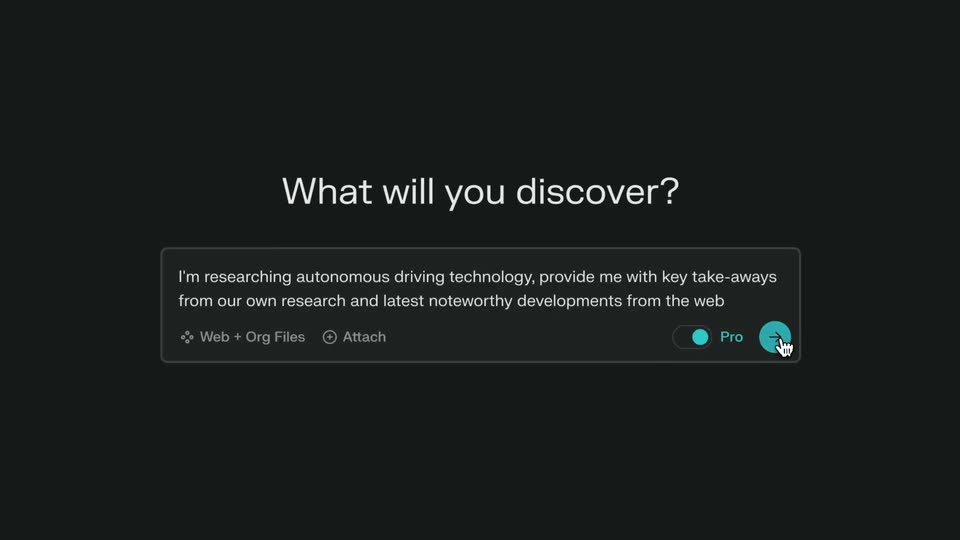
A dark prompt box holds a typed question about autonomous driving beneath the headline “What will you discover?”. A hand cursor slides in and clicks the cyan send button, then the field crossfades into “Perplexity breaks down your question” with two static sublines.
On-screen text: “What will you discover?”, “Perplexity breaks down your question”, “Search across the public web”, “and your internal knowledge bases”
Techniques: Cursor demo
Camera: Static
On a black background, the white line 'Perplexity breaks down your question' appears as two vertically offset copies that slide together into one centered line, then hold still.
On-screen text: “Perplexity breaks down your question”
Techniques: Kinetic type
Camera: Static
A dark chat prompt about autonomous driving research fades in above a Pro Search panel. The panel's first task reveals its Searching query chips, then its Reading file chips fade in line by line, while the second task row stays dim below.
On-screen text: “Perplexity breaks down your question”
Camera: Push in
A single line of white text sits centered on a black background. It resolves from a soft blur into sharp focus over the first second, then holds still for the rest of the clip.
On-screen text: “Finds the sources that matter”
Camera: Static
On a dark background, a typed prompt about researching autonomous driving sits above a Pro Search panel. The panel fills in step by step, adding search lines, Searching query pills, Reading source pills, and a Wrapping up line, all in a locked-off frame.
On-screen text: “Finds the sources that matter”
Camera: Push in
Two lines of white text sit centered on a black background. The top line scales gently into its final position while the bottom line holds still, the frame locked off throughout the shot.
On-screen text: “And gives an answer that combines the best”, “of your internal expertise and the public web”
Techniques: Kinetic type
Camera: Static
A dark research answer scrolls down through a long document. A cursor hovers over source cards and citation markers, popping up small detail panels for a PDF file and a web article.
On-screen text: “And gives an answer that combines the best”, “of your internal expertise and the public web”
Techniques: Cursor demo
Camera: Push in
Two lines of white text fade in at the center of a black screen, brightening from dim gray. The lower line scales up slightly as it settles, then both lines hold still for the rest of the clip.
On-screen text: “Spaces is your canvas to”, “organize and share research”
Techniques: Kinetic type
Camera: Static
A dark Spaces grid of cards fills the screen; the cursor glides to the Create a Space tile, which highlights, then a Create a Space modal opens with title, description, AI model and custom instructions fields. The view cuts to black and the caption Customize your AI assistant fades in.
On-screen text: “Spaces is your canvas to”, “organize and share research”, “Customize your AI assistant”
Techniques: Cursor demo, Kinetic type
Camera: Push in
A single centered line of text fades in from dim gray to full white on a black background, then holds still with no other elements or movement.
On-screen text: “Customize your AI assistant”
Camera: Static
A dark settings dialog on a black background. The cursor moves to the AI Model field and clicks the Default dropdown, opening a list of models from Perplexity, OpenAI and Anthropic. The dialog then fades out, leaving a dimmed Space settings page.
On-screen text: “Customize your AI assistant”
Techniques: Cursor demo
Camera: Push in
A dark settings panel with an Instructions section and a Files section fades up from dim to full brightness. A hand cursor hovers over the circular plus button beside the Files heading.
Techniques: Cursor demo
Camera: Push in
A cursor drags a blue folder labeled Internal Documents from a Desktop window into the Files dialog drop zone, marked by a green plus badge. The folder is released and an Uploading panel lists four PDF files as they load.
Techniques: Cursor demo
Camera: Push in
The phrase “Invite collaborators” sits centered on a black background. The text brightens to full white and then dims back to gray, with the frame locked off.
On-screen text: “Invite collaborators”
Camera: Static
A close-up of a dark app header. A cursor moves to the teal Invite button and clicks it, opening a Contributors panel with an email field and a list of invited names. The panel closes, returning to the empty header.
Techniques: Cursor demo, UI zoom
Camera: Push in
A dark Contributors dialog sits centered over a blurred interface. The panel sharpens from a soft defocus into clear focus. It shows an invite email field with a blue send button and a list of invited users, each with a Remove button.
Camera: Push in
A black screen holds a single centered line of white text that fades in and stays static for the duration of the clip.
On-screen text: “Primed to supercharge your research”
Camera: Static
A dark product interface shows a Product Team space with a prompt card and a Threads section. A white cursor drifts down from the card edge and rests on the cyan send button.
On-screen text: “Primed to supercharge your research”
Techniques: Cursor demo
Camera: Push in
A dark Pro Search task card fills the frame as its steps check off in sequence, then the view pulls back to reveal a right-hand column of source cards and scrolls down to a numbered summary of feedback.
Techniques: UI zoom
Camera: Push in
A two-line white tagline sits centered on a black background, then fades out as a small white line-art logo reveals itself in the center.
On-screen text: “With Internal Knowledge Search and Spaces, what will you discover?”
Camera: Static
A white line-art star mark rotates into place on black, then the white text lockup “perplexity.com | Ask Anything” fades in beside it and holds still for the rest of the shot.
On-screen text: “perplexity.com”, “Ask Anything”
Camera: Static