2:36

Ace 16-9 1080(5Mbps)EN
Insta360 · Nov 2023
Partoo · Apr 2025 · 2:50 · Full motion · AI-annotated
Partoo’s 2:50 launch film runs 52 scenes, about 3.3 s each. The product shows up at 0:14 and 7 features are revealed. There is no explicit call to action; a voiceover carries the film. The video opens on a pastel 3D montage of the multi-channel world, pivots on a dark navy question card, then reveals the Partoo logo before walking through each feature as 3D-tilted UI panels that flatten into focus. Pacing is steady at about nine cuts a minute, with signature moves like the orange avatar cursor clicking through the interface, floating app icons drifting at varying depths, and review cards flying in from the edges.
Is this your launch? to your site or press kit.
Insta360 · Nov 2023
NVIDIA · Jun 2026
Luma AI · Mar 2026
Films whose music sounds like this one, voice left out
Hanji · Modern electronic, corporate tech
Resin · Upbeat electronic
Cardinal · Modern electronic
A white search-bar pill with a purple building icon and the label “Mon établissement” sits centered on a soft pink-to-blue gradient. The pill carries a gradient outline, then the view pulls back as a field of blue, purple and orange location-pin app icons drifts in at varying depths, some out of focus.
On-screen text: “Mon établissement”
Techniques: 3D mockup, Parallax, UI zoom
Camera: Static
A glowing blue location pin badge sits at the center of a dark blue grid, ringed by floating app icons and white UI cards, one with a bar chart, one a business profile. The elements drift slowly at different depths, foreground and background cards softly out of focus.
Techniques: Parallax
Camera: Push in
A glowing orange star badge pulses at the center of a dark navy grid as six white review cards fly in from the edges, blurring into focus, and settle around it. The cards show avatars, star ratings and short French comments, drifting slowly.
Techniques: Speed ramp
Camera: Push in
On a dark blue grid, blurred review cards and a glowing orange star fly off to the right, replaced by a purple chat bubble, a green chat icon and small social icons drifting at different depths.
On-screen text: “Comment puis-je vous aider ?”
Techniques: Parallax
Camera: Pull out
A glowing green WhatsApp icon sits at the center of a dark blue grid, ringed by floating chat bubbles and round avatars with small app badges. The bubbles and avatars drift slowly at different speeds, the lower white bubble sliding down out of frame.
On-screen text: “Comment puis-je vous aider ?”, “Quelles sont vos disp”, “Bonjour”, “Êtes-vous fermé le samedi ?”
Techniques: Parallax
Camera: Pan
Abstract purple rounded bars of a bar chart sit on a soft pink-to-blue gradient. The shot pushes in, the bars growing from small blurred shapes at the bottom to large forms that fill the frame.
Camera: Static
On a soft lavender-to-cream gradient, the frame pans upward to reveal two white pill buttons stacked at the top, each carrying a small purple icon and the label Mon établissement.
Camera: Static
A white “Mon établissement” pill stays in sharp focus at center while floating review cards and social icons drift outward and blur, their red badges counting up. The pill's outline shifts from white to pink to blue over a soft purple gradient.
Techniques: Parallax
Camera: Static
On a dark navy gradient, centered white lowercase text updates word by word on a locked-off frame: 'et s'il' gives way to 'existait', then 'existait une', matching the spoken line.
On-screen text: “et s'il”, “existait”, “existait une”
Techniques: Kinetic type
Camera: Static
The word meilleure glows white and centered on a dark blue field, flanked by two faded purple-to-blue copies above and below that drift horizontally at a different pace.
On-screen text: “meilleure”
Techniques: Parallax
Camera: Static
The lowercase word “option” in white holds centered on a near-black background with a soft blue radial glow behind it, the frame locked and still.
On-screen text: “option”
Camera: Static
A rebranded browser mark, blue, orange and green lobes with a purple center, sits sharp and small on a pale lavender gradient while oversized blurred color circles drift out of focus. The blur clears and the mark settles alone, centered on the plain background.
On-screen text: “option”
Camera: Static
On a pale lavender background, the Partoo mark of three overlapping blue, green and orange circles sits left of the wordmark, whose letters fade in one by one from left to right, then the full lockup settles centered and still.
Techniques: Kinetic type
Camera: Static
A multicolor circular logo holds the center of a lavender field while a ring of social media icons orbits it, resolving from a soft blur. The frame then pans right to a white panel with a small logo and a greeting line.
Camera: Push in
A blurred close-up of the dashboard greeting sharpens and pulls back, revealing the full interface tilted in 3D perspective. The frame settles on a white panel with a left icon rail, a row of action buttons, task cards, and a performance stats row.
Techniques: UI zoom, 3D mockup
Camera: Pull out
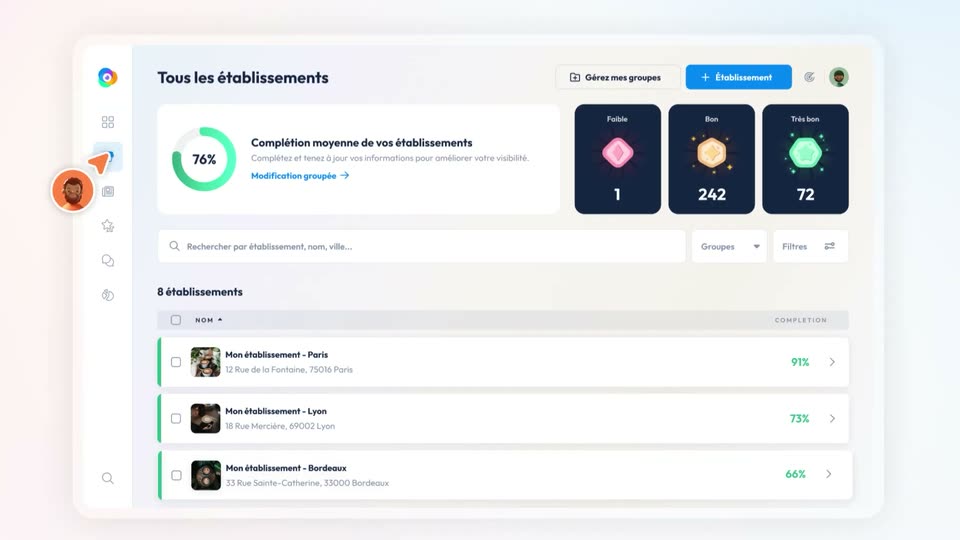
A French dashboard titled Tous les établissements floats at a 3D angle on a pale background, showing a 76% completion ring, three dark stat cards and a list of cities. The panel then tilts and blurs as it shifts across the frame.
Techniques: 3D mockup
Camera: Pan
Two tilted interface panels hover in 3D perspective, a location card with a map above a dashboard. The panels settle into frame and a red pin drops onto the map while the completion gauge reads 76%.
Techniques: 3D mockup
Camera: Static
A 3D dashboard tilts on a pale background while a floating map card above it shrinks into a globe app icon, then two more app icons join the row. The camera zooms down the establishment list, isolating one white row with an orange avatar pointer beside it.
Techniques: 3D mockup, Morph, UI zoom
Camera: Push in
A single address row slides in on a soft gradient background, settling beneath an orange cursor that carries a small circular avatar. The row shows a checkbox, a square icon, a bold title, a street address and a green 66% with a chevron at the right edge.
Techniques: Cursor demo
Camera: Static
A white list of establishment cards floats on a pale pink background. The top row shows a storefront icon, the name Mon établissement - Bordeaux and a green 66% score, with an orange cursor and avatar nearby. The list then rotates in 3D, rows stacking and blurring into depth.
Techniques: 3D mockup, Cursor demo
Camera: Static
A white settings card titled Horaires d'ouverture pulls into focus and zooms out to reveal the full weekly list. An orange avatar cursor travels down the rows, switching the Samedi and Dimanche toggles to Fermé, then moves to the blue Enregistrer button.
Techniques: UI zoom, Cursor demo
Camera: Pull out
A soft-focus field of white attribute cards snaps into sharp focus, revealing a grid of labeled tiles with icons and blue check marks. A blue Enregistrer button and two orange avatar circles hold the center throughout.
Camera: Pan
A white settings card labeled Photos for a Bordeaux establishment sharpens into focus on a soft pink-to-blue gradient, showing a grid of cafe photos and a blue save button, while an orange avatar with a pointing cursor slides in from the right.
Camera: Pan
A tilted 3D dashboard flattens and zooms onto the completion score card as the gauge fills from 51% orange to 96% green and the hexagon icon turns green with a small sparkle burst.
Techniques: 3D mockup, UI zoom, Particles
Camera: Push in
A social post builder zooms in as a custom cursor, an orange arrow with a bearded man avatar, clicks the Google, Facebook and Instagram buttons, which gain blue borders and sparkles. The cursor then places a photo of a woman into the Photos field, and the view zooms back out.
Techniques: UI zoom, Cursor demo
Camera: Push in
A blue rounded button reading Publier with a right arrow floats on a pale blue background, an orange user-avatar cursor tag pinned to its top-left corner. The button bounces down and back up, the label blurring with the fast motion.
Techniques: Cursor demo
Camera: Static
Three flat social post cards fade in side by side on a pale background, each topped by a Google, Facebook or Instagram logo. Every card shows the same photo of a woman at an eye exam and the same French caption, rising into place as the clip ends.
Camera: Static
A light statistics dashboard zooms from the full layout into a line chart, where four colored lines draw across a yearly axis. The view then pans down to a competitor ranking table, highlighting the user's own establishment row with a floating white card.
Techniques: UI zoom
Camera: Push in
A review card on a dark navy background fills the frame: Sarah's avatar, five yellow stars and a French testimonial type in. The camera then zooms out, revealing a field of similar review cards scattered around the centered one.
Techniques: UI zoom
Camera: Static
A white rounded panel on a soft blue gradient sharpens from a blur as the client invitation form and a blue SMS preview bubble populate, with a blue send button along the bottom.
Camera: Push in
A white review-invitation form sits on a soft gradient background. An orange cursor with a cartoon avatar points to the establishment field, the customer name and phone number, then the blue send button, while the camera zooms in on each field and pulls back to the full card.
Techniques: UI zoom, Cursor demo
Camera: Pull out
A white notification card with a blue envelope icon and blue headline sits over a blurred dashboard. A green checkmark pops into the envelope, the card slides left and the review list behind it sharpens into focus.
On-screen text: “Invitation envoyée !”, “Votre invitation a été envoyée, votre client”, “devrait laisser un commentaire rapidement”
Techniques: Kinetic type
Camera: Static
A tilted 3D mockup of a French review dashboard flattens into a front view, then the review list scrolls as new cards enter from the top, ending in a soft blur.
Techniques: 3D mockup
Camera: Push in
A white Google review card glows on a dark purple field. The view zooms into the reply box as an orange pointer hovers the sparkle icon, then a purple reply types itself in. Three pill tags pop in above, and the card settles to show the approved response.
Techniques: UI zoom, Cursor demo, Kinetic type
Camera: Pull out
A white rounded review card tilts from a skewed 3D perspective into a flat front-on position over a dark purple gradient. The name, NPS score and date settle at the top while the French testimonial body fills in line by line.
On-screen text: “Sophie FARHET”, “NPS 8 17 Janvier 2025”, “Le personnel était incroyablement serviable et compétent.”, “Ils ont su rendre le processus d'achat de voiture agréable !”
Techniques: 3D mockup, Kinetic type
Camera: Static
A horizontal beam of light sweeps across a dark purple gradient, opening a white rounded review card. The reviewer's avatar, name, five stars and date appear, then the French review text fills in line by line.
On-screen text: “Antoine TABLI”, “8 mars 2025”, “Je ne suis pas très familier avec les voitures, mais le personnel était patient et serviable !”
Techniques: Light sweep, Kinetic type
Camera: Static
A white rounded review card with a five-star comment sits on a dark purple glow, then the card content swaps to a review summary showing a 3.7 score and rating bars.
Camera: Static
A white review-summary card on a dark purple background slowly scales up. Its yellow rating bars lengthen, the large score counts from 4,8 to 4,9, and the review total ticks up to 1245.
Techniques: UI zoom
Camera: Pull out
A dark indigo dot with a glowing lavender beam trails diagonally across a soft pink-to-blue gradient that fades to white, where thin horizontal lines appear.
Camera: Static
A circular avatar of a bearded man in a green cap sits on a purple glow. A rounded bubble opens beside it, shows typing dots, then types the customer's question. The pair slides left as the frame pulls back to reveal the bubble inside a messaging dashboard.
On-screen text: “Bonjour, avez-vous des baskets taille 42 ?”
Techniques: Kinetic type, UI zoom
Camera: Static
A white messaging app card sits on a dark background, showing a conversation list and an open chat. The camera zooms in from the full interface toward the list, ending on a close-up where the top item, Pierre Lefevre, is highlighted in blue.
Techniques: UI zoom
Camera: Push in
A close-up of a French inbox list of customer conversations. The view pulls back to a 3D card on a dark field, then dives into the reply box where a message types itself and a blue send button slides in. The list then scrolls to new names.
Techniques: 3D mockup, UI zoom
Camera: Push in
On a pink-to-blue gradient, the dark sans headline “Découvrez Jim” sharpens from a blur while centered. A purple speech-bubble logo beside it tilts, grows a waving arm, and its face shifts to a closed-eye smile.
On-screen text: “Découvrez Jim”
Techniques: Morph
Camera: Static
A purple smiley chat logo pops in at left on a pale pink gradient. A light purple bubble to its right fills with the dark message “Bonjour 👋 Nous sommes ouverts du lundi au samedi, de 9h à 18h”, fading from soft to sharp. The frame then blurs and reframes into a chat view where the message sits as a blue right-aligned bubble.
On-screen text: “Découvrez Jim”
Camera: Static
A messaging interface shows a gray customer bubble and a blue gradient auto-reply bubble. A three-dot typing indicator pulses, then a second customer message types itself word by word, and the whole screen blurs out at the end.
Techniques: Kinetic type
Camera: Pull out
A purple chat-bubble icon with a smiling face appears centered on a pale pink-to-blue gradient. A pale lavender pill slides in to its right, the face morphs into a surprised look, two purple dots appear in the pill, and the pair scales down.
Techniques: Morph
Camera: Static
A close-up of a French chat interface zooms toward the top-right assignee control. A purple smiley mascot slides in, the dropdown opens and highlights Alexandre, the button updates, and sparkles pop before the view blurs out.
Techniques: UI zoom, Particles
Camera: Push in
A scattered collage of app interface cards, including a 4.0 rating widget, review bubbles and social posts, drifts into place on a soft pink-to-blue gradient. Cards enter from the edges, some blurred then sharpening, until the layout fills the frame.
Techniques: Parallax
Camera: Pull out
A phone mockup enters with motion blur on a pale pink-blue gradient, its screen showing a French app dashboard. The camera zooms into the task grid as three cards lift and scale up in turn with yellow, green and blue icons, then pulls back and the phone exits blurred.
Techniques: 3D mockup, UI zoom
Camera: Static
Three flat circular icons, a blue location pin, a green chat bubble and an orange star, float on a pale gradient and snap into focus. Thin rings open around each, and small photo avatars of people pop in to form three clusters, then the whole composition blurs out.
Camera: Pull out
On a dark navy background, French text appears in three centered lines. The first line fades in word by word, the last two words in a pink-to-purple gradient, then the next two lines follow, the final one scaling slightly before blurring out.
On-screen text: “Tout ce dont vous avez besoin”, “se trouve ici”, “à portée de main”
Techniques: Kinetic type
Camera: Static
On a pale pink-blue gradient, the partoo mark grows from a small circle while the wordmark slides in, then two French taglines fade in below as rows of client logos fill the top and bottom of the frame.
On-screen text: “partoo”, “La plateforme de marketing local tout-en-un”, “Utilisée par 350 000 établissements dans le monde”, “à portée de main”
Techniques: Kinetic type
Camera: Static