1:26

Opti — SaaS Product Explainer Video | SaaS Animate
Opti · Oct 2026
Papaya’s 0:59 launch film runs 33 scenes, about 1.8 s each. The product shows up at 0:23 and 4 features are revealed. The call to action lands at 0:53 (90% in), over a voiceover. A deadpan comedy skit in a warm orange food court dramatizes AI agents fumbling orders, then a presenter hands off to a clean light-gray 3D motion-graphics walkthrough that steps through connect, analyze, fix, and track. The skit cuts fast at roughly twenty cuts per minute with locked-off shots and physical gags, while the product section slows to smooth 3D camera pans, focus pulls, and word-by-word caption builds that land each feature beat.
Is this your launch? to your site or press kit.
Opti · Oct 2026
Yenmo · Fintech · Feb 2024
Google · AI · Apr 2026
Films whose music sounds like this one, voice left out
Ramp · Upbeat corporate electronic
Kos AI · Modern electronic
Juicebox · Modern electronic
A woman in a denim jacket walks toward a locked-off camera in front of an orange logo backdrop, two men standing behind her. She stops and comes into sharp focus as she speaks, a white subtitle reading Hi appearing at the bottom center.
On-screen text: “Hi”
Camera: Static
A blonde woman in a white collared shirt and an orange “Hello / AI AGENT #34” badge smiles and speaks, flanked by her blurred mirrored reflections against a coral wall with stacked boxes. A white subtitle “How can I help you?” sits at the bottom.
On-screen text: “How can I help you?”
Camera: Static
A tight, locked-off close-up of an orange and white name badge pinned to a white button-up shirt. The badge reads “Hello my name is AI AGENT #34” and stays perfectly still for the whole shot.
On-screen text: “Hello”, “my name is”, “AI AGENT #34”, “How can I help you?”
Camera: Static
A red-haired woman in a denim jacket speaks to camera in front of an orange step-and-repeat banner, two men standing behind her. White subtitles at the bottom carry her line as the locked-off shot holds.
On-screen text: “Can I get a”, “chocolate chip cookie?”
Camera: Static
A blonde barista in a white shirt stands behind a cafe counter, smiling and holding a chocolate chip cookie on her outstretched palms. A second blonde woman in white turns away to the right. A caption reads “chocolate chip cookie?”. The frame is locked off.
On-screen text: “chocolate chip cookie?”
Camera: Static
A red-haired woman in a denim jacket stands before an orange step-and-repeat backdrop while a man with crossed arms watches behind her. Off-camera hands thrust a cookie into her mouth; she winces and bites it, then the hands withdraw and she raises her palms.
Camera: Static
A woman with long hair in a denim jacket stands at a concession counter holding a phone, then walks out of frame right, revealing a blonde cashier in a white shirt behind the counter. The shot is a locked-off medium view of the candy and popcorn display.
Camera: Static
A blonde woman in a white collared shirt stands in a cafe, smiling and talking to camera. Shelves with coffee bags and a menu board sit blurred behind her. A white caption reads 'Next!' at the bottom of the frame.
On-screen text: “Next!”
Camera: Static
A close-up shows hands with long pale nails slicing a yellow lemon on a dark speckled board. The knife cuts through the fruit and the two halves separate.
Camera: Static
A hand holds a lemon slice threaded on a brown stick above a dark counter. A second hand reaches in, grasps the slice, and pulls it away. Shallow depth of field keeps the colorful background blurred.
Camera: Static
A man in a gray shirt walks to a lit popcorn machine at a cinema counter while staff serve behind it. Two men wait near a red-carpeted staircase beside a wall of movie posters. The camera stays locked off.
Camera: Static
A blonde woman in a white uniform smiles and holds a giant inflatable pretzel toward the camera. Her name tag reads Hello, AI Agent #34. A second blonde employee works at the counter behind her among stacked cups and a drink fridge.
Camera: Static
A man in glasses and a brown tee holds a large inflatable pretzel at chest height before an orange step-and-repeat banner. He grins, then scrunches his face looking at it, while two people stand out of focus behind.
Camera: Static
A woman in a brown sleeveless top stands before an orange step-and-repeat banner covered in black logos, smiling and speaking to the camera. A staircase with a metal railing sits at left. A white caption reads at the bottom of the frame.
On-screen text: “Can I get some popcorn?”
Camera: Static
A blonde cashier in a white shirt lifts a brown paper bag with an orange logo into view at a fast food counter, smiling, while a customer with her back to the camera works at the register. The shot is locked off and the motion is limited to her hands raising the bag.
Camera: Static
A woman in a brown sleeveless top stands before an orange step-and-repeat backdrop as a hand tilts a popcorn box above her head, kernels raining down across the frame. Her smile shifts to a surprised open mouth.
On-screen text: “10700”
Camera: Static
At a cinema snack bar, a man flips a giant pretzel, launching a shower of popcorn that scatters across the tiled floor. The pretzel drops to the ground while a woman in a gray jacket watches and another man holds a pretzel near a patterned staircase.
Camera: Static
A woman in a black top walks toward the camera through a busy food court with orange walls and a staircase, while other people stand at a counter in the soft, blurred background. The handheld shot stays loose and out of focus.
Camera: Static
A woman in a black blouse stands in a crowded restaurant, a staircase and orange wall behind her, speaking directly to the camera. Blurred patrons move in the background. White caption lines swap at the bottom of the frame as she talks.
On-screen text: “Don't let your AI agents”, “embarrass you in front of customers.”, “Papaya finds where”, “your agents are messing up”, “and fixes them for you.”, “Here is how it works.”
Camera: Static
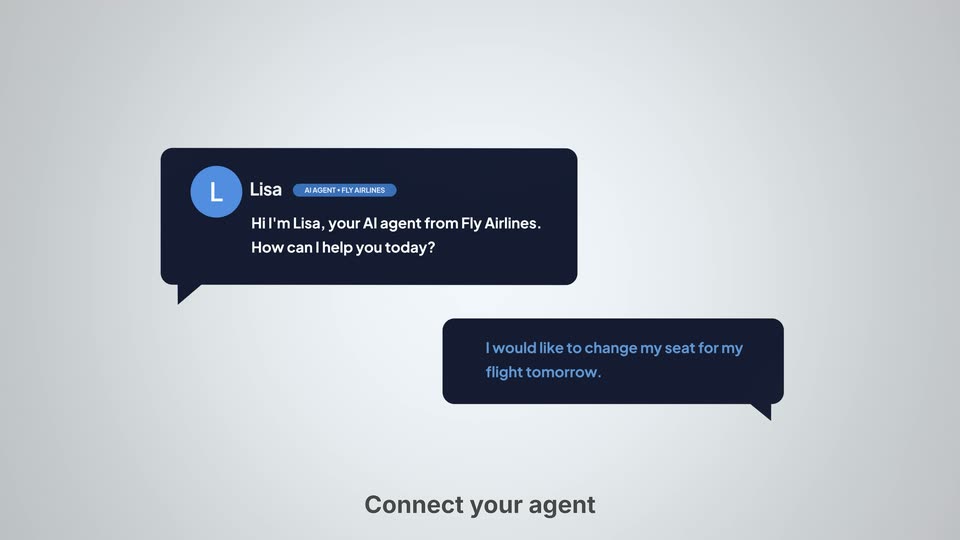
Two navy chat bubbles, an AI agent greeting and a user seat-change request, sit over a blurred live-action background that resolves to a clean light gray field. The headline “Connect your agent” fades in centered below the bubbles.
On-screen text: “Connect your agent”
Camera: Static
Two dark chat bubbles float on a light gradient, an AI agent greeting on the left and a user request on the right, with thin blue trace lines and yellow dots rising above them. A gray caption at the bottom swaps from Connect your agent to traces to Papaya.
On-screen text: “Connect your agent”, “traces to Papaya”
Techniques: Kinetic type
Camera: Pan
Dark chat bubbles with customer questions drift over a pale field of thin blue lines and yellow dots. The camera tilts up as the lines converge into a diamond grid that assembles at the top, and a caption locks in at the bottom.
On-screen text: “into business use cases.”
Techniques: Morph
Camera: Push in
Four dark pill labels with white text slide into a vertical stack above an isometric grid plane with colored dots and a blue and orange border. Lines hang from the grid's lower edge. A bottom caption reads “into business use cases.” then switches to “From there,”.
On-screen text: “Flight cancellations”, “Seat change requests”, “Baggage tracking”, “Refunds”, “into business use cases.”, “From there,”
Techniques: Kinetic type
Camera: Static
Four dark pill labels with white text float in 3D above a flat diamond grid of blue and orange dots, outlined in blue, orange, and yellow, with thin lines trailing below. The labels slide upward as the frame pans down, and a black caption appears at the bottom.
On-screen text: “From there,”, “Papaya looks at areas”
Techniques: Parallax
Camera: Static
A row of dark navy 3D badge cards labeled Context, Prompts, Tool Calls recedes diagonally on a light gray background. The camera pans left with a focus pull, sharpening each card in turn, and the Tool Calls card turns bright blue. Subtitles run along the bottom.
On-screen text: “Papaya looks at areas”, “like your context,”, “prompts and tool calls”
Techniques: 3D mockup, Parallax
Camera: Push in
A perspective dotted plane with blue, orange and yellow borders sits at the base. Four dark rounded chips float above it in a vertical stack; the second chip turns red. A white caption cycles at the bottom while the stack gently bobs.
On-screen text: “to pinpoint”, “where customers”, “are running into issues.”
Techniques: 3D mockup, Kinetic type
Camera: Push in
The papaya fruit logo slides off-screen left while the caption below completes word by word. A list of four support topics with orange icons appears on the left, and a dark card on the right cycles through priority-tagged fix suggestions with a blue arrow beside it.
On-screen text: “Papaya then shows you what to fix and open a pull request for you.”, “Flight cancellations”, “Seat change requests”, “Baggage tracking”, “Refunds”, “Improve refund reasoning in policy edge cases”, “Reduce unnecessary tool calls in order tracking”, “Clarify eligibility checks to prevent rework”
Techniques: Kinetic type
Camera: Static
A mind-map of dark navy issue cards with colored priority badges radiates from a partially visible orange node on the left. A large blue cursor arrow hovers over the middle card as the layout settles and the view reframes slightly wider.
On-screen text: “to fix and opens”
Techniques: Cursor demo
Camera: Static
A tree of dark navy cards with priority badges and task text is linked by thin gray lines on a light gray field. A blue cursor glides between cards, and each P1 badge it touches morphs into a green checkmark.
On-screen text: “a pull request for you.”, “the improvements”, “as your new traces come in”
Techniques: Cursor demo, Morph
Camera: Static
A dark list of task cards on a light gray background, each linked by thin lines, with a blue cursor resting near the bottom right. A Papaya logo card slides in from the left. The frame stays locked off.
On-screen text: “and shows you the”
Techniques: Cursor demo
Camera: Static
A dark navy panel with the Papaya logo holds three white tiles that pop in left to right, each pairing a colored line chart with a label. A gray caption below updates to the impact line.
On-screen text: “and shows you the”, “impact to quality, latency, and cost.”
Camera: Push in
On a plain light-gray background, the words of the headline “Your agents get better with every conversation” fly in from scattered positions and scale into place, word by word. A small caption at the bottom then settles on “Start using Papaya.”
On-screen text: “Your agents get better”, “with every conversation”, “Start using Papaya”
Techniques: Kinetic type
Camera: Pull out
The Papaya logo lockup, a pear-shaped icon in orange, yellow and blue with a white drop, sits left of the black wordmark and gray URL on a light gray gradient. A dark caption at the bottom reads Start using Papaya, then swaps to for free today.
On-screen text: “Start using Papaya”, “www.papaya.fyi”, “for free today.”
Camera: Static