0:52
Explore
Serena Pei - Today we’re launching Palette! Built by MIT AI researchers, Palette
Palette · Jul 2026 · 0:56 · AI-annotated
- Length
- 0:56
- Scenes
- 20 · 2.8 s avg
- Product on screen
- 0:04
- Features shown
- 5
- Call to action
- 0:53 · 96%
- Voiceover
- Yes
00:00:00 / 00:56:13
Palette’s 0:56 launch film runs 20 scenes, about 2.8 s each. The product shows up at 0:04 and 5 features are revealed. The call to action lands at 0:53 (96% in), over a voiceover. The video opens on a fast montage of generated footage, then settles into a clean light-gray UI walkthrough where each feature is a short labeled slide pairing a before-and-after demo with a side menu of options. Pacing is steady at about thirteen cuts a minute, with light-beam wipes and purple highlight dots as the recurring signature moves.
Footage neededEstimated needs: 6 capture groups — your screens or recordings · 2 filmed passages — shoot, supply or replace · 1 graphic passage — draw or supply · 2 3D passages — build or supply
Is this your launch? to your site or press kit.
More like this
3:27
0:40

Stripe - Introducing the new Stripe Treasury: • Hold funds in multiple curren
Stripe · Finance · Apr 2026
Serena Pei - Today we’re launching Palette! Built by MIT AI researchers, Palette, scene by scene
· 20 scenes as text
01 · Hook · 0:00–0:01
First-person cockpit view of a formula car sliding through a street-circuit corner, the front wing throwing off a spray of sparks as it grazes the barrier. Yachts and grandstands streak past in motion blur behind the car, while a small static label holds in the top-left corner.
On-screen text: “ALL MADE IN PALETTE”
Techniques: Particles
Camera: Push in
02 · Hook · 0:01–0:02
First-person cockpit view of a Formula 1 car cornering through a street circuit past packed grandstands. The camera tracks forward over the nose and front wheels as the car turns, while a small label holds top-left and a larger caption fades in at the bottom.
On-screen text: “ALL MADE IN PALETTE”, “These all started as”
Camera: Push in
03 · Hook · 0:02–0:03
A humpback whale glides through deep blue water, a small diver visible near its head. White text appears at the bottom left, reading “These all started as one sentence.” A small label sits in the top left.
On-screen text: “ALL MADE IN PALETTE”, “These all started as”, “one sentence.”
Camera: Static
04 · Hook · 0:03–0:04
An underwater shot of a humpback whale glides through blue water, head toward the right. White headline text sits lower left, with the word sentence in purple and a thin underline. A small ALL MADE IN PALETTE label sits top left. The frame stays locked as the whale drifts.
On-screen text: “ALL MADE IN PALETTE”, “These all started as one sentence.”
Camera: Static
05 · Demo · 0:04–0:10
A dark node canvas of the Palette app builds a pipeline as a cursor works through it; the heading settles from a brief glitch while the labels Describe, Reference, Storyboard, Generate, Stitch on the right highlight in sequence, each gaining a purple dot.
On-screen text: “THE WORKFLOW”, “Every format, one canvas.”, “Describe”, “Reference”, “Storyboard”, “Generate”, “Stitch”, “Character Reels Generation”, “running”
Techniques: Cursor demo
Camera: Static
06 · Feature reveal · 0:10–0:11
A lavender layout with a dark node-graph canvas and a right-hand step list switches to a cream layout with an anime character sheet of a girl and a white fox. The headline and label change to a generate message.
On-screen text: “THE WORKFLOW”, “Every format, one canvas.”, “Describe”, “Reference”, “Storyboard”, “Generate”, “Stitch”, “Character Reels Generation”, “running”, “GENERATE', 'Start with a prompt, an image, or a reference.', 'prompt to scene', 'reference to variation', 'source to formats', 'one character sheet' — wait, I误”
Camera: Static
07 · Feature reveal · 0:11–0:14
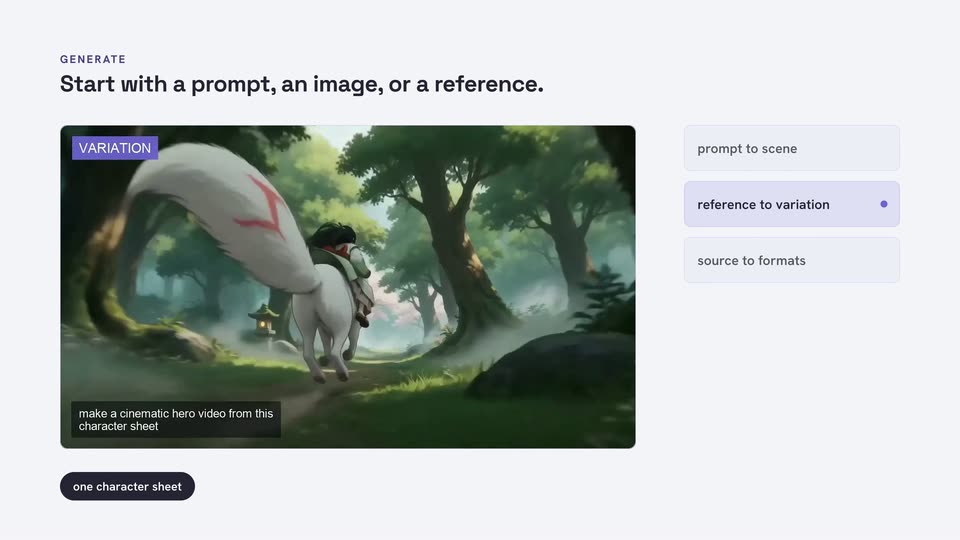
A product UI slide on a light gray background shows a headline and a video frame playing an animated rider on a white horse through a misty forest that shifts to a cherry blossom waterfall. Three option cards sit to the right, one highlighted in purple.
On-screen text: “GENERATE”, “Start with a prompt, an image, or a reference.”
Camera: Static
08 · Feature reveal · 0:14–0:16
A pale interface screen shows a headline at top left and a three-item list on the right. The large rounded card on the left cycles through anime illustrations of a rider with a white fox. A vertical beam of light sweeps across the frame at the end.
On-screen text: “Start with a prompt, an image, or a reference.”
Techniques: Light sweep
Camera: Static
09 · Feature reveal · 0:16–0:23
A product UI on a light gray field: a preview card shows a red car under a light beam, tagged BEFORE, while a right-side menu highlights replace an object. The preview then switches to AFTER, showing a black motorcycle in the same spotlight.
On-screen text: “EDIT”, “Change the work with words.”
Camera: Static
10 · Feature reveal · 0:23–0:25
A product interface on a light background. A bold headline and small EDIT label sit above a street video thumbnail, with a dark pill button below and three option cards on the right, the middle one dotted. Elements fade in over the first second as the footage plays.
On-screen text: “EDIT”, “The source stays connected as the format changes.”
Camera: Push in
11 · Feature reveal · 0:25–0:29
A product edit panel on a light background shows a cobblestone street that shifts from a photograph to a watercolor painting while a caption bar and a second prompt pill slide in below it; a list of three edit options rests on the right with 'restyle a scene' highlighted.
On-screen text: “EDIT”, “The source stays connected as the format changes.”
Techniques: Morph
Camera: Push in
12 · Feature reveal · 0:29–0:32
A lavender UI panel shows a clip of milk poured into a coffee cup, tagged with a prompt caption, beside a column of three option chips. The headline wipes in, the 'revise a sequence' chip highlights, and a 'tightened into a fast cut' chip pops in below.
On-screen text: “EDIT”, “Reshape the output in plain language.”
Techniques: Masking
Camera: Static
13 · Feature reveal · 0:32–0:33
A light gray slide shows the headline Reshape the output in plain language. above a video of a barista at an espresso machine, which cuts from a wide shot to a close-up of coffee pouring into a cup. Pills on the right and bottom list the edit options.
On-screen text: “EDIT”, “Reshape the output in plain language.”
Camera: Push in
14 · Feature reveal · 0:33–0:35
A purple panel wipes in from the right, the slide swaps from an edit demo with a milk-steaming clip to a lookbook demo with a yogurt cup, then the panel wipes out to reveal the new slide.
On-screen text: “Reshape the output in plain language.”, “One product photo, styled every way you need it.”
Techniques: Masking
Camera: Push in
15 · Feature reveal · 0:35–0:39
A light gray layout shows a Chobani yogurt cup under “THE PRODUCT YOU UPLOAD”; a purple arrow points to a 2x2 grid of lifestyle photos that fade in under “WHAT COMES BACK”. Three chips stack on the right, then a white beam wipes across.
On-screen text: “PRODUCT LOOKBOOK”, “One product photo, styled every way you need it.”, “WHAT COMES BACK”, “THE PRODUCT YOU UPLOAD”, “reads the product”, “one upload”, “styles the model”, “keeps the label”, “real packaging, untouched”
Techniques: Light sweep
Camera: Static
16 · Feature reveal · 0:39–0:41
A light lavender slide holds the heading over a white panel of four character model sheets. The panel takes on a purple outline, the three right labels darken, the bottom pill turns black, and a cursor appears.
On-screen text: “CHARACTERS”, “A consistent identity across the sequence.”, “same face”, “same wardrobe”, “same palette”, “four sheets”
Camera: Static
17 · Feature reveal · 0:41–0:45
A light lavender layout presents a character sheet: a rainy alley image of an anime girl with red eyes slowly zooms in on the left, while three pill cards and the name Kagemi sit on the right. The identity locked chip fades in below the image.
On-screen text: “CHARACTERS”, “A consistent identity across the sequence.”, “generated from this sheet”, “same face”, “same wardrobe”, “same palette”, “Kagemi”, “ROLE · WANDERER”, “red eyes · dual orbs · skull mark”, “four sheets”
Techniques: UI zoom
Camera: Static
18 · Feature reveal · 0:45–0:46
Violet blocks wipe across the frame to clear, revealing a circular diagram of model nodes around a center label, a request card on the right, and a bold dark headline top left.
On-screen text: “DIRECTION”, “Control the outcome, not just the prompt.”
Techniques: Masking
Camera: Static
19 · Feature reveal · 0:46–0:53
A flat interface panel shows a circular routing diagram with six model pills around a center node. A purple line sweeps between nodes, highlighting each as the right-side request card updates its prompt and price. A caption fades in, then the screen crossfades to a large gray tagline.
On-screen text: “DIRECTION”, “Control the outcome, not just the prompt.”, “Each one lands on the cheapest model that covers the job: $0.51 where Veo 3.1 would have been $3.39 for the same 8 seconds.”, “Make something worth watching.”
Camera: Static
20 · CTA · 0:53–0:56
A dark blue palette icon in a white rounded square sits above a bold black headline and a smaller grey URL on a light background. The static elements fade to a lighter grey at the end.
On-screen text: “Make something worth watching.”, “palettelabs.com”
Camera: Static