
2:32
Explore
Stripe - Introducing the new Stripe Treasury: • Hold funds in multiple curren
Stripe · Apr 2026 · 0:40 · AI-annotated
- Length
- 0:40
- Scenes
- 23 · 1.8 s avg
- Product on screen
- 0:01
- Features shown
- 3
- Call to action
- 0:38 · 94%
- Voiceover
- No
00:00:00 / 00:40:34
Stripe’s 0:40 launch film runs 23 scenes, about 1.8 s each. The product shows up at 0:01 and 3 features are revealed. The call to action lands at 0:38 (94% in). The video is built as a rapid feature tour: a phone hook, then each capability (Send, Create card, ChatGPT control) is announced by a glowing pill or button and demoed with a cartoon cursor, closing on a dashboard sweep and a URL sign-off. Its style is a clean pastel-gradient stage with 3D device renders, soft pink-purple glows, and blur-to-focus rack moves that keep the pacing brisk and the UI always the hero.
No filming indicatedEstimated needs: 5 capture groups — your screens or recordings · 1 official logo — reused across the film · 5 3D passages — build or supply
Is this your launch? to your site or press kit.
More like this


1:55


Asakana: Automating sales and the entire back office for food distributors
Asakana · B2B · Oct 2026
1:40

Best AI SaaS Product Launch Video | Sovera
Sovera · May 2026
Stripe - Introducing the new Stripe Treasury: • Hold funds in multiple curren, scene by scene
· 23 scenes as text
01 · Hook · 0:00–0:00
A titanium iPhone sits centered on a soft white-to-blue gradient. On its lock screen, a purple wallpaper glows behind the 9:41 clock, while Stripe payment banners stack upward, each sliding in beneath the last.
Camera: Static
02 · Hook · 0:00–0:01
A close-up of a phone screen on a purple gradient wallpaper. Two Stripe payment notifications sit in a vertical stack; the lower $826.24 card slides up into place while the upper $100.00 card stays fixed.
Camera: Pull out
03 · Demo · 0:01–0:03
A tight crop of a phone's balances screen zooms out to reveal the full device in 3D perspective. Its screen fades as three action pills, Transfer, Convert and Add funds, sharpen into focus on a soft gradient.
Techniques: UI zoom, 3D mockup
Camera: Pull out
04 · Feature reveal · 0:03–0:06
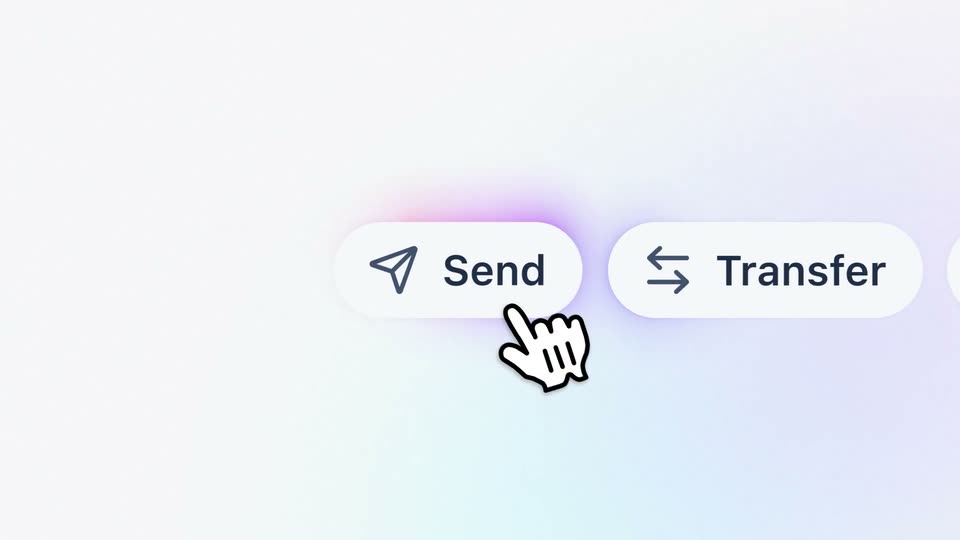
A row of white pill buttons labeled Send, Transfer, Convert slides horizontally across a soft gradient field. A glowing purple halo sits behind the Send button, then an arrow cursor and a cartoon click-hand tap it.
Techniques: Cursor demo
Camera: Static
05 · Feature reveal · 0:06–0:12
A white Send modal on a soft gradient. A cartoon hand cursor types @ in the search field, a recipient list fades in, and the cursor selects Rocket Rides. The panel swaps to a transfer form, the amount fills to $2,000, and the cursor rests on the Send button.
Techniques: Cursor demo
Camera: Static
06 · Feature reveal · 0:12–0:13
A white send dialog showing $2,000 USD with a cursor on the Send button morphs into two stacked cards, one for the sender account and one for Rocket Rides.
Techniques: Cursor demo, Morph
Camera: Pull out
07 · Feature reveal · 0:13–0:16
Two flat account cards stack on a soft pastel gradient. The top balance fades to gray as its label switches to 'Sent' and a down-arrow pulses between them; the bottom balance fills in to match with 'Receipt confirmed', then the top card fades out.
Camera: Static
08 · Feature reveal · 0:16–0:17
A white rounded payment card with a green Rocket Rides icon and $2,000.00 sits centered on a pale gradient. The card's header collapses and blurs as a search bar and a country list slide in from the left over it.
Techniques: Morph
Camera: Static
09 · Feature reveal · 0:17–0:19
A close-up of a search interface shows the text 'Argen' being typed into a field. The dropdown list filters to a single result, 'Argentina', which a hand cursor clicks.
Techniques: Cursor demo
Camera: Static
10 · Feature reveal · 0:19–0:20
A white Send payment modal sits centered on a soft lavender gradient, its fields and purple Send button held static while a colored glow drifts around the card edge. A small caption slides in over the locked-off frame.
On-screen text: “Q Argentina”
Camera: Static
11 · Feature reveal · 0:20–0:21
A white pill button with a card icon and the label Create card pops in at center, its rim glowing pink and purple against a pale blue and lavender gradient. A hand cursor and an arrow pointer rest on the button.
Techniques: Cursor demo
Camera: Static
12 · Feature reveal · 0:21–0:23
A centered white modal for creating a card appears on a pale gradient background, showing a purple Mastercard preview. A hand cursor moves from the Cardholder field to the Virtual option and selects it, adding a purple outline.
Techniques: Cursor demo
Camera: Static
13 · Feature reveal · 0:23–0:24
A close-up of a white panel on a light blue field shows two option cards, the right one titled Physical. A cartoon hand cursor slides from the Back button to the purple Create card button and presses down on it.
Techniques: Cursor demo
Camera: Static
14 · Feature reveal · 0:24–0:27
The create-card dialog holds a tilted purple Mastercard, then the card straightens and the dialog drops away to a flat card with an animated glowing border on the left. A large dark 2% and cashback on card spend headline sit on the right over a pale gradient.
On-screen text: “2%”, “cashback on card spend”, “For eligible customers who open a Prepaid Card issued by Cross River Bank.”
Techniques: Light sweep
Camera: Static
15 · Feature reveal · 0:27–0:29
A front view of a smartphone on a pale gradient background. The screen holds a chat with the ChatGPT mark and a user message, then a Stripe balance card expands below it while the camera pulls back from a tight crop to the full device.
Techniques: UI zoom
Camera: Pull out
16 · Feature reveal · 0:29–0:30
A close-up of a phone screen in 3D perspective, its metal edge visible on the right, shows a light gray chat bubble fading from blur into sharp focus. The bubble reads “Can you pay this invoice?” on a pale gradient background.
Techniques: 3D mockup
Camera: Static
17 · Feature reveal · 0:30–0:32
A 3D phone, angled to show its side buttons, displays a chat thread. A Stripe receipt card fades in beneath the question bubble, revealing payment details and the Download receipt and View transaction buttons.
Techniques: 3D mockup
Camera: Static
18 · Feature reveal · 0:32–0:33
A close-up of a white transaction card on a phone screen. The date, a HYPERNIAN.CO link, and a purple View transaction button sit in a rounded panel, with small edit and refresh icons below. The button presses in slightly.
Camera: Static
19 · Demo · 0:33–0:34
The Recent activity list shows tabs and rows of amounts, descriptions and balances. The view opens zoomed and blurred on a few rows, then pulls back to the full list, which scrolls down to reveal more transactions.
On-screen text: “HYPERNIAN.CO”
Techniques: UI zoom
Camera: Pull out
20 · Demo · 0:34–0:35
A close-up of a financial dashboard starts blurred and racks into focus as a purple bar chart animates upward. Below it, the Recent activity panel lists transaction rows with amounts, names and dates.
Camera: Static
21 · Demo · 0:35–0:38
A light dashboard interface fades in from a ghosted, pink-washed state into a solid centered view, then tilts into 3D perspective as a dark purple panel wipes in from the right edge.
Techniques: Masking, 3D mockup
Camera: Pull out
22 · CTA · 0:38–0:39
A dark purple background holds a centered white URL, stripe.com/treasury. The frame is locked off and the text remains still for the short sign-off.
On-screen text: “stripe.com/treasury”
Camera: Static
23 · Outro · 0:39–0:40
A locked-off frame holds the white stripe wordmark centered on a dark purple vertical gradient that lightens toward the bottom. The URL stripe.com/treasury is locked in frame with it, static for the full beat.
On-screen text: “stripe.com/treasury”
Camera: Static