1:10

Tech Explainer Video Example: Eccasion EV Platform | Beliv8 Motion Studio
Eccasion · Nov 2026
Oxus’s 1:21 launch film runs 36 scenes, about 2.3 s each. The product shows up at 0:25 and 3 features are revealed. The call to action lands at 1:11 (88% in). The film opens with a typed two-ways premise, cuts rapidly through a live-action and UI montage of manual audit grind, then pivots on a chat message to reveal the Oxus brand before settling into a white 3D-laptop demo reel where each feature is announced by a colored badge and a typed caption. Its signature moves are character-by-character typing, the 3D laptop rotate-and-zoom, pop-in corner badges, and interface elements that draw themselves, with pacing that snaps fast in the problem montage (
Is this your launch? to your site or press kit.
Eccasion · Nov 2026
Spacesheep · B2B · Nov 2026
monday sidekick · Feb 2026
Films whose music sounds like this one, voice left out
Ant Ling · Electronic, Lo-fi Hip-hop, Chillwave
Polylane · Electronic dance music
On a plain off-white background, monospaced text is typed character by character behind a blinking caret, reading “There are two ways to do an audit.” The line clears, then a larger line, “One is manual.”, is typed in the same way.
On-screen text: “There are two ways to do an audit.”, “One is manual.”
Techniques: Kinetic type
Camera: Static
A man sits at a wooden desk facing a monitor that displays a lock screen, flanked by a laptop and office supplies. The camera remains static behind him.
Camera: Push in
A tight close-up holds on a hand resting on a glossy black mouse, the index finger pressing the left button. The blurred edge of a laptop sits in the background on a white desk. The shot stays static.
Camera: Static
A close-up of a spreadsheet. A green box selects an email cell in row seven while a cursor hovers nearby, then the view pans right across the columns, tracking the highlighted row past status and position fields.
Techniques: UI zoom
Camera: Pan
A tilted close-up of a verification table fills the frame, rows of email addresses on the left and green PASS or pink FAIL cells on the right. A thin text caret blinks once inside a PASS cell, then the view holds still.
Camera: Static
Tight side-angle close-up of a white laptop keyboard. Two hands type quickly, fingertips blurred with motion, while shallow focus keeps the black keys in the foreground sharp.
Camera: Static
Extreme close-up of a person's eye, the dark pupil reflecting a small bright blue rectangle like a monitor. Cool blue light washes over the iris and surrounding skin. The eye holds steady with a faint drift, framed tightly on the brow and lashes.
Camera: Static
A close-up of a spreadsheet listing employee IDs, names and email addresses. A green cell outline shifts down one row to Mia Lee's email field as a black cursor hovers over it. The framing stays static.
Techniques: Cursor demo
Camera: Static
A tilted spreadsheet grid fills row by row. Green highlights mark PASS cells and pink highlights mark FAIL cells as a text cursor types each result into the status column.
Techniques: Cursor demo
Camera: Static
A seated person's feet in black leather shoes fill the frame, the raised foot turning to show its treaded sole. Khaki trousers, dark socks, a wooden stool edge and metal chair legs sit in soft focus behind on a wooden floor.
Camera: Static
A tilted Oracle Cloud console panel floats over a spreadsheet grid in 3D perspective. A red outline and crosshair track elements while width and height tooltips update as the view pans right across the top bar.
Techniques: 3D mockup, UI zoom
Camera: Pan
Extreme macro of a dark teal analog watch dial with white Arabic numerals and thin hands. The locked-off frame holds still as focus racks from a soft blur to a crisp reading of the face.
Camera: Static
A white grid canvas holds a purchase-process flowchart. The view drifts right and zooms in, sliding past a shape library panel toward a diamond decision node and a buyer-follow-up box, with a blue 803 px dimension line crossing the frame.
Techniques: UI zoom
Camera: Pan
A flowchart on a white grid canvas. The cursor clicks the Decision diamond, a blue selection frame with corner handles and a rotation arrow appears around it, and the pixel dimension guides fade out.
Techniques: Cursor demo
Camera: Pan
Macro close-up of a dark eye, a tiny screen reflection glinting in the pupil. The eye holds steady for most of the clip, then the upper lid drops and the eye closes.
Camera: Static
A flowchart editor canvas on a light grid. A crosshair cursor grabs a corner handle of a Process box and drags it, resizing the shape while blue pixel-dimension labels update, and the view reframes onto the box.
Techniques: Cursor demo, UI zoom
Camera: Pan
A flowchart editor canvas pans across a procurement diagram. A Document shape sits selected with purple corner handles as a four-directional cursor hovers over it, with pixel dimension labels and an open shape library panel visible at the left.
Techniques: Cursor demo
Camera: Pan
A white page holds a static dark-text dialogue. A mouse cursor glides left along one line and drags a blue selection highlight over the phrase about thresholds and re-approval.
Techniques: Cursor demo
Camera: Static
A flat chat screen holds a thank-you bubble at the top as the input field types a sentence letter by letter, sends it, then starts typing a second line about unfinished workpapers.
Techniques: Kinetic type
Camera: Pan
A close-up of a chat conversation scrolls down past messages about overtime and unfinished workpapers. A new message from Melinda Liu appears with a link to Oxus, and a cursor blinks in the empty message field.
Camera: Static
A chat interface shows Melinda Liu's message bubble reading “Have you tried Oxus?” while the caption “The other way.” slides in below it. The interface then fades to white, leaving the caption centered alone on the plain background.
On-screen text: “The other way.”
Techniques: Kinetic type
Camera: Static
A chat thread sharpens from blur as the serif headline “The other way.” slides across the center and fades. An emoji reaction bar pops in above the message, then a cursor hovers the underlined Oxus link to reveal a URL tooltip.
On-screen text: “The other way.”, “http://oxus-ai.com/”
Techniques: Kinetic type, Cursor demo
Camera: Static
A dark laptop opens toward the camera while a navy circular logo draws itself on the white screen. The wordmark OXUS fades in letter by letter, then the camera rotates to a three-quarter 3D angle.
On-screen text: “OXUS”
Techniques: 3D mockup
Camera: Static
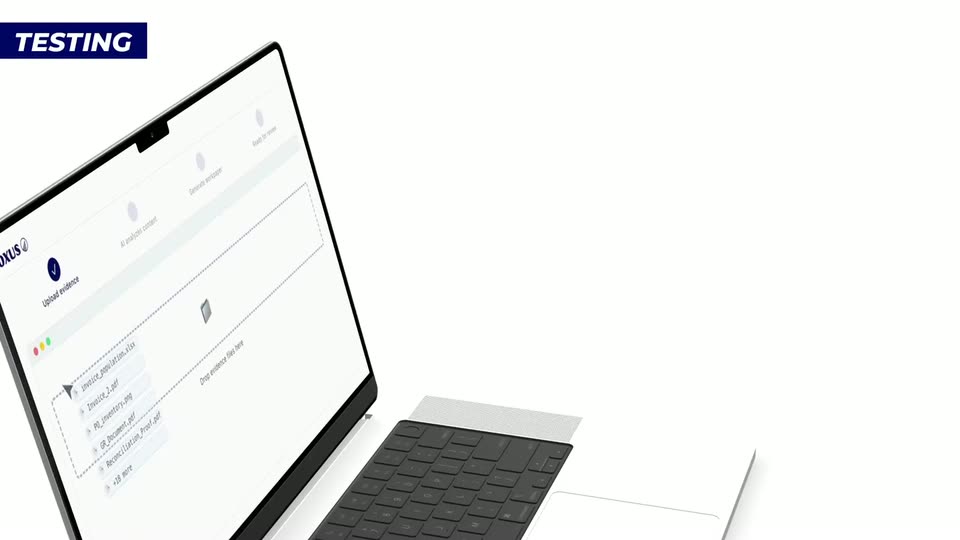
A silver laptop in 3D perspective on a white background swings open, its screen revealing a file upload interface. A blue TESTING badge pops in at the top left, then disappears as the device settles fully open.
On-screen text: “TESTING”
Techniques: 3D mockup
Camera: Static
A silver laptop in 3D perspective shows the OXUS interface as the file list switches to analysis and blue progress bars fill. On the right, the words Upload evidence to test control appear one by one, with a TESTING badge fixed at the top left.
On-screen text: “TESTING”, “Upload evidence to test control”
Techniques: 3D mockup, Kinetic type
Camera: Static
A 3D laptop mockup on a white background shows the OXUS interface, with checkmarks ticking off the workpaper generation steps. The caption “AI generates workpaper within minutes” types in on the right, then the view zooms into the screen to a green check and a Workpaper Complete panel.
On-screen text: “TESTING”, “AI generates workpaper within minutes”, “Workpaper Complete!”, “Ready for reviewer approval”, “Export Workpaper”
Techniques: 3D mockup, Kinetic type, UI zoom
Camera: Push in
A laptop mockup in 3D perspective shows a success card with a green check circle, a title, subline and a dark blue export button with a cursor resting on it. The view then pans down the screen to a lined table with section tabs along the bottom edge.
Techniques: 3D mockup, UI zoom
Camera: Pull out
A 3D laptop mockup rotates into a frontal view of an audit workpaper table. The camera zooms to the tab bar, a cursor clicks Testing & Sample Analysis, and a green-red PASS/FAIL grid fills in. The view pulls back to the laptop, which turns away as a caption appears.
On-screen text: “Results traceable to source data”
Techniques: 3D mockup, UI zoom, Cursor demo, Kinetic type
Camera: Pull out
A 3D laptop mockup rotates from a tilted angle to face the camera, its screen cycling from a file upload list to a processing bar, then to a swimlane flowchart drawing itself. Right of it, the caption Upload meeting notes fades in word by word under a blue FLOWCHARTS badge.
On-screen text: “FLOWCHARTS”, “Upload meeting notes”
Techniques: 3D mockup, Kinetic type
Camera: Static
A 3D laptop mockup on white shows a flowchart drawing itself across four swimlanes as black text assembles on the right. The laptop then rotates out of frame to the right.
On-screen text: “Generate flowcharts in under a minute”
Techniques: 3D mockup, Kinetic type
Camera: Static
A laptop mockup in 3D perspective rotates from a tilted side angle to a front view, its screen showing an OXUS scoping table. A blue SCOPING tag expands at top left while a black headline types in, wrapping to a second line.
On-screen text: “SCOPING”, “Bring higher-ri”
Techniques: 3D mockup, Kinetic type
Camera: Pan
A 3D laptop mockup on white shows an OXUS scoping table. A black headline builds word by word on the left, then the view zooms into the table where a cursor hovers a Medium badge.
On-screen text: “SCOPING”, “Bring higher-risk areas into focus with multi-factor insight”
Techniques: 3D mockup, Kinetic type, UI zoom, Cursor demo
Camera: Push in
A silver laptop rests in 3D perspective on a white field. A modal window holding a risk-assessment table scales down from a tight close-up to settle at the screen's center, its color-coded rating chips and justification rows now fully legible.
Techniques: UI zoom, 3D mockup
Camera: Pull out
A silver laptop in 3D perspective sits on a white background. Its lid rotates shut, the open screen showing a risk assessment table folding down until only the flat closed lid remains.
Techniques: 3D mockup
Camera: Pull out
The OXUS logo scales up to center on a white field as a gray wipe clears the bottom edge. The tagline types in beneath it, then the italic CTA line follows, and the lockup holds still.
On-screen text: “Modern intelligence for better audits”, “Book a demo at oxus-ai.com”
Techniques: Masking, Kinetic type
Camera: Static
A black end card holds the brand logo above the tagline and a demo URL, all static on a locked-off frame.
On-screen text: “Modern intelligence for better audits”, “Book a demo at oxus-ai.com”
Camera: Static