
0:43
Explore
BYOC CoPilot demo (see the newer version)
Omnistrate · Jun 2025 · 3:37 · Clip · AI-annotated
- Length
- 3:37
- Scenes
- 17 · 12.8 s avg
- Product on screen
- 0:20
- Features shown
- 1
- Voiceover
- Yes
- Views
- 48 on YouTube
as of November 26, 2026
00:00:00 / 03:37:07
- Length
- 3:37
- Scenes
- 17 · 12.8 s avg
- Product on screen
- 0:20
- Features shown
- 1
- Voiceover
- Yes
- Views
- 48 on YouTube
as of November 26, 2026
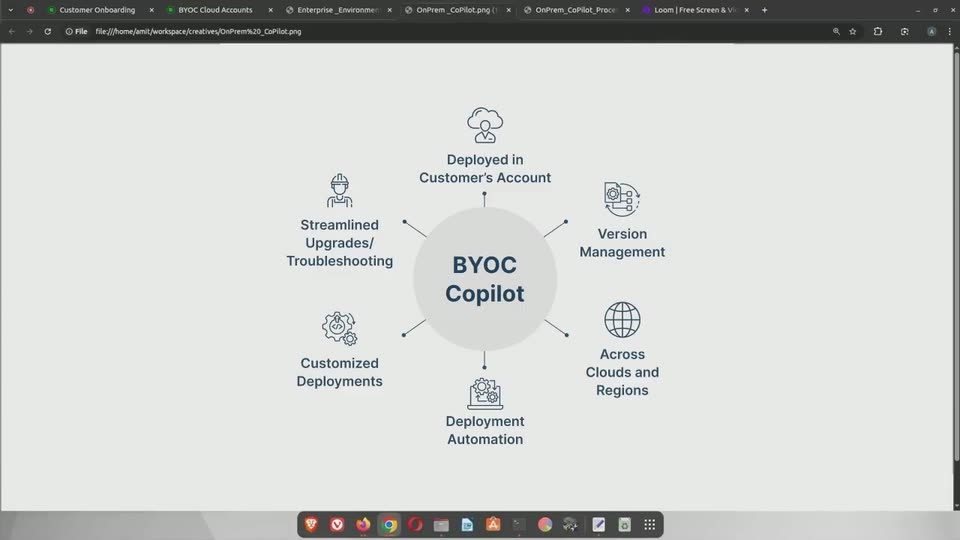
Omnistrate’s 3:37 clip runs 17 scenes, about 13 s each. The product shows up at 0:20 and 1 feature is revealed. The video pairs static hub-and-spoke explainer slides with a long, continuous screen-recorded walkthrough of the BYOC Copilot workflow, closing on a 3D logo reveal. Its signature moves are the radial icon diagrams, a persistent lower-third demo label, and a metallic logo morph lit by a sweeping spotlight.
No filming indicatedEstimated needs: 1 capture group — your screens or recordings · 1 official logo — reused across the film · 2 graphic passages — draw or supply
Is this your launch? to your site or press kit.
More like this

3:20


Replit ⠕ - AI builds web apps well. Mobile apps have been harder. Now, the i
Replit · Developer tools · Jan 2026
1:15

Karmen Demo
Karmen · Real Estate and Construction · Nov 2024
BYOC CoPilot demo (see the newer version), scene by scene
· 17 scenes as text
01 · Problem · 0:00–0:20
A static slide in a browser window: a bold navy headline above a central gray circle labeled Challenges, joined by thin lines to six line icons with labels arranged in a ring. The macOS dock sits at the bottom; nothing moves.
On-screen text: “Why do deployments get complicated in enterprise environments?”
Camera: Static
02 · Feature reveal · 0:20–1:00
A static hub-and-spoke diagram fills a browser window: a gray circle labeled BYOC Copilot at the center, six line icons with labels radiating outward. The frame is a screen capture showing tabs and a dock, with no motion.
Camera: Static
03 · Feature reveal · 1:00–1:24
A browser window shows the service-build form; the dark YAML editor scrolls down the config file, then the cursor clicks Create Service. A hosting modal opens, the cursor selects the OnPrem CoPilot model and an AWS account, and clicks Create Service. A static lower-third label sits bottom left.
On-screen text: “OnPrem CoPilot Demo”
Techniques: Cursor demo
Camera: Static
04 · Feature reveal · 1:24–1:26
A static screen recording of the Omnistrate BYOC Cloud Accounts page: a dark left sidebar, a search bar, and a table listing one Redis Server account. A purple 'OnPrem CoPilot Demo' pill label rests in the lower-left corner.
On-screen text: “OnPrem CoPilot Demo”
Camera: Static
05 · Feature reveal · 1:26–1:50
A browser window shows the Omnistrate dashboard with a 'Create Deployment Instance' form open on the right. A cursor works through the form, picking a version, provider and region, then typing an instance type and password before clicking the create button.
On-screen text: “OnPrem CoPilot Demo”
Techniques: Cursor demo
Camera: Static
06 · Feature reveal · 1:50–2:00
A full-screen dashboard shows a deployment instances table. The cursor moves down the left sidebar to BYOC Cloud Accounts and clicks it, replacing the table with an empty page.
On-screen text: “OnPrem CoPilot Demo”
Techniques: Cursor demo
Camera: Static
07 · Feature reveal · 2:00–2:03
Full-screen view of the Omistrate console on the Manage BYOC Cloud Accounts page, one account row visible. A cursor moves right and clicks the Disconnect button, the row flashes green. A pale lavender lower-third label sits bottom left.
On-screen text: “OnPrem CoPilot Demo”
Techniques: Cursor demo
Camera: Static
08 · Feature reveal · 2:03–2:09
A centered modal on a cloud-account table shifts from a disconnect confirmation to a Disconnecting step with a copyable shell command. A cursor hovers the copy icon and a Copied tooltip pops up. A purple OnPrem CoPilot Demo tag sits in the lower-left corner.
On-screen text: “OnPrem CoPilot Demo”
Techniques: Cursor demo
Camera: Static
09 · Feature reveal · 2:09–2:15
A dark browser window shows a centered terminal icon, then a Gemini Code Assist card fades in, then an authorization dialog appears over it. A cursor drifts and hovers the buttons. A purple OnPrem CoPilot Demo label sits in the bottom-left corner.
On-screen text: “OnPrem CoPilot Demo”
Techniques: Cursor demo
Camera: Static
10 · Feature reveal · 2:15–2:25
A dark terminal window in a browser shows a long command typed at the prompt, then a disconnection script prints a checklist and scrolls log lines. A lavender caption box reading OnPrem CoPilot Demo sits in the lower-left corner.
On-screen text: “OnPrem CoPilot Demo”
Camera: Static
11 · Feature reveal · 2:25–2:30
A dimmed admin console shows a centered modal with a green check and a two-step progress bar. The cursor drifts to the green Close button and clicks it, dismissing the dialog. A white caption pill sits in the lower left corner.
On-screen text: “OnPrem CoPilot Demo”
Techniques: Cursor demo
Camera: Static
12 · Feature reveal · 2:30–3:04
A browser window shows the Omnistrate dashboard. The cursor clicks the sidebar to switch between the Deployment Instances and BYOC Cloud Accounts tables, both listing one Disconnected row, then opens a Connect dialog and types connect into the field.
On-screen text: “OnPrem CoPilot Demo”
Techniques: Cursor demo
Camera: Static
13 · Feature reveal · 3:04–3:13
A browser window shows a dark Cloud Shell terminal where a setup script runs, log lines streaming in and scrolling upward. A rounded caption reading OnPrem CoPilot Demo sits in the lower-left corner, then jumps to the lower-right near the end.
On-screen text: “OnPrem CoPilot Demo”
Camera: Static
14 · Feature reveal · 3:13–3:16
A dimmed dashboard sits behind a centered modal that switches from a verification-in-progress view to a green check mark reading Verification complete. A cursor hovers over the Close button. A lavender caption box in the lower right reads OnPrem CoPilot Demo.
On-screen text: “OnPrem CoPilot Demo”
Techniques: Cursor demo
Camera: Static
15 · Feature reveal · 3:16–3:29
A full-screen deployment dashboard with a dark sidebar and an instance table. The page holds still as the cursor drifts and the Create button turns from gray to purple. A lavender box in the corner reads OnPrem CoPilot Demo.
On-screen text: “OnPrem CoPilot Demo”
Camera: Static
16 · Outro · 3:29–3:32
A thin white line drawing of a circular logo with a rounded square inside tilts in perspective, then morphs into a 3D metallic emblem as a spotlight beam sweeps across it from the right.
Techniques: Morph, Light sweep
Camera: Pull out
17 · Outro · 3:32–3:37
A green circular logo with a rounded square inside glows and flattens on a dark background. The white wordmark Omnistrate and a smaller tagline fade in beneath it, then hold static on a locked-off frame.
On-screen text: “Omnistrate”, “World's first control plane as a service”
Techniques: Morph
Camera: Static