1:08
Explore
Spline - Today, we're releasing Omma. Create 3D, Websites, and Apps with AI a
Omma · Mar 2026 · 0:36 · Full motion · AI-annotated
- Length
- 0:36
- Scenes
- 25 · 1.5 s avg
- Product on screen
- 0:03
- Features shown
- 1
- Voiceover
- No
- Views
- 1M on X
as of November 14, 2026
00:00:00 / 00:36:22
- Length
- 0:36
- Scenes
- 25 · 1.5 s avg
- Product on screen
- 0:03
- Features shown
- 1
- Voiceover
- No
- Views
- 1M on X
as of November 14, 2026
Omma’s 0:36 launch film runs 25 scenes, about 1.5 s each. The product shows up at 0:03 and 1 feature is revealed, with social proof. There is no explicit call to action. A black-canvas launch film built from typewriter text and 3D camera moves, alternating flat prompt pills, centered taglines and tilted product windows. Pacing sits near 127 BPM with about 21 cuts a minute, and the signature moves are letter-by-letter typing, depth-of-field blur on pill menus and slow 3D pushes through rendered pages.
No filming indicatedEstimated needs: 7 capture groups — your screens or recordings · 1 official logo — reused across the film · 1 graphic passage — draw or supply · 6 3D passages — build or supply
Is this your launch? to your site or press kit.
More like this
1:38

Harjot Gill - Your engineering team is about to snap. And your AI coding agent is m
CodeRabbit · Apr 2026
1:47

Perceptron ML (YC S26)
Perceptron ML · B2B
Spline - Today, we're releasing Omma. Create 3D, Websites, and Apps with AI a, scene by scene
· 25 scenes as text
01 · Hook · 0:00–0:03
A dark rounded input bar on black types out a prompt letter by letter. A white send button pops in at the right, the view zooms onto it, and a cursor arrow slides in to press it.
Techniques: Kinetic type, UI zoom, Cursor demo
Camera: Static
02 · Product intro · 0:03–0:05
A dark agent interface shows a centered prompt bubble reading “Make a 3D landing page with water interaction” above an Omma Agent card listing steps and a code block. The view reframes wider to reveal a top toolbar and a 2x2 grid of generation cards v1 to v4.
Techniques: UI zoom
Camera: Static
03 · Demo · 0:05–0:06
A dark code editor with a chat panel and four 'Generating' code tiles crossfades into a preview view showing two large 3D interior landing pages side by side, one pink with a 3D letter M, one teal with a lamp.
Techniques: Morph
Camera: Pull out
04 · Demo · 0:06–0:07
A dark chat panel and a grid of four colorful website mockups sit in 3D perspective on a black background. The camera pans right, the chat panel sliding off the left edge as the pink, teal, blue and white mockups rotate toward the viewer.
Techniques: 3D mockup
Camera: Pan
05 · Feature reveal · 0:07–0:10
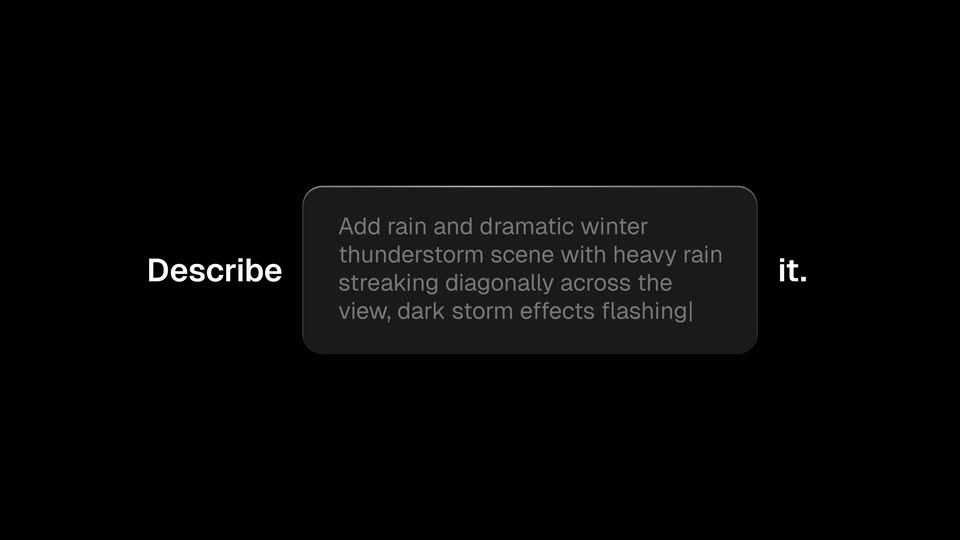
White text “Describe it.” sits centered on black, then the two words slide apart to reveal a flat prompt box holding typed gray text and a caret. The box clears and the words rejoin as “Describe it. Watch.”
On-screen text: “Describe it.”, “Describe it. Watch”
Techniques: Kinetic type
Camera: Static
06 · Feature reveal · 0:10–0:11
A white tagline assembles word by word at center on black, then the frame cuts to a dark rounded input bar with a plus icon and a blinking text caret.
On-screen text: “Describe it. Watch it build”
Techniques: Kinetic type, Cursor demo
Camera: Static
07 · Feature reveal · 0:11–0:12
Close-up of a dark rounded input field on a black background. A plus icon sits at the left as white text types out 'Add rain and thunderstorms' behind a blinking caret.
Techniques: Kinetic type
Camera: Static
08 · Feature reveal · 0:12–0:14
Split view of a design tool: a dark chat panel on the left where the prompt bubble reads add rain and thunderstorms, and a 3D website preview on the right. The pink arch scene crossfades into a cold blue stormy landscape with rain streaks while the serif title switches from Maison de l'Eau to a winter letter.
On-screen text: “Maison”, “de l'Eau”, “ALetter”, “to Winter”
Techniques: Split screen, Morph, Particles
Camera: Static
09 · Feature reveal · 0:14–0:14
A dark chat panel on the left lists code notes beside a 3D winter website preview on the right, where a serif title sits over a snowy arched courtyard. The preview zooms in as the title scales up and a small tagline fades in at the base.
Techniques: Split screen, 3D mockup, UI zoom
Camera: Push in
10 · Feature reveal · 0:14–0:15
A tilted 3D view of a webpage builder shows a dark chat panel on the left and a rendered page on the right, where white serif italic text reads A Letter to Winter over a snowy blue corridor. The camera zooms in on the page while the left panel blurs out of focus.
Techniques: 3D mockup, UI zoom
Camera: Push in
11 · Feature reveal · 0:15–0:16
A white rounded button with a globe icon and the word Publish sits centered on black. A white outline cursor arrow glides up from below and presses the button.
Techniques: Cursor demo
Camera: Static
12 · Feature reveal · 0:16–0:18
A 3D browser window on black pushes forward, revealing a peach arched corridor with a blue pool, two loungers and fluttering red leaves. The white italic serif headline and tagline scale up as the page scrolls down.
Techniques: 3D mockup, Particles
Camera: Pan
13 · Demo · 0:18–0:20
A vertical column of grey pill tags with line icons scrolls upward on black, a depth-of-field blur keeping only the center tag sharp. A red webpage in a browser frame sits at the bottom and scrolls out of view.
Techniques: Parallax, Kinetic type
Camera: Static
14 · Demo · 0:20–0:21
A floating app window shows a 3D block build rising on a blue baseplate as pieces snap into a red arch. On the left, category pills shift and the selected one brightens.
Techniques: 3D mockup
Camera: Static
15 · Demo · 0:21–0:22
A left column of category pills sharpens from a soft blur, with the 3D Websites pill sliding into a highlighted state. Beside it, a flat card shows the Arbor site: a 3D voxel tree with red leaves on a green grass island, the camera locked off.
On-screen text: “3D/2D Games”, “3D Websites”, “Apps & Tools”
Techniques: 3D mockup, Masking
Camera: Static
16 · Demo · 0:22–0:23
A flat panel on a brown gradient holds a rounded preview window where an orange car drives away across a 3D desert, leaving tire tracks. A left column of pill labels cycles, sliding and scaling between items like 3D Websites and Apps & Tools.
Camera: Static
17 · Demo · 0:23–0:23
A tilted 3D window shows a pie chart of phone market share with separated colored slices (green, pink, orange, purple, teal) rotating slowly in perspective. On the left, translucent feature pills slide in over a plain gray backdrop.
On-screen text: “3D Websites”, “Interactive”, “Real-time Data”, “3D/2D Games”
Techniques: 3D mockup, Kinetic type
Camera: Static
18 · Demo · 0:23–0:24
A low-poly 3D diorama of a toy train on tracks sits in a rounded window, a hand cursor with a blue ring hovers over a curved track piece. Three feature pills slide in on the left against a dark gray backdrop.
On-screen text: “WebGPU 3D”, “Interactive”, “Real-time Data”
Techniques: 3D mockup, Cursor demo
Camera: Static
19 · Demo · 0:24–0:26
A dark 3D viewer window fills the right side while a left menu of pill buttons scales into focus. The viewport cuts from a 2x2 grid of glass cubes to a 3D synth machine with glowing knobs and a spectrum bar.
Techniques: 3D mockup
Camera: Static
20 · Demo · 0:26–0:27
A dark interface shows a vertical list of category pills scrolling on the left while a rounded panel on the right renders a 3D shape of shimmering particles forming a tilted card.
Techniques: Particles, 3D mockup
Camera: Static
21 · Social proof · 0:27–0:28
Centered white text 'Create anything' fades out on a black background. A group of interface elements, including a Share button, a settings icon, and four image cards, fades in around the text.
On-screen text: “Create anything”, “Share”
Camera: Static
22 · Social proof · 0:28–0:30
A cluster of rounded 3D cards floats on a black field, each holding a render: a keyboard, a voxel model, a tree, a water splash, a torus, a DNA helix, a fiber swirl and a bubble cluster. White and blue pills labeled Publish, Share and Community, plus a gear icon, drift among the cards as the group slowly rotates and pulls back.
On-screen text: “Create anything”
Techniques: 3D mockup
Camera: Static
23 · Outro · 0:30–0:31
A dark rounded input bar sits on black with a plus icon at left. A white caret grows into a vertical bar, then the phrase types out letter by letter, reading From when, while the bar stays locked off.
On-screen text: “From when”, “Share”, “Publish”, “Community”
Techniques: Kinetic type
Camera: Static
24 · Outro · 0:31–0:33
A black screen holds a centered white tagline. A dark rounded input pill with a text caret briefly frames the first words, then the pill clears and the full line remains centered.
On-screen text: “From words to worlds.”
Camera: Static
25 · Outro · 0:33–0:36
On black, the Omma logo assembles in the center, a white petal mark and wordmark fading in, then the logo gives way to the URL omma.build typing out with a cursor, closing on the still tagline From words to worlds.
On-screen text: “Omma”, “omma.build”, “From words to worlds.”
Techniques: Kinetic type
Camera: Static