0:37
Microsoft AI - MAI‑Transcribe‑1 makes speech‑to‑text clearer, faster, and more relia
Microsoft AI · Apr 2026
Oguste · Oct 2026 · 0:52 · Full motion · AI-annotated
Oguste’s 0:52 launch film runs 14 scenes, about 3.8 s each. The product shows up at 0:04 and 5 features are revealed. There is no explicit call to action. The video is built as a chain of five feature beats, each opened by a centered serif caption that assembles letter by letter, then cut to a white UI card floating on a concrete backdrop. Pacing is slow and even at about 100 bpm, with signature moves: letter scramble and decode, counting numbers, and the card scaling in over the texture.
Is this your launch? to your site or press kit.
A centered two-line serif caption sits on a white field. The second line's number counts up from 2 to 432 and darkens from gray to black, while a fine line grid scales outward from the center behind the text.
On-screen text: “54 diagnostics,”, “432 cases à remplir.”
Techniques: Kinetic type
Camera: Static
On a plain white field, a single centered line of black serif type begins as a jumble of scrambled letters, then decodes left to right until it reads as a fixed sentence.
On-screen text: “Oguste remplit le tableau.”
Techniques: Kinetic type
Camera: Static
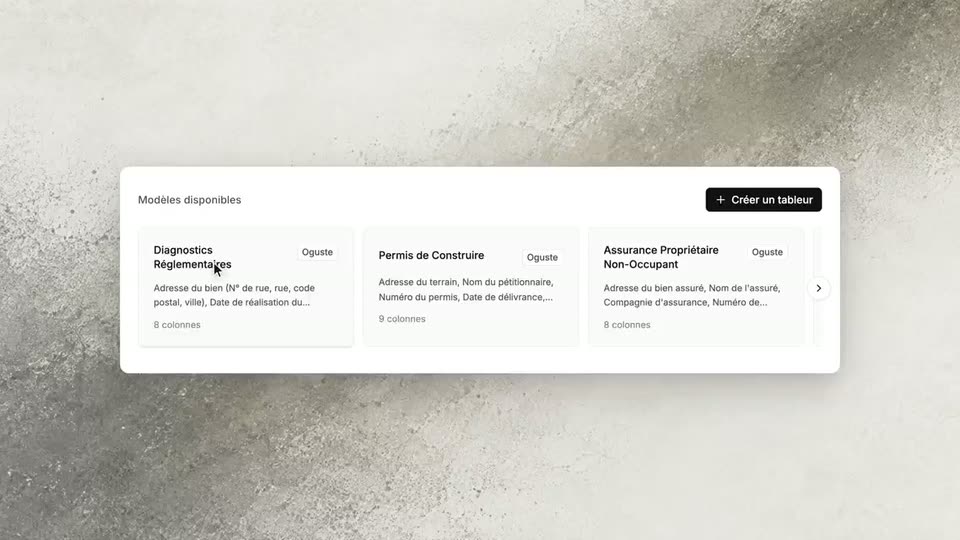
A white card on a concrete backdrop holds a serif caption that fades as the card reveals three template cards. A cursor clicks the first, and the card switches to a table of file rows the cursor scrolls down.
On-screen text: “Oguste remplit le tableau.”
Techniques: Cursor demo
Camera: Static
A flat spreadsheet UI sits on a textured concrete backdrop. The cursor clicks the dark Analyser button and the empty data columns fill row by row with surface areas, dates and letters. The card then pulls back and fades to white.
Techniques: Cursor demo
Camera: Push in
A centered French serif line on a white field sharpens into focus, holds steady, then blurs and fades to nothing.
On-screen text: “Ajoutez une colonne, en une phrase.”
Camera: Static
A white spreadsheet card fades in over a pale concrete backdrop. A cursor clicks the add-column button, a small form popover opens, then the cursor confirms and a new column of energy values fills in on the right.
Techniques: Cursor demo
Camera: Pull out
A white card sits on a gray concrete texture. Small black serif letters drift in scattered across it, then slide together and settle into the centered sentence. The card then blurs and fades out.
On-screen text: “Puis interrogez votre tableau.”
Techniques: Kinetic type
Camera: Pull out
A white app card on a concrete background: a data table switches to a chat panel, a cursor types a question, an answer with citations appears, then clicking a citation opens a DPE certificate PDF over the table, highlighting the 272 kWh/m² row.
Techniques: Cursor demo
Camera: Static
A white interface card floats on a grey concrete backdrop. The left panel shows a French energy-report answer and the right a data table with one row highlighted yellow; a cursor rests at the right edge. The whole UI then fades to a blank white card.
Camera: Static
A dark serif sentence builds word by word at the center of a plain off-white frame, then holds still on a locked-off shot.
On-screen text: “Signalez ce qui compte.”
Techniques: Kinetic type
Camera: Static
A white card sits on a gray concrete backdrop. The tagline fades in at center, then the card populates with a document analysis view: a French summary on the left and a data table on the right, one row highlighted yellow.
On-screen text: “Signalez ce qui compte.”
Camera: Pull out
A white two-panel interface card rests on a concrete background. A cursor clicks the filter button, opens a dropdown and selects Critique, so the table shrinks to one yellow row, then the card wipes to white.
Techniques: Cursor demo
Camera: Static
Centered text and a small green Excel logo sit on a plain white background. A white rounded card scales in behind the elements, revealing a textured light gray backdrop.
On-screen text: “Et exportez vers Excel.”
Camera: Static
On a textured off-white backdrop, a white app icon with a ring in the center dissolves into two overlapping circles, which merge into the letter O of the Oguste wordmark as the remaining letters fade in one by one.
On-screen text: “Et exportez vers Excel.”, “Oguste”
Techniques: Morph, Kinetic type
Camera: Static