0:48


OpenAI - Now in beta: Businesses in ChatGPT. Claim your business, manage your
OpenAI · AI · Nov 2026
Microsoft AI · Apr 2026 · 0:37 · AI-annotated
Microsoft AI’s 0:37 launch film runs 13 scenes, about 2.9 s each. The product shows up at 0:02 and 2 features are revealed. The call to action lands at 0:29 (79% in), over a voiceover. Built as centered type cards on cream that scale in and out to announce the model, then a single player and transcript demo types the story word by word, with two feature cards for 25 languages and use cases before a tagline and logo. Signature moves are the scaling headline reveals, the word-by-word typing that bolds the tricky word and flips allowed to aloud, and the Microsoft to MAI wordmark morph on flat brown.
Is this your launch? to your site or press kit.
OpenAI · AI · Nov 2026
HeroUI · Oct 2026
OpenAI · AI · Sep 2026
On a plain cream background, the word “Introducing” sits centered, then the line grows and a second line fills in to form the headline “Introducing our state-of-the-art transcription model”. The frame stays locked off.
On-screen text: “Introducing”, “Introducing our state-of-the-art transcription model”
Techniques: Kinetic type
Camera: Static
On a cream background, the label MAI-Transcribe-1 scales up from the center until it exits the frame, then a dark play triangle pops in at the center with a white cursor arrow at the lower left.
On-screen text: “MAI-Transcribe-1”
Techniques: Kinetic type
Camera: Static
A dark play triangle and two outlined mouse cursors on a cream field expand into a player bar with a waveform, playhead and timecodes; the cursors drift right and grow larger.
Techniques: Morph
Camera: Static
A black audio waveform on a cream field shifts its peaks above a beige player bar with a pause icon, a counting timecode, a scrubber line and a total time. A white cursor arrow rests on the scrubber, then vanishes. A “Show transcript” label sits fixed beneath.
Techniques: Cursor demo
Camera: Static
The centered phrase “Some words” in gray sans scales up on a plain cream background, growing from a small line to a larger one over the short clip.
On-screen text: “Some words”
Techniques: Kinetic type
Camera: Static
A plain cream card shows centered dark gray sans-serif text, “Some words,” scaling in place. It is followed by a small centered monospaced timestamp, “00:00:00.”
On-screen text: “Some words”, “00:00:00”
Techniques: Kinetic type
Camera: Static
On cream, a thin audio waveform pulses above a monospace timestamp. The sentence types in word by word, 'allowed' bold, then the word scales up. Next, 'are hard to get right' scales in, and a new timestamp appears above 'When I play the audio allowed'.
On-screen text: “00:00:20 - SPEAKER_01”, “When I play the audio allowed, the noise is so bad...”, “are hard to get right”, “00:14:06 - SPEAKER_01”, “When I play the audio allowed”
Techniques: Kinetic type
Camera: Static
In a static frame on a cream background, a thin audio waveform pulses above a running timestamp and the label SPEAKER_01. Below, a transcription types out word by word in dark sans, the word aloud set in bold.
Techniques: Kinetic type
Camera: Static
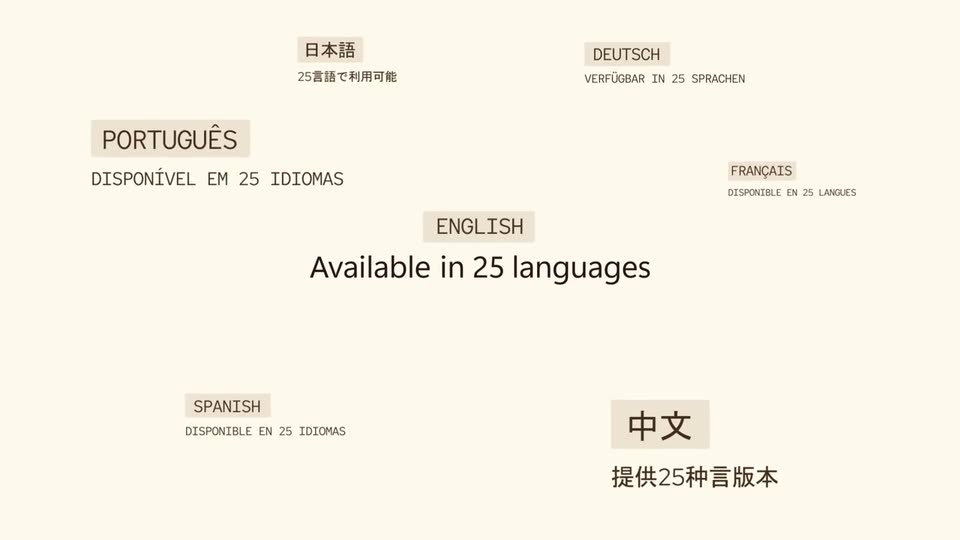
On a cream background, the line “Available in 25 languages” types in at center, then small translated versions of the same sentence fade in around it, each with a language label, and the ENGLISH label is highlighted with a beige box.
On-screen text: “Available in 25 languages”, “日本語”, “25言語で利用可能”, “DEUTSCH”, “VERFÜGBAR IN 25 SPRACHEN”, “DISPONÍVEL EM 25 IDIOMAS”, “DISPONIBLE EN 25 IDIOMAS”, “DISPONIBLE EN 25 LANGUES”, “提供25种言版本”, “PORTUGUÊS”
Techniques: Kinetic type
Camera: Push in
On a cream field, the dark headline For all kinds of words holds center while six small monospace labels (Podcast Narration, Education, Customer Service, Captions & Subtitles, Audiobooks, Legal & Compliance) drift slowly around it. The headline carries a soft motion blur as the layout gently expands.
On-screen text: “For all kinds of words”, “Podcast Narration”, “Education”, “Customer Service”, “Captions & Subtitles”, “Legal & Compliance”, “Audiobooks”
Camera: Pull out
Black text on a cream field. “This time” holds center, then “Get it write” fades in beneath a thin line, and the word “write” reshapes into “right” as the letters slide and overlap.
On-screen text: “This time”, “Get it write”, “Get it right”
Techniques: Kinetic type, Morph
Camera: Static
On a flat dark brown background, the cream wordmark Microsoft AI sits centered. The letters of Microsoft fade out while the M and AI drift together, resolving into the centered wordmark MAI, which holds.
On-screen text: “Microsoft AI”, “MAI”
Techniques: Kinetic type, Morph
Camera: Static
A small white logo of four squares in a two-by-two grid sits centered on a flat brown background. It holds still with no motion or reveal throughout the short clip.
Camera: Static