1:16

Anvil (YC X25) - Launch Video
Acolite · Fintech · May 2025
Numeral · Oct 2026 · 0:30 · Clip · AI-annotated
Numeral’s 0:30 clip runs 16 scenes, about 1.9 s each. The product shows up at 0:07 and 1 feature is revealed. A pale data-viz hook opens, then a run of feature vignettes each pairs an animated white UI card with desaturated archival footage in a rounded frame, closing on a chat concierge. Signature moves are 3D pull-backs, blur focus shifts, count-up monospace figures and soft curved-band backgrounds on a split card-plus-footage layout.
Is this your launch? to your site or press kit.
Acolite · Fintech · May 2025
Anthropic · AI · Apr 2026
Reason Machines · B2B · Nov 2026
A close-up of a US map with halftone-shaded California and a data pill pulls back to reveal the whole country. 3D cube nodes pop in across states, joined by curved arcs, each carrying a white pill with a city name and a percentage that counts up.
Camera: Pull out
A pale wireframe globe spins and slides left off frame, carrying small white and green currency tags for UK, Switzerland, Finland, Kenya, Vietnam and Japan across its surface. A white two-by-two grid square appears in the center as the globe exits.
On-screen text: “£ UK 20%”, “CHF Switzerland 8.1%”, “KSh Kenya 16%”, “€ Finland 25.5%”, “d Vietnam 10%”, “¥ Japan 10%”
Camera: Pull out
A white order receipt card slides in from the right on the left half, its values settling from $815 to $1,280, while a rounded video panel fades in on the right showing a person in a red shirt working at a desk. The two panels sit side by side over a pale gray background with soft curved bands.
Techniques: Split screen
Camera: Pull out
Split layout on a pale wavy background: a white receipt card on the left updates its tax line and total, while a rounded frame on the right loops vintage footage of a woman in red operating a control panel.
Techniques: Split screen
Camera: Static
Split screen: a white receipt card on a pale blue striped background lists a teak desk order with tax lines, while the right panel plays archival footage of a dot-matrix printer feeding a form. The Grand Junction tax line jumps from $0.00 to $42.58, a delivery fee appears, and the total updates to $1,365.03.
Techniques: Split screen
Camera: Static
A white receipt card listing an order, taxes and total sits on the left over pale blue waves, while a sepia-toned clip of a hand operating a vintage cash register plays on the right.
Techniques: Split screen
Camera: Pull out
A white order receipt card and a rounded clip of a hand on a vintage cash register sit side by side, then slide off screen left and right. A new rounded clip of a woman typing on a laptop on a red couch slides in from the right over a pale blue background.
Techniques: Split screen
Camera: Pan
A rounded video panel on the left plays a woman on a couch, then cuts to a close-up of hands typing on a laptop. On the right, a white card slides in from the edge, its sales bar filling and the dollar figure counting up.
Techniques: Split screen
Camera: Pan
A split layout pairs filmed hands typing on a laptop with a white alert card on the right. The card shows South Dakota with a red Threshold exceeded badge; its red progress bar fills from 92% to 100% as the value counts up to US$100,000, and the card nudges upward.
Techniques: Split screen
Camera: Static
A white rounded card on a pale blue background resolves from blur, showing a South Dakota tax summary with a Processing badge. The dollar figures for taxable sales, non-taxable sales and tax due roll upward to new values.
Camera: Static
A close-up of a South Dakota tax card with a green Filed badge pulls back to reveal five state cards, Pennsylvania to South Dakota, stacked in 3D perspective on a pale blue background, then the row blurs out of focus.
Techniques: UI zoom, 3D mockup, Parallax
Camera: Pull out
Split screen on a pale grid backdrop: left, a flat line-art demand notice letter rises from an envelope as three red pill labels pop in; right, a rounded video window cuts from hands sorting mail to two men filing at shelves.
On-screen text: “Demand notice”, “Underpayment”, “Action needed”
Techniques: Split screen
Camera: Pull out
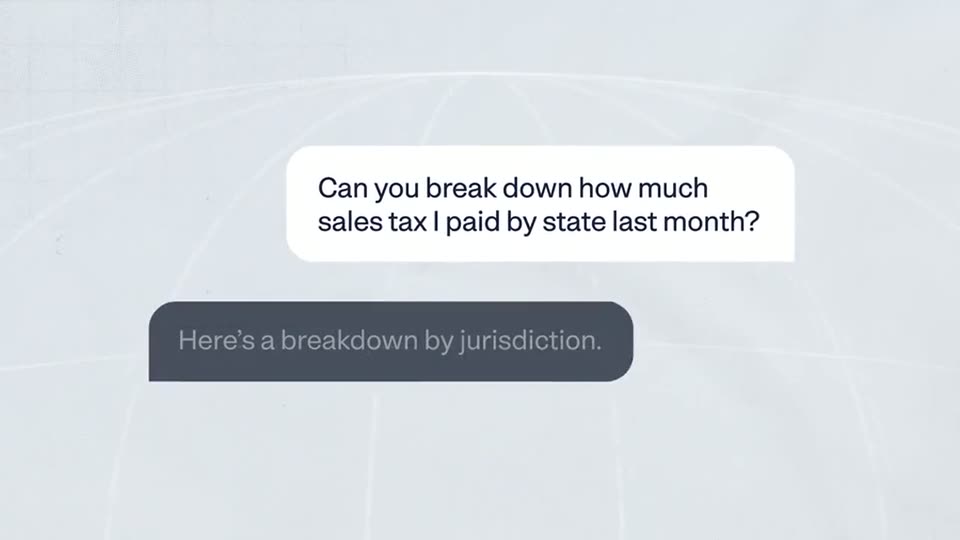
A light gray chat view with faint curved lines. A white question bubble sharpens from a soft blur into focus, then a dark gray reply bubble fades in beneath it.
Camera: Pull out
Two chat bubbles, a white question and a dark reply, sit over a pale gray field with faint arcs. A white card labeled Jurisdictions, Feb 2026 slides up from the bottom edge, overlapping the dark bubble.
Camera: Pull out
A chat exchange and a Jurisdictions data card sit on the left, the California and Total figures counting up, while a rounded video panel on the right shows a hand with a gold ring typing on a keyboard.
Techniques: Split screen
Camera: Pull out
Left: a chat bubble asks for a sales tax breakdown; a dark reply bubble sits above a jurisdictions card as a New York row appears and the total updates. Right: a man in earbuds at a laptop, a green tint lifting off the video, then a white fade.
Techniques: Split screen
Camera: Pan