
0:59
Explore
What is Notion Projects?
Notion · May 2023 · 1:06 · Full motion · AI-annotated
- Length
- 1:06
- Scenes
- 23 · 2.9 s avg
- Product on screen
- 0:13
- Features shown
- 6
- Call to action
- 1:02 · 95%
- Voiceover
- Yes
- Views
- 73K on YouTube
as of November 28, 2026
00:00:00 / 01:06:03
- Length
- 1:06
- Scenes
- 23 · 2.9 s avg
- Product on screen
- 0:13
- Features shown
- 6
- Call to action
- 1:02 · 95%
- Voiceover
- Yes
- Views
- 73K on YouTube
as of November 28, 2026
Notion’s 1:06 launch film runs 23 scenes, about 2.9 s each. The product shows up at 0:13 and 6 features are revealed. The call to action lands at 1:02 (95% in), over a voiceover. The video opens with a line-art character overwhelmed by sketch tool windows, then settles into a steady cadence of clean UI panels that slide and zoom to demo one feature per beat, and closes on a tagline and a static CTA card. Its look is flat off-white staging with high-contrast black line drawing, soft rounded UI cards, and small accent colors (blue, purple, orange) reserved for AI and status marks.
No filming indicatedEstimated needs: 8 capture groups — your screens or recordings · 1 official logo — reused across the film · 5 graphic passages — draw or supply · 1 3D passage — build or supply
Is this your launch? to your site or press kit.
More like this

Similar soundtrack
Films whose music sounds like this one, voice left out
1:34
0:43

Meet your Frangel — Switch fast. Ship faster.
Framer · Corporate Tech Advertisement
0:53

Proximitty (YC W26) - Launch Video
Proximitty · Electronic / Jazz Fusion
What is Notion Projects?, scene by scene
· 23 scenes as text
01 · Hook · 0:00–0:01
A hand-drawn figure with a black bob and striped top stands at a tall stand holding a laptop, then leans forward to work on it. A browser-style checklist with one ticked box slides in from the right edge on a plain off-white background.
Camera: Static
02 · Problem · 0:01–0:09
A hand-drawn character with a black bob stands calmly beside a small laptop as sketch-style browser windows with checklists and text lines slide in from both sides, crowding the character, who ends up pressing both hands against them with a distressed face.
Camera: Static
03 · Problem · 0:09–0:13
Two tilted hand-drawn browser windows slide together over a cream background, squeezing a bob-haired stick-figure woman in the gap until she flattens into a dazed, stretched shape with a spinning star overhead.
Techniques: Morph
Camera: Static
04 · Product intro · 0:13–0:14
A sketch-style figure with a black bob and striped shirt stands next to a line-drawn laptop on a stand. The character's arms ease from a spread pose to the sides, while a small floating box sketch hovers near the top right, all on a plain off-white background.
Camera: Static
05 · Product intro · 0:14–0:20
A line-drawn figure at a desk with a laptop sits left of a white browser window. Inside, a 3D N cube morphs into a red tools icon, the title becomes Engineering home, and Docs and Meeting notes lists fill in as sparkles pop by the laptop.
Techniques: Morph, Kinetic type
Camera: Static
06 · Product intro · 0:20–0:25
A line-drawn figure stands beside a laptop as a flat project board fades in on the right. The “Engineering home” headline crossfades out, a dollar speech bubble pops out of the laptop, and the figure reacts with open mouth and spread arms.
On-screen text: “Engineering home”
Camera: Pan
07 · Feature reveal · 0:25–0:26
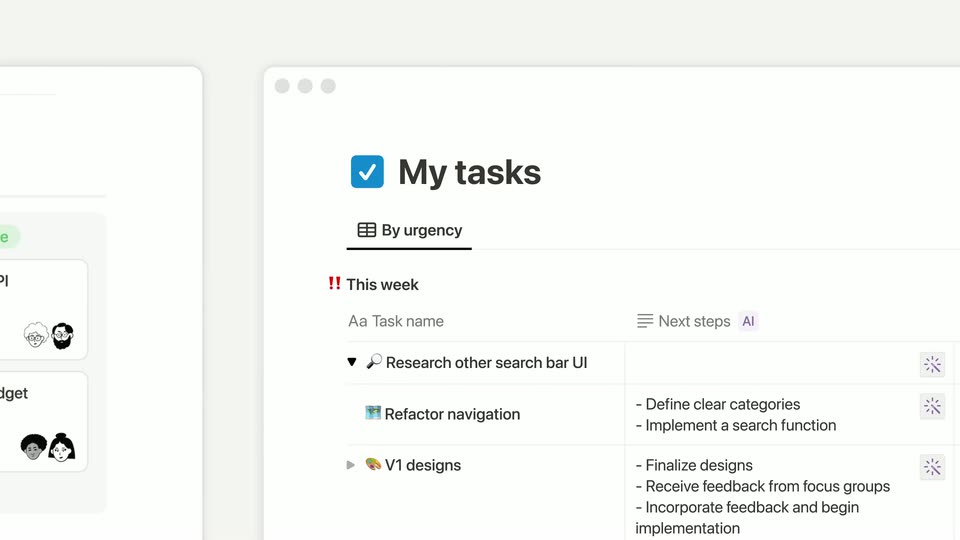
A flat project board with task cards and avatar rows sits beside a line-drawn figure, then the frame pans right to center a My tasks list with a Next steps AI column.
Camera: Pan
08 · Feature reveal · 0:26–0:30
A tilted 3D task-list window rotates to face the camera. A cursor moves to the AI sparkle icon on the first row and clicks it, and the Next steps cell fills with three bullet points. The window settles flat.
Techniques: 3D mockup, Cursor demo
Camera: Static
09 · Feature reveal · 0:30–0:30
A row of flat white interface cards on a light gray background pans left, sliding from a My tasks list view to a Q3 Projects kanban board with Planning, Building and Shipped columns.
Camera: Pan
10 · Feature reveal · 0:30–0:32
A light project-management window titled Q3 Projects with three kanban columns; a black cursor glides in from the left and turns into a grab hand over the Mobile app launch card as the frame eases out.
Techniques: UI zoom, Cursor demo
Camera: Static
11 · Feature reveal · 0:32–0:34
A flat browser window of a project app opens on a kanban board with Planning, Building and Shipped columns, then zooms out to reveal a Product strategy document above it. A cursor moves in and hovers over the Mobile app launch card.
Techniques: UI zoom, Cursor demo
Camera: Static
12 · Feature reveal · 0:34–0:35
A white product window shows a kanban board titled Product strategy, with a hand cursor resting on the first card. The view crossfades into a task list titled Product launch.
Techniques: Cursor demo
Camera: Static
13 · Feature reveal · 0:35–0:37
A white project-management window titled “Mobile app launch” shows a roadmap timeline with task cards and red and yellow connector arrows. The view starts zoomed in and pulls back to reveal the full window while avatar icons on the cards update.
Techniques: UI zoom
Camera: Static
14 · Feature reveal · 0:37–0:39
A cursor moves across a project board and clicks the Product tab. The timeline view blurs and switches to a kanban board, where a task card lifts forward to open its detail panel showing status and a comment.
Techniques: Cursor demo
Camera: Static
15 · Feature reveal · 0:39–0:41
A white document card is centered over a dimmed browser window showing a red logo and task list. The card scrolls up, revealing a Problem paragraph and a Userflow diagram of connected boxes.
Camera: Pan
16 · Feature reveal · 0:41–0:45
A flowchart modal fades out over a kanban board, then a hand cursor drags a task card into the next sprint column. The screen transitions to a standup meeting notes view with an agenda list.
Techniques: Cursor demo
Camera: Pan
17 · Feature reveal · 0:45–0:48
A note page titled “Standup @Today” fills a browser window. The AI prompt finishes typing in the input field, the cursor clicks Generate, and the field expands into a Summary card as a numbered list of takeaways fades in line by line.
Techniques: Cursor demo, Morph
Camera: Static
18 · Feature reveal · 0:48–0:49
A white document card with a sun icon, the title Standup @Today, attendee avatars and a numbered summary list fills the frame on a light gray background. The view zooms out and shifts left, revealing a second card at the right edge and a cursor.
Techniques: UI zoom
Camera: Pan
19 · Feature reveal · 0:49–0:53
A cream backdrop holds a setup form on the left and a workspace sidebar on the right. A cursor picks Manager and Engineering from two dropdowns, and the sidebar list fills in with Projects, Tasks, Sprints and Meeting notes as the selections land.
Techniques: Cursor demo, Split screen
Camera: Static
20 · Demo · 0:53–0:54
A light onboarding form with role and team fields slides out left while the Notion workspace window scales up and centers, exposing the Acme Inc. sidebar and an Engineering home board with stacked task cards.
Techniques: UI zoom
Camera: Pull out
21 · Demo · 0:54–0:57
A flat front view of a project management interface: a left sidebar lists teamspaces, and the main panel shows an Engineering home page with doc links, meeting notes and a three-column task board. The shot holds still, then eases into a slow zoom on the board.
Techniques: UI zoom
Camera: Static
22 · Other · 0:57–1:02
A white app panel with notes and task cards slides off left, leaving a hand-drawn figure at a tall pedestal with a small screen. The figure shifts poses and waves as “Projects. Docs. Wiki.” pops in word by word, then “Powered by AI” appears in purple.
On-screen text: “Projects. Docs. Wiki.”, “Powered by AI”
Techniques: Kinetic type
Camera: Static
23 · CTA · 1:02–1:06
A plain off-white end card holds centered bold text reading Get Notion free, the word free in blue with a gray underline, above the Notion logo. The headline then cuts to the URL notion.com/projects, with projects in blue. The frame stays locked and static throughout.
On-screen text: “Get Notion free”, “notion.com/projects”
Camera: Static