1:03

Boom Video
Boom AI · B2B · Oct 2025
Notion’s 2:56 launch film runs 50 scenes, about 3.5 s each. The product is on screen from the first frame and 5 features are revealed. The call to action lands at 2:41 (91% in), over a voiceover. The video is built as a talking-head course intro that cuts between a presenter in a bright loft office and flat Notion screens on a light gray ground, moving from welcome, to course overview, to a problem statement with a customer quote, then a rapid feature montage before a URL card and logo. Pacing is brisk at roughly 16 cuts per minute with 117 BPM energy, and its signature moves are the motion-blur resolves into sharp interface views, the tilted 3D mockup transitions, and the translucent UI
Is this your launch? to your site or press kit.
Boom AI · B2B · Oct 2025
Perplexity · AI · Apr 2026
Films whose music sounds like this one, voice left out
Runway · Comedy sketch and rock
Axelrod · Jazz-fusion and modern electronic
Conversion · Upbeat electronic and jazz
A woman in a brown sweater sits at a light wooden desk with a laptop and mug, speaking to the camera. Behind her a white sofa, chairs and large windows sit out of focus. She gestures with both hands, then rests them on the desk.
Camera: Static
A plain light gray frame holds the Notion cube mark, which darkens from a thin gray outline to solid black and slides left. A small line sparkle pops in on the right, then the wordmark Notion Academy appears beside the cube, locking the sign-off.
On-screen text: “Notion Academy”
Camera: Static
The Notion Academy logo on a pale background cross-fades into a medium shot of a woman at a desk, who begins speaking and gestures with one hand. A laptop and a white mug sit on the desk in a bright office.
On-screen text: “Notion Academy”
Camera: Static
A woman in a brown sweater sits at a wooden desk in a bright office, speaking to camera and gesturing with her hands. A laptop and mug rest on the desk, and a white lower-third nameplate appears at bottom left.
On-screen text: “Notion Academy”, “Andrea Lim”, “Brand Campaigns”
Camera: Static
A Notion window on a light gray background. A cursor types a task name into a selected row, opens an emoji picker, and picks a red apple icon. The view then zooms in on the updated row and pulls back to a board view.
Techniques: Cursor demo, UI zoom
Camera: Push in
A Notion board interface resolves from horizontal motion blur into a sharp view. The camera eases in on the Project tasks board, showing three columns with task cards and assignee names.
Techniques: Speed ramp, UI zoom
Camera: Pan
A woman in a brown sweater sits at a light wooden desk with a beige mug and a closed laptop, speaking to camera. Behind her, a bright loft office with white sofas and tall windows stays softly out of focus. The shot holds steady.
Camera: Static
A flat Notion interface fills the frame as a cursor clicks the Status field and a dropdown of colored status chips opens. The view zooms into the right panel while the cursor selects Approved, swapping the orange chip for a green one.
Techniques: Cursor demo, UI zoom
Camera: Push in
A faded close-up of a task detail panel zooms out to reveal the full application window, showing a left sidebar, a Projects template grid in the center and a Tasks panel on the right.
Techniques: UI zoom
Camera: Static
A flat app interface shows a template picker: three cards fan out from a stacked overlap into a neat column while a Tasks preview panel slides in on the right. A cursor then glides down to the blue Get started button.
Techniques: Cursor demo
Camera: Static
A woman with dark hair and a brown sweater speaks, looking slightly off-camera. She is framed in a medium shot against a blurred background featuring white lamps and framed abstract art.
Camera: Static
A woman in a brown sweater sits at a light wooden table, hands clasped, speaking to camera and gesturing. A beige mug and an open laptop sit in front of her. The office lounge with white sofas and large windows stays softly out of focus behind her.
Camera: Static
A flat browser window shows a two-panel project dashboard. On the right, a cursor moves to the Docs field and clicks it, opening a dropdown titled Link or create a page with a list of page options that slide into place.
Techniques: Cursor demo
Camera: Static
A tilted 3D mockup of a Notion-style project page with a linked-pages dropdown dissolves into a second 3D mockup of a sprint board with a left sidebar. Both float on a plain light background with a soft drop shadow.
Techniques: 3D mockup
Camera: Static
A flat Notion sprint board page fills the frame inside a macOS browser window. A mouse cursor glides over the Sprint 1 tab while the task table and left sidebar remain still.
Techniques: Cursor demo
Camera: Static
A Notion-style task board fades in, a cursor hovers over the GitHub Pull Requests row in the right-hand property panel, and a centered card displays a linked pull request with a note about automated status updates.
Techniques: Cursor demo
Camera: Static
A woman in a brown sweater sits at a light wooden table in a bright loft office, a dark laptop and a beige mug in front of her. She faces the camera and gestures with both hands as she speaks, the white sofa and large windows blurred behind her.
Camera: Static
A woman in a brown knit sweater talks to an off-camera interviewer in a medium close-up, her head turned slightly left. The blurred background holds a window, two white oval lamps, and a framed geometric print. She makes a small hand gesture at the end.
Camera: Static
A man with black-rimmed glasses and a dark jacket sits in a softly lit room, speaking with a blurred office background behind him. A white lower-third label at the lower left names him and his title. The camera holds a locked-off medium close-up.
On-screen text: “Tyler Calder”, “Chief Marketing Officer, PartnerStack”
Camera: Static
A man with glasses in a blue blazer speaks and gestures in a brick-walled office, a blurred coworker at a desk behind him. The shot is locked-off inside a white rounded frame.
On-screen text: “Tyler Calder”, “Chief Marketing Officer, PartnerStack”
Camera: Static
A woman in a brown sweater sits at a wooden table, speaking to camera with hands clasped. A dark laptop and a beige mug sit in the foreground; a bright loft office with a white sofa blurs behind her. The frame stays locked off.
Camera: Static
A flat sprint board fills the frame. A cursor grabs the Design CMS hierarchy card in the Not Started column and drags it right into the In Progress column, where it snaps into place. The column counts update and the list reflows as the card moves.
Techniques: Cursor demo
Camera: Static
A woman in a brown sweater sits at a desk facing the camera, hands clasped, with an open laptop and mug in front of her, a blurred lounge behind. At the end, a translucent icon toolbar and a dock with Gmail and Slack fade in.
Camera: Static
A translucent browser window fades to opaque over a blurred woman, then the view pans right across the top bar, sliding past the traffic lights and sidebar toggle to reveal a row of app tabs for Gmail, Slack, Meet, Dropbox, Zoom and GitHub.
Camera: Pan
A close-up of a light toolbar pans right, sliding truncated tab labels and icon buttons across the frame while a blurred live-action office scene shows through the top bar.
Techniques: UI zoom
Camera: Pan
A semi-transparent app interface with share, plus and copy icons and a project list fades out over a woman seated at a wooden desk. She faces the camera in a bright office lounge, gesturing with both hands as she speaks, a laptop and mug on the desk.
Camera: Static
A woman with dark hair in a brown sweater speaks to an off-camera interviewer in a softly lit room, gesturing with her hands. The background stays out of focus, showing lamps and a framed print. The camera holds a steady medium close-up.
Camera: Static
A two-pane project tool shows a task list on the left and a detail panel on the right. A cursor moves down a dropdown of linked pages, each row revealing a plus button on hover, then the dropdown closes and the pages appear inline in the Docs field.
Techniques: Cursor demo
Camera: Static
A woman in a brown sweater talks to camera at a wooden table with a laptop, gesturing with her hands in a bright loft. The shot cuts to a Notion project list where a cursor hovers over a status label.
Techniques: Cursor demo
Camera: Static
A flat browser-window mockup of a Notion Marketing Projects page sits on a light gray background, a cursor hovering over an In Progress status pill. The scene then cuts to a woman in a brown sweater who gestures both thumbs toward herself while speaking.
Camera: Static
A woman in a brown sweater sits in a blurred office, talking and gesturing with her hands. White lamps and a framed black-and-white print sit behind her.
Camera: Static
A woman in a brown sweater sits at a light wooden table in a bright loft office, speaking to the camera with a laptop and mug in front of her. The clip ends with a cut to a Notion tasks screen showing a selected course row and its detail panel.
Camera: Static
A flat task-management screen shows a project task list on the left and a detail panel on the right. A cursor moves down the detail rows, highlighting the assignee, status and due date fields in turn.
Techniques: Cursor demo
Camera: Static
A project app window shows a Marketing Projects table with an Edit property panel open, searching Rollup. The panel closes, revealing the full table with a Rollup column listing linked meetings. It cuts to a woman in a brown sweater speaking in a blurred interview setting.
Techniques: Cursor demo
Camera: Static
A woman with dark shoulder-length hair in a brown knit sweater sits in a medium close-up, speaking toward an off-camera interviewer. The office background stays softly blurred, with two white floor lamps and a framed print. She shifts her gaze and head slightly as she talks.
Camera: Static
A woman in a brown sweater sits at a wooden desk with a laptop and mug, facing the camera in a bright open office with a white sofa and tall windows behind her. She speaks and lifts one hand to gesture near the end, while the locked-off frame stays still.
Camera: Static
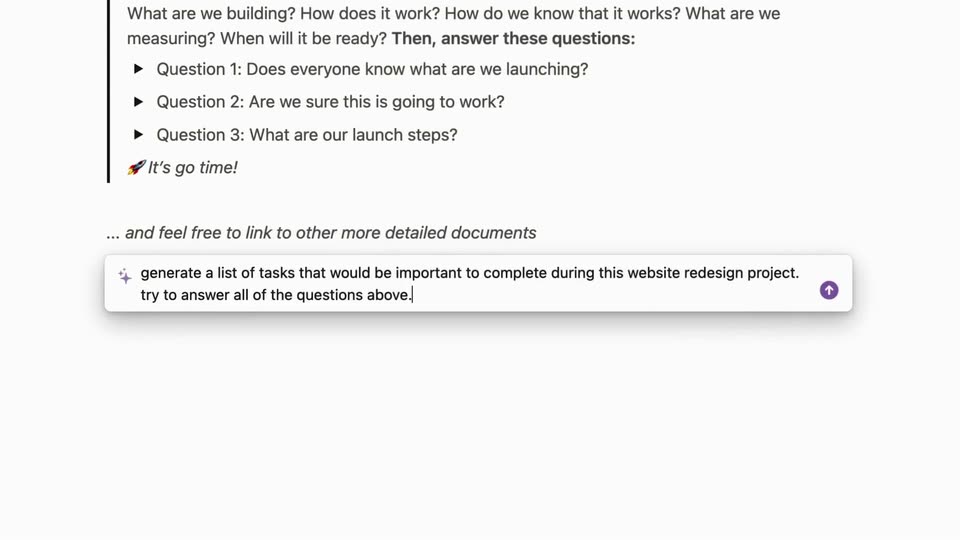
A Notion document window is shown, then the view zooms into the AI prompt field. A task-generation request is typed into the box, and the page populates with a generated checklist of launch tasks grouped by category.
Techniques: UI zoom
Camera: Push in
A flat project-tracker window appears on a plain background, then the table pans right while a caret types a new row, 'Project: website redesign', and a checkbox ticks on.
Camera: Static
A flat project-management window sits on a light background. A cell in the Project name column is edited as the text Website redesign is typed, then a cursor hovers over the new row and an OPEN tooltip appears.
Techniques: Cursor demo
Camera: Static
A tilted 3D mockup of a project management interface floats on a light gradient background. The left pane lists projects grouped by status; the right pane shows the Website redesign detail with property rows. A text caret blinks at the end of the title.
Techniques: 3D mockup
Camera: Static
A light two-pane project view shows a Marketing Projects list beside the Website redesign details, then the layout switches to a full-width Tasks table grouped by project while the cursor hovers the Board tab.
Techniques: Cursor demo
Camera: Static
A task management window opens on a kanban board. A cursor clicks the view tabs, switching to a flat task table, then to a Mine view grouped by priority, rows shifting into place.
Techniques: Cursor demo
Camera: Static
A light product window shows a task list grouped into High and Medium rows, a cursor resting on the Mine tab, then cuts to a sprint board with three columns and an expanded left sidebar.
Camera: Static
A Notion sprint board fills the frame inside a browser window. A task card labeled Write design document is dragged from the In Progress column into the Needs review column, where it lands beneath Conduct research interviews. A cursor hovers over the moved card.
Techniques: Cursor demo
Camera: Static
A flat browser window shows a sprint board interface, then the view slides horizontally left to reveal an engineering tasks table. The two screens of the same project tool pan past each other in a quick horizontal transition.
Camera: Static
A flat Notion task board titled Engineering Tasks fills the frame. A cursor clicks the add-property button, a right-side panel slides in listing suggested properties, the cursor selects GitHub Pull Requests, and a new column with an open PR card appears in the table.
Techniques: Cursor demo
Camera: Static
A Notion database titled Engineering Tasks fills the frame. A task table with due dates and priority labels sits on the left, while an open Edit property panel on the right shows a GitHub pull request link and status fields.
Camera: Static
A woman in a brown sweater sits at a wooden desk with a laptop and mug, talking to camera in a bright open office with white sofas and large windows; she gestures then clasps her hands, and the scene ends on a black card with a URL.
On-screen text: “Learn more at Notion.so/help”
Camera: Static
A plain off-white background holds a single centered line of black text reading Learn more at Notion.so/help. The line stays locked and static for the full duration, serving as a closing call to action.
On-screen text: “Learn more at Notion.so/help”
Camera: Static
The Notion logo, a black cube icon with a serif N next to the word Notion, sits centered on a plain off-white background and remains completely still for the whole clip.
Camera: Static