1:43

Rebuilding Discord in Rust | Project Phoenix
Discord · Consumer · Nov 2026
Nine Fives · May 2026 · 1:12 · AI-annotated
directed Jiahui Tang · edited Noah Levy
Nine Fives’s 1:12 launch film runs 28 scenes, about 2.6 s each. The product shows up at 0:32 and 6 features are revealed. There is no explicit call to action; a voiceover carries the film. A parody launch built as a hard cut between three worlds: live action smashing of legacy gear in a gravel field, clean 3D product renders on a black void, and screen captured UI and terminal demos, all driven by a 128 BPM rap voiceover. Signature moves are the typewriter pixel text, the red on yellow impact captions, the blue and white lower third name bars, and the whip cuts that jump between field, void, and browser.
Is this your launch? to your site or press kit.
Discord · Consumer · Nov 2026
Descript · Design · Jun 2024
Google · AI · Nov 2008
Films whose music sounds like this one, voice left out
Rumik AI · Modern electronic, promotional tech launch
Relume · Modern hip-hop / trap
NebuSec · Modern electronic
A Hewlett Packard 8591A spectrum analyzer sits on a blue mat in a cubicle, its screen dark. The camera holds on the full unit, then pushes in tightly on the black display, where a faint vertical trace glows.
Techniques: UI zoom
Camera: Push in
Green pixelated text types out letter by letter on a near-black background. The first line reads 'CELLPHONES DONT WORK LIKE THEY DID IN 1999', its first word glitches into 'SATELLITES', then a second line types below. Both lines dissolve into static at the end.
On-screen text: “CELLPHONES DONT WORK LIKE THEY DID IN 1999”, “SATELLITES DONT WORK LIKE THEY DID IN 1999”, “WHY IS TEST EQUIPMENT STILL STUCK IN 1999?”
Techniques: Kinetic type, Particles
Camera: Static
A high-angle shot looks down at a gravel ground. A gray boxy device tumbles in from the top, falls, and splits into two halves on impact, raising a small puff of dust.
Camera: Static
A glass bottle with a green label falls from above and lands on a smartphone lying flat on a gravel surface. The top-down shot stays fixed as the bottle tumbles onto the phone.
Camera: Static
A man in a plaid shirt and khaki pants walks into frame from the left across a dry, open field, heading toward a hazy hillside and tall stadium lights under a heavy overcast sky. The camera holds a wide static shot, keeping the walker in sharp focus against a soft background.
Camera: Static
Two men walk away from the camera across a gravel field under a grey, cloudy sky. One wears a dark plaid shirt and beige pants, the other a white shirt and dark pants, holding a wooden bat. The camera tracks them at a low angle.
Camera: Pull out
A man in a checkered shirt and light blue tie swings a wooden bat overhead against a gray cloudy sky. A blue name bar and a white title bar wipe in at the top left, then hold still over the footage.
On-screen text: “ANDREW KURTZ”, “MechE, ex-SpaceX”
Camera: Static
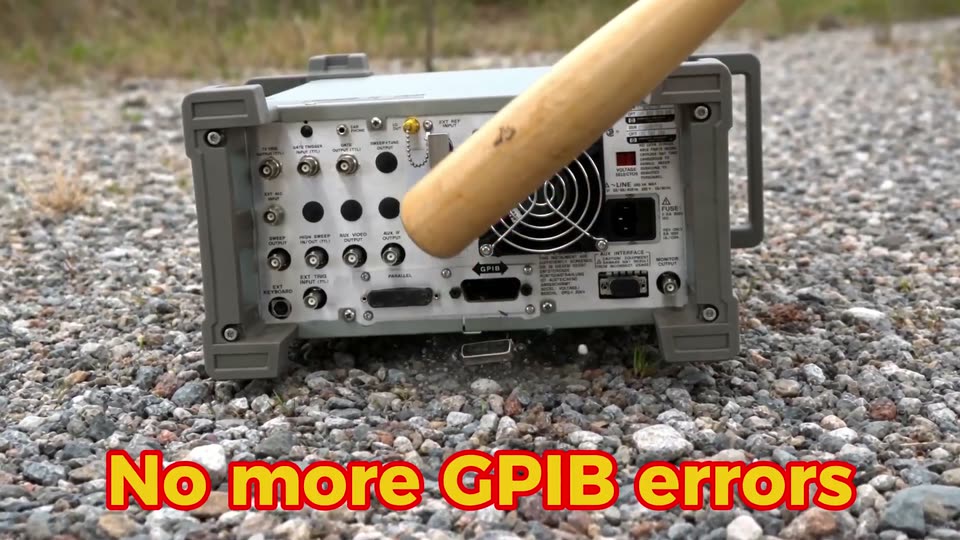
A rugged gray instrument case sits on gravel outdoors. A wooden mallet swings in from above and strikes the back panel, knocking a small metal piece loose. A red caption with a yellow outline pops in at the bottom.
On-screen text: “No more GPIB errors”
Camera: Push in
A small black measuring device with a lit screen rests on a glossy black surface and rotates in 3D, turning from its front display to the side panel with USB and network ports. A white two-line caption slides in from the left at the bottom.
On-screen text: “USB-C and PoE”, “in every product”
Techniques: Kinetic type, 3D mockup
Camera: Pull out
A small blue and silver box turns in 3D on a black reflective floor, rotating from a three-quarter angle to face the camera and show its front USB-C and Ethernet ports. White text sits static in the lower left corner.
On-screen text: “USB-C and PoE”, “in every product”
Techniques: 3D mockup
Camera: Static
Low-angle shot: a bearded man in a light blue shirt and tie strides toward the camera under a cloudy gray sky, a second man blurred in the background. A blue and white lower-third banner slides in at the left with his name and title.
On-screen text: “NOAH LEVY”, “RF Engineer, ex-SpaceX”
Camera: Static
A gray HP 8591A spectrum analyzer sits on gravel in a locked-off frame. A black shoe enters from the left and kicks the front panel of the device.
On-screen text: “RF Engineer, ex-SpaceX”, “NOAH LEVY”
Camera: Static
A black leather shoe stomps down on a vintage HP spectrum analyzer resting on gravel, shattering its CRT screen as glass shards burst out and fall. A red headline with yellow outline pops in at the top and holds.
On-screen text: “No more CRTs & custom drivers”
Techniques: Particles
Camera: Static
Locked-off screen capture of a Chrome window on the white Google homepage. The address bar is typed into letter by letter, growing from “poe” to “poe-atten,” with a suggestion dropdown hovering below and the page staying still.
On-screen text: “No more CRTs & custom drivers”, “8591A”, “HEWKLETTT”
Techniques: Cursor demo
Camera: Static
A browser window shows the Nine Fives attenuator web UI. A cursor types 41 into the attenuation field, the current value and diagram label update from 5 dB to 41 dB. White outlined captions sit at left and lower right.
On-screen text: “No driver installs no custom software”, “SCPI, REST, mDNS, and Web UI”
Techniques: Cursor demo
Camera: Static
Low angle shot of two men in dress shirts and ties against a grey cloudy sky. The front man swings a wooden bat overhead, then the second man grabs him from behind and he tips into a dramatic, arms-outstretched fall.
Camera: Pan
A black rack backplane with a touchscreen and four red-handled slots sits in 3D perspective on a dark void. The unit rotates to a top-down angle as a silver top plate lifts, revealing gray modules in the slots, while two captions swap at the top.
On-screen text: “A rack-mountable, power and data backplane”, “Standardized interface and API across all products”
Techniques: 3D mockup
Camera: Static
A dark rack-mounted unit with a touchscreen panel floats in 3D perspective on black. A silver module with a small spectrum graph slides out from the left slot as the caption box at top left switches text.
On-screen text: “Standardized interface and API across all products”, “Spectrum Analyzer”
Techniques: 3D mockup
Camera: Static
A black rack chassis floats in 3D perspective on a black void. A silver module with a color screen slides out of the left bay, retracts, and a second module slides out as the caption switches.
On-screen text: “Spectrum Analyzer”, “Signal Generator”
Techniques: 3D mockup
Camera: Static
A 3D rack unit sits in perspective on black; a touchscreen, blue connector modules and gray modules with red toggles line the front, a small handheld unit tilts in front. A top-left label box cycles component names while the model holds a fixed angle.
On-screen text: “Signal Generator”, “Programmable Attenuator”, “Amplifier”, “SPDT Switch”
Techniques: 3D mockup
Camera: Static
A 3D RF chassis sits on black, its front panel holding a touchscreen and modular connector cards. Individual modules slide out and swap in front of the right slot while a label in the top-left names each component.
On-screen text: “SPDT Switch”, “Directional Coupler”, “SP4T Switch”, “Wilkinson Divider”
Techniques: 3D mockup
Camera: Static
A 3D RF rack with blue modules and red connectors rotates from an angled view to a flat front-on view. A small UI panel on the left shows RF1 and RF2 buttons. The top caption swaps from a title to a tagline.
On-screen text: “Wilkinson Divider”, “A unified web interface to simplify RF rack design”
Techniques: 3D mockup
Camera: Static
A dimmed view of a web-based RF rack interface fades up to full brightness, revealing a browser window with an equipment sidebar and a grid of blue modules in numbered slots. A gray headline sits across the top.
On-screen text: “A unified web interface to simplify RF rack design”
Camera: Static
A browser window fills the frame, showing a rack of blue modules with orange ports. A cursor drags red connection lines between the ports, linking them across the rack. A bold white outlined caption sits along the bottom. The view stays locked off.
On-screen text: “Rack Configuration through offline-capable web app”
Techniques: Cursor demo
Camera: Static
A browser window shows a rack module list on the left and a YAML code editor on the right. A large white two-line headline with a black outline pops in over the center of the screen and holds still.
On-screen text: “Network and RF path configuration”, “are git compatible yaml files”
Camera: Static
A dark terminal shows a Claude Code session. A prompt line types a request, then a response block and Python code appear below. A large white caption fades in across the lower half of the frame.
On-screen text: “With our custom hardware + SKILL.md writing test automation software takes minutes instead of months”
Camera: Static
A dark terminal window fills the frame as lines of code, YAML and JSON log output scroll upward continuously. A bold white caption block sits fixed over the center, unchanged throughout the shot.
On-screen text: “With our custom hardware + SKILL.md writing test automation software takes minutes instead of months”
Camera: Static
On a white background, a thin green and blue arc draws into a circular 9, then thickens while a gray 5 fades in at the center. The wordmark NINE FIVES fades in below the mark and holds.
On-screen text: “NINE FIVES”
Camera: Static