1:14

What is GitHub Spark? Introducing a brand new way to build powerful, AI assisted applications
GitHub · Developer tools · Oct 2024
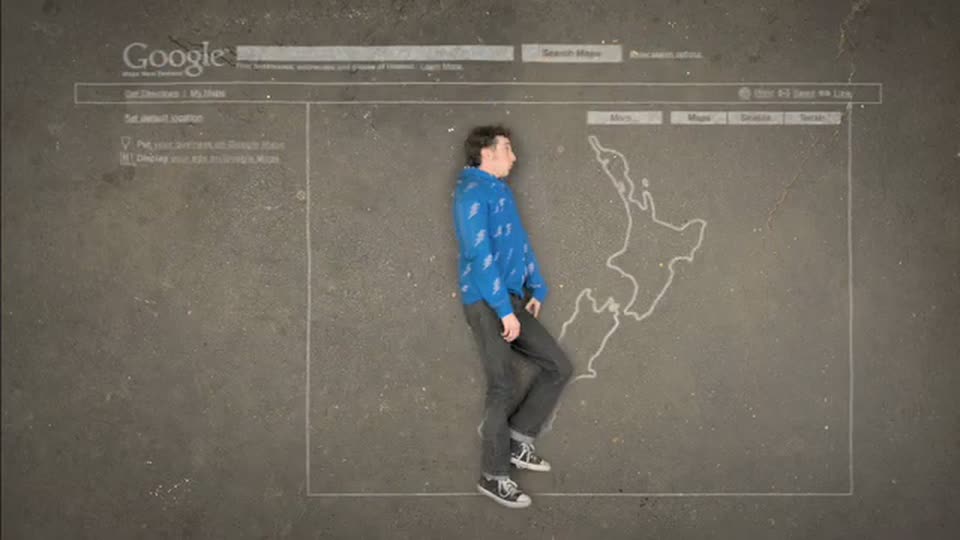
Google’s 1:51 launch film runs 31 scenes, about 3.6 s each. The product shows up at 0:19 and 4 features are revealed. There is no explicit call to action; a voiceover carries the film. The video alternates between overhead live action on chalk-drawn streets and screen recordings of the Google Maps interface, following a man in a blue hoodie as he moves from the drawn world into the product and back out to meet a friend. Signature moves include top-down tracking shots, chalk line-art that crossfades into UI overlays, and the character physically interacting with flat icons such as the bicycle and the Send tile.
Is this your launch? to your site or press kit.
GitHub · Developer tools · Oct 2024
FlashDrive · Nov 2026
Shopify Canvas · Oct 2026
Films whose music sounds like this one, voice left out
Runway · Comedy sketch and rock
Apple · Modern electronic, upbeat
Microsoft · Modern corporate promotional music with elements of upbeat electronic, indie rock, and alternative.
A young man in a blue hooded jacket stands before a dark mottled wall, holding a large paper map open with both hands. He looks down at it with a furrowed brow. Static medium shot, centered framing.
Camera: Static
Top-down view of a man in a blue hoodie lying on asphalt marked with white chalk street drawings. He studies a paper map, tosses it aside, then runs in place across the drawn street, past a trash can and building, until he lunges at a chalked payphone and collapses onto it.
On-screen text: “88”
Camera: Pan
Top-down view of a man in a blue sweater tumbling across a gray concrete floor marked with a white chalk city skyline. He lands and sits up, mouth open, hands braced on the ground.
Camera: Static
Top-down view of a person in a blue patterned sweater and gray pants lying on concrete above a white line-drawn city skyline. The person slides out of frame to the right, leaving the empty pavement and the sketch.
Camera: Static
Top-down shot of gray asphalt: a person in a blue shirt and white sneakers falls and lands flat. A thin white frame and Google Maps UI overlays appear around a wavy white line on the ground, while the Google logo holds in the top-left corner.
On-screen text: “Google”
Camera: Static
Top-down view of a man in a blue sweater lying on asphalt beneath a Google Maps interface overlay with a white route line. He sits up, stands, and walks across the map panel.
Camera: Static
The Google Maps page shows a map of New Zealand while the cursor drifts across it. The view then zooms into the top search field as the address 222 Victoria Street, Auckland is typed in.
Techniques: Cursor demo, UI zoom
Camera: Push in
A locked-off close-up of the Google Maps toolbar shows a gray Search Maps button beside a blue Show search options link. A hand cursor slides in from the lower left and clicks the button.
Techniques: Cursor demo
Camera: Static
A static Google Maps view shows a white address card over a street map with a red pin. A black cursor glides from the top right to the Street View link, then a hand cursor appears to click it.
Techniques: Cursor demo
Camera: Pull out
A map with an address card and a Street View thumbnail; a hand cursor hovers the thumbnail, which then expands to fill the frame, dissolving the map into a full street-level view with a car on the road and a mini-map in the corner.
Techniques: Cursor demo, UI zoom
Camera: Pull out
A Google Maps Street View screen drives forward down a sunlit Auckland street, then the cursor drags the view in a slow pan right across an intersection and a red NEW WORLD sign before swinging back to face the road and rolling on.
Techniques: Cursor demo
Camera: Push in
A Google Maps Street View screen follows a car down Victoria St W in Auckland, the Sky Tower rising ahead. The interface chrome, address bar and minimap stay fixed while the street view dollies forward, then zooms in for a closer look at the tower.
Techniques: UI zoom
Camera: Push in
A Google Maps page fills the frame, then the view zooms in on the Get Directions panel as two addresses are typed into the fields. A hand cursor moves to the Get Directions button and hovers over it.
Techniques: UI zoom, Cursor demo
Camera: Push in
A directions panel opens on a zoomed-in bold heading, then the view pulls back to the full step list as a cursor hovers the small camera icons beside each turn. The frame widens to the whole Google Maps page, showing a street view and a map with the route highlighted.
Techniques: UI zoom, Cursor demo
Camera: Pull out
A Google Maps directions screen shows a left panel with the route steps, a top street view of a red car at an Auckland intersection, and a bottom 2D map with a yellow route line. The street view advances to the next step along the journey.
Camera: Static
A Google Maps directions page zooms into the street view, isolating the underlined Report a concern link in sharp focus as the rest blurs. A black arrow cursor slides in and rests beside it.
Techniques: UI zoom, Cursor demo
Camera: Push in
A tight close-up on the underlined Report a concern link and a black cursor arrow, the frame then pulls back to reveal the full Google Maps view: a left directions panel with distances and a right 3D street view with a blue route over a 2D map.
Techniques: Cursor demo, UI zoom
Camera: Pull out
A Google Maps interface displays a directions panel on the left, a 3D street view on the top right, and a 2D map on the bottom right. A cursor moves across the screen.
Camera: Push in
A Google Maps view zooms in on a city map as a yellow Street View figure is dragged from the controls onto a blue-outlined street, dropping a green marker.
Techniques: UI zoom, Cursor demo
Camera: Push in
A crossfade settles on a Google Maps page showing a street view of a cafe facade labeled Botanical Cafe. The view zooms into the top-right toolbar as a hand cursor moves across the Print, Send and Link links.
Techniques: UI zoom, Cursor demo
Camera: Push in
A white “Send to” dialog box floats over a blurred park background. The view starts on the full form, then pushes in past the email fields and message, ending on a tight close-up of the Send and Cancel buttons.
Techniques: UI zoom
Camera: Push in
Top-down locked-off shot of asphalt with a white painted tile reading “Send »”. A hand in a blue sleeve enters from the top left, presses the tile, and lifts away, leaving a faint smudge on the surface.
On-screen text: “http://maps.goog”, “Cano”
Camera: Static
Overhead tracking shot on a dark gray surface. A man in a blue shirt runs right, then mounts a flat white bicycle icon and rides it. White line-art city elements, windows, fence, lamp, car, tree, appear behind him as he moves, ending with him tumbling off.
Camera: Pull out
Top-down shot of a person in a blue patterned shirt tumbling on dark pavement covered in white chalk line drawings of a street, with a bicycle, bins and a storefront. The camera tracks the roll, sliding the hand-drawn 'Botanical Cafe' sign into frame on the right.
Camera: Pan
Overhead shot of a man in a blue patterned hoodie walking left to right across a chalk outline of a cafe storefront drawn on the ground. He pauses and looks up at the Botanical Cafe sign and two cup sketches.
On-screen text: “Botanical Cafe”
Camera: Static
Top-down view of a man in a blue lightning-print hoodie on gray asphalt marked with white chalk lines. He turns and walks to the right holding a blue paper cup as the cafe label slides in.
On-screen text: “Botanical Cafe”
Techniques: Kinetic type
Camera: Static
A man in a blue lightning-bolt hoodie lies inside a white chalk outline on dark asphalt, holding two paper cups with straws. He looks up with a surprised open-mouthed expression, then rolls his torso to one side while keeping the cups.
Camera: Static
Top-down view of a pavement with white line drawings of a bench and figures. A man in a blue jacket walks in from the left holding a phone and stops to face a woman in a gray top and blue skirt standing at the drawn bench.
Camera: Pan
A man in a blue lightning-print jacket and a woman in a gray top stand in profile before a wall painted with white grid lines. He holds a stack of blue paper cups. They smile, then lean in and kiss as the camera holds a steady medium shot.
Camera: Static
Two people stand in profile before a painted park set with a picnic table and trees. The man in a blue jacket hands a coffee cup to the woman, who tips her head back. The camera tilts up, revealing a painted city skyline with towers and a clock face.
Camera: Pan
A sketched city skyline lines the bottom of a brown textured backdrop. The multicolor Google wordmark assembles from scattered colored fragments in the center, then holds. The URL maps.google.co.nz fades in below in small white type.
On-screen text: “maps.google.co.nz”
Techniques: Particles, Kinetic type
Camera: Pan