1:05

Kuli - AI agent for Influencer Discovery
Kuli · Jan 2026
Nexus · Oct 2025 · 0:59 · Full motion · AI-annotated
Nexus’s 0:59 launch film runs 29 scenes, about 2.1 s each. The product shows up at 0:16 and 5 features are revealed, with social proof. There is no explicit call to action. The video is built as a rapid card sequence: black grain stat cards flip to off-white brand cards, then blue-gradient UI cards demo each feature, all cut on a fast beat. Signature moves are word-by-word type reveals, crossfading tagline pairs, and drifting pill labels that frame every headline.
Is this your launch? to your site or press kit.
Kuli · Jan 2026
Sonos · Hardware · Apr 2023
Pax Historia · Consumer · Feb 2026
Films whose music sounds like this one, voice left out
Vojtěch Peták · Lo-fi hip-hop, ambient electronic, and retro game-style music
Anthropic · Electronic, Lo-fi Hip-hop, Chillwave, Funk
Proximitty · Electronic / Jazz Fusion
On a black, grain-filled background, white serif text states a statistic, the opening quote and “95%” holding still as the word “of” slides in from the left. The frame stays locked off and the line keeps building.
On-screen text: ““95% of en”
Techniques: Kinetic type
Camera: Static
A white serif quote types in word by word on a grainy black background, with a gray sans attribution line filling in beneath it. The text then clears and a centered white sans 'Why?' appears.
On-screen text: ““95% of enterprise AI projects fail””, “MIT Report - August 18, 2025”, “Why?”
Techniques: Kinetic type
Camera: Static
The word “Why?” holds centered on a black, film-grain background. The frame is static and locked-off with no motion or reveal.
On-screen text: “Why?”
Camera: Static
The word Why is centered on a grainy black background. The scene cuts to solid black, then the phrase Engineering needs appears on the left against the same textured backdrop.
On-screen text: “Why?”, “Engineering needs”
Camera: Static
A grainy black field holds the white headline “Engineering needs 4 months”, which builds word by word as a vertical stack of digits rolls and locks on 4. Two faint pill buttons, “Pilot iteration” and “Evals”, with a cursor, drift in the corners.
On-screen text: “Engineering needs 4 months”
Techniques: Kinetic type
Camera: Static
A grainy black field holds a white headline, “Engineering needs 18 months to ship,” whose number cycles through 24 and 12. Outlined pill tags with task labels drift at different speeds around it while two cursors wander. The scene cuts to the line “Everyone is waiting for powerful agents.”
On-screen text: “Engineering needs 18 months to ship”, “Pilot iteration”, “Evals”, “Training users”, “Integration development”, “Architecture design”, “Vendor selection”, “LLM testing”, “Internal deployment”, “Prompt engineering”
Techniques: Kinetic type, Parallax
Camera: Pull out
On a black grainy background, a single line of white text sits centered. The final word, agents, fades in from transparent to solid while the rest of the sentence holds still. The frame is locked off.
On-screen text: “Everyone is waiting for powerful agents”
Techniques: Kinetic type
Camera: Static
On a grainy black background, a centered white line reads “Everyone is waiting for powerful agents”, then a dimmer gray line, “But by the time engineering ships”, scales up over it as the first line fades. The frame stays locked-off.
On-screen text: “Everyone is waiting for powerful agents”, “But by the time engineering ships”
Techniques: Kinetic type
Camera: Static
On a grainy black background, the white line “But by the time engineering ships” scales in word by word, trailing words fading up from gray, then the frame holds the still line “Business needs change”.
On-screen text: “But by the time engineering ships”, “Business needs change”
Techniques: Kinetic type
Camera: Static
A white headline sits centered on a black, grainy background inside a thin rounded border. The frame is locked off and the text stays static for the whole clip.
On-screen text: “Business needs change”
Camera: Static
A centered white sentence, “Business needs change,” holds on a dark, grainy textured background. The frame is locked off with no motion or animation.
On-screen text: “Business needs change”
Camera: Static
A centered headline on a white card builds word by word, the italic serif and sans-serif lines crossfading from one tagline to the next, then a black angular logo scales in at the center.
On-screen text: “Business needs change”, “Stop waiting for engineering.”, “Start setting the tempo.”
Techniques: Kinetic type
Camera: Static
A black stacked-parallelogram mark and serif Nexus wordmark fade in at center on off-white, hold, then clear. The tagline fades in word by word, left of center.
On-screen text: “Reliable agents built by business teams”
Techniques: Kinetic type
Camera: Pull out
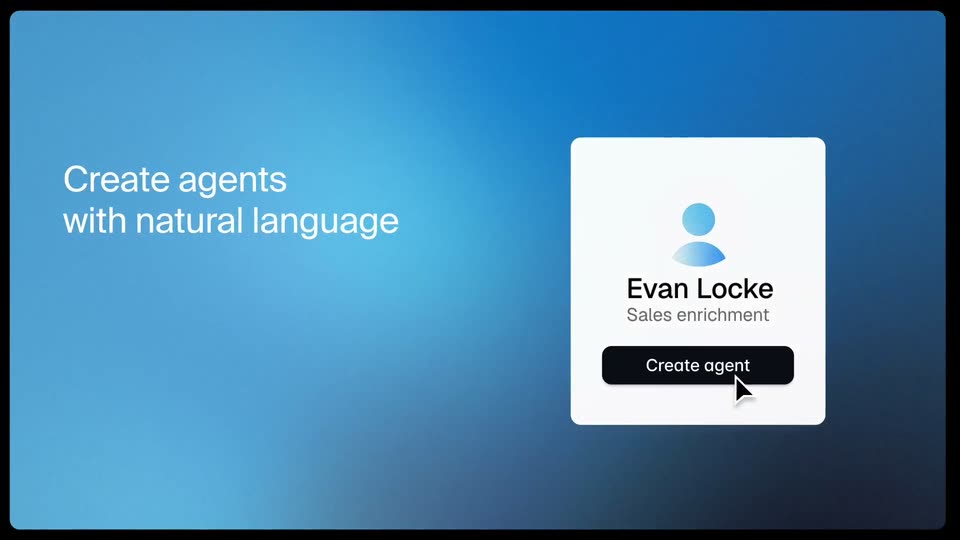
A white contact card with a person icon, the name Evan Locke and a Sales enrichment line sits on a blue gradient, with the headline Create agents with natural language on the left. A cursor glides to the Create agent button, then the card blurs and slides away as a list panel of import and sync options rises from the bottom.
On-screen text: “Create agents with natural language”, “Sync data across your entire”
Techniques: Cursor demo
Camera: Static
A white import menu card sits centered on a blue gradient field beneath a cyan headline. A cursor glides down the list, moving from the upper rows toward the import and sync options.
On-screen text: “Sync data across your entire knowledge base”
Techniques: Cursor demo
Camera: Pull out
A blue gradient screen holds a white card of import options. A cursor hovers over and clicks Sync with SharePoint, the card content swaps to a SharePoint file list, and a progress badge at the bottom counts up from 14 to 19 of 20.
On-screen text: “Sync data across your entire knowledge base”
Techniques: Cursor demo
Camera: Static
A cyan headline sits above a white Sharepoint card on a blue gradient, listing six yellow folder rows. A black cursor drifts up the list as a green badge at the bottom confirms the sync.
On-screen text: “Sync data across your entire knowledge base”
Techniques: Cursor demo
Camera: Static
A white feature card scales in on a blue background. A cursor moves down the list, highlighting the Plugin row, while the headline fades in above.
On-screen text: “Build complex agentic workflows”
Techniques: Kinetic type, Cursor demo
Camera: Static
A white list card with a highlighted Flow row and a black cursor sits under a blue headline. The card gives way to a dotted white panel that slides in from the right as Sales Lead is typed at its top.
On-screen text: “Build complex agentic workflows”
Techniques: Cursor demo
Camera: Static
A white dotted card on a blue gradient shows a title field. A black arrow cursor hovers below as the words type out character by character, then an orange Draft badge pops in at the right edge while the frame reframes to reveal the header bar.
Techniques: Cursor demo, UI zoom
Camera: Static
A workflow canvas shows a trigger picker; the cursor clicks Agent, the picker collapses into an Agent input node, and the list scrolls down to reveal added steps. The cursor then clicks Save & publish and the screen blurs out.
Techniques: Cursor demo
Camera: Pull out
On a blue gradient, a three-row grid of circular brand app icons sits under a centered headline. A frosted-glass panel over the grid clears away, the icons brighten from dim to full color, and the headline completes with the final words.
On-screen text: “Deploy your agent in 15+ apps”
Techniques: Masking
Camera: Pull out
A blue gradient background holds a white headline above a three-row grid of circular app icons. The icons blur and fade out as the backdrop lightens, and the headline crossfades to a dark navy line centered on the now pale background.
On-screen text: “Deploy your agent in 15+ apps”, “Enable every department”
Camera: Static
A white card holds two centered black sans-serif lines that overlap in the middle. The upper line reads Deploy your agent in 15+ apps and the lower line reads Enable every department, both static and aligned on the same horizontal axis.
On-screen text: “Deploy your agent in 15+ apps”, “Enable every department”
Camera: Pull out
A white rounded card fills the frame, ringed by gray pill labels naming use cases. The labels drift as a doubled, ghosted layer that converges to a single set. In the center, the black headline builds word by word to read To build their own agent.
On-screen text: “To build their own agent”
Techniques: Parallax, Kinetic type
Camera: Pull out
A white field of light-gray pill-shaped tags listing agent use cases frames the edges, while the black headline in the center fades out. The tags stay in place as the text dissolves.
On-screen text: “To build their own agent”
Camera: Static
A white card with a black border shows a dark gray sentence. The number counts up from 85 to 100 as a large italic R slides into the word Reduce.
On-screen text: “Reduce time-to-value by 100x”
Techniques: Kinetic type
Camera: Static
A centered headline on white reads Transform operations in years, the last word flips to weeks and the line darkens to black. It swaps to From pilot hell to production-ready as a field of grey customer logos fades in around it, then the line shrinks.
On-screen text: “Transform operations in years”, “Transform operations in weeks”, “From pilot hell to production-ready”
Techniques: Kinetic type
Camera: Static
A black Nexus wordmark with a stacked chevron mark is centered on a white field, a gray tagline below it. The lockup eases in from a faint offset and locks into a static, centered sign-off.
On-screen text: “Nexus”, “Business-led Enterprise AI”
Camera: Static