0:36

Introducing image and shader generation in Framer
Framer · Design · Nov 2026
Morphic · Nov 2026 · 0:31 · Full motion · AI-annotated
Morphic’s 0:31 launch film runs 14 scenes, about 2.3 s each. The product shows up at 0:03 and 3 features are revealed. There is no explicit call to action. The video alternates still black title cards with short word-by-word pop-ins against cursor-driven UI demos and a 3D brand reveal, keeping the cut rate brisk while the cards stay locked. Its signature moves are the sliding selection pill, the cursor-led menu interactions, and the app icon assembling from scattered photo cards and floating waveform bars.
Is this your launch? to your site or press kit.
Framer · Design · Nov 2026
FlowiseAI · B2B · May 2025
Mercury · Finance · Sep 2026
Films whose music sounds like this one, voice left out
Reallusion · Electronic Dance Music
Canva · Electronic dance music (Deep House, Progressive House)
Arbitrum · Electronic dance music (EDM)
On a black background, the white text “Edit here.” pops in at center, then “Send anywhere” fades in beside it. The full line holds for a beat before fading out to black.
On-screen text: “Edit here. Send anywhere”
Techniques: Kinetic type
Camera: Static
A dark tab bar with Canvas, Copilot and Compose sits on black. A white cursor arrow glides to Compose and the selection pill slides over it, then a blue sky with clouds and power lines rises from the bottom.
On-screen text: “Edit here. Send anywhere”
Techniques: Cursor demo
Camera: Pull out
A dark video-editor screen zooms out to reveal a tab bar, a center preview, and a timeline of clips with blue waveforms. The playhead glides right as the preview plays an illustration shifting from a cyclist in green fields to a girl by a sunset river.
Techniques: UI zoom
Camera: Pull out
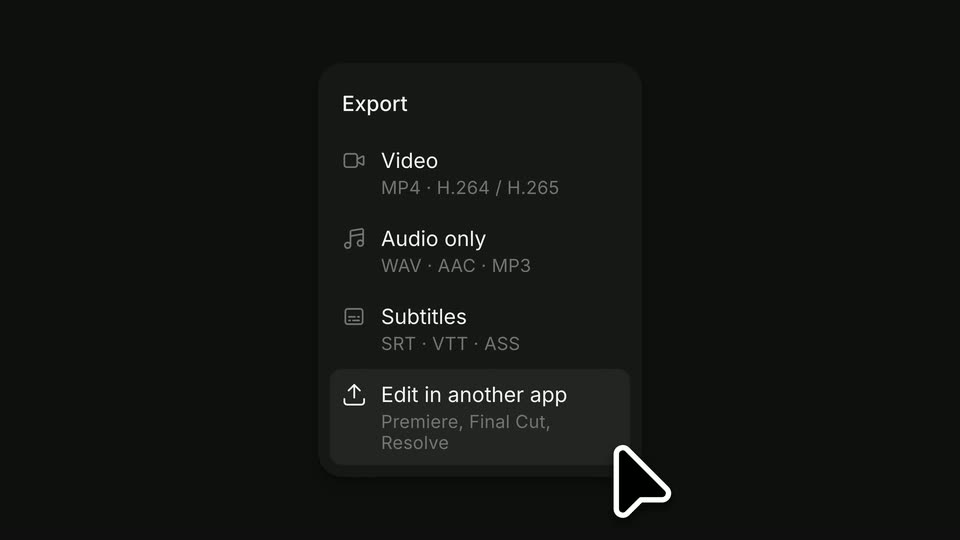
A dark Export button sits centered on black. A white cursor arrow moves to it and clicks, opening a dropdown panel that lists Video, Audio only, Subtitles, and Edit in another app with format details. The cursor then hovers over the last row, which highlights.
Techniques: Cursor demo
Camera: Static
A plain black frame holds a centered headline. The word Supports fades in from gray to white, then the phrase all your favorites fades in to its right in soft gray. The frame stays locked and the pace is slow.
On-screen text: “Supports all your favorites”
Techniques: Kinetic type
Camera: Static
A white headline reading “Supports all your favorites” sits centered on a solid black field. The line holds still for the entire shot, with no camera movement or animation.
On-screen text: “Supports all your favorites”
Camera: Static
A dark Open in menu lists three apps; a white cursor arrow glides up to the DaVinci Resolve row, which lights up with a blue border, then the view cuts to a blue Export button.
Techniques: Cursor demo
Camera: Static
A blue rounded button reading Export is centered on a black field. A white arrow cursor glides in from the lower right and rests on the button's bottom corner, where the button lifts a few pixels into a hover state.
Techniques: Cursor demo
Camera: Static
White text on black: “Same cuts.” appears centered, then the line widens as “Same place” fades in at the right. A hard cut lands on the editor interface, a lake-and-bike clip filling the preview above a two-track timeline.
On-screen text: “Same cuts. Same place”
Techniques: Kinetic type
Camera: Static
A dark editing interface shows a large preview of an anime lakeside scene with a woman and a red bicycle. Below, a video track of thumbnails and a blue audio waveform track sit under track labels, with the caption “Same cuts. Same place” held over the frame.
On-screen text: “Same cuts. Same place”
Camera: Static
A 3D app icon with a rainbow gradient border and three colored teardrops forms in the center as a landscape photo card flies to the top-left corner and a burst of photo cards scatters to the edges.
Techniques: 3D mockup, Particles
Camera: Static
A rainbow-rimmed app icon with a three-drop mark holds center on black while small photo thumbnails and blue waveform bars swirl around it. The swarm clears away and the icon's face opens to reveal a landscape image. A large numeral 8 stays locked in the frame.
On-screen text: “8”
Techniques: Particles, Morph
Camera: Pull out
Three rounded-square app icons sit in a row on black: a blue tile with Pr, a clapperboard over a rainbow gradient, and a dark tile with a three-leaf clover. The row fades in from black, holds, then fades out.
Camera: Static
The Morphic logo, three vertical bars beside the wordmark, sits centered on a black background. It fades from dim to full white and back to dim over the clip.
On-screen text: “Morphic”
Camera: Static