2:20

Meet DJI Neo 2 - Follow Me Camera Drone
DJI · Hardware · Nov 2025
Moonlake AI · Mar 2026 · 0:59 · AI-annotated
studio ObiN Studio
Moonlake AI’s 0:59 launch film runs 37 scenes, about 1.6 s each. The product is on screen from the first frame and 2 features are revealed. The call to action lands at 0:51 (85% in). The video is built as a three-step pipeline, build, publish, earn, where each step opens on a single gradient keyword and then demos the product through floating 3D interface cards and rendered game worlds. Pacing holds a steady 100 bpm with about 21 cuts per minute, driven by blur-to-focus text reveals, live typing, and slow camera pushes through depth-of-field UI panels on a dark amber field.
Is this your launch? to your site or press kit.
DJI · Hardware · Nov 2025
DJI · Hardware · Jul 2025
AI Studio · Jun 2026
Films whose music sounds like this one, voice left out
Microsoft · Electronic, Hip-Hop/Trap
RoboParty · Electronic
Insta360 · Electronic dance music
A peach crescent-and-wave mark fades in at the center of a black screen. A small studio watermark with a purple dot sits fixed in the top-left corner throughout.
On-screen text: “ObiN STUDIO™”
Camera: Static
Floating ObiN Studio interface cards (Reskin, Export, Publish, Code, Play toolbar, a Hey there card) drift on a warm gradient with depth of field. The headline Isn't just an Engine sharpens into focus at center, then the scene blurs and fades to black.
On-screen text: “Isn't just an Engine”
Techniques: 3D mockup
Camera: Static
A dark video editor interface with rounded clip thumbnails drifting into place around the edges, a Play button sliding in at the top, and the ObiN STUDIO mark in the corner. The tagline holds centered in the open space as the layout settles.
On-screen text: “It's where worlds take shape.”
Camera: Pan
On a black background, the gradient headline “It starts with” holds, then the line slides left so “you” in pink enters and “It” exits, settling on “starts with you”. A thin horizontal line runs below the text.
On-screen text: “It starts with”, “starts with you”
Techniques: Kinetic type
Camera: Static
Warm amber gradient holds a cream headline, Just an idea?, while dark note cards with Hey there...! slide up from the bottom and an up-arrow button sits top left. The backdrop shifts to red as a frosted input field with a plus button settles center left.
On-screen text: “Just an idea?”, “starts with you”
Techniques: Kinetic type
Camera: Pull out
A dark rounded input box with a glowing orange border sits centered on a blurred warm gradient. White text types out “A fast-paced pl” with a blinking caret, replacing the gray placeholder “Type here...”. The ObiN Studio wordmark stays top left.
On-screen text: “ObiN STUDIO™”
Camera: Static
A black frame with a warm orange glow on the right edge. A white sans-serif line types out “A fast-paced platform set”, scrolling left behind a thin vertical cursor bar. The ObiN STUDIO logo sits fixed at the top left between two hairlines.
On-screen text: “ObiN STUDIO™”, “A fast-paced platform set”
Techniques: Kinetic type
Camera: Static
A dark rounded prompt box on a warm brown gradient types a game description in monospace, then a results panel expands above it, highlighting a file row in amber with a green +91 count.
Techniques: Kinetic type
Camera: Static
A dark ObiN STUDIO chat interface fills the frame, its logo top left. Stacked cards show a file path, a running command, and a prompt reading a platformer game brief. The view zooms into the command card, resolving blurred orange bars into terminal text.
Techniques: UI zoom
Camera: Pan
A dark terminal chat panel on the left scrolls upward through commands and file paths. On the right, a large headline fades in as “watch it begin.” then swaps to “Systems aligning” in orange. The ObiN STUDIO logo stays fixed in the top-left corner.
On-screen text: “watch it begin.”, “Systems aligning”
Techniques: Kinetic type
Camera: Pan
On a dark orange-to-purple gradient, the ObiN STUDIO logo sits top left as large text “Layer by layer” with an underline appears and a smaller “layer” slides in below. Two dark agent-interface panels slide in from the right, overlapping, showing a running command and a chat input.
On-screen text: “Layer by layer”, “layer”
Techniques: Kinetic type
Camera: Pan
A dark field with a maroon edge glow holds a translucent gray cube that rotates and solidifies at center. Below it, faint serif status lines stack one by one, reading Almost there, Setting up things, Creating world, while the ObiN STUDIO mark sits fixed in the top left.
Camera: Static
On a dark maroon gradient, a small isometric 3D cube showing a sunset on its faces sits center stage. It expands and flattens into a rounded rectangular panel revealing a silhouetted figure in a hat before an orange sunset and industrial rigs. Three status lines cycle beneath the panel.
On-screen text: “Almost there...”, “Creating world...”, “Setting up things...”
Techniques: 3D mockup, Morph
Camera: Push in
A wide-brimmed figure walks away from camera through a rusted, pipe-strewn wreck under an orange smog sky, framed in a rounded rectangle with a purple gradient border. The figure drifts slowly forward as smoke rises from the structures.
On-screen text: “ObiN STUDIO™”
Camera: Pull out
A tilted 3D mockup of the ObiN STUDIO interface floats on a dark red gradient and pushes forward, growing larger across the frame. Its main viewport holds an orange sunset concept-art scene with a wide-hatted figure, while a left panel shows terminal text.
Techniques: 3D mockup
Camera: Pan
A dark AI coding interface fills the frame, reframing outward from the chat input where a prompt types itself out. A steampunk city with a hatted figure renders in the right pane while a file sidebar and version note sit on the left.
On-screen text: “ObiN STUDIO™”
Techniques: UI zoom
Camera: Pull out
A developer tool window fills the frame: a left panel of terminal text and a chat prompt sits beside a 3D viewport. The viewport's color grade shifts from warm orange to cool blue dusk as the world re-renders.
Camera: Pull out
A dark product UI sharpens into view, holding a left prompt panel beside a large viewport with a small hat-wearing figure on a rocky shore under a starry sky. The composition stays still.
Camera: Pull out
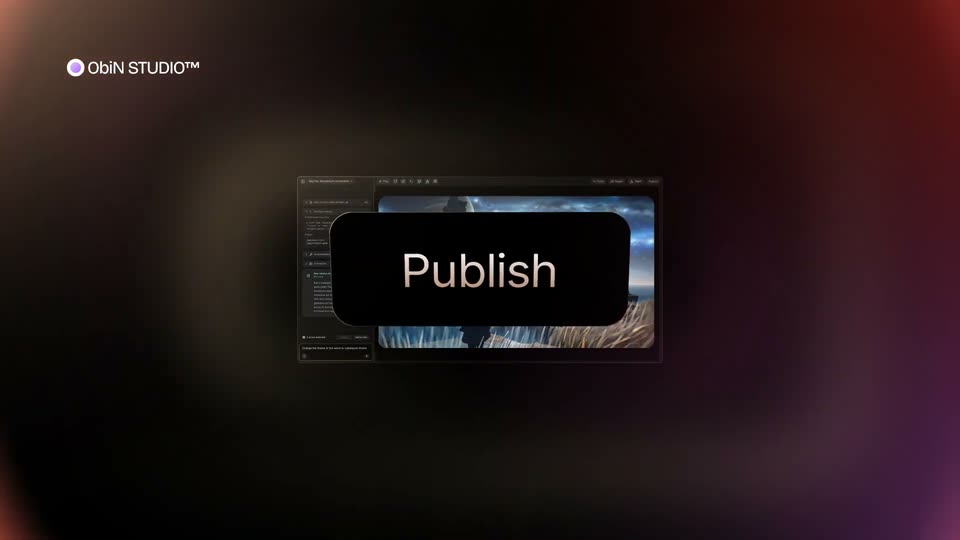
A dimmed video-editor interface floats on a dark background with a soft orange glow. A black rounded button bearing the white word Publish scales up at the center, while the ObiN STUDIO logo stays fixed top-left.
On-screen text: “ObiN STUDIO™”, “Publish”
Techniques: Kinetic type
Camera: Static
A black rounded button labeled Publish sits on a dark gradient with a warm orange glow. The button scales up from small to large, the glow blooming around it, while the ObiN Studio logo stays fixed in the top left.
On-screen text: “ObiN STUDIO™”
Camera: Static
A dark 3D field of blurred video thumbnails; the camera pushes in on one sunset clip card that scales into focus, a Power squash title and click/hours counters sliding in, then the view pans right and the card exits left.
On-screen text: “ObiN STUDIO™”, “Power squash”
Techniques: 3D mockup, UI zoom, Parallax
Camera: Static
A dark globe of Earth with pink continents scales into the center, ringed by floating rounded game thumbnails at different depths. A sharp game window on the right resolves into the orbiting cards as the camera pulls back. The ObiN STUDIO wordmark holds top left.
On-screen text: “ObiN STUDIO™”
Techniques: Morph, 3D mockup, Parallax
Camera: Pull out
A dark 3D globe of Earth with peach continents rotates slowly at center as small video thumbnails drift outward in orbit around it. The line 'Let players all around the world play' sits locked across the globe's middle while the ObiN STUDIO logo holds top-left.
On-screen text: “Let players all around the world play”
Techniques: Parallax
Camera: Static
A dark globe with a tan North America silhouette sits among floating gameplay thumbnails under the line “Let players all around.” A fast whip pan streaks the clips past as the headline completes with “Climb the leaderboard.”
On-screen text: “Let players all around the world play”, “Climb”, “the leaderboard”
Techniques: Kinetic type, Speed ramp
Camera: Static
A tilted card showing a sunset game scene floats in a dark 3D space, an avatar badge pinned above it. A ring of blurred text rotates behind. The two-line headline sits lower left while the card's stat counters tick.
On-screen text: “Climb the leaderboard”, “ObiN STUDIO™”
Techniques: 3D mockup, Parallax
Camera: Static
A 3D row of video cards sits on a dark gradient field; the carousel pans so a sunset game clip, a yellow abstract clip and a forest clip line up, while the headline holds bottom left and a giant blurred word drifts past on the right.
On-screen text: “Climb the leaderboard”
Techniques: 3D mockup, Parallax
Camera: Static
A tilted 3D leaderboard panel lists games and click counts on a warm amber gradient. The POWER SQUASH row highlights in gold, then lifts out as a floating bar while the rest fades, its count ticking up beside a Compete by Clicks caption.
On-screen text: “Top 10 Creators”, “Compete by Clicks”
Techniques: 3D mockup, UI zoom
Camera: Pan
On a dark backdrop with a warm orange glow, the word Earn in a pink-to-orange gradient snaps from blur into focus, then the line drifts left to bring up to 30k this first month into view.
On-screen text: “Earn up to 30k this first month”
Techniques: Kinetic type
Camera: Pan
A dark amber gradient fills the frame as the headline types in word by word, a thin cursor trailing the last word. The ObiN Studio logo holds the top-left corner while a soft brown glow drifts toward the lower right.
On-screen text: “Earn up to 30k this first month”
Techniques: Kinetic type
Camera: Static
On a dark grainy background with a warm orange glow top right and a thin red grid, the word Every types in with a caret, then the line expands and slides to read Every month resets with, while a new payout fades in below in a peach gradient.
On-screen text: “Every month resets with”, “a new payout”
Techniques: Kinetic type
Camera: Static
A dark grid stage with a warm orange glow. Three rounded payout cards ($2,000 1st, $1,000 2nd, $500 3rd, labeled Game of the month) fade in while the text Month - Jan types out beside them.
On-screen text: “Every month resets with”, “a new payout”
Techniques: Kinetic type
Camera: Static
A dark reddish grid board displays translucent prize cards for first to tenth place, panning slowly to the right across the layout.
On-screen text: “Month - January”
Camera: Pan
On a dark brown gradient field, the word Build forms in the center as large warm-toned letters slide together from vertical slices. The ObiN Studio logo holds steady in the top-left corner throughout.
On-screen text: “Build”
Techniques: Kinetic type, Masking
Camera: Pan
A dark dashboard assembles: an input field slides in from the left, a $2,000 card and stats panel drop in from the right, a $500 card and creator bar rise below, framing the centered headline.
On-screen text: “Build, Publish, Earn”, “Visit app.moonlakeai.com”
Techniques: Parallax
Camera: Pull out
A pale moon and waves mark brightens to peach at center as the black background blooms with a purple glow from below. The ObiN Studio credit holds top left and a URL line sits at the bottom edge.
On-screen text: “ObiN STUDIO™”, “Visit app.moonlakeai.com”
Camera: Static
A purple-to-pink gradient warms toward orange while a small white crescent moon and wave mark fades in at the center. The studio credit sits top left and a URL caption rests at the bottom edge.
On-screen text: “ObiN STUDIO™”, “Visit app.moonlakeai.com”
Camera: Static
On a black field, the white Moonlake mark, a crescent moon over two wave lines, and its wordmark fade in at the center, then hold still. A small ObiN STUDIO credit sits top-left and a URL sits bottom-center throughout.
On-screen text: “ObiN STUDIO™”, “Visit app.moonlakeai.com”
Camera: Static