1:33

Meet Devin Bots
Cognition · Nov 2026
Microsoft’s 0:52 launch film runs 39 scenes, about 1.3 s each. The product shows up at 0:05 and 4 features are revealed, with social proof. There is no explicit call to action. The video moves from a glitchy opening reveal into a named product intro, then alternates hardware beauty shots with 3D feature demos and live typing or drawing moments. Its style is defined by soft peach-to-blue gradients, glossy reflective surfaces, quick macro-to-wide transitions, and clean white text over floating feature pills.
Is this your launch? to your site or press kit.
Films whose music sounds like this one, voice left out
The Browser Company · R&B/Pop
Sinter · Modern Electronic
Talkmore · Cinematic, Electronic, Lo-fi Hip-hop
A dark, out-of-focus frame. A bright pale-lavender rounded shape, like a glowing device screen, slides in from the right, its left edge rimmed in purple, against a black background with faint horizontal lines.
Camera: Static
A full-frame glitch burst smears the image into horizontal bands of purple, blue and white. Scan lines tear across the screen and a faint dark rectangle flickers near the center, the whole frame dissolving in fast distortion as a transition.
Camera: Pan
A blue tablet stands on a dark glossy floor, its back to the camera with a Windows logo centered. Colorful light reflections streak across the foreground and settle as the frame sharpens, the device resolving from motion blur into a steady rear view.
Techniques: Speed ramp, 3D mockup
Camera: Pan
A blue tablet stands on a dark stage, a white light flaring from its base. The flare collapses into a thin blue ring as the camera pulls back, shrinking the tablet and revealing a dark angular logo on its face.
Techniques: 3D mockup
Camera: Static
A smooth abstract 3D wave of layered ribbons fills the frame. It opens in deep blue, then blooms into a full rainbow gradient as the camera drifts slowly across the curving surfaces, revealing the colored peaks and valleys.
Camera: Pan
A soft multicolor ribbon, gradient from pink and purple to blue and green, sweeps in from the left across a dark field. The word Introducing holds centered in pale text as the shape fills the lower frame.
On-screen text: “Introducing”
Camera: Static
A close-up of a colorful, flowing 3D wallpaper zooms out to reveal the screen on a tablet tilted in 3D perspective, then cuts to the device standing on its kickstand against a soft gradient. White lowercase captions read “Introducing”, “the fastest, most intelligent”, and pink “Surface”.
On-screen text: “Introducing”, “the fastest, most intelligent”, “Surface”
Techniques: UI zoom, 3D mockup
Camera: Static
A Surface Pro stands in tent pose on a reflective surface against a peach-to-blue gradient, with an amber headline centered over it. The device then spins in place, blurring into a horizontal streak as the frame ends.
On-screen text: “the fastest, most intelligent”, “Surface Pro ever”
Techniques: 3D mockup
Camera: Static
A matte blue 3D render shows a corner hinge with a looped strap, a white panel edge below. The camera orbits slowly around the latch, turning the corner to reveal its geometry against the smooth blue surface.
Techniques: 3D mockup
Camera: Static
A silver tablet rotates in 3D against a blue-to-orange gradient sky, turning from a tilted back view to a thin edge-on profile that catches the light.
Techniques: 3D mockup
Camera: Static
A blue Surface laptop with its kickstand propped open sits on a glossy surface against a peach-to-blue gradient. The dark screen wakes to a vivid blue, green and pink flower wallpaper, casting a soft reflection below.
Techniques: 3D mockup
Camera: Static
A blue 2-in-1 laptop with a keyboard rests on a reflective surface, propped up against a soft gradient background transitioning from warm orange to cool blue.
Techniques: 3D mockup
Camera: Static
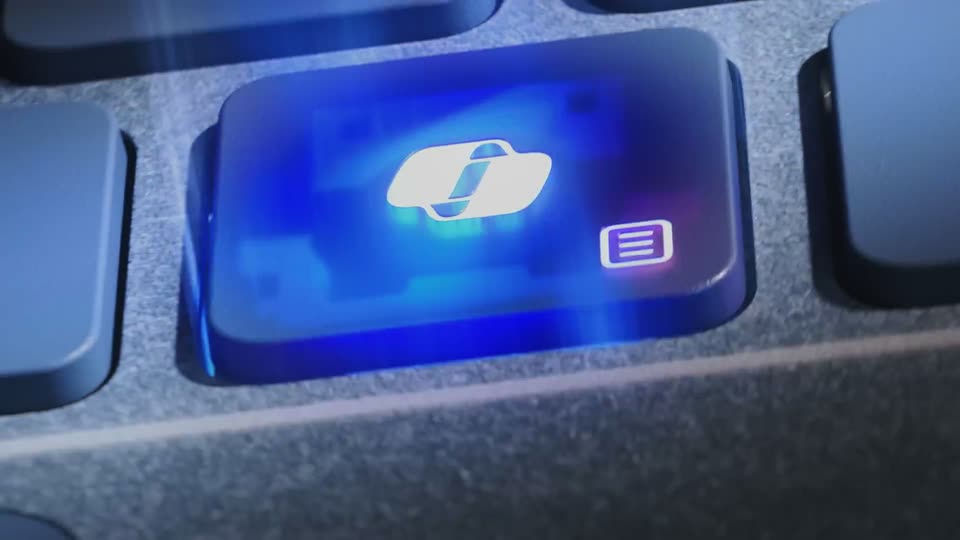
A macro close-up of a dark keyboard under blue light. The camera pushes in on a center key carrying a white logo and a small list icon, then a blue beam of light sweeps diagonally across the keycap.
Techniques: Light sweep
Camera: Push in
A 3D processor chip with a dark reflective top plate and a purple-blue die rests on a circuit board, centered in frame. Swirling rainbow light flares and a circular circuit platform surround it, the flares brightening and shifting around the chip.
Techniques: 3D mockup, Light sweep
Camera: Static
A 3D processor chip with a pink-to-white gradient face and gold NPU engraving rests on a white circuit board. The shot opens in motion blur and eases into a locked angled view of the chip.
Techniques: 3D mockup
Camera: Push in
A frosted search bar sits centered on a soft peach-to-blue gradient. A query types in letter by letter after the magnifier icon, ending with a microphone icon on the right.
On-screen text: “Recall optimized for select languages. Content-based and storage limitations apply. See aka.ms/copilotpluspcs”
Techniques: Kinetic type
Camera: Static
White 3D rings and a small sphere spin and stretch on a blue gradient, a blue cylinder sliding in from the right. The shapes blur and rotate as the logo assembles, with a small disclaimer line fixed at the bottom.
On-screen text: “Recall optimized for select languages. Content-based and storage limitations apply. See aka.ms/copilotpluspcs”
Techniques: 3D mockup, Morph
Camera: Static
A translucent white tube with a blue center dot extends across a blue gradient as a glass cursor arrow hovers on it. A white pill labeled Now rides the tube while a 11:13 AM speech bubble pops in above and a faceted 3D shape rises below.
On-screen text: “Now”, “Recall optimized for select languages. Content-based and storage limitations apply. See aka.ms/copilotpluspcs”
Techniques: 3D mockup
Camera: Static
A horizontal time slider labeled Yesterday, Today, Now floats above a 3D helix of translucent white panels that coil into perspective against a pink-to-cyan gradient. The slider handle glides left while the helix rotates, revealing earlier screens with image thumbnails on the left end.
On-screen text: “Recall optimized for select languages. Content-based and storage limitations apply. See aka.ms/copilotpluspcs”
Techniques: 3D mockup
Camera: Pull out
A horizontal timeline bar marked Yesterday, Today, Now floats above a 3D fan of interface cards that turns slowly in perspective on a peach-to-blue gradient. The front card shows a Recall video thumbnail of a person in red, while a small disclaimer line stays fixed at the bottom.
On-screen text: “Recall optimized for select languages. Content-based and storage limitations apply. See aka.ms/copilotpluspcs”
Techniques: 3D mockup
Camera: Static
A tablet in 3D perspective rotates from a tilt to face the camera, its screen showing a Windows desktop with Photoshop open on a portrait of a woman in a pink top. A cursor arrow rests at the bottom edge against a peach-to-blue gradient.
Techniques: 3D mockup
Camera: Static
A close-up of a woman's chin and red patterned top, edged with a dashed selection outline on a light blue background. A dark prompt bar reading Colorful Background with a Generate button slides in over her chest as a cursor glides to the button.
Techniques: Cursor demo
Camera: Static
A tilted Photoshop window floats on a soft blue gradient, then the view zooms into the canvas where a woman in a pink turtleneck stands before a colorful striped backdrop as a Generate control slides in at the bottom.
Techniques: 3D mockup, UI zoom
Camera: Push in
A Photoshop window frames a portrait of a woman in a pink top against a colorful abstract background. The view zooms into the canvas, the background colors shift, and her selection outline stays visible while the right panel switches from Transform to Layers.
Techniques: UI zoom
Camera: Push in
A woman with pink eyeshadow and twin buns, in a pink dotted turtleneck with arms crossed, is cut out with a white sticker border and held centered. Behind her a colorful geometric set of stripes, triangles and a pink loop rotates, swinging from flat walls to a ceiling lit by a grid of panels.
Techniques: Parallax
Camera: Static
A 3D tablet with a dark keyboard rests on a white surface, its screen showing a colorful abstract wallpaper. The camera pulls back and rotates to a side profile view.
Techniques: 3D mockup
Camera: Pull out
A dark grey keyboard hinge corner rotates from motion blur into sharp focus against a white-to-blue gradient. The title Surface Pro Flex Keyboard fades in on the left in light lavender.
On-screen text: “Surface Pro Flex Keyboard”
Techniques: 3D mockup
Camera: Static
A 3D render shows the black hinge of a keyboard and the corner of a tablet flexing against a soft gradient. The title holds center in black.
On-screen text: “Surface Pro Flex Keyboard”
Techniques: 3D mockup
Camera: Static
A low-angle shot frames a dark keyboard in the foreground with a tablet screen showing a colorful floral wallpaper behind it. A hand enters from the left and presses a key as the background screen sharpens into focus.
On-screen text: “Surface Pro Flex Keyboard”
Camera: Pull out
A silhouetted hand types on a backlit tablet keyboard against a soft blue-to-amber gradient, then cuts to the tablet propped upright in perspective showing a yellow “The Power” page while the keyboard lies flat in the foreground.
Techniques: 3D mockup
Camera: Push in
A blue tablet on a stand sits on a reflective desk against a soft peach-to-blue gradient, its screen showing a design document titled “The Power of Color.” A keyboard rests at the left edge as the camera pushes in slightly.
Camera: Push in
A person in a cream shirt, seen from behind, draws on a tablet with a stylus while the other hand rests on a blue keyboard. The tablet shows a colorful portrait, set on a white desk under a warm blue-to-peach gradient.
On-screen text: “The Power of Color”
Camera: Pan
A hand holds a black stylus and adds a pink stroke to a portrait on a tablet lying at an angle on a pale desk. The screen shows a photo editor with a color panel on the right. The camera slowly pushes in toward the display.
Camera: Push in
Four tablets with fabric covers in tan, gray, teal and black float at diagonal angles over a warm-to-cool gradient. The shot racks focus from soft to sharp. A small white caption sits at the bottom.
On-screen text: “Color availability varies by market.”
Techniques: 3D mockup
Camera: Static
A blue tablet on its kickstand rests on a pale surface. The frame opens motion-blurred, then the camera settles into a sharp low-angle close-up of the device corner and kickstand, with a green swirl wallpaper and weather widget on screen.
Techniques: Speed ramp
Camera: Static
A half-open blue Surface laptop floats on a pale gradient backdrop, rotating in 3D from its ported side edge to face the lid, where the Windows logo catches the light.
Techniques: 3D mockup
Camera: Static
A blue laptop rotates from open to tent mode on a reflective surface, ringed by floating white feature pills, then folds shut as the frame defocuses into a soft gradient.
On-screen text: “13″ OLED with HDR”, “Up to 90% faster”, “Lightning-fast Wi-Fi 7”, “New, stunning colors”, “Translate instantly”, “Ultra-wide Studio camera”, “45 trillion operations per second”, “The most flexible laptop”, “1M:1 contrast ratio”, “Ultra-thin, ultra-light', 'Copilot', 'All-day battery life', 'Secured-core PC', 'Supports fast charging', 'New Surface Pro Flex Keyboard', 'Cocreate with AI', '”
Techniques: 3D mockup
Camera: Push in
A black screen holds a centered white tagline that fades in, pauses, and fades out. The Copilot+PC wordmark and its multicolor icon then fade in at center and hold.
On-screen text: “A new AI era begins”, “Copilot+PC”
Camera: Static
On a black background, the four-color Microsoft square sits left of a centered wordmark. The text reads Copilot+PC, then resolves into the Microsoft Surface lockup in light gray, holding before the frame fades to black.
On-screen text: “Copilot+PC”, “Microsoft Surface”
Camera: Static