2:36
Ace 16-9 1080(5Mbps)EN
Insta360 · Nov 2023
AI Studio’s 2:44 launch film runs 94 scenes, about 1.7 s each. The product shows up at 0:10 and 11 features are revealed. The call to action lands at 2:04 (76% in), over a voiceover. The video opens with a fast-cut cinematic 3D montage, lands on a centered logo lockup, then runs a rapid feature tour that pairs flat UI screen-captures with rendered payoff shots, and closes with a playful animated call to action over a subscribe card. Its signature moves are diagonal band wipes, split-screen clay-versus-render comparisons, and a persistent top-left feature label that names each capability.
Is this your launch? to your site or press kit.
Insta360 · Nov 2023
Watch.fun · Jun 2026
DJI · Hardware · Jul 2025
Films whose music sounds like this one, voice left out
Apple · Modern electronic, upbeat
Astra · Electronic, Post-Rock
Extreme close-up of a CGI ape face, eyes shut and brow furrowed, dark hair blowing in the wind against a soft pale blue backdrop. The head drifts almost imperceptibly as strands sway, holding a tense, still expression.
Camera: Static
A static extreme close-up frames a man's scowling face, hair and beard soft at the edges. His eyes flare bright orange with a horizontal streak of light, then dim as embers drift past.
Techniques: Light sweep, Particles
Camera: Static
A 3D armored warrior with long head plumes rides a horse up through a sea of clouds, seen from a low angle against a sunset sky. The figure climbs and blurs with speed as it rises out of the mist.
Camera: Pull out
A floating figure holding a staff hangs in a cloudy dusk sky. A diagonal white band wipes across the frame, revealing a white rounded 3D device with black lenses in the upper left while the sky remains in the lower right.
Techniques: Masking, 3D mockup
Camera: Static
A diagonal split screen divides the frame: a fiery dragon gripping a golden staff on the left, a white robot arm on a dark field on the right. The arm lunges forward and strikes the dragon, which bursts into flames and sparks.
Techniques: Split screen
Camera: Static
A 3D figure in white tumbles headfirst through a smoky gray void, centered where two dark diagonal bands converge. Orange ember streaks scatter across the background and brighten as the figure falls.
Techniques: Particles
Camera: Static
A 3D tunnel of swirling orange smoke fills the frame as the camera pushes forward. A small glowing golden star sits at the center, its radiating light streaks dimming as the dense smoke closes in around it.
Techniques: Parallax
Camera: Push in
A golden winged creature spins fast through a wall of orange smoke, trailing bright sparks. The figure blurs with rapid motion as embers scatter across the frame.
Techniques: Particles, Parallax, Speed ramp
Camera: Push in
A white humanoid robot strikes a dynamic pose in 3D perspective against a dark field. The camera pushes in as a diagonal copper band opens to reveal orange fire and smoke on the left.
Techniques: 3D mockup
Camera: Static
A hooded warrior in ornate gold armor is seen from behind, framed by diagonal black bars over a smoky orange backdrop. The shot cuts to a bald warrior swinging a circular blade as sparks and dust fly.
Techniques: Masking, Particles
Camera: Static
A diagonal wipe splits the frame into two 3D renders: white humanoid robots sparring on dark ground and a fiery volcanic landscape with a creature. The diagonal band slides across, swapping the views as the robots and lava terrain shift.
Techniques: Masking
Camera: Static
Two armored warriors clash on a cracked, smoldering plain beneath a blood-orange sky. The left figure spins a long staff while the right figure raises a heavy hammer. Fast motion blur smears the swing, and embers drift through the air.
Camera: Push in
On black, the iClone wordmark sharpens from a soft blur, then the AI STUDIO mark fades in to its right, forming a centered lockup. The frame cuts to a 3D viewport showing a medieval town square with a cart under a selection gizmo.
On-screen text: “iClone®”, “AI STUDIO”
Camera: Static
A flat screen capture of the iClone viewport shows a dim medieval market with a wooden cart, barrels, and crates. The virtual camera orbits and pushes in on the cart as a selection gizmo follows it, while a translucent iClone AI Studio watermark stays fixed at center.
On-screen text: “iClone®”, “AI STUDIO”
Camera: Push in
The iClone interface frames a 3D scene of a brick wall, stone pillar, and glowing lantern. A tri-axis gizmo with cyan and magenta squares hovers over the lantern as the viewport pans right, shifting the pillar into view.
Camera: Static
Inside a 3D software viewport, a stone wall with a glowing lantern fills the frame. A colored transform gizmo hovers over the lantern as the view orbits right, revealing a window and a stone pillar. The menu bar and timeline stay fixed.
Techniques: 3D mockup
Camera: Static
A 3D editor viewport frames a brick courtyard with lit wall lanterns and a colored three-axis gizmo hovering over a stone column. A content panel listing prop files slides in along the left edge while the timeline bar stays fixed at the bottom.
Camera: Static
The iClone workspace fills the frame, locked off. A left panel lists prop thumbnails under a green Template tab, while the right viewport shows a sunlit stone arch building with hanging linens and a multi-axis selection gizmo floating over the scene.
Camera: Static
A locked-off screen of the iClone editor: a content panel on the left lists asset thumbnails with one highlighted, while the right viewport shows a stone courtyard with a clothesline and hanging laundry, a colored selection gizmo floating around the line.
Camera: Static
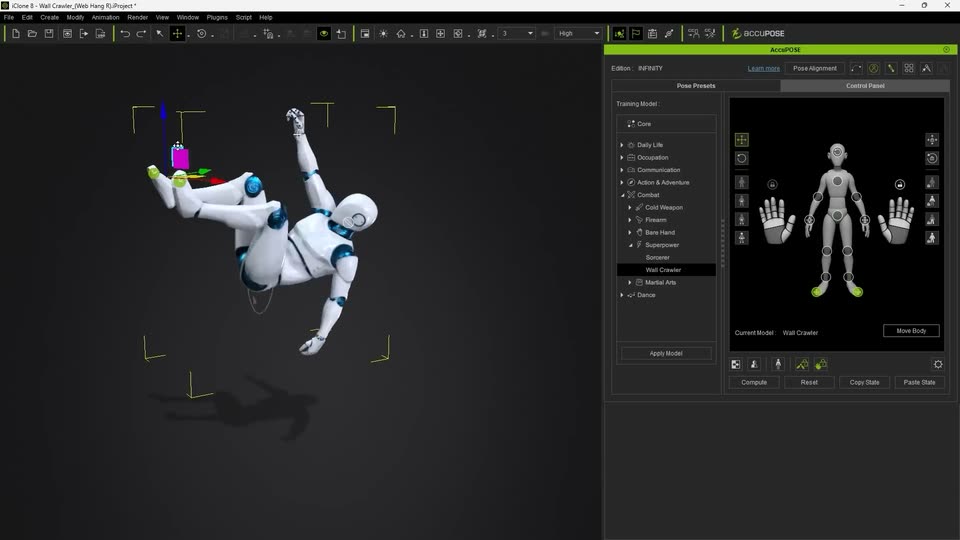
A 3D white robot with two blades and colored rig gizmos animates through combat poses in a modeling app viewport, the camera orbiting it, while the right-hand pose panel switches from Dual Weld to Wall Crawler and the figure inverts and falls.
Techniques: 3D mockup, Cursor demo
Camera: Static
A motion-capture software window plays a looping clip of two grey 3D boxers trading punches in a dark viewport, their reflections on the floor. A rig panel on the right shows the character skeleton and hands while the frame counter ticks up.
Camera: Static
A 3D rendered woman's face fills the right side against a black background, mirroring the mouth and eye movements of a smaller filmed inset of a white-haired woman at lower left. The accuFACE 2 logo slides in at the top left and holds still.
On-screen text: “accuFACE 2”
Techniques: 3D mockup, Split screen
Camera: Static
A 3D rendered head of a curly-haired woman fills the right of a dark frame, her eyes and lips moving to copy a smaller still photo of a real woman at left. The accuFACE 2 logo sits top left on a locked-off shot.
On-screen text: “accuFACE 2”
Techniques: Split screen
Camera: Static
A split screen shows a woman dancing in a tiled courtyard on the left and a gray 3D character mirroring her movements on the right. The text VIDEO MOCAP sits in the top left corner as both figures perform the same choreography.
On-screen text: “VIDEO MOCAP”
Techniques: Split screen, 3D mockup
Camera: Static
A 3D software window shows a gray female figure standing on a dark stage. A small inset of a camera rig on an orange floor slides in from the left with motion blur as a cursor rests on it. The scene panel lists objects at right.
On-screen text: “VIDEO MOCAP”
Techniques: Cursor demo
Camera: Static
A locked-off shot of a motion-capture software window. In the 3D viewport, a gray mesh dancer and a textured dancer mirror each other's moves before an orange curtain, the green VIDEO MOCAP logo held in the top-left corner.
On-screen text: “VIDEO MOCAP”
Camera: Static
Locked-off screen of a 3D app. In the viewport, a white clay figure in a spacesuit walks through a sci-fi doorway toward the camera, then two more clay figures sweep past in the near foreground. The left panel lists characters, props and lights.
On-screen text: “VIDEO MOCAP”
Techniques: 3D mockup
Camera: Static
A screen capture of a 3D animation tool shows three white clay character models in the central viewport, turning in place as the timeline plays. The dark interface lists a transfer list of lights and cameras in the left panel.
Camera: Static
The full application window of a virtual camera tool is shown, with a transfer panel on the left and a timeline below. In the 3D viewport a clay model of two hands holds a gray boxy device as the camera drifts around it and the playhead scrubs along the timeline.
Techniques: 3D mockup
Camera: Static
A screen recording of the iClone 8 interface fills the frame. The left panel shows the Unreal Live Link transfer list, while the 3D viewport displays two white mannequin figures on a gray platform as the virtual camera pans across the scene and the timeline plays.
Camera: Static
Locked-off screen capture of the iClone workspace. In the dark viewport, four grayscale 3D characters, including a penguin, stride forward in sync, while the Smart Motion panel on the right lists video clips marked Applicable and the timeline playhead advances.
Camera: Static
The iClone screen shows the Edit Motion Layer panel with a character rig and IK, FK tabs on the left. On the right, a gray 3D man in a wide stance raises his sword from low to high, colored gizmos attached to his hand.
Techniques: 3D mockup
Camera: Static
A 3D animation software window shows a gray clay warrior in a crouched pose on the right, sword raised with a colored gizmo at the hand, beside a rig editor panel with a humanoid joint map on the left. The arm and sword shift slightly as the motion plays.
Camera: Static
A 3D app viewport shows a gray rigged character in a wide stance, with a motion-layer panel on the left. The panel fades out as scene and lighting panels slide in on the right, then both clear to reveal the character seated in a dim lit room.
Techniques: 3D mockup, Morph
Camera: Static
The 3D app viewport fills the frame, showing a blue-walled room with a seated figure, lamp and TV. A spotlight gizmo with colored rotation arcs turns above the window while side panels list the scene and light sliders.
Techniques: 3D mockup
Camera: Static
The 3D editor's viewport shows a dim room at night with a moonlit window and a TV, while a spotlight gizmo at the roof edge rotates, redirecting its blue light cone into the room. The right-hand panel lists the scene's objects.
Camera: Static
The 3D software window shows a night living room in the viewport while the cursor drags a Falloff slider in the Modify panel, and the warm volumetric light cone on the floor shrinks in real time.
Techniques: Cursor demo
Camera: Static
The iClone 8 window fills the frame, a lighting preset grid on the left and a 3D female head in the viewport. A thumbnail highlight shifts down as a 'Starting a 64-bit' progress dialog pops up over the face.
Camera: Static
A CINE 8 window shows a left panel of lighting preset thumbnails beside a viewport of a woman's face. The face begins grainy under a green progress bar, then resolves to a clean render as the bar disappears.
Camera: Static
A locked-off screen of a 3D app shows a plugin panel on the left with a tree view and a grid of lighting preset thumbnails, one highlighted in green. On the right, a viewport holds a neutral 3D female face with a soft rim light on the hair.
Camera: Static
A screen recording of a 3D software interface holds still. The left panel lists a scene tree and a grid of lighting preset thumbnails, while the right viewport displays a female head lit in magenta and blue against a gradient backdrop.
Camera: Static
A dark interface shows a column of lighting-preset thumbnails on the left and a 3D female head in the viewport on the right. The green selection box moves down the list, and the head relights as the background shifts from gray to black.
Camera: Static
A screen capture of a 3D app: a cursor hovers over a glass material thumbnail in the left library panel, then a green glass sphere pops into the viewport beside a white clay dragon, and the material is applied to the dragon's eye.
Techniques: Cursor demo
Camera: Static
A 3D modeling app window fills the frame. The right viewport shows a green glass dragon figurine on a white surface against a white disc backdrop, while the left panel lists glass material thumbnails. A cursor hovers over one thumbnail. The view holds static.
Camera: Static
Inside a 3D rendering app, a glass dragon figurine sits in the right viewport while a cursor clicks material swatches in the left panel, swapping the dragon's tint from green and amber to blue and violet.
Techniques: Cursor demo
Camera: Static
A dark 3D tool interface fills the frame, its viewport showing a draped pink fabric. A cursor leaves the material list on the left and moves onto the cloth, where two green selection boxes snap around it.
Techniques: Cursor demo
Camera: Static
A rendering app window shows a fabric material library on the left and a draped cloth on the right. The cloth in the viewport shifts from smooth purple silk to a textured white weave while the panels stay still.
Camera: Static
A 3D software interface fills the frame, its main viewport showing a draped purple fabric beside a left panel of material thumbnails. A cursor drifts across the viewport as a small green selection box with a 1 badge disappears from the left edge.
On-screen text: “Modity”
Techniques: Cursor demo
Camera: Static
A screen capture of 3D software shows two gray clay character models facing each other in the viewport while a box prop is selected, scaled and repositioned between them. The AI STUDIO logo reveals in the top-left corner over the interface.
On-screen text: “AI STUDIO”
Camera: Static
A gray clay previs of two 3D characters in the software viewport wipes from right to left into a fully rendered medieval tavern scene. The rendered mustached character then gestures with his hands while speaking.
On-screen text: “AI STUDIO”
Techniques: Masking
Camera: Push in
A dark AI video editor fills the frame. A cursor opens a character picker, selects two actor portraits, then opens a file browser to add image references. The reference strip and prompt tags grow with each pick while the central preview holds the AI STUDIO mark.
On-screen text: “AI STUDIO”
Techniques: Cursor demo
Camera: Static
Close-up of a woman in a feathered pirate hat and beaded dreadlocks, scowling and speaking against a blurred sea. She holds an angry stare, then the frame whips into a wider shot as she points at a man in a patterned coat.
On-screen text: “AI STUDIO”
Camera: Static
On a ship deck, a person with dreadlocks and a tricorn hat points a sword at a man in a powdered wig and ornate coat. The man's eyes widen, then he swings the blade and stumbles backward as the camera tracks his retreat.
On-screen text: “AI STUDIO”
Camera: Static
A 3D software window fills the frame. A left panel lists posed character thumbnails while the viewport shows a woman seated on a bench. A small bordered preview window glides across the viewport as more seated figures populate the scene.
Camera: Static
The 3D editor screen shows a left panel of posed-character thumbnails and a viewport with figures on a gray bench. The chrome drops away to a split view: the same figures on a beige sofa in a sunlit living room at left, and in a black studio at right.
On-screen text: “AI STUDIO”
Techniques: Split screen, UI zoom
Camera: Push in
A wide shot of a sunlit living room: a group of adults and two children sit on a cream sectional, two women clink wine glasses, a man gestures mid-conversation, another holds a toddler while a small girl in a pink skirt stands by the coffee table.
On-screen text: “AI STUDIO”
Camera: Static
A dark 3D software screen shows a grid of vehicle thumbnails on the left and a viewport with a motorcycle rider and a tank. The interface panels fade out as the viewport expands to a full-frame render of the motorcycle and tank in a misty forest.
On-screen text: “AI STUDIO”
Techniques: UI zoom
Camera: Static
A red, white and blue sportbike rider in matching leathers pops a wheelie on a wet road while a tank fires behind him, smoke and debris filling the air. The camera pushes in past the action to a tight, blurred close-up of the helmet and fairing.
On-screen text: “AI STUDIO”
Camera: Push in
A red and black robot stands in a misty forest as metal shards and a car wheel burst outward. The mech reconfigures from a tilted, vehicle-like pose into an upright stance, debris scattering around it.
On-screen text: “AI STUDIO”
Techniques: 3D mockup, Particles, Morph
Camera: Pull out
A red robot with car wheels on its shoulders strides down a wet road through a foggy pine forest, kicking up spray. The camera tracks it at a low angle as it advances. A white AI STUDIO logo holds in the top left corner.
On-screen text: “AI STUDIO”
Techniques: 3D mockup
Camera: Pull out
A 3D animation software interface is displayed, showing a panel of giraffe thumbnails on the left. The view zooms into a 3D giraffe model in the dark viewport on the right.
Techniques: 3D mockup, UI zoom
Camera: Static
A giraffe stands in a dry savanna dotted with zebras and wildebeest. The frame tilts up along its long neck to frame its head against a cloudy blue sky, a bird drifting past. The AI STUDIO logo holds in the top left.
On-screen text: “AI STUDIO”
Camera: Pan
A giraffe's long neck and head rise against a blue sky with soft clouds, birds drifting past. A radial blur zoom punches in on the head, streaking the clouds outward. The AI STUDIO mark holds static in the top left.
On-screen text: “AI STUDIO”
Techniques: Speed ramp
Camera: Pan
A 3D giraffe neck rises vertically against a starfield. The head begins motion-blurred as stars streak radially outward, then sharpens into focus. A glowing blue planet horizon fades in along the bottom edge. A white AI STUDIO logo holds the top-left corner.
On-screen text: “AI STUDIO”
Techniques: Speed ramp
Camera: Pull out
A 3D giraffe lunges toward the camera, mouth wide open, against a starfield and Earth's glowing blue horizon. A dark circular vignette closes in around the frame as the animal approaches. A white AI STUDIO logo with a star icon sits in the top-left corner.
On-screen text: “AI STUDIO”
Techniques: Masking
Camera: Pull out
A man leans over a diner table toward a seated blonde woman holding a coffee cup, while a small grayscale 3D render of the same pose sits in the corner. The camera pushes in on her face, then cuts to a white robot striking a dynamic pose on gray.
On-screen text: “AI STUDIO”
Techniques: Split screen
Camera: Push in
A white humanoid robot with black joints climbs the corner of a tall gray pillar, wrapping its limbs around the edge as it moves, set against a dark backdrop. The AI STUDIO wordmark holds static in the top left.
On-screen text: “AI STUDIO”
Techniques: 3D mockup
Camera: Static
A comic-style climber in a green jacket and brown pants ascends a gray rock wall against a blue sky, his limbs moving upward, then the frame cuts to a neon city facade with a glowing cyan elevator door and pink vertical signage.
On-screen text: “AI STUDIO”, “AI generated”
Camera: Pull out
An illustrated man in a yellow jacket rappels down the corner of a tower past a glowing cyan panel. The camera pulls back to reveal a neon city of pink and cyan signs. The AI STUDIO logo sits top-left and an AI generated tag bottom-right.
On-screen text: “AI STUDIO”, “AI generated”
Camera: Pull out
The software viewport shows two humanoid 3D figures, a blue one and a pink one, standing back to back on a dark floor, framed by a scene list and timeline. The view then zooms in on the pink figure's head and shoulders.
Techniques: UI zoom
Camera: Static
A full-screen view of the AI STUDIO editor frames a low-poly mannequin head in the central viewport, its surface turning from pink to blue while the camera drifts around it. A scene list fills the left panel and a green timeline runs along the bottom.
Camera: Static
A dark interface shows a grid of character avatars. A cursor clicks an avatar, then the Select button, adding the chosen actors to the left panel. The AI STUDIO logo stays in the top-left corner.
On-screen text: “AI STUDIO”
Techniques: Cursor demo
Camera: Static
A dark AI Studio interface with a left control panel and a center 3D viewport. The viewport transitions from two colored 3D mannequins in empty space to a rendered cinematic shot of a couple on a stormy seaside promenade, while a cursor selects figures in an Assign Actors dialog.
Techniques: Cursor demo
Camera: Static
A dark software interface displays a left panel with actor avatars and a text prompt, a central canvas showing a cinematic image of a couple on a pier, and a right history panel. A large white logo and text are overlaid in the top left.
On-screen text: “AI STUDIO”
Camera: Static
A man and woman stand with their backs to camera on a wet pier, facing a stormy sea and city skyline. A small inset bottom left shows blue and pink 3D mannequins on a dark panel; the AI Studio logo sits top left.
On-screen text: “AI STUDIO”
Camera: Static
A close-up of a crying blonde woman fills the frame against a blurred outdoor background. A small inset at the lower left shows a pink 3D mannequin head, and the white AI STUDIO logo sits in the top left corner.
On-screen text: “AI STUDIO”
Camera: Static
A man in a dark jacket turns from profile to face the camera against a blurred city backdrop. A small inset in the lower left shows a white faceless robot head. The AI STUDIO logo sits in the top left corner.
On-screen text: “AI STUDIO”
Camera: Static
A man in a dark coat and a woman in a tan coat embrace on a seawall as waves crash against a foggy city skyline. A small 3D clay preview of the same pose sits in the lower left while the camera slowly pushes in.
On-screen text: “AI STUDIO”
Camera: Push in
A man and woman embrace on wet stone in front of a roaring waterfall beneath dark storm clouds. The camera pushes in as rising mist swallows the frame, ending on the white spray.
On-screen text: “AI STUDIO”
Camera: Push in
A solid black frame holds for the brief duration, serving as a cut or fade point.
Camera: Static
A 3D beach at sunset, framed by palm trees, resolves through a curtain of falling water droplets. The shot opens dark and blurred on the rippled sand, then brightens and racks focus to the calm sea and the low sun on the horizon.
Camera: Static
A low-angle view of a tropical cove at sunset, palm trees leaning in from both edges, a bright sun sitting on the horizon over calm turquoise water. The camera glides slowly forward across textured sand toward the water, layers of trees and rocks drifting past at different speeds.
Techniques: Parallax
Camera: Static
A 3D animated man with dark hair and a beard holds the camera selfie-style on a sunset beach with palm trees. He grins and talks to the viewer, his face and head moving expressively, while white caption lines swap at the bottom.
On-screen text: “With iClone Personal!”, “You can seriously control AI however you want”, “this is insane!”
Camera: Static
A 3D man on a sunset beach grins with open mouth, blurred by a fast whip move, then a green spotted turtle holds a selfie pose with arms stretched toward the camera as a caption appears at the bottom.
On-screen text: “this is insane!”, “Your account even comes with 500 free Al points”
Camera: Static
A 3D spotted turtle grins at the camera on a sunset beach, flippers stretched forward like a selfie. A white caption sits still at the bottom, then the frame lurches forward with motion blur as the line changes.
On-screen text: “Your account even comes with 500 free Al points”, “so you can jump in and start creating right away!”
Camera: Pan
A 3D animated blonde woman in a pink shirt films a selfie on a sunny palm beach, smiling and talking to the camera with a slight handheld shake. A green parrot rises into frame over her shoulder.
On-screen text: “Your account even comes with 500 free Al points”, “so you can jump in and start creating right away!”
Camera: Pan
A 3D blonde woman in a pink shirt takes a selfie on a sandy beach, a green dragon grinning behind her. The scene cuts to a bearded man in a dark suit taking a selfie, a shadowy figure looming behind him, palm trees in the background.
On-screen text: “so you can jump in and start creating right away!”
Camera: Static
A 3D-rendered bearded man in a teal striped shirt holds the camera selfie-style on a sunset beach with palm trees. The shaky handheld shot steadies as he talks to the lens, then he grins and raises a thumbs up.
On-screen text: “Everything's ready!”, “Just go for it and bring your ideas to life.”
Camera: Push in
A 3D rendered close-up of a man's face fades up from black behind a centered white lockup of the iClone and AI STUDIO wordmarks. The face stays still and dimly lit while the logos brighten to full white over the dark background.
On-screen text: “Just go for it and bring your ideas to life.”, “iClone®”, “AI STUDIO”
Camera: Static
A dark close-up of a rendered humanoid face, one eye white, the other brown, fills the frame. The iClone and AI STUDIO lockups sit in white across the cheek, static for the whole shot.
On-screen text: “iClone®”, “AI STUDIO”
Camera: Static
A black card holds the iClone PERSONAL logo lockup with the bold white line FREE for all users Now, which slides into place. At 4 seconds a lime green bar reading 500 FREE AI POINTS pops in below as the lockup shifts up.
On-screen text: “FREE for all users Now”, “500 FREE AI POINTS”
Techniques: Kinetic type
Camera: Static
The REALLUSION logo rests centered on a dark navy field, then the frame cuts to a card where a white “iClone PERSONAL” headline and a red “FREE for all users Now” line slide in above a still “500 FREE AI POINTS” caption and the small logo.
On-screen text: “iClone PERSONAL”, “FREE for all users Now”, “500 FREE AI POINTS”
Techniques: Kinetic type
Camera: Static
Two white REALLUSION logos sit side by side on a dark navy background. The right logo slides away as a thin circle draws around the left one, the word Subscribe fades in below, and two empty rounded video slots appear on the right.
On-screen text: “Subscribe”
Camera: Static
A circular REALLUSION badge with the word Subscribe below it sits left on a dark navy background, two empty rounded rectangles on the right. A white ring pulses outward from the badge in a repeating ripple while the frame stays locked off.
On-screen text: “Subscribe”
Camera: Static