1:35

Zach Roseman - We just killed cold email: Introducing Draftboard. The world’s first
Draftboard · Apr 2026
Modal’s 1:18 launch film runs 27 scenes, about 2.9 s each. The product is on screen from the first frame and 3 features are revealed, with social proof. The call to action lands at 1:13 (93% in), over a voiceover. The video alternates locked-off talking-head shots against a brick wall with fast, scrolling fly-throughs of the notebook UI on a mint-green field, each feature announced in one line of narration and then proven by a camera move through the interface. Its signature moves are the zoom-and-slide transitions on browser windows, crossfading text overlays, and the isometric green logo that bookends the launch.
Is this your launch? to your site or press kit.
Draftboard · Apr 2026
HeyClicky · Consumer · Jul 2026
A man in a black Modal t-shirt sits at a desk against a brick wall with a framed poster and plants, speaking to camera. A white name caption fades in at the top left while the frame stays locked off.
On-screen text: “Eric Zhang”, “Founding Engineer”
Camera: Static
On black, a green isometric mark of three stacked slabs scales up, then the wordmark Modal Notebooks appears to its right, Modal in white and Notebooks in green, on a locked-off frame.
Camera: Static
A dark browser window of the Modal Notebooks page slides up into the center of a green background, covering a lighter copy of the same page. A cursor rests on a Try this example button in the right card.
Camera: Pan
A browser window shows a dark notebook interface with a code editor and a left settings panel. The view scrolls upward, sliding the document preview up to reveal a new code cell and a command bar at the bottom.
On-screen text: “Slack Community”, “+”, “howard-modal-labs”
Camera: Static
A flat browser window on a green gradient shows a dark notebook app. A left sidebar lists kernel and compute settings. A white page in the center displays OCR text with blue, green and purple highlight boxes. The view stays static.
Camera: Static
A man in a black Modal t-shirt sits at a wooden desk, speaking directly to a static camera. Behind him a brick wall holds a framed poster, a green chair, potted plants, and a white cabinet with a camera on top.
Camera: Static
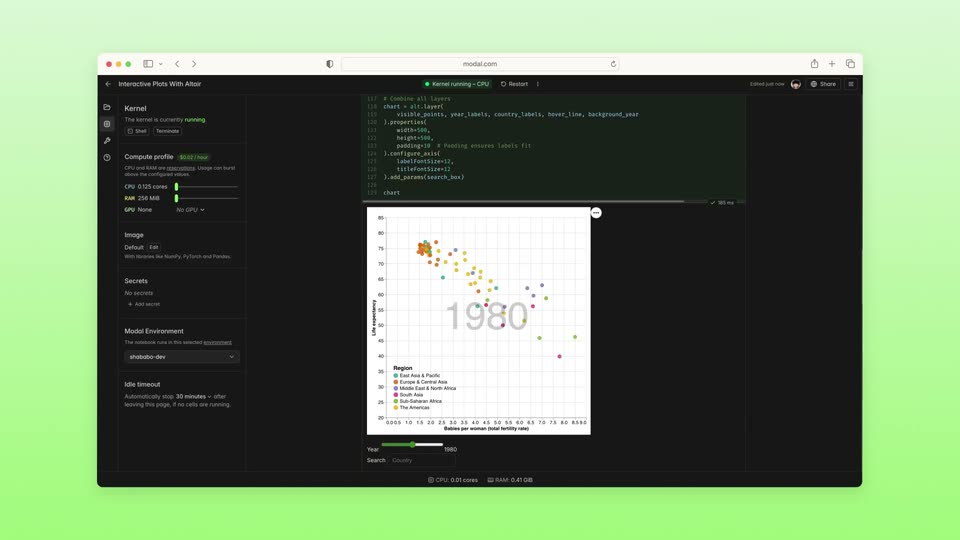
A browser window on a mint green background shows the Modal app: a code panel above an interactive scatter plot with a large 1980 label. The points re-shuffle as the year updates, a cursor hovers the Share button, then the window scales down to a smaller centered frame.
On-screen text: “modal.com”
Techniques: Cursor demo, UI zoom
Camera: Push in
A dark notebook interface shows code cells and an audio player under the heading “Audio transcription”. A white cursor glides to the player and clicks it, the play icon flipping to pause as the clip begins.
Techniques: Cursor demo
Camera: Push in
A dark notebook interface shows a code cell above a large purple heatmap with cyan diagonal bands and a red step line. The view scrolls down, revealing a table of word timings and a Conclusion heading with a green Run button.
Camera: Pull out
A browser window on a green gradient background shows the Modal Notebooks interface with a white callout pointing at the notebook title, then the view zooms in to the left panel where the compute profile sliders sit.
On-screen text: “Parse Documents with dots.ocr”
Techniques: UI zoom
Camera: Push in
A dark browser window shows the Modal notebooks interface. A cursor drags the RAM slider from 256 MiB to 32 GiB, then opens the GPU dropdown and selects Nvidia H200 as the price ticks up to $5.59/hour. The camera pulls back to the full window while the kernel initializes.
Techniques: Cursor demo, UI zoom
Camera: Static
A dark notebook interface sits in a browser window over a light green background. A green progress bar in the left Kernel panel fills as a Shell button fades in, while a cursor hovers beside the GPU row and the document text stays static.
Camera: Static
A man in a black t-shirt sits at a wooden table, hands clasped, speaking to camera. The locked-off frame holds a brick wall behind him with potted plants, a green chair, and a framed poster. A laptop edge sits in the foreground right.
Camera: Static
A browser window displays a dark notebook page; overlapping text lines crossfade and slide into place, then the frame zooms to the chapter title and a purple-and-yellow spin grid. It cuts to a presenter in a black shirt at a desk against a brick wall, hands clasped.
Techniques: UI zoom
Camera: Push in
A man in a black t-shirt sits at a wooden desk, hands clasped, speaking to the camera. Behind him a brick wall, a framed poster, potted plants and a laptop rest on a white cabinet. The locked-off frame stays static.
Camera: Static
Two code-editor browser windows sit side by side on a green field, each crowned by a circular face avatar. On the right, Python code types itself line by line under a Protein Visualizer heading; a scatter-chart preview fades in at the bottom left.
Techniques: Split screen
Camera: Static
Two Jupyter notebook windows sit side by side on a mint background, each with a circular webcam avatar peeking over the top. The notebooks scroll through code and colorful protein ribbon models; a cursor types in the right window, then the left window enlarges to reveal its title.
Techniques: Split screen, Cursor demo, UI zoom
Camera: Static
A man in a black T-shirt sits at a wooden table against a brick wall, talking to camera and gesturing with his hands. A framed poster and potted plants sit on a shelf behind him. A white Modal caption fades in at the bottom center.
On-screen text: “Modal”
Camera: Static
A dark notebook interface in a browser window zooms into the left file panel. A cursor hovers over folders, opening assets then showcase, and the list scrolls down to reveal three green image chips.
Techniques: UI zoom, Cursor demo
Camera: Push in
A dark notebook screen shows a file tree on the left and a markdown document with a git code block on the right. The frame zooms out from a tight crop to reveal the full layout and the heading, while a cursor arrow drifts across the page.
Techniques: UI zoom
Camera: Pull out
A dark Jupyter notebook in a browser window on a green gradient background, titled Parse Documents with dots.ocr, shows a file list on the left and a code cell on the right; the view settles from a brief overlap of the previous screen.
Camera: Pull out
A man in a black t-shirt with a white Modal logo sits at a desk, speaking to the camera. A brick wall behind him holds a framed poster, potted plants, a green chair and a white cabinet, with a laptop edge in the lower right. The frame is locked off.
Camera: Static
A browser window on a green background shows the Modal dashboard. A cursor hovers over a green bar chart, pulling up a tooltip, then clicks the Metrics tab and the page switches to a grid of line charts.
Techniques: Cursor demo
Camera: Static
A dark analytics dashboard fills a browser window on a pale green background. The view scrolls slightly through a grid of line graphs while a white cursor hovers over the middle charts.
Techniques: Cursor demo
Camera: Static
A man in a black Modal shirt sits at a desk against a brick wall and speaks. White name labels with small icons fade in on the left, then the shot cuts to a black end card showing the green Modal logo and a URL.
On-screen text: “SUNO”, “Lovable”, “ramp”, “modal.com/notebooks”
Techniques: Kinetic type
Camera: Static
On a black background, the green Modal mark of two 3D blocks rotates slowly in place above the centered URL modal.com/notebooks. The frame stays locked off as the logo turns and settles into its final angle.
On-screen text: “modal.com/notebooks”
Camera: Static
On a black background, a green isometric mark splits into two separate cubes while the white wordmark Modal appears to its right, then the lockup holds on a locked-off frame.
Techniques: Morph
Camera: Static