1:38
Meet Coda
Coda · Feb 2022
Miro’s 1:18 launch film runs 46 scenes, about 1.7 s each. The product shows up at 0:18 and 1 feature is revealed, with social proof. There is no explicit call to action; a voiceover carries the film. The video cuts between live-action B-roll, glossy 3D product renders and Miro UI mockups on a dotted canvas at a steady 128 BPM pulse, moving from a problem stat to a logo reveal, feature demos and customer results. Signature moves include yellow highlight bars for numbers, 3D-tilted panels that flatten into the canvas, purple hand-drawn arrows linking cards, and a recurring four-pointed star that punctuates every Miro AI moment.
Is this your launch? to your site or press kit.
Films whose music sounds like this one, voice left out
Insta360 · Electronic dance music
DJI · Electronic dance music
Finto · Upbeat electronic
A dark circular showerhead face sits centered on a pale tiled wall, a hose shadow curving below. It switches on and a radial burst of water jets sprays outward in every direction, flooding the frame with bright spray.
Camera: Push in
On a near-black background, white uppercase text builds in the center. Overlapping letters in the first frame resolve into two centered lines reading the full sentence, then hold. The frame stays locked while the type settles.
On-screen text: “IT WILL REMEMBER WHAT ACTUALLY”, “MADE IT OUT THE DOOR”
Techniques: Kinetic type
Camera: Static
Three vertical panels on a black background: a white sneaker with teal sole accents rotates on the left, a gold ring spins upright on a reflective amber surface in the center, and a smartphone lock screen with an orange circle graphic sits on the right.
Techniques: Split screen
Camera: Static
A slow push-in glides forward through a dense open-plan office of cubicles and seated workers. A yellow highlighter bar pops into the center with the headline, then a second bar scales in beneath it. A source caption holds at the bottom edge.
On-screen text: “Miro's Momentum At Work Survey, Q2 2025”, “3 HOURS OF ADMIN WORK”, “FOR 1 HOUR OF ACTUAL WORK”
Techniques: Kinetic type
Camera: Push in
A laptop on a desk shows a project dashboard with a teal chat panel and a task table, framed by a blurred office window and a coffee cup. Large stat text overlays the screen, the lower line scaling up as it lands.
On-screen text: “Miro's Momentum At Work Survey, Q2 2025”, “3 HOURS OF ADMIN WORK”, “FOR 1 HOUR OF ACTUAL WORK”
Techniques: Kinetic type
Camera: Push in
A laptop on a desk, framed by a blurred window and a coffee cup, displays a whiteboard grid of dark cards each stamped with an AI logo. The orange selection border jumps from one card to the next while a cursor hovers over the grid.
Techniques: 3D mockup, Cursor demo
Camera: Static
A laptop sits on a desk beside a coffee cup, its screen showing a project app with a chat list and a status grid. The frame holds still as a cursor drifts across the empty grid rows.
Techniques: 3D mockup
Camera: Static
A laptop on a desk displays a project board with a grid of eight dark tiles, each bearing an AI logo. The interface zooms into the centered grid as the side panels fade, then the camera pulls back to frame the whole laptop.
Techniques: 3D mockup, UI zoom
Camera: Pull out
A laptop in 3D perspective on a desk shows a white screen with a 3x3 grid of black AI tiles. The tiles tumble down, stack along the bottom edge, then drop off, clearing the screen as a green Charlie cursor bubble drifts to center.
Techniques: 3D mockup
Camera: Push in
On a white field, black rounded tiles bearing the letters AI in mixed fonts drift and rotate across the frame while a teal Charlie speech bubble floats among them. One tile flashes gold at the center as the others scatter outward.
Camera: Static
A glowing yellow dot with a teal Charlie name tag and a small teal cursor triangle sits on a white field; two tilted black AI chips drift out of frame as the view zooms in, revealing the rounded card edges.
On-screen text: “Charlie”
Camera: Static
On a flat yellow field, a black logo in a glowing rounded square sits at the center, ringed by two larger concentric glowing square outlines. A light blue speech bubble labeled Charlie with a small cursor arrow floats to the right, scaling slightly.
On-screen text: “Charlie”
Camera: Static
A bright yellow field of concentric rounded squares expands outward and darkens to olive while the yellow brand logo holds center. A small teal “Charlie” chat bubble scales and slides off the right edge.
On-screen text: “Charlie”
Camera: Static
A yellow rounded-square icon with a black double-chevron mark sits centered on a near-black field, flanked by thin vertical lines at the frame edges. The icon scales up to fill more of the frame as the side lines drop out.
Camera: Static
A yellow rounded-square logo with a black M mark sits centered on a dark background and scales up to fill the frame.
Camera: Static
A white Miro board fills the frame with scattered cards: a colored pie chart, sticky notes, task cards and avatars. A dark pill reading “Exploring ideas...” hovers center above a purple “Miro AI” button, a purple pointer arrow nearby. The camera slowly pushes in.
Camera: Push in
A collage of workspace cards, 3D character stickers and avatar heads drifts gently around a central dark loading bar. The bar text switches from exploring to generating as a white splash shape blooms behind it.
Techniques: Masking
Camera: Push in
A white four-pointed star at center morphs between a sharp star and a soft rounded blob, flanked by two smaller stars at upper right and lower left. The shape pulses in and out while the purple gradient shifts lighter at the corners.
Techniques: Morph
Camera: Static
A white card with a glowing purple edge settles into frame, a purple gradient circle with a white four-pointed star icon at its top left. Two thick and three thin lavender bars fade in below as placeholder text.
Camera: Static
A white report card with a purple sparkle icon slides in from the right and sharpens into place. Around it, rounded name pills in teal, green and red scale in, each paired with a small cursor arrow.
Camera: Static
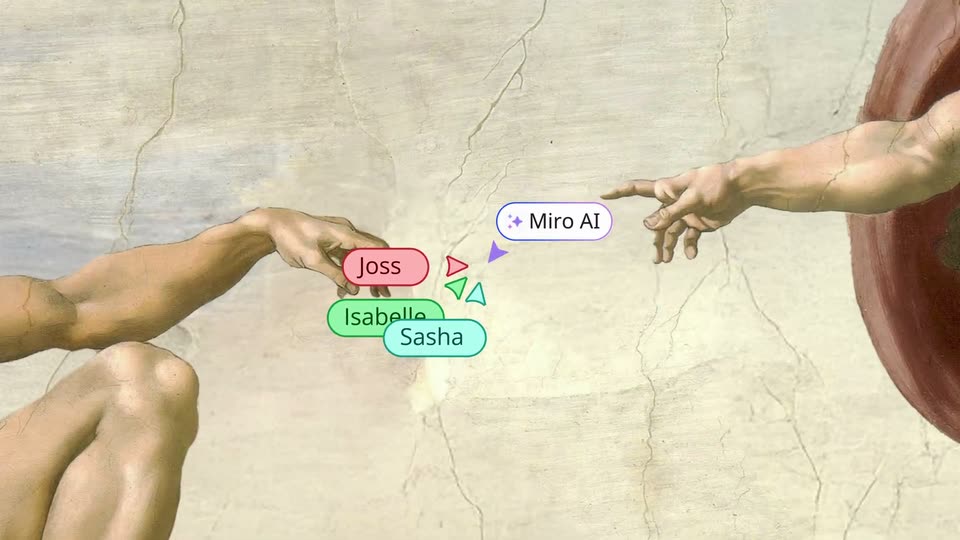
The camera slowly zooms in on the two outstretched hands of the Creation of Adam fresco. Colored name pills, Joss, Isabelle, Sasha, Miro AI, with small pointer triangles drift and converge toward the gap between the fingers.
On-screen text: “Joss”, “Isabelle”, “Sasha”, “Miro AI”
Techniques: Kinetic type, Parallax
Camera: Push in
The two reaching hands from the Creation of Adam fill the frame. Pink, green and teal name pills scale in beside the left hand, a white Miro AI pill slides in beside the right, and small triangles point between the groups.
On-screen text: “Joss”, “Isabelle”, “Sasha”, “Miro AI”
Techniques: Kinetic type
Camera: Static
A Miro dialog titled Create Sidekick sits center screen as the name field fills in and a model list panel slides in from the right. The dialog then shifts down-right and two collaborator tags pop in beside a small pink and purple sparkle burst.
Techniques: Particles
Camera: Pan
A Miro whiteboard shows an open Create Sidekick dialog at the bottom. The view zooms out to reveal a dotted canvas scattered with colored pill labels for people and AI sidekicks, each tagged with a small cursor triangle.
Techniques: UI zoom
Camera: Static
A dotted-grid whiteboard holds name tags, role labels and prototype cards linked by purple arrows. The view zooms in and reframes onto a device-list card, where a purple arrow points to a diagram card as its flowchart nodes fill in.
Techniques: UI zoom
Camera: Push in
A white card tilted in 3D perspective displays a flowchart diagram with a prompt bar and colored nodes, a purple hand-drawn arrow points at it from the left, then the card zooms and slides out to the left over a dotted grid.
Techniques: 3D mockup
Camera: Push in
On a dotted canvas, a flowchart card and two purple arrows point to a table card that fades in. The view then zooms in on the table as its rows and a Run action populate.
Techniques: UI zoom
Camera: Push in
On a dotted light-gray grid, a stack of product panels slides upward: a prompt bar with a Run button and a Table card rise off the top, exposing a project board with a To do task list beside a September–October calendar timeline of yellow event chips. Two hand-drawn purple arrows point into the panels from the left and scroll out of frame.
Techniques: Parallax
Camera: Pull out
A dotted-grid canvas zooms out from a single task board to reveal a wider workspace holding flowcharts, a mobile app mockup, and connected panels.
Techniques: UI zoom
Camera: Pull out
A wide dotted whiteboard canvas holds app mockups, flowcharts and a feedback document, then the camera zooms and reframes onto the roadmap table at lower right, where a green Andrew cursor tag pops in beside a row.
Techniques: UI zoom
Camera: Push in
A task table in 3D perspective sits on a dotted background while a purple arrow curves in from a flowchart card on the left. A green Andrew tag with a cursor hovers over one row. The camera pans left to bring the flowchart card fully into frame.
Techniques: 3D mockup
Camera: Pull out
A tilted 3D canvas of connected panels, starting on a close-up of a roadmap table with a green Andrew annotation, then pulling back to reveal three rows of prototype, flowchart, and report cards linked by purple arrows.
Techniques: UI zoom, 3D mockup
Camera: Pull out
A man in a maroon shirt steps through a white front door, bag over his shoulder, as a boy in a striped shirt runs to greet him. A girl in a yellow top smiles from behind. Bright white hallway in daylight.
Camera: Static
Over-the-shoulder view of a person at a wooden table, both hands gesturing as they speak to a laptop screen showing a nine-person video call grid. The bright office background stays soft and out of focus.
Camera: Static
A Miro board zooms out from a prototype frame of four mobile app screens, revealing a fifth screen, a wide yellow note, and teammate cursor labels (Manny, Andrew, Joanne) hovering over the mockups.
Techniques: UI zoom
Camera: Static
A Miro canvas with a dotted grid pans right, sliding past a phone mockup and colored name-tagged cursors to settle on a flowchart card titled Diagram, where blue, cyan and pink multiplayer cursors hover over the nodes.
Camera: Pan
A bearded man with round glasses sits at a laptop in a warm home office, speaking while looking at the screen. The WebMD logo and the white headline GOT PRODUCT SHIPPED 60% FASTER overlay the left, with FASTER sliding in.
On-screen text: “WebMD”, “GOT PRODUCT SHIPPED 60% FASTER”
Techniques: Kinetic type
Camera: Static
A 3D-rendered white house with a dark roof stands on a green lawn under a blue sky, framed by leafy trees. The Keller Williams logo sits top-left while the headline resolves in the center, the 50% set in a yellow pill.
On-screen text: “kw KELLERWILLIAMS”, “GOT TO MARKET 50% FASTER”
Techniques: Kinetic type
Camera: Push in
A black-background macro shot of an iced drink as a stream of coffee pours onto the foam and ice, sending up a fine spray. White italic text overlays the glass, scaling in to read PEPSICO GOT TO LAUNCH 3.5X FASTER, with the multiplier set in a yellow pill.
On-screen text: “PEPSICO”, “GOT TO LAUNCH 3.5X FASTER”
Techniques: Kinetic type
Camera: Static
Blue light streaks stream through a dark tunnel toward the viewer. The Catena-X logo sits top left as the headline 3.5X FASTER gives way to GOT 200 HOURS OF PRODUCTIVITY BACK, with 200 set in a yellow rounded box.
On-screen text: “3.5X FASTER”, “GOT 200 HOURS OF PRODUCTIVITY BACK”
Techniques: Parallax
Camera: Static
A white prompt card with SUGGESTION and PROMPT tabs, a placeholder line and four suggestion chips sits on a light gray dotted grid. The frame zooms in as the card scales up toward center, its Generate button growing largest. A black pill button with a sparkle icon anchors the card's right edge.
On-screen text: “Catena-X”, “GOT”, “200HOURS OF”, “PRODUCTIVITY BACK”
Techniques: UI zoom
Camera: Static
A 3D-tilted product panel with a prompt field and suggestion chips sits on a dotted grid. The camera tilts down to reveal a second document panel below, while pink and yellow name tags float at the right edge.
On-screen text: “Joss”, “Sasha”
Techniques: 3D mockup
Camera: Pull out
Two document panels and a command bar float in 3D over a dotted grid, tilted at an angle. Purple nodes join them with a curved blue line, while yellow and pink name tags and a circular user avatar sit beside. The panels ease toward a flatter, front-facing view.
Techniques: 3D mockup
Camera: Pull out
A dotted Miro board fills the frame, camera glides across linked cards: documents, a flowchart, app screens and code, with cursors named Lee and Karen. The board shrinks to the edges as the giant black headline GET GREAT DONE lands in the center, a soft purple glow blooming behind it.
On-screen text: “GET GREAT DONE”
Techniques: UI zoom, Kinetic type, Light sweep
Camera: Pull out
Bold black type stacks three lines, GET, GREAT, DONE, on a flat yellow field, with a small four-point spark and a rounded app icon below. The middle word GREAT scales while the frame stays locked.
On-screen text: “GET”, “GREAT”, “DONE”
Techniques: Kinetic type
Camera: Static
A dark screen shows stacked white text reading 'GET GREAT DONE' with a yellow star. The word 'GREAT' scales up as the Miro logo below fades in and holds.
On-screen text: “GET”, “GREAT”, “DONE”, “miro”
Techniques: Kinetic type
Camera: Static