1:51

akash - We’ve raised 25M to build the world’s first Personal Intelligence. I
Vellum · B2B · May 2026
Microsoft’s 0:49 launch film runs 23 scenes, about 2.2 s each. The product shows up at 0:13 and 4 features are revealed. There is no explicit call to action. The video interleaves live-action top-down desk flat-lays with 3D dioramas, using a rolling marble as a cursor that triggers each writing fix at a brisk pace. Its signature moves are the torn paper word slips that materialize into UI corrections and the bright desk props that keep every app inside the same playful set.
Is this your launch? to your site or press kit.
Vellum · B2B · May 2026
Summer Engine · Nov 2026
HyperFrames · Jul 2026
Films whose music sounds like this one, voice left out
Claude · Electronic, chiptune, synthwave
Anthropic · Electronic, Lo-fi Hip-hop, Vaporwave, Funk, Disco
Origami · Electronic
A peach translucent box overflows with small paper slips, each printed with a single tone word such as casual, cordial or conversational. It rests on a folded yellow towel next to a white card with a blue corner and a white pen with a yellow cap.
Camera: Static
A tablet lies flat on a two-tone white and blue surface, ringed by yellow, pink and gray geometric props. Its screen shows a browser with open tabs and a bookmark row. The top-down angle holds steady with a slow drift.
Techniques: 3D mockup
Camera: Static
A glossy blue sphere rolls right across a row of small white flip tiles, turning each one over to reveal a word. The camera then pulls back to show the full 3D browser window with LinkedIn, Word, and Outlook tabs above a LinkedIn page.
Techniques: 3D mockup, UI zoom
Camera: Static
Top-down desk view: a browser window open on LinkedIn sits on an orange mat while a torn paper strip with typewriter text and a blue marble slide right across the gray notebook above it.
Camera: Static
Top-down flat lay of a white desk holding a red notebook, a yellow-capped pen and a gray perforated metal strip. A black serif headline types on in the center with a red zigzag underline, while small gray letters assemble in the top-right corner.
On-screen text: “Bring you're”, “ideas to”, “B”, “I”, “ideas to life.”, “U”
Techniques: Kinetic type
Camera: Pan
On a locked-off 3D set, a blue ball rolls through white slats that flatten to reveal a short message, then it cuts to a top-down Outlook layout where 3D shapes float around a half-typed word.
On-screen text: “B”, “Bring you're”, “ideas to life.”
Techniques: 3D mockup, Morph
Camera: Static
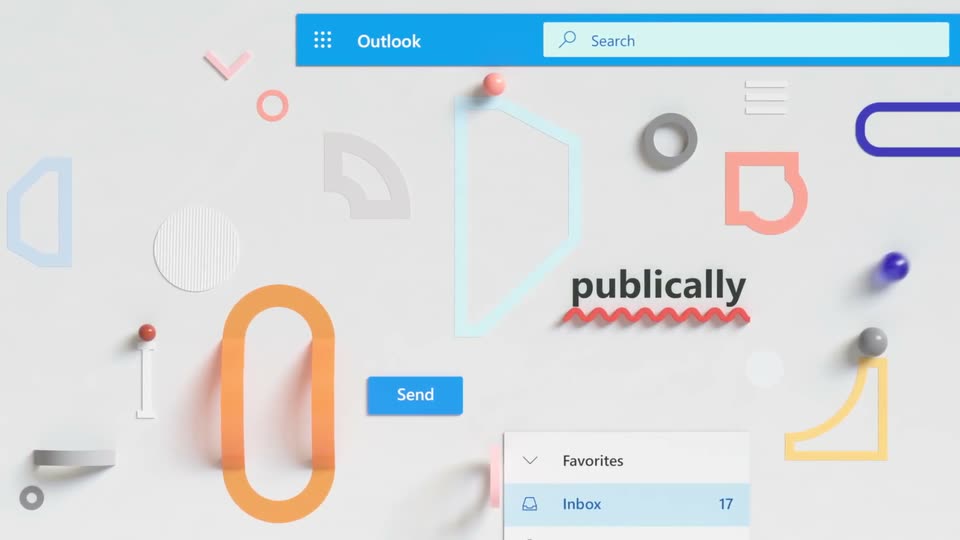
A light gray 3D diorama scatters UI fragments: an Outlook top bar, a blue Send button, a Favorites panel and abstract shapes like an orange oval and a blue pentagon outline. The lowercase word publically scales in mid-frame with a red squiggle sliding under it, while a purple sphere rolls in from the right.
On-screen text: “publically”, “Savannah M.Fifield”, “Software Engineer”, “3m”, “en asked if”, “Micros”
Techniques: Kinetic type, 3D mockup
Camera: Static
A 3D scene on a light gray surface: the black word publically sits above a red wavy tube as a cursor hovers, and a white card slides in below listing publicly and openly, then tilts as a blue sphere drops in.
On-screen text: “publically”, “publicly”, “openly”
Techniques: 3D mockup, Kinetic type, Cursor demo
Camera: Static
A static 3D macro shot of a yellow textured surface holding upright paper word strips (communicate, intelligent, assistant, writing, language). A glossy blue sphere rolls across the surface past a LinkedIn search bar, with clear acrylic steps glowing on the right.
On-screen text: “publically”
Techniques: 3D mockup, Kinetic type
Camera: Static
A tilted Word document floats in 3D over a whiteboard of blue and red shapes, its serif headline and mountain photo marked by a blue pushpin that slides across the page as the depth layers drift.
Techniques: 3D mockup, Parallax
Camera: Static
A 3D Editor panel sits at an angle beside a gray fabric swatch. A blue knob slides right along a top track, the percentage counts up to 45 and a yellow bar fills, while a label below cycles through Vocabulary, Perspectives, Conciseness, Acronyms.
Techniques: 3D mockup
Camera: Static
A close-up of a text editor document reframes and zooms out as a gray suggestion card expands beneath the highlighted word MAU, revealing the spelled-out acronym monthly active users.
Techniques: UI zoom, Masking
Camera: Pan
A blue Word title bar sits angled on a white surface in 3D perspective. Colored spheres roll across it while an orange book slides in from the left. The Search field scales up at the bar's end, with a yellow frame and pink rods in the background.
Techniques: 3D mockup
Camera: Static
A white email composer card sits on the left, its body text typing out line by line. To the right, a flat 3D set of rings, spheres and a gray button floats around a large black “most common” headline on a light gray field.
On-screen text: “most common”
Techniques: 3D mockup
Camera: Static
A 3D tablet and phone mockup shows a Create a post form typing out a sentence about social media, then cuts to a glass box of white letter tiles on an orange surface with a casual label and a blue glass sphere.
On-screen text: “casual”
Techniques: 3D mockup
Camera: Static
A clear acrylic box full of white word slips sits on an orange mat, a blue glossy sphere at its corner. White text labels (casual, communal, familiar, open, conversational) float in 3D space around the box, sliding to new positions as the locked-off shot holds.
On-screen text: “casual”, “communal”, “familiar”, “open”, “conversational”
Techniques: Kinetic type, 3D mockup
Camera: Static
A white 3D block with a social post composer sits on orange fabric, next to a blue block showing a profile card. A paper roll, marbles and a box of letter tiles frame the set while the camera drifts slowly across the still scene.
Techniques: 3D mockup
Camera: Static
A tilted 3D view of an email document fills the frame, with orange 3D shapes floating at its edges. A glossy blue sphere rolls diagonally down the page from top right to bottom left, then exits the view.
Techniques: 3D mockup
Camera: Static
A tilted sheet of paper with a thin letter sits in 3D space beside an orange paperclip. The camera pulls back to reveal the sheet as the body of an email, with a left sidebar and a blue header bar.
Techniques: 3D mockup, UI zoom
Camera: Pull out
A tilted close-up of a tablet screen showing an email app pulls back and levels into a wide desk shot. The device sits centered on a gray surface against a blue wall, flanked by a potted plant and bright 3D shapes, while a white tagline types out on the right.
On-screen text: “Bring out your best writer ever”
Techniques: Kinetic type, 3D mockup
Camera: Pull out
A Surface laptop on a gray desk against an orange wall shows a LinkedIn feed. White headline text types out on the right with a blinking caret. A white tile with a blue pen icon, a yellow paper roll, a purple ball and a succulent sit beside it.
On-screen text: “Bring out your best writer everywhere you write”
Techniques: Kinetic type
Camera: Static
A grey laptop sits on a white desk against a blue wall, framed by blue vases with dried grass and a red cloth with yellow props. The screen shows a document with a mountain photo. A slow push-in tightens on the laptop while the white headline holds on the right.
On-screen text: “Bring out your best writer everywhere you write”
Camera: Static
On a plain white background, the four-color Microsoft mark sharpens from a small blurred square into the full logo with its gray wordmark, centered in frame. The logo holds still as the tagline “Bring out your best writer” appears below it.
On-screen text: “Bring out your”, “best writer”
Camera: Static