0:56

Introducing Tasklet: Automate your business with AI agents | Tasklet
Tasklet · B2B · Feb 2026
Microsoft · Mar 2019 · 1:10 · Full motion · AI-annotated
Microsoft’s 1:10 launch film runs 16 scenes, about 4.4 s each. The product is on screen from the first frame and 1 feature is revealed. The call to action lands at 0:53 (76% in), over a voiceover. The video alternates flat vector diagrams with screen recordings, using grid fade-ins, dotted connector lines, and centered title cards to move from context to product to demo. Its pacing is measured, with short graphic beats and longer UI scrolls that show the security workflow.
Is this your launch? to your site or press kit.
Tasklet · B2B · Feb 2026
Saccade · Healthcare · Oct 2026
herdr · B2B · Oct 2026
Films whose music sounds like this one, voice left out
Remster · Calm, minimalist corporate advertisement soundtrack
Bolna · Calm, melodic underscore with a minimalist arrangement
Shiboleth · Electronic
On a dark navy field, a grid of flat monitor icons, each with a blue shield and white lightning bolt, fades in and settles. A large blue shield with a white lightning bolt then scales up in the center as the grid dims.
On-screen text: “7”
Camera: Static
A blue shield with a white lightning bolt sits centered on dark blue, backed by a grid of faint monitor icons. The grid fades out and the shield eases slightly smaller, leaving it alone on the plain field.
Camera: Static
A small blue shield with a white lightning bolt holds center on a dark navy background, then gives way to a flat illustration of a woman at a gray laptop, a blue cloud floating above her head joined by three dashed lines.
Camera: Static
A flat illustration of a woman at a laptop sits under a white and blue cloud, linked by dashed lines. The camera pulls back to reveal a grid of monitors and laptops bearing Windows, Linux and Apple logos on a dark blue field.
Camera: Static
A four-by-six grid of flat gray monitor icons sits on a dark navy field, each screen holding a white penguin, four-pane window, or apple mark. The icons fade in to fill the grid, hold still, then the pattern slides down so the top row is cropped.
Camera: Pan
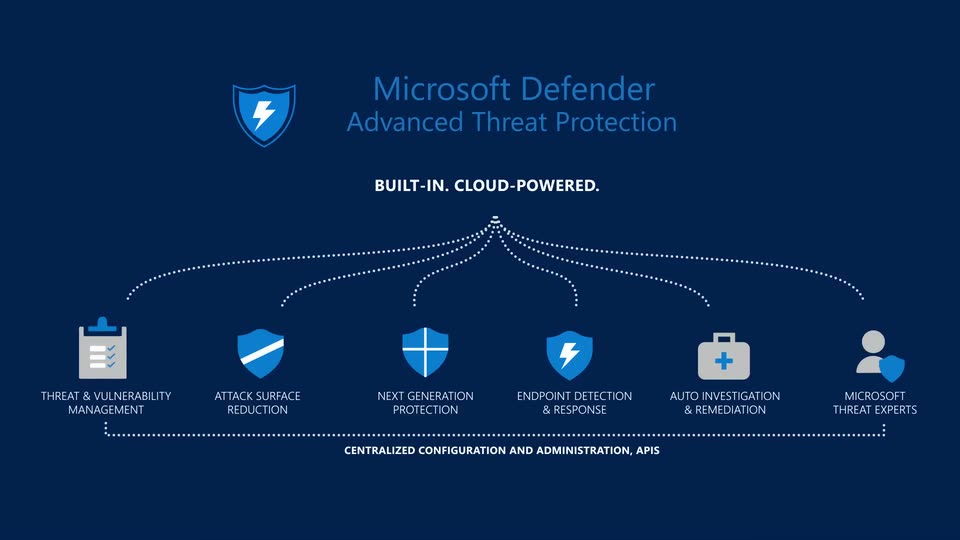
On a dark navy field, a shield logo and product title fade in, then dotted lines fan out from a center point to six feature icons that pop in with labels. The diagram holds, then crossfades to a laptop on a desk showing a Windows Security window.
On-screen text: “Microsoft Defender Advanced Threat Protection”, “BUILT-IN. CLOUD-POWERED.”, “THREAT & VULNERABILITY MANAGEMENT”, “ATTACK SURFACE REDUCTION”, “NEXT GENERATION PROTECTION”, “ENDPOINT DETECTION & RESPONSE”, “AUTO INVESTIGATION & REMEDIATION”, “MICROSOFT THREAT EXPERTS”, “CENTRALIZED CONFIGURATION AND ADMINISTRATION, APIS”
Camera: Static
A macOS window of Microsoft Defender ATP sits over a desktop, showing the Virus & threat protection screen. The heading scales in and the intro line slides in, while a threat row and two settings sections stay fixed.
Camera: Static
A macOS desktop shows a Finder window with a disk-image error dialog; the cursor clicks OK to close it, then a Microsoft Defender ATP 'Threats found' banner slides in at the top right and the cursor opens its menu to reveal a Quick Scan option.
Techniques: Cursor demo
Camera: Static
A macOS desktop shows a Finder window on the Downloads folder with a dmg file highlighted. A Defender ATP menu drops from the top right corner, then collapses into a threats-found notification as the cursor clicks the tray icon.
Techniques: Cursor demo
Camera: Static
On a Mac desktop with a sand-dune wallpaper, a Microsoft Defender ATP window titled Virus & threat protection slides and scales into place. A cursor then expands a Trojan threat row and glides to the Start actions button, over a Finder file list.
Techniques: Cursor demo
Camera: Static
The Security operations dashboard with donut charts and a list of Trojan alerts fills the frame. The view then cuts to an alert detail page showing the malware title, an Actions menu, and Alert context and Status panels on the right.
Camera: Static
The alert detail page of the Windows Defender Security Center scrolls down, revealing the alert process tree, an incident graph linking a laptop node to a file node, and an artifact timeline table. A cursor hovers over the timeline row.
Techniques: Cursor demo
Camera: Static
A light security dashboard page with a dark left rail scrolls downward, passing file hash details, a 32/52 malware detection card, a related-alerts table, and organization prevalence cards. A small cursor drifts near the table header.
Camera: Pan
A blue shield with a white lightning bolt scales in above the blue title “Microsoft Defender Advanced Threat Protection” on a dark navy field. The block eases up as a flat gray laptop with an Apple logo slides in below, flanked by white labels “Antivirus Protection” and “EDR Capabilities.”
On-screen text: “Microsoft Defender Advanced Threat Protection”, “Antivirus Protection”, “EDR Capabilities”
Techniques: Kinetic type
Camera: Pan
Flat vector figures on a dark navy field. A woman at an Apple laptop with a blue lightning shield fades in, then two men appear at her sides on Windows and Linux laptops, each gaining a matching shield. All three hold a gentle idle sway.
Camera: Static
The Microsoft logo, four colored squares beside a white wordmark, sits centered on a black background. It holds still through the clip, then fades to black at the end.
Camera: Static