1:20
Explore
Introducing Jira Service Management
Atlassian · Nov 2020 · 1:39 · Full motion · AI-annotated
- Length
- 1:39
- Scenes
- 48 · 2.1 s avg
- Product on screen
- 0:12
- Features shown
- 3
- Call to action
- 1:25 · 85%
- Voiceover
- Yes
- Views
- 163K on YouTube
as of November 24, 2026
00:00:00 / 01:39:19
- Length
- 1:39
- Scenes
- 48 · 2.1 s avg
- Product on screen
- 0:12
- Features shown
- 3
- Call to action
- 1:25 · 85%
- Voiceover
- Yes
- Views
- 163K on YouTube
as of November 24, 2026
Atlassian’s 1:39 launch film runs 48 scenes, about 2.1 s each. The product shows up at 0:12 and 3 features are revealed. The call to action lands at 1:25 (85% in), over a voiceover. Flat vector illustration and low-poly 3D share one purple-blue palette, with UI mockups morphing in place and 3D cards tilting on axis. The racing metaphor bookends a feature montage, and a recurring checkmark flip signals every completed task.
No filming indicatedEstimated needs: 4 capture groups — your screens or recordings · 1 official logo — reused across the film · 17 graphic passages — draw or supply · 18 3D passages — build or supply
Is this your launch? to your site or press kit.
More like this

1:25
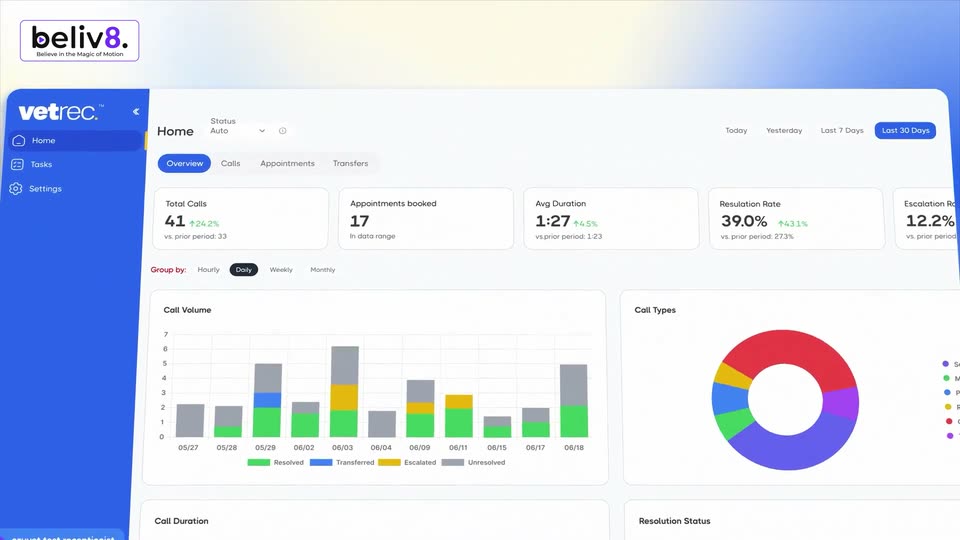

Product Feature Video for VetRec - Veterinary AI Assistant
VetRec · Sep 2026
1:30

Introducing Project Sunroof
Google · AI · Aug 2015
Similar soundtrack
Films whose music sounds like this one, voice left out
1:20

Vema's Engineered Mineral Hydrogen Explainer Video
Vema Hydrogen · Corporate promotional
2:56

DJI - Introducing the N3
DJI · Modern electronic
1:13

Odin Robotics (YC F26) - Launch Video
Odin Robotics · Upbeat electronic
Introducing Jira Service Management, scene by scene
· 48 scenes as text
01 · Hook · 0:00–0:00
A top-down 3D view of a single car on a road, bordered by orange block buildings on purple ground, emerges as a white circular mask widens from the center until it fills the frame.
Techniques: Masking, 3D mockup
Camera: Pan
02 · Hook · 0:00–0:04
A top-down 3D view of a stylized city street with blocky orange buildings on a purple ground. Three small vehicles drive down the center road as the camera slowly pushes forward.
Techniques: 3D mockup, Parallax
Camera: Push in
03 · Hook · 0:04–0:06
Top-down tracking shot of a teal and purple race car driving straight down a gray road marked with white dashes. Flat low-poly buildings in purple and orange scroll past on both sides as the street moves beneath the car.
Camera: Pan
04 · Hook · 0:06–0:06
A top-down flat illustration of a teal and purple race car drives down a city street flanked by muted orange and purple buildings. A translucent purple layer fades out as a blue car enters from below.
Camera: Static
05 · Hook · 0:06–0:07
Top-down view of a stylized city street. A teal and a blue race car drive up a gray road flanked by flat orange, purple and gray buildings. The camera tracks the cars from above as the blocks scroll past.
Camera: Static
06 · Problem · 0:07–0:09
A low-poly purple and teal race car, seen from behind the cockpit, drives down a gray street lined with white and lavender buildings under an orange sunset sky. A blue and white car passes on the left and another leads ahead as the road scrolls forward.
Camera: Static
07 · Problem · 0:09–0:12
Flat vector illustration: the camera pulls back from a telemetry dashboard showing a race car feed, track map and charts to reveal two engineers in blue uniforms and red headsets. The woman points at the car view, then rests a hand on her chin.
Techniques: UI zoom
Camera: Pull out
08 · Product intro · 0:12–0:16
Blue shapes swirl into a large white screen in a purple illustrated garage and form the Jira lightning logo, then the text Jira Service Management fades in beside it. Three workers in blue uniforms stand at the screen's edges; the one on the left points up at it.
On-screen text: “Jira Service Management”
Techniques: Particles
Camera: Static
09 · Demo · 0:16–0:21
A purple 3D workshop with flat blue-uniformed characters stands around a large white Jira Service Management panel. The panel fills in: a left menu, then an All open list of five requests with icons and colored status tags. The camera slowly zooms in on the panel.
Techniques: UI zoom
Camera: Push in
10 · Demo · 0:21–0:24
A Jira Service Management screen shows a list of change requests that crossfades into a detail card for Replace brake rotor and pads with Create and Link buttons, then a white panel slides in from the right to cover the content.
Camera: Static
11 · Demo · 0:24–0:26
A Jira Service Management 'Create a major incident' dialog sits over a dimmed dashboard. 'Replace Brake Rotor and Pads' is typed into the top field, gray bars fill the Message and Description fields, then the view pulls back into a lavender frame.
Techniques: UI zoom
Camera: Pull out
12 · Demo · 0:26–0:27
A white Jira Service Management card sits on a lavender field. It opens on a Create a major incident form, then the form dissolves into an All open list of five tickets, each with a colored status tag, while the left sidebar sharpens.
Camera: Pull out
13 · Demo · 0:27–0:36
A Jira Service Management ticket list sits on a purple field, then its labels and card frame morph into abstract bars as the rows scroll up. A white outline box groups four rows, their status bars flip to green, and a green checkmark badge pops in above.
Techniques: Morph
Camera: Pan
14 · Demo · 0:36–0:37
On a lavender field, a green check badge floats above a white card listing four rows of bars, colored icons and progress bars. The frame pans right, pushing the list off the left edge as a second white card with three circles slides in from the right.
Camera: Static
15 · Demo · 0:37–0:40
A white card with four dots sits on a purple field, the first dot purple. A flat-vector hand slides in from the bottom right and taps the third dot; the background flips to blue, the dot turns blue and morphs into a rounded square.
On-screen text: “8”
Techniques: Morph
Camera: Pull out
16 · Demo · 0:40–0:41
A dark phone floats in 3D on a blue background, turning to face front. White notification cards slide in from the right onto its blue screen, each showing a colored icon and a blue bar.
Techniques: 3D mockup
Camera: Static
17 · Demo · 0:41–0:41
A smartphone mockup on a blue background morphs into a tablet, then a laptop, while two white notification cards with a red cross and a yellow warning icon stay fixed at the top right.
Techniques: 3D mockup, Morph
Camera: Static
18 · Demo · 0:41–0:42
A flat calendar timeline with shifting colored task bars tilts into 3D perspective, rotates, then settles back to a flat centered view on a blue gradient.
Techniques: 3D mockup
Camera: Static
19 · Demo · 0:42–0:44
On a blue gradient, a stack of rounded cards tilts and rotates in 3D. The front white card holds a yellow warning triangle with a black exclamation mark, while two gray cards sit behind it, drifting with the motion.
Techniques: 3D mockup
Camera: Static
20 · Demo · 0:44–0:45
A gray 3D panel rotates from a thin edge-on view to face the camera, revealing a list interface with circular avatars and white rows, set against a blue gradient background.
Techniques: 3D mockup
Camera: Static
21 · Demo · 0:45–0:47
A tilted four-row list card with a soft shadow sits on a blue gradient. The gray rows flip to green with checkmarks while a teal ring expands outward from the card's edges.
Techniques: 3D mockup
Camera: Static
22 · Demo · 0:47–0:47
A white 3D list panel with four rows floats against a blue background. Each row displays a green checkmark icon and a green horizontal bar. A thin green circular line passes behind the panel.
Techniques: 3D mockup
Camera: Static
23 · Demo · 0:47–0:49
A blue rounded-square app icon with a white two-part sail logo rotates in 3D against a light blue backdrop. The tile tilts from a flat front view toward an edge-on orientation, its soft drop shadow shifting as it turns.
Techniques: 3D mockup
Camera: Static
24 · Feature reveal · 0:49–0:59
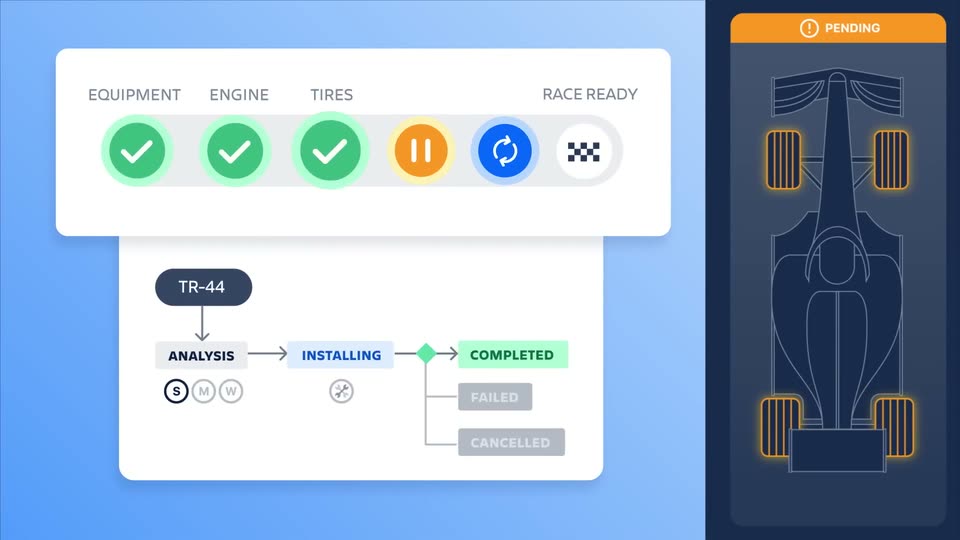
A white card with four status icons sits on blue beside a dark panel with a top-down F1 car line drawing. Icons turn to green checks in sequence, a hand taps the car's tire, the card expands to a workflow flowchart, then the car glows green under a SUCCESSFUL banner.
Techniques: Split screen, Morph, Cursor demo
Camera: Pan
25 · Feature reveal · 0:59–1:04
Dark dashboard widgets frame a blue panel of user avatars with green check badges. The view zooms from a stacked card list to the single panel, then two illustrated hands of different skin tones tap avatars as the grid grows from four to nine icons.
Techniques: UI zoom
Camera: Pan
26 · Feature reveal · 1:04–1:07
A flat white task list with colored squares, gray bars, and green Completed buttons sits between chart panels. A pointing hand indicates a row, then the hand and the avatar column with green checks vanish, the side panels fade out, and the view zooms in on the list.
Techniques: UI zoom
Camera: Pull out
27 · Feature reveal · 1:07–1:08
A white task list with colored squares and green Complete buttons fills the frame. The view pulls back to reveal a blue Jira Service Management panel with sidebar and buttons; the list card settles lower right, overlapped by a card with gray rows and an orange icon.
Techniques: UI zoom
Camera: Static
28 · Feature reveal · 1:08–1:11
A flat illustration of the Jira Service Management interface, a white text card, three colored status labels and a small list panel, sits still on a blue gradient. It then tilts into 3D and folds into a blue chevron shape.
Techniques: 3D mockup, Morph
Camera: Static
29 · Feature reveal · 1:11–1:15
Three stacked isometric planes, a white UI list, a blue card grid, and a dark grid, hover on a blue gradient. The stack rotates in 3D, the top plane turns to face the camera, then a blue circular logo with a white mark pops onto it.
Techniques: 3D mockup
Camera: Push in
30 · Feature reveal · 1:15–1:16
A blue tile bearing a white abstract mark tilts in 3D over a purple-blue gradient, then flattens as a grid of lighter blue tiles with small centered squares expands around it.
Techniques: 3D mockup
Camera: Static
31 · Feature reveal · 1:16–1:18
A blue checkerboard grid of colorful app icons surrounds a white lightning logo at the center. The camera zooms into the grid, the icons grow larger and the outer tiles slide out of frame.
Camera: Pull out
32 · Other · 1:18–1:19
A black and white checkerboard grid fills the frame, flanked by blue and purple horizontal bands. The grid slides to the right, the colored bands peel away, and a pale panel with a small yellow dot emerges on the left.
Techniques: Masking
Camera: Static
33 · Other · 1:19–1:19
A black and white checkered flag waves and drifts across the frame in a low-poly 3D set. Behind it, purple and pink blocky buildings line a gray road with white lane markings under a flat orange sky.
Camera: Static
34 · Other · 1:19–1:21
A waving black-and-white checkered flag fills the frame, then clears to reveal a low-poly 3D street at sunset. A small car drives down the center road toward the horizon as the camera tracks forward past purple mountains and blocky buildings.
Techniques: Parallax
Camera: Push in
35 · Other · 1:21–1:23
Two flat-illustration engineers in blue racing uniforms and caps face a wall of telemetry dashboards. The woman in red headphones turns her head while the man lifts a hand, and gauges plus a track map shift subtly.
Camera: Static
36 · Other · 1:23–1:24
Two flat-illustration hands slide in from opposite edges and meet in a high-five. The left hand is dark-skinned with a purple glove, teal stripe, and white patch. The right hand is light-skinned with a dark wristband, against a plain lavender background.
On-screen text: “↑”
Camera: Static
37 · Other · 1:24–1:25
Two flat-illustration hands high-five on a lavender field. White impact lines burst outward at contact, then the hands pull apart as the lines fade. The left hand wears a purple glove with a green strap and white sensor; the right has a dark band.
Camera: Static
38 · CTA · 1:25–1:26
A low-poly purple and green formula car drives down a gray street toward a sunset between flat buildings. The camera swings from a rear chase view to a top-down view of the car and its small dashboard screen.
Techniques: 3D mockup
Camera: Pull out
39 · CTA · 1:26–1:27
A low-poly teal and purple race car drives up a gray city street. The camera pulls back and rises, revealing a crosswalk and orange and purple block buildings lining the road as the car shrinks into the distance.
Techniques: Parallax
Camera: Pull out
40 · CTA · 1:27–1:28
A stylized 3D road runs vertically through the center with a small car driving down it, flanked by stacks of orange and brown cubes on a purple ground. The camera pulls back rapidly, smearing the blocks into motion blur as the scene widens.
Techniques: Parallax, Speed ramp
Camera: Pull out
41 · Outro · 1:28–1:29
A vertical white light beam pierces a purple gradient sky while clusters of orange voxel cubes rise from the bottom. As the beam softens, blue and purple rectangular blocks drop in from the top edge.
Camera: Pull out
42 · Outro · 1:29–1:30
A magenta field fills the frame as vertical rectangular bars in blue, purple, white and orange fall downward at varied speeds, glitching and shifting across the screen.
Techniques: Particles
Camera: Static
43 · Outro · 1:30–1:30
Abstract vertical and horizontal blocks in pink, purple and blue fill the frame as a white band wipes in across the middle, carrying the blue Jira bolt and the Jira Service Management wordmark. The lockup holds still as the scene closes.
On-screen text: “Jira Service Management”
Camera: Static
44 · Outro · 1:30–1:33
The Jira Service Management logo and wordmark hold centered on a light background. A blue wave band sweeps left to right across the frame, passing behind the text.
Camera: Static
45 · Outro · 1:33–1:34
Six blue icons pop in one by one across the center of a white background beneath a blue wavy line. A pale blue diagonal panel wipes in from the right edge, covering the last two icons.
Camera: Static
46 · Outro · 1:34–1:35
A blue field with a white diagonal band and a small eye shape collapses into a white background as the two rounded blue logo shapes assemble and settle at center.
Techniques: Morph
Camera: Static
47 · Outro · 1:35–1:36
A small blue Atlassian mark sits left of center on a plain white background. The word ATLASSIAN fades in to its right, letters appearing from left to right while the frame stays locked.
On-screen text: “ATLASSIAN”
Camera: Static
48 · Outro · 1:36–1:39
The blue Atlassian logo, a two-peak icon beside the wordmark, sits centered on a plain off-white background and holds still for the full clip.
Camera: Static