0:49
Explore
microsandbox - introducing microsandbox cloud. the microvm sandboxes on your laptop
microsandbox cloud · Nov 2026 · 1:01 · AI-annotated
- Length
- 1:01
- Scenes
- 37 · 1.7 s avg
- Product on screen
- 0:14
- Features shown
- 1
- Call to action
- 0:49 · 81%
- Voiceover
- Yes
- Views
- 8.8K on X
as of November 26, 2026
00:00:00 / 01:01:06
- Length
- 1:01
- Scenes
- 37 · 1.7 s avg
- Product on screen
- 0:14
- Features shown
- 1
- Call to action
- 0:49 · 81%
- Voiceover
- Yes
- Views
- 8.8K on X
as of November 26, 2026
microsandbox cloud’s 1:01 launch film runs 37 scenes, about 1.7 s each. The product shows up at 0:14 and 1 feature is revealed, with social proof. The call to action lands at 0:49 (81% in), over a voiceover. The video cuts between a live-action presenter in warm, sunlit interiors and flat retro pixel-OS mockups laid on dark purple dot-matrix grids, holding a steady pace of about thirty-seven cuts a minute. Its signature moves are typewriter text builds, cascading pixel windows, and a pixel cursor that clicks through each interface to land the point.
Footage neededEstimated needs: 5 capture groups — your screens or recordings · 1 official logo — reused across the film · 13 filmed passages — shoot, supply or replace · 10 graphic passages — draw or supply
Is this your launch? to your site or press kit.
More like this


Similar soundtrack
Films whose music sounds like this one, voice left out
1:27
RoboColosseum - Introducing RoboColosseum An open robot eval initiative by @huggingf
RoboColosseum · Electronic
0:44


Opusense
Opusense AI · Upbeat electronic
1:07

SaaS Product Explainer Video Energy Management Software | Arcus Power x MotionCue
Arcus Power · Electronic
microsandbox - introducing microsandbox cloud. the microvm sandboxes on your laptop, scene by scene
· 37 scenes as text
01 · Hook · 0:00–0:00
A purple pixel-grid background shimmers behind a centered retro video window showing a computer icon, the caption hear me out and a play button. A pixel cursor drifts from the lower right toward the play button while a frame counter ticks up in the top corner.
Techniques: Cursor demo
Camera: Static
02 · Hook · 0:00–0:01
A dark frame with a dotted waveform, a play label, and a cursor in a dashed box cuts to a man in a white shirt and glasses speaking before a white curtain, gesturing with both hands. A black subtitle box reads so hear me out, and a name caption appears.
On-screen text: “play”, “so hear me out,”, “toks · co-founder”
Techniques: Kinetic type
Camera: Static
03 · Hook · 0:01–0:03
A man in glasses and a white henley talks to camera before a cream curtain. A retro window name card with a purple shadow sits at the lower left, and a black caption box with a purple border at the bottom shows his words, switching lines mid-scene.
On-screen text: “so hear me out,”, “about”, “toks”, “co-founder | microsandbox”, “you've been running agents on your”
Camera: Static
04 · Problem · 0:03–0:03
On a black field of purple pixel dots, the word “you’ve” holds at left while a glowing scanline crosses the center and a caption box reads at the bottom. The caption fades and a dashed selection rectangle with an inner square draws in on the right.
On-screen text: “you've”, “you've been running agents on your”
Techniques: Kinetic type
Camera: Static
05 · Problem · 0:03–0:06
On a dark purple pixel grid, a monospace headline builds line by line on the left, the word 'agents' enlarged in purple, while a retro 'local machine' window on the right fills with rows of running agents. CRT scanlines overlay the flat mockup.
On-screen text: “you've been running agents on your local machines for a while.”
Techniques: Kinetic type
Camera: Static
06 · Problem · 0:06–0:09
A man with glasses and a white shirt talks to camera in front of framed pottery art. A retro purple-bordered window slides in on the right, an hourglass icon morphs into a sad pixel face beside the word frustrated. Subtitles sit in a black bar at the bottom.
On-screen text: “and there are probably some days”, “some days”, “where you're frustrated because your machine”, “frustrated”
Techniques: Morph
Camera: Pan
07 · Problem · 0:09–0:10
On a dark field of purple pixel noise, four retro window panels labeled sandbox 01 to 04 cascade in diagonally, each showing a running state and a filling progress bar. A cpu panel pops in at top right reading 28% with a small meter, while a pixel cursor hovers low right.
On-screen text: “some days”, “where you're frustrated because your machine”, “frustrated”
Camera: Static
08 · Problem · 0:10–0:11
Retro pixel OS windows cascade on a dark dotted background, each labeled sandbox and showing running; the CPU meter jumps from 33% to 100% as the stack grows and a local machine dialog pops to the front, typing your machine was just too beside a warning triangle.
Camera: Static
09 · Problem · 0:11–0:14
A stack of pixel-art sandbox windows shows waiting bars and a CPU window at 100%. The front 'local machine' dialog displays a warning triangle and 'your machine was just too slow'; the line 'and you were constrained.' types in, then a pixel cursor moves to the ok button and clicks it.
On-screen text: “your machine was just too slow”, “and you were constrained.”
Techniques: Kinetic type, Cursor demo
Camera: Static
10 · Product intro · 0:14–0:16
A man in a white shirt and glasses talks to camera before a blurred plant wall and wooden shelves. The shot reframes from center to right as a dashed white box opens on the left. Purple-bordered captions sit at the bottom.
On-screen text: “today you're in luck.”, “we're announcing microsandbox cloud,”
Camera: Static
11 · Product intro · 0:16–0:18
A presenter in a white shirt stands right of frame against a blurred shelf backdrop, gesturing as he speaks. Left, a pixel-art window with a purple shadow shows a computer icon dotted to a cloud icon while 'microsandbox cloud' types in. A bottom caption box repeats the line.
On-screen text: “announcing”, “new”, “we're announcing microsandbox cloud,”, “microsandbox cloud”
Techniques: Kinetic type
Camera: Static
12 · Product intro · 0:18–0:19
On a black dot-matrix grid, the words 'the cloud' type in at the top left while a retro terminal window labeled 'local runtime' pops into the lower left. A dashed selection box slides from left to right across the frame.
On-screen text: “the cloud”, “the cloud that's one-to-one compatible”
Techniques: Kinetic type, Masking
Camera: Static
13 · Product intro · 0:19–0:23
A dark dot-grid background holds a typewriter headline that reads out the cloud that's one-to-one compatible with microsandbox local runtime. Below, two retro window panels sit side by side, the cloud panel's sandbox rows popping in to mirror the local panel.
On-screen text: “the cloud that's one-to-one compatible with microsandbox local runtime.”
Techniques: Kinetic type, Split screen
Camera: Static
14 · Product intro · 0:23–0:24
A pink pixel cloud outline glows on a dark purple dot-matrix grid. Inside, the word introducing sits above a white vertical bar and a horizontal underscore, which nudge as the frame holds.
On-screen text: “introducing”
Camera: Static
15 · Product intro · 0:24–0:25
A violet pixel grid frames a dark cloud outlined in dotted pixels. Inside, small letter-spaced 'introducing' sits above large white pixel text that types out letter by letter, while a purple progress bar fills left to right beneath it.
On-screen text: “introducing”, “microsandbox cloud”
Techniques: Kinetic type
Camera: Static
16 · Product intro · 0:25–0:25
A purple pixel-grid backdrop frames a white dotted cloud outline. Centered inside, the words introducing and microsandbox cloud sit in monospace type above a segmented progress bar. The frame is locked off with no motion.
On-screen text: “introducing”, “microsandbox cloud”
Camera: Static
17 · Social proof · 0:25–0:26
A man in a white sweater and glasses sits on a cream couch against a wood slat wall, gesturing with open hands. A small browser-window graphic tagged shipped scales up on the left, and a black caption bar sits at the bottom.
On-screen text: “shipped”, “microsandbox local”, “we shipped microsandbox local”
Camera: Static
18 · Social proof · 0:26–0:26
A dark frame holds the pixel-font word microsandbox in the top left. A dashed selection box expands at center while a purple-outlined caption reads we shipped microsandbox local at the bottom; the frame is locked off.
On-screen text: “we shipped microsandbox local”
Camera: Static
19 · Social proof · 0:26–0:28
A flat terminal window with a purple border sits on a black dotted grid. The command msb run ubuntu is typed after the $ prompt, then a root@ubuntu prompt appears, while the caption shipped earlier in the year. types out below the heading microsandbox local.
On-screen text: “microsandbox local”, “shipped earlier in the year.”
Techniques: Kinetic type
Camera: Static
20 · Social proof · 0:28–0:29
A horizontal glitch line flashes on black, then cuts to a man in a white shirt and glasses seated on a beige couch before a wooden slat wall. An empty dashed box floats at left. A bottom caption reads the line.
On-screen text: “and developers loved it,”
Camera: Static
21 · Social proof · 0:29–0:30
A man in a white henley sits on a white sofa before a wooden slat wall, speaking to camera. A browser window graphic at left fills with rising black bars, the last in purple, while a caption box holds at the bottom.
On-screen text: “and developers loved it,”, “loved it”
Camera: Static
22 · Social proof · 0:30–0:31
A dashed marquee outline flashes on a black purple pixel grid, then a retro window pops in with a pixel counter rolling up from 147,670 and a purple progress bar filling. A caption reading loved it holds at the bottom.
On-screen text: “downloads”, “almost”, “loved it”
Techniques: Masking, Kinetic type
Camera: Static
23 · Social proof · 0:31–0:31
A retro OS window sits on a flickering purple pixel grid. Inside, a black LED panel shows a white dotted number counting up fast, with the label almost above it and a purple progress bar below. The frame stays locked off.
Camera: Static
24 · Social proof · 0:31–0:32
A retro OS-style window sits on a purple pixel-grid background. Inside, a dot-matrix counter reads 250,000 beneath the word almost, above a full purple progress bar. Below the bar, the caption downloads per week. types in word by word.
On-screen text: “almost”, “250,000”, “downloads per week.”
Techniques: Kinetic type
Camera: Static
25 · Feature reveal · 0:32–0:34
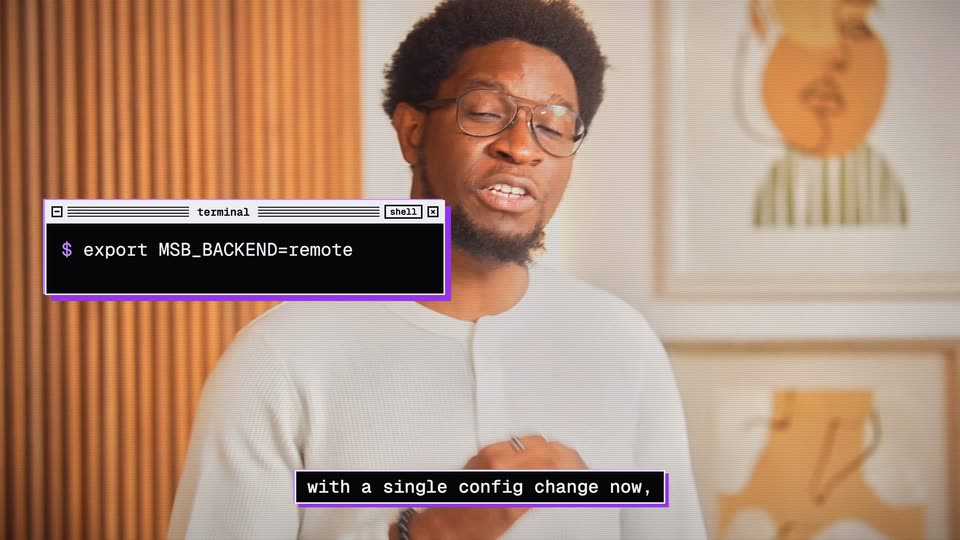
A man in glasses and a white shirt talks to camera in a room with orange blinds. A black terminal window with a purple border sits at left, where the command export MSB_BACKEND=remote types out character by character behind a blinking cursor. A caption bar reads with a single config change now, at the bottom.
On-screen text: “with a single config change now,”
Camera: Static
26 · Feature reveal · 0:34–0:36
A dark terminal window with two export commands sits top left; a second window labeled sandbox_configuration slides in below, typing a TypeScript snippet that builds a sandbox. A caption on highlight blocks reads “a single config change.” on the right over a faint purple pixel field.
On-screen text: “a single config change.”
Camera: Static
27 · Feature reveal · 0:36–0:40
Two flat code windows stack on a dark dithered background, a terminal above a typescript sandbox config. The caption “a single config change.” holds at right; a pixel laptop icon and “on your local device” then fade into the lower window.
On-screen text: “a single config change.”, “on your local device”
Camera: Static
28 · Feature reveal · 0:40–0:41
A pixel-art layout holds three windows beside a purple headline. The top terminal types a run command, the left window shows code, and the right window fills a progress bar as its text completes.
On-screen text: “a single config change.”
Techniques: Split screen
Camera: Static
29 · Pricing · 0:41–0:43
A man with glasses sits on a beige couch against a wooden slat wall, gesturing as he talks. A retro pixel window with a purple border on the left fills in with checkboxes for shared resources and dedicated vCPUs, while monospace subtitles caption him below.
On-screen text: “on the cloud,”, “the option”, “shared resources”, “you have the option for shared resources”, “dedicated vCPUs”
Camera: Static
30 · Pricing · 0:43–0:43
A dark field of faint purple dots waves across the frame. A white headline, with 'cloud' in purple, sits at the top while a boxed caption reads at the bottom. The caption fades out and two nested dashed squares draw in on the left.
On-screen text: “on the cloud, you have the option.”, “you have the option for shared resources”
Camera: Static
31 · Pricing · 0:43–0:46
A pixel-styled pricing window titled shared resources sits left on a dark dotted field, beneath a white headline with the word cloud in purple. Its two progress bars fill left to right, then a dashed empty box fades in on the right.
On-screen text: “on the cloud, you have the option.”
Camera: Static
32 · Pricing · 0:46–0:49
A static headline tops two retro pixel-style pricing windows on a dark dotted background. The left shared resources window's progress bars fill from empty to full while the right dedicated vCPUs window's price and text fade in to solid.
On-screen text: “on the cloud, you have the option.”, “4 vCPUs · 8 GiB RAM · 64 GiB disk · monthly at 730 hours · USD”
Techniques: Split screen
Camera: Static
33 · CTA · 0:49–0:53
A man in glasses and a white sweater talks to camera in a warm room. A retro window with a purple border slides in right, showing the microsandbox cloud logo and a try it today button. A pixel cursor clicks the button, turning it black, as the caption below changes.
On-screen text: “we hope you like microsandbox cloud.”, “give it a try today.”
Techniques: Cursor demo
Camera: Pull out
34 · CTA · 0:53–0:54
A bespectacled man in a white shirt talks before a wall of framed art. A retro purple-bordered dialog box slides off to reveal a second window with a visit field and ok button, a pixel cursor hovering. A bottom caption swaps from give it a try today. to visit microsandbox.dev.
On-screen text: “give it a try today.”, “visit microsandbox.dev”
Techniques: Cursor demo, Kinetic type
Camera: Push in
35 · CTA · 0:54–0:56
A man in a white shirt stands on the left, talking, while a retro pixel dialog on the right types microsandbox.dev into a visit field and a pixel cursor clicks the ok button. A caption at the bottom reads visit microsandbox.dev.
On-screen text: “visit microsandbox.dev”
Techniques: Kinetic type, Cursor demo
Camera: Pull out
36 · CTA · 0:56–0:57
A dark field of purple and white pixel dots holds the frame. A pixel-art dial-up window pops in at center: a computer icon links to a cloud by a dashed line, and a purple progress bar fills left to right under the status line. The window stays locked off as the bar completes.
On-screen text: “visit microsandbox.dev”
Camera: Static
37 · CTA · 0:57–1:01
A purple pixel dot-matrix frames a white outlined cloud. A small cube logo sits above the URL in white pixel type, with a light button below reading give it a try today and a cursor at its right edge. The text sharpens from blur into crisp pixels.
On-screen text: “microsandbox.dev”, “give it a try today”
Techniques: Kinetic type
Camera: Static