1:01
microsandbox - introducing microsandbox cloud. the microvm sandboxes on your laptop
microsandbox cloud · Nov 2026
microsandbox cloud · Nov 2026 · 1:01 · AI-annotated
microsandbox cloud’s 1:01 launch film runs 32 scenes, about 1.9 s each. The product shows up at 0:14 and 1 feature is revealed, with social proof. The call to action lands at 0:49 (81% in), over a voiceover. The video cuts back and forth between a live-action presenter in warm wood-and-plant interiors and full-screen retro pixel-UI graphics on a dark purple dot-matrix grid, moving from a 'hear me out' hook through a slow-machine problem, the microsandbox cloud announcement, a one-config-change demo and compute pricing, then a URL call to action. Its signature moves are monospace text that types in word by word, progress bars that fill and reset, and purple-bordered OS windows that cascade, flip and
Is this your launch? to your site or press kit.
microsandbox cloud · Nov 2026
GojiberryAI · Mar 2026
Films whose music sounds like this one, voice left out
RoboColosseum · Electronic
Microsoft · Upbeat corporate electronic
Arcus Power · Electronic
A retro pixel window titled toks.mov sits centered on a dark purple dot-matrix background that flickers. Inside, a computer icon, the heading hear me out, the line toks · co-founder, and a play button. A pixel cursor glides from the lower right to the button and presses it, which flashes and scales as the heading pulses.
On-screen text: “hear me out”, “toks · co-founder”
Techniques: Cursor demo, Kinetic type
Camera: Static
A man in a white sweater and glasses talks to camera against a pale curtain, gesturing with his hands. Heavy analog static covers the frame at the start and clears over the first second. A pixelated purple-bordered window card sits bottom-left with his name and title, and a subtitle line rolls along the bottom in time with his speech.
On-screen text: “about”, “toks”, “co-founder | microsandbox”, “so hear me out,”, “you've been running agents on your”
Camera: Static
Dark field of purple pixel dots; the word you've holds at left while a bordered monospace caption, you've been running agents on your, sits at the bottom, then the caption fades and two dashed rectangles appear at right.
On-screen text: “you've”, “you've been running agents on your”, “so hear me out,”, “about”, “toks”, “co-founder | microsandbox”
Techniques: Kinetic type, Masking
Camera: Static
Dark field of purple pixel noise. A retro 'local machine' window on the right lists agents, progress bars filling row by row. Left, monospace lines stack into 'you've been running agents on your local machines for a while,' with 'agents' enlarged in purple. The frame letterboxes at the end.
On-screen text: “you've been running agents on your local machines for a while.”
Techniques: Kinetic type, Split screen
Camera: Static
A man with glasses and a white sweater speaks to camera in a room with framed art. A retro window with a purple border pops in on the right, showing an hourglass, then a pixelated sad face and the word frustrated, while subtitles run along the bottom.
On-screen text: “and there are probably some days”, “some days”, “where you're frustrated because your machine”, “frustrated”
Camera: Pull out
A dark field of flickering purple pixel dots hosts retro pixel-art OS windows. Empty dashed outlines fill in one by one as sandbox 01 to 04 windows cascade in at the top left, each showing a running progress bar, while a cpu window pops in at the top right with a percentage bar and a small pixel sprite idles at the bottom right.
On-screen text: “some days”, “where you're frustrated because your machine”, “frustrated”
Techniques: Particles
Camera: Static
Retro pixel-art desktop on a dark dotted background: stacked windows labeled sandbox 01 to 07 show 'running', then flip to 'waiting_' as the CPU meter climbs from 77% to 100%, and a 'local machine' warning dialog pops up typing 'your machine was just too slow'.
Techniques: Kinetic type
Camera: Static
A retro pixel-art desktop stacks gray 'sandbox' windows marked waiting, with a CPU meter reading 100%. A 'local machine' dialog in front shows a warning icon and the line 'just too slow'; a second line types in, then a cursor clicks the ok button.
On-screen text: “your machine was just too slow”, “and you were constrained.”
Techniques: Kinetic type, Cursor demo
Camera: Static
A man in a white shirt and glasses talks to camera against a plant wall and wooden shelves. A black caption box with white monospace type sits at the bottom, switching lines, while a dashed outline box fades in on the left.
On-screen text: “today you're in luck.”, “we're announcing microsandbox cloud,”
Camera: Static
A man in a white shirt and glasses talks and gestures before a blurred interior. A pixel-art window with a purple border on the left shows a computer linked to a cloud as microsandbox and cloud type out below. A monospace caption at the bottom reads we're announcing microsandbox cloud.
On-screen text: “announcing”, “new”, “we're announcing microsandbox cloud,”, “microsandbox”, “cloud”
Techniques: Kinetic type
Camera: Pan
On a dark field of purple pixel dots, a monospace headline types out at the top left while a flat retro window mockup labeled microsandbox local slides in from the left. A dashed outline box drifts right and a bordered caption reads the cloud that's one-to-one compatible.
On-screen text: “the cloud”, “the cloud that's one-to-one compatible”
Techniques: Kinetic type
Camera: Static
On a dark pixel-grid background, two retro UI windows sit side by side under a 1:1 marker; the left lists local sandboxes while the right populates to mirror them, as a monospace headline types in word by word above.
On-screen text: “the cloud that's one-to-one compatible with microsandbox local runtime.”, “1:1”
Techniques: Kinetic type, Split screen
Camera: Static
A purple LED dot-matrix field with a white dotted cloud outline at center. 'introducing' sits in small purple pixel caps; 'microsandbox cloud' types in letter by letter in large white dot-matrix type with a block cursor, while a purple progress bar fills below.
On-screen text: “introducing”, “microsandbox cloud”
Techniques: Kinetic type
Camera: Static
A purple dot-matrix field shimmers behind a white dotted cloud outline. Inside the cloud, small purple text reads introducing above large white pixelated text microsandbox cloud, with a row of purple squares beneath. The frame is locked off and the text stays still.
On-screen text: “introducing”, “microsandbox cloud”
Camera: Static
A man in a white sweater and glasses sits on a white couch against a wooden slat wall, gesturing with his hands as he speaks. A flat purple-bordered browser card at left shows the microsandbox local logo, and a monospace caption runs along the bottom.
On-screen text: “microsandbox local”, “we shipped microsandbox local”, “shipped”
Camera: Static
A retro terminal window on a dark pixel grid types the command msb run ubuntu and drops to a root prompt, under the headline microsandbox local. The caption shipped earlier in the year. types out below as the headline and window drift downward.
On-screen text: “microsandbox local”, “shipped earlier in the year.”
Techniques: Kinetic type, Parallax
Camera: Static
A man in a white shirt and glasses sits on a cream couch against a wood slat wall, talking to camera. A retro window graphic with a rising bar chart labeled developers loved it fills in on the left while a black caption box with a purple border at the bottom swaps its line.
On-screen text: “and developers loved it,”, “loved it”, “getting almost 250,000 downloads per week.”
Camera: Static
A dashed white outline snaps into a retro pixel window over a twinkling purple dot grid. Inside, a black display counts up through pixel digits while a purple progress bar fills, the label reading almost and the title bar reading downloads.
On-screen text: “loved it”
Techniques: Masking
Camera: Static
A retro pixel window on a dark dot-matrix background shows a download counter ticking up from 244,876 to 249,023 while a purple progress bar fills to full. The frame is locked off.
Techniques: Kinetic type
Camera: Static
A retro Mac-style window sits on a purple pixel grid. Inside, a dot-matrix counter reads 250,000 above a full purple bar, while the bottom line types out the words per week.
On-screen text: “almost”, “250,000”, “downloads per week.”
Techniques: Kinetic type
Camera: Static
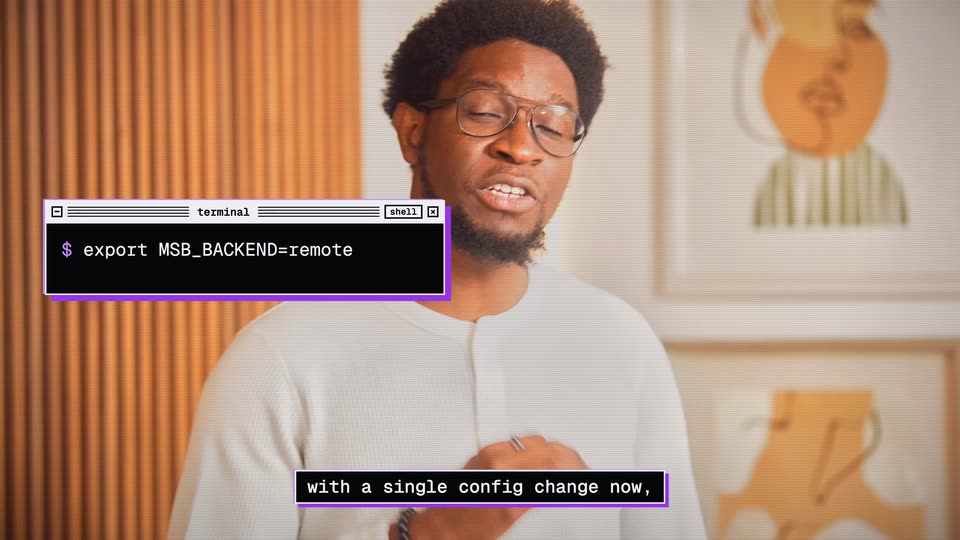
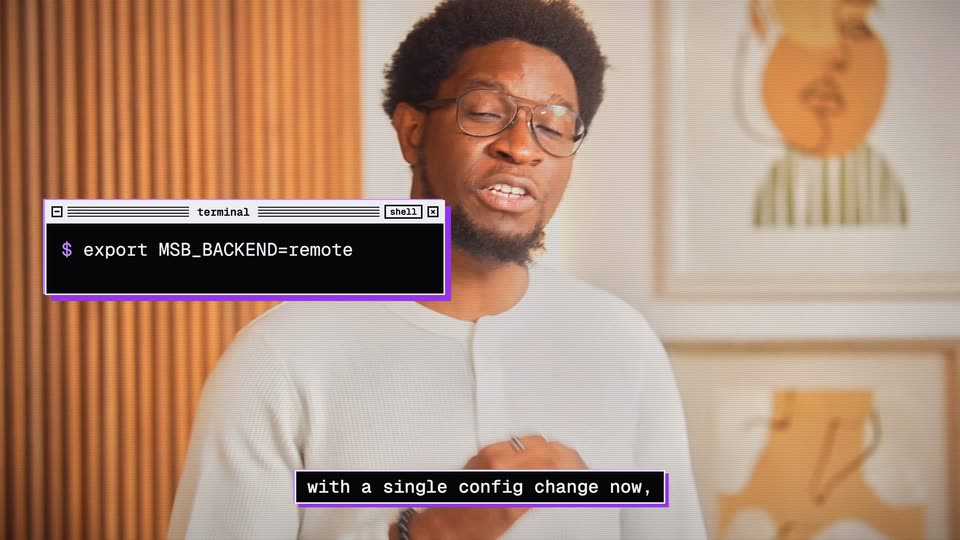
A man in a white shirt and glasses stands in a warm room with an orange slatted wall, talking to camera. A retro terminal window with a purple border sits on the left, typing out a shell command letter by letter, while a monospace caption box reads at the bottom.
On-screen text: “with a single config change now,”
Techniques: Cursor demo
Camera: Static
Two stacked code windows sit on a dark pixel grid. The top terminal lists two export commands, the bottom editor draws in a TypeScript sandbox snippet, and highlighted text sits to the right.
On-screen text: “a single config change.”
Camera: Static
Two code windows stack on a dark dotted field: a terminal pane highlights the MSB_BACKEND=remote line, a typescript pane shows sandbox code. A purple caption reads a single config change. A laptop icon and on your local device type into the lower pane; a dashed square opens at right.
On-screen text: “a single config change.”, “on your local device”
Camera: Static
Three retro pixel windows sit on a dark dotted background. The top terminal types a command and a prompt, the bottom-left shows static TypeScript code with a laptop caption, and the bottom-right types a caption while a purple progress bar fills.
On-screen text: “a single config change.”, “on your local device”, “the same sandbox in the cloud.”
Techniques: Cursor demo, Kinetic type
Camera: Static
A man in glasses and a white sweater sits on a couch against a wood slat wall, gesturing. A white window mockup with a compute and cloud title bar pops in on the left, showing the word the option. A caption reads on the cloud, at the bottom.
On-screen text: “on the cloud,”, “the option”
Camera: Static
A presenter in a white shirt gestures on a couch beside a white window graphic with a purple border listing compute options. The shot cuts to a dark card where the same window shows a chip icon and the label shared resources under a top headline.
On-screen text: “you have the option for shared resources”, “on the cloud, you have the option.”
Camera: Static
A pixel-art pricing card labeled shared resources sits on the left with a large $0.035/hour price and two progress bars that fill and reset. A headline reads above it. An empty dashed rectangle outline appears on the right.
On-screen text: “on the cloud, you have the option.”
Camera: Static
Two retro terminal windows compare shared resources and dedicated vCPUs on a dark grid. The right window's price and caption fade from gray to black as its purple progress bar fills, while the left window's black bars fill up.
On-screen text: “on the cloud, you have the option.”, “4 vCPUs · 8 GiB RAM · 64 GiB disk · monthly at 730 hours · USD”
Techniques: Split screen
Camera: Static
A man in glasses speaks to camera before a warm wall of framed art. A retro window card pops in at right with the microsandbox cloud logo and a try it today button; a cursor hovers the button as it fills black. Subtitles caption the bottom.
On-screen text: “we hope you like microsandbox cloud.”, “microsandbox cloud”, “try it today”, “give it a try today.”
Techniques: Cursor demo
Camera: Static
Man in glasses and a white shirt talks to camera in a room with framed art. A retro dialog box on the right types microsandbox.dev into a visit field as a pixel cursor clicks the ok button. A black caption bar below reads visit microsandbox.dev.
On-screen text: “give it a try today.”, “visit microsandbox.dev”
Techniques: Cursor demo
Camera: Static
A pixel-art dial-up window sits centered on a static purple pixel-dot field. A dashed line links a computer icon to a cloud icon while a purple progress bar fills from left to right, ending on a 'visit microsandbox.dev' line.
On-screen text: “visit microsandbox.dev”
Camera: Static
A purple dot-matrix field frames a white pixel-outlined cloud. A small pixel logo hovers at the top, then the URL microsandbox.dev types in across the center, and a white button reading give it a try today pops in below with a cursor at its corner.
On-screen text: “microsandbox.dev”, “give it a try today”
Techniques: Kinetic type
Camera: Static