
0:37
Explore
Y Combinator - Video professionals don’t want to play prompt roulette. Filmmaking h
Martini · Jan 2026 · 0:16 · AI-annotated
- Length
- 0:16
- Scenes
- 15 · 1.1 s avg
- Product on screen
- 0:05
- Features shown
- 1
- Voiceover
- Yes
00:00:00 / 00:16:06
Martini’s 0:16 launch film runs 15 scenes, about 1.1 s each. The product shows up at 0:05 and 1 feature is revealed. There is no explicit call to action; a voiceover carries the film. Dark, cinematic teaser built on a single white cursor that manipulates framed clips and a minimal dark UI, cutting at roughly 45 cuts per minute between live-action takes and interface panels. The structure runs a skeptic hook, a logo reveal, a fast interface tour, a multi-angle feature build-up, then a whispered tagline and wordmark over drifting dots, with warm lamp-lit footage set against near-black backgrounds and thin sans-serif type.
Footage neededEstimated needs: 3 capture groups — your screens or recordings · 1 official logo — reused across the film · 4 filmed passages — shoot, supply or replace · 1 3D passage — build or supply
Is this your launch? to your site or press kit.
More like this
1:23

Mistral AI - 🆕 Today, we're releasing the public preview of Workflows, the orchest
Mistral AI · AI · Apr 2026
1:50
Y Combinator - Video professionals don’t want to play prompt roulette. Filmmaking h, scene by scene
· 15 scenes as text
01 · Hook · 0:00–0:00
A white-bordered video frame sits on a black background; inside, a man in a beanie and plaid jacket dissolves in over a darker two-person table scene. A large white cursor arrow with an echo trail hovers at the frame's bottom edge, while the labels 005 and v4 sit in the top corners.
On-screen text: “005”, “v4”, “K”
Techniques: Cursor demo
Camera: Static
02 · Hook · 0:00–0:01
A laptop in 3D perspective shows a video call of a woman in a beige hoodie with earphones. A selection frame with corner handles surrounds the screen, and a white cursor drags it slightly. Small labels 005 and v4 sit at the top corners.
On-screen text: “005”, “v4”, “K”
Techniques: 3D mockup, Cursor demo
Camera: Static
03 · Hook · 0:01–0:01
A dark review interface centers a silver-framed clip of a woman holding a phone to her ear. A header bar shows a sliding clip index on the left and a scaling version tag on the right, while a large white cursor rests on the frame's lower edge.
Techniques: Cursor demo
Camera: Static
04 · Hook · 0:01–0:02
A dim live-action clip of a woman holding a phone to her ear sits in a thin silver frame on black, with a 005 / v4 slate bar above and a white arrow cursor on the frame's bottom edge. The frame and cursor drift slightly.
Techniques: Cursor demo
Camera: Static
05 · Hook · 0:02–0:03
A white-bordered frame tagged 005 and v4 holds a filmed close-up of hands holding a phone, its dark screen showing a chat bubble and a keyboard. The footage drifts slightly while a large white cursor sits on the frame's bottom edge.
On-screen text: “005”, “v4”
Camera: Static
06 · Hook · 0:03–0:05
A dark editor view frames a clip of a man and woman in a close moment, a white cursor resting below. The view zooms into the frame while a context menu drops in, the cursor hovering over its top option.
Techniques: UI zoom, Cursor demo
Camera: Push in
07 · Product intro · 0:05–0:07
A dark app screen stays locked off while its viewport dissolves between two camera angles of a 3D-rendered room with two people. The lens value steps from 35mm to 200mm as the highlighted chip moves, captured thumbnails stack in the right panel, and a cursor hovers near the bottom.
Techniques: Cursor demo
Camera: Static
08 · Demo · 0:07–0:08
A dark martini screen titled Explore your set frames a library scene with two people among bookshelves and lit lamps. The lens selector steps from 50mm to 300mm as the inner view tightens and blurs, with a Photos thumbnail column on the right.
Techniques: UI zoom
Camera: Static
09 · Demo · 0:08–0:10
A dark interface displays a grid of cinematic video thumbnails behind an open context menu. The frame zooms in on the menu as a white cursor hovers over the Turn into Video option.
Techniques: Cursor demo, UI zoom
Camera: Push in
10 · Feature reveal · 0:10–0:10
A black frame holds a small rectangular window in the lower right that fades in to show two people in a dim room. A man in a denim jacket faces a dark-haired woman who rests her hand on his cheek, a lit window and bookshelf behind them.
Techniques: Masking
Camera: Static
11 · Feature reveal · 0:10–0:11
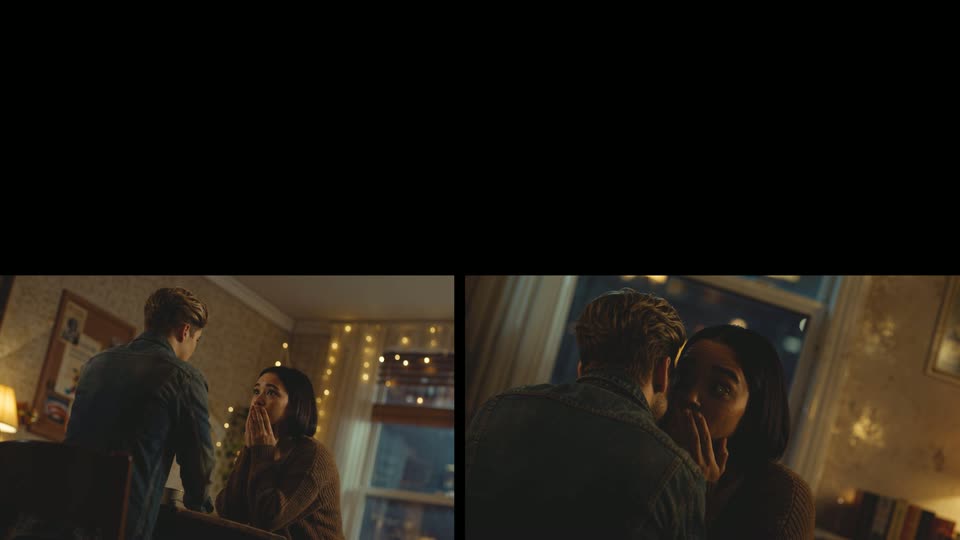
A split screen shows two angles of a couple in a warmly lit room with string lights. Left, a man stands over a seated woman with her hands near her mouth. Right, a closer shot frames the man leaning toward the woman, her hand on her face.
Techniques: Split screen
Camera: Static
12 · Feature reveal · 0:11–0:11
A four-panel grid with a black top-left corner shows a couple in a warm, string-lit apartment at night from three angles at once: a wide room shot, a medium two-shot, and a close over-the-shoulder view as the woman covers her mouth in surprise.
Techniques: Split screen
Camera: Static
13 · Other · 0:11–0:12
A four-panel split screen frames a dim, lamp-lit living room from four angles at once. A man stands facing a seated woman; the bottom-right panel tightens on her face as her eyes widen and her hands fly to her mouth in surprise.
Techniques: Split screen
Camera: Static
14 · Other · 0:12–0:14
A centered white sentence sits on a black field while small grey dots drift slowly like distant stars. The text stays locked in place for the full shot.
On-screen text: “Your film set for AI video production.”
Techniques: Particles
Camera: Static
15 · Outro · 0:14–0:16
A centered white wordmark fades in over a black field of small drifting gray dots, then holds still as the sign-off.
On-screen text: “Your film set for Al video production.”, “martini.film”
Techniques: Particles
Camera: Static