0:45


See Lantern AI (YC F26)’s activity on LinkedIn
Lantern AI · B2B
machine0 · Jun 2026 · 4:05 · Full motion · AI-annotated
machine0’s 4:05 launch film runs 14 scenes, about 18 s each. The product is on screen from the first frame and 1 feature is revealed. The call to action lands at 3:43 (91% in), over a voiceover. One unbroken screen-recording demo on a flat sage green field, cut at a slow ~1.5 cuts per minute so each typed command and scroll of terminal output gets room to breathe. Signature moves are the oversized white cursor that morphs between pointer and I-beam, terminal windows tilted in 3D space, and a persistent rounded webcam of the presenter pinned to the corner.
Is this your launch? to your site or press kit.
Lantern AI · B2B
StackBlitz · Developer tools · Mar 2025
A dark macOS terminal window sits on a sage background, a small webcam PIP of a presenter in the corner. A large white cursor in the center morphs from a pointer to a text I-beam, then fades. Terminal lines type out at the top as the install command runs.
Techniques: Morph
Camera: Static
A macOS terminal window sits on a pale green field, monospace commands typed at the top, a block cursor blinking at the prompt. A large white I-beam cursor icon fades in at the center. A rounded webcam feed of the presenter occupies the bottom-right corner.
Camera: Static
A flat dark browser window fills the frame. A cursor drifts over a blank page, then the page loads an authorization screen with a terminal icon and a connecting button. A small webcam self-view of a man stays in the bottom-right corner.
On-screen text: “app.machine0.io/connect?state=f095e530d806fc73b7b9cdb6b4029cb28...”
Techniques: Cursor demo
Camera: Static
A browser window plays the machine0 sign-in flow as a cursor clicks Continue with Google, then Connect on the Authorize the CLI page, landing on Connected Successfully before a cut to a terminal. A webcam inset of the speaker sits in the corner.
On-screen text: “app.machine0.io/connect?state=f095e530d806fc73b7b9cdb6b4029cb28...”
Techniques: Cursor demo
Camera: Static
A dark macOS terminal window fills the frame, with a small rounded picture-in-picture of a man speaking in the bottom right. A white cursor appears, the SSH command is typed, and a remote NixOS shell banner loads in a bordered box as the prompt returns.
Techniques: Cursor demo
Camera: Static
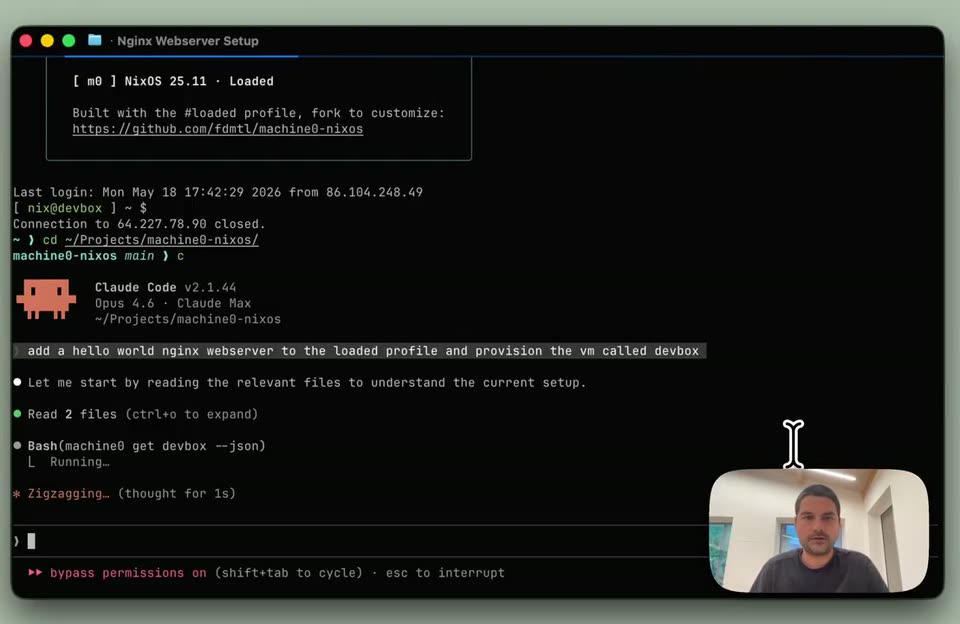
A tilted 3D terminal window shows Claude Code logs. A cursor hovers a GitHub link, a command is typed into the prompt, and the log scrolls as response lines appear; a bone-shaped loading icon pulses mid-screen and a small video inset of the speaker sits bottom-right.
Techniques: 3D mockup, Cursor demo
Camera: Pan
A dark code editor window shows a green diff of an nginx config block, then scrolls to a second diff while a small webcam inset of a presenter sits in the bottom right corner.
Camera: Static
A dark terminal window titled Nginx Webserver Setup floats at a slight 3D tilt on a pale gray-green backdrop. Green diff lines sit at the top while provisioning output streams and scrolls through the pane. A rounded webcam inset of a man speaking and gesturing occupies the lower right corner.
Techniques: 3D mockup
Camera: Static
A dark macOS terminal fills the frame, its body copy showing nginx setup output above a prompt. A small webcam video of a man overlays the lower right corner. At the prompt, the command 'hunk diff' is typed letter by letter, then the window title updates to match.
Camera: Static
A dark diff viewer window fills the frame, its green-highlighted added lines showing an Nginx config block. A small rounded webcam inset of a man sits in the bottom right, talking while the code stays still.
Camera: Static
A dark terminal window fills the frame, showing lines of CLI output and a green prompt. A small rounded webcam inset in the lower right shows a man speaking, with a bone icon above it. The terminal text stays static throughout.
Camera: Static
A dark terminal window fills the frame, with a small webcam self-view of a man in the bottom-right corner. A cursor moves to the prompt and types a command; the log scrolls up, revealing a bordered table of VM details, then the cursor types the VM's URL.
Techniques: Cursor demo
Camera: Static
A dark browser window fills the frame with a small webcam self-view of a man in the corner. The tab loads from Untitled to devbox.mac0.io, the page shows Hello, world!, then the view cross-fades into a terminal listing devbox details.
Techniques: Cursor demo
Camera: Static
A dark macOS terminal window sits on a sage green field, showing a devbox VM details table and command lines. A small webcam inset in the bottom right shows a man speaking to camera, while a white cursor drifts down the empty right side of the terminal.
Techniques: Cursor demo
Camera: Static