1:06

Paul Klein IV - Your agents suck when using the web because 85% of it doesn't have an
Browserbase · Apr 2026
Lottielab’s 2:03 launch film runs 65 scenes, about 1.9 s each. The product shows up at 0:17 and 6 features are revealed. The call to action lands at 2:02 (99% in), over a voiceover. Built as a tight problem-to-product arc: a rapid montage of failing tools and a frustrating chat message, then a logo reveal, then a back-to-back run of feature demos that each open on a typed prompt and resolve into a polished poster or editor view. The style is defined by a clean white canvas, a recurring rainbow semicircle mark, and a signature move of blurring the background while a single UI panel or poster snaps into sharp focus, with fast radial wipes and 3D-tilted interface mockups punct
Is this your launch? to your site or press kit.
Browserbase · Apr 2026
Salesforce · Aug 2026
Films whose music sounds like this one, voice left out
Solid · Modern electronic
Codag · Modern electronic
Helios Intelligence · Cinematic electronic
On a white background, a collage of product posts, a yellow can illustration, a purple video of a berry jar and a glass of iced tea, reflows and sharpens from a blur, while the blue caption For every post slides in from the right.
On-screen text: “For every post”
Techniques: Kinetic type
Camera: Pull out
A white canvas holds the blue caption Every advertisement on the left while a cluster of video tiles on the right cycles through sample clips: a plant greeting, a dark app screen, a mouse, a face, a sunflower.
On-screen text: “Every advertisement”
Camera: Static
A white field holds the blue headline “Every launch” at center as a vertical strip of small video and interface tiles scrolls along the left edge, each tile a different product clip or screen.
On-screen text: “Every launch”
Camera: Pull out
On a white background, the sentence builds word by word in the center: “The moving version” first, then “is the one that works.” in a dark gray sans-serif. A blurred, colorful panel slides out of the left edge in the first beat, and the frame stays locked off.
On-screen text: “The moving version”, “is the one that works.”
Techniques: Kinetic type
Camera: Static
A heavily blurred video editing timeline glitches between two views, color bars on a preview monitor, then colored clips with audio waveforms. Chromatic aberration fringes the edges while the tagline holds locked in place.
On-screen text: “The moving version”, “is the one that works.”
Camera: Static
Extreme macro close-up of a teal interface, heavily out of focus, with vertical bars and a red selection box. A white cursor arrow sits in the center above a blurred data readout along the bottom.
Camera: Static
A hand grips a black mouse in extreme close-up; the index finger presses the left button once against a warm, blurred background.
Camera: Static
A Canva screen splits the frame: a left panel of text animation presets with a cursor resting on Bounce, and a right canvas where the word TENNIS and a script line bounce into place on a green tennis court. The view holds steady.
Techniques: Cursor demo
Camera: Static
A locked-off close-up of a dark interface. A small Generating status chip with a spinning loader stays in sharp focus at center, while a white text list on the left and a green bar on the right blur into soft focus.
Camera: Static
A vector editor screen on a monitor, shallow focus blurring the bezel. On the black canvas, white, red, blue and green paths with visible anchor points animate into the FIFA logo, while a right panel shows color and preview options.
On-screen text: “Generating”, “ds for”, “epens”
Camera: Static
A dark keyframe graph with purple easing curves and yellow handles fills the frame. The view zooms in on the curves as a cursor hovers over a handle, and a small tooltip updates its speed and influence values.
Techniques: Cursor demo, UI zoom
Camera: Static
A vertical list of notification cards scrolls upward on the right against a blurred orange gradient. New cards like “Export complete” and “Design team” slide into view at the top while older ones exit at the bottom.
Techniques: Parallax
Camera: Static
A close-up of a notification card, “Content Team: Nvm, let's just have it as an image.”, stays sharp over a blurred orange gradient, then the focus racks out and the view pulls back to show the stack small at right beside a Premiere Pro icon.
Techniques: UI zoom
Camera: Static
A defocused chat list on an orange gradient cuts to a dark vector editor, where red, blue and green Bezier shapes with pink anchor lines and yellow handles sit on a grid.
Camera: Static
A fast radial motion-blur transition: a white UI panel with a purple plus icon and a colorful list on the left streaks into dark red, green and blue radial smears as the frame whips toward a black center.
Camera: Pull out
A white title card holds two centered lines of text, 'introducing the', wrapped in horizontal motion blur. Blurred colored panels rush in from the frame edges as the text snaps toward focus, a fast radial-style transition.
On-screen text: “introducing the”
Techniques: Kinetic type, Speed ramp
Camera: Static
A motion-blurred collage of colorful posts and the caption 'For every post' slide out, then a Google search bar appears on white as the URL burp.com is typed into the field.
On-screen text: “For every post”, “burp.com”
Techniques: Cursor demo
Camera: Static
A locked-off close-up of a browser address bar shows a rainbow semicircle icon beside the highlighted text burp.com, with a matching suggestion row below. The frame holds still.
On-screen text: “burp.com”
Camera: Static
Extreme close-up of two hands resting on a laptop keyboard, fingers tapping the keys. Shallow depth of field keeps the hands sharp while the screen behind blurs into a white panel and orange desktop. Locked-off frame, slow and quiet.
On-screen text: “burp.com”
Camera: Static
On a white field, the black semicircle mark of the Burp logo fills with vertical rainbow stripes and small pixel blocks, then shrinks; the wordmark flips from burp to durp as it scales down, then settles back to burp.
On-screen text: “burp”, “durp”
Techniques: Morph, Kinetic type
Camera: Static
A centered rainbow half-circle mark and black lowercase wordmark sit on a white cross, framed by a grid of design posters. The posters start out of focus and sharpen while the grid eases outward, the logo holding its place.
Camera: Push in
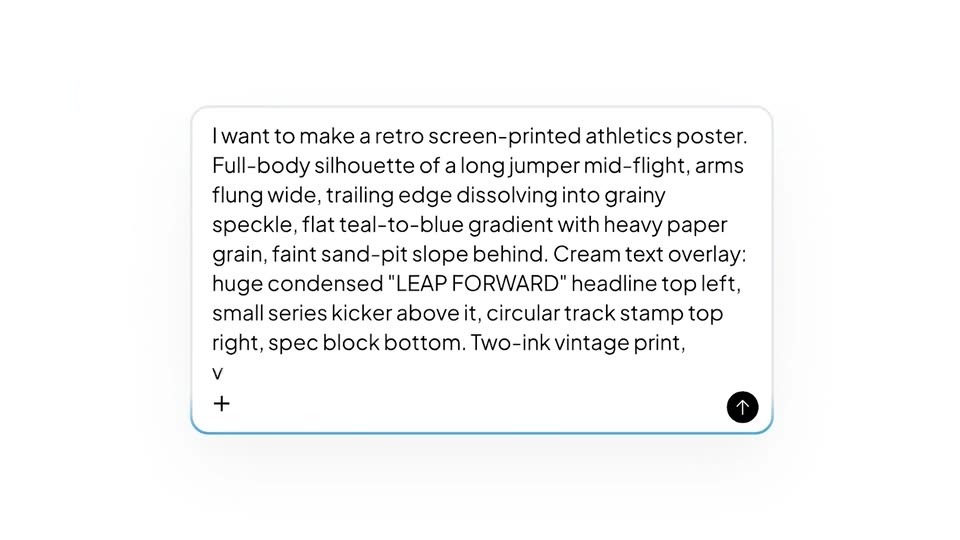
A white prompt card with a shifting gradient border sits centered on a pale background. A poster brief types itself into the field line by line, the card growing to fit, ending on the word vertical beside a black send button.
Techniques: Kinetic type
Camera: Static
The interface shows a black prompt card left and a white canvas panel right. The card shifts to the top-left as a Thinking label, Director badge, and Reading the brief text appear below it, while the right panel shrinks to a black square with a white dot.
Camera: Static
A product UI shows a prompt panel left of a vertical poster canvas. The poster starts dark and blurry, a white counter climbing 13% to 72%, then resolves into a teal long-jump poster with a black silhouette and LEAP FORWARD headline. The view zooms in on the poster.
Techniques: UI zoom
Camera: Push in
A tilted white prompt panel over a blurred photo background. Blue role pills (Image Generator, Video Generator, Motion Designer, Director) float over faint body copy, while a rounded input card types a multi-line brief word by word, its border shifting from black to an orange gradient and then blue.
Techniques: Kinetic type
Camera: Static
A white rounded card corner sits over a dark blue grid. The card slides left, bringing a pill button with a plus icon and the words Add Files into full view.
Camera: Static
A white prompt card sits on a grid background that shifts from purple to red. Three photo thumbnails of a man fade in across the top, while a typed prompt, a plus icon and a black send button hold still.
Camera: Static
A white rounded chat input box sits on a blurred multicolor background crossed by a white grid. Black text types out a prompt, then the card morphs into a new prompt with two small data tiles showing percentages and a multiplier above it.
Techniques: Morph
Camera: Static
A white rounded prompt card sits centered on a grid background that shifts from magenta to blue. The card shows two CSV file chips and a prompt line, with a plus icon and a black send button below, all held in a locked-off frame.
Camera: Static
A white rounded prompt card sits centered on a dark blue grid background with soft color blobs. The prompt text scales and slides into place, with brewtide.com highlighted in a blue pill, a plus icon at left and a black arrow button at right.
On-screen text: “Turn brewtide.com”, “into a 12s ad — hero”, “product, “BREW BOLDER”.”
Techniques: Kinetic type
Camera: Static
A white prompt card reading the brewtide.com brief floats over a blurred pastel grid. The card shrinks and drops to the lower center as the background resolves into a two-panel website mockup, an orange hero on the left and a teal grid panel on the right.
On-screen text: “Turn brewtide.com into a 12s ad — hero product, ”
Camera: Static
A Brewtide website layout fills the frame: a teal can on a blue grid at right, a BREW BOLDER headline at left. Yellow selection boxes and labels appear over the elements as a chat prompt reads Turn brewtide.com into a 12s ad and the can color cycles.
Camera: Pull out
A black prompt bubble at the top shows the instruction to turn brewtide.com into a 12 second ad. Below, a vertical progress line with a checkmark and three cards for products, palette and type brighten from dim to full as the planning step completes.
Camera: Static
A static product photo of a condensation-covered Brewide can on wood sits centered on a coral field. Two rings of white uppercase words rotate around it, fading and brightening, while the caption BREW BOLDER pops in at the bottom of the photo.
On-screen text: “BREW BOLDER”
Techniques: Kinetic type
Camera: Pull out
A square product shot of a Brewide can sits centered on a red field. Two concentric rings of white text spin around it, the outer ring faster, framing the static image.
Techniques: Kinetic type
Camera: Pan
A vertical ÉLAN magazine cover card holds the center over a blue field, with a scrolling serif letter pattern on the left and a blurred close-up of the cover's face on the right as parallax layers. The cover's headline and taglines fade in line by line while the side layers drift at different speeds.
On-screen text: “THE CONTEMPORARY FASHION ISSUE”, “ÉLAN”, “THE NEW ICONS”, “STYLE WITH A POINT OF VIEW”, “EXCLUSIVE COBALT IN MOTION”, “SILK, STRENGTH, SELF”, “READ THE STORY”
Techniques: Parallax, Kinetic type
Camera: Pull out
Three vertical poster panels sit side by side: a teal long jumper, a green basketball player, and a purple dancer, each a flat silhouette trailing particles. The figures cycle through poses as cream headlines and small caption lines fade in across the panels.
On-screen text: “NATIONAL ATHLETIC SERIES - 1974”, “LEAP FORWARD”, “CITY LEAGUE - SEASON 74”, “HANG TIME”, “AUTUMN SEASON 2026”, “SUSPENDED IN AIR”, “ROYAL ACADEMY THEATRE”, “14 OCT - NOV”, “EVENING 19:30”, “TICKETS AT THE DOOR NO. 07 / LONG JUMP DISTANCE 8.90 M WIND +1.4 M/S PRINTED IN TWO INKS 01 · TIP-OFF 19:30 02 · EASTSIDE ARENA 03 · SEC 114 GATE B 04 · NO REPL”
Techniques: Split screen, Kinetic type, Particles
Camera: Static
A design editor fills the frame, an icon grid panel on the left and a basketball poster canvas on the right. A cursor edits a star shape that fills solid, then the view pans right to reveal a second poster.
Techniques: Cursor demo
Camera: Static
A tilted 3D poster of a leaping dancer sits in a design editor while a cursor drags the hue slider, recoloring the background from red to violet. The color panel and hex field update in step.
Techniques: 3D mockup, Cursor demo
Camera: Static
A tilted 3D mockup of a motion-design app sits on a purple field. Its center canvas plays a LEAP FORWARD poster: a black athlete silhouette cycles through poses while a circular FIELD TRACK badge spins, and the timeline playhead glides right across the tracks.
Techniques: 3D mockup
Camera: Pull out
Close-up of a design tool screen: a preview window shows 3D sunglasses with annotation labels, above a timeline whose playhead advances from 0.17 to 0.24 while a hand cursor hovers over a blue keyframe bar.
Techniques: Cursor demo
Camera: Static
A motion editor interface fills the frame. A cursor drags the easing curve in the right-hand properties panel, and the green Wealth Bank card in the center canvas tilts and glows in sync with each handle change.
Techniques: Cursor demo
Camera: Static
A design tool screen fills the frame: a chat panel on the left shows a thinking timer counting up, while the right canvas displays sunglasses over a swirled teal and orange backdrop, its small annotation labels fading in and out. A timeline at the bottom scrubs forward.
Camera: Static
A flat design-tool interface fills the frame: chat panel left, fashion cover preview center, properties panel right, timeline below. The playhead scrubs forward, the preview fills with white serif headlines over a blue model, and the left chat logs the result.
Techniques: Cursor demo
Camera: Pull out
A motion editor interface tilts in 3D perspective on a violet background. Its timeline playhead crawls right while a magazine cover preview titled ELAN, showing a model in blue sunglasses, holds the center panel.
Techniques: 3D mockup
Camera: Pull out
A design tool interface on a purple background shows a fashion cover with a woman in blue sunglasses in the center canvas. A cursor drags the playhead rightward along the bottom timeline while the left assistant panel lists layout notes.
Techniques: Cursor demo
Camera: Static
A tilted 3D view of a design tool interface, white panel set against a red wall. A grid of colorful app icons scrolls up in the left column while a blurred photo of a seated figure stays on the right.
Techniques: 3D mockup
Camera: Static
A tilted 3D view of a white panel listing font-pairing samples, with a blurred dark green phone poster to the right. The list scrolls down and the zoom readout at the bottom changes from 500% to 100%.
Techniques: 3D mockup
Camera: Static
A design tool interface shown in 3D perspective, the stock images grid on the left scrolls upward through thumbnails while a product can mockup stays fixed on the right and the timeline counter ticks forward.
Techniques: 3D mockup
Camera: Static
A locked-off view of a design tool. The center canvas holds a fashion ad: a seated woman in a striped dress beside a wicker basket, with a red banner below. A chat panel sits left, a properties panel right, and the timeline playhead advances along the bottom.
Camera: Static
A motion-design tool window on a violet backdrop. A grid of dark squares with white strokes fills the center artboard, a teal radial glow ripples outward from the middle. A color-picker panel sits on the right and a timeline of row tracks runs along the bottom as the playhead advances.
Techniques: UI zoom
Camera: Static
A motion-design app window fills the frame: a code panel left, a properties panel right, a timeline below. In the center canvas a tilted bank card mockup rests on a dark green poster as a light sweep crosses its surface while the playhead advances.
Techniques: 3D mockup, Light sweep
Camera: Static
A motion design app appears in 3D perspective, angled on a white backdrop. The left canvas plays a sunglasses product animation with callout labels fading in, while the right panel lists transform, style and effect presets. A cursor hovers over the Animate button.
Techniques: 3D mockup, Cursor demo
Camera: Static
A locked-off close-up of a timeline view shows rows of blue bars and diamond keyframe markers. A thin red playhead line travels left to right across the tracks while a red time badge at the top counts up from 0.76 to 2.18.
Camera: Static
A tilted 3D view of a motion-design interface shows a fashion layout with a seated model on the right and instruction text on the left, while a prompt is typed into an input box at the bottom: Update the colours to blue.
Techniques: 3D mockup
Camera: Static
A motion editor interface fills the frame on a green backdrop. A 3D bank card on a dark green canvas rotates in perspective beneath the headline “Fewer limits. More access.” while a light sweeps its gold edge; code and properties panels flank the canvas and a timeline runs below.
Techniques: 3D mockup, Light sweep
Camera: Static
A motion design app window on an orange field, with an instruction panel left, a fonts list right and a timeline below. The center preview shows a woman holding a lipstick; the title types out letter by letter, a small chip slides in beneath it, and a caption sits at the bottom.
On-screen text: “SIX HOUR ROUGE”
Techniques: Kinetic type
Camera: Static
A motion design tool fills the frame on a warm terracotta backdrop. The center canvas plays a sunglasses mockup: thin leader lines draw out and labels slide in over a wavy abstract background, while the playhead travels the timeline below. Left and right panels hold static spec text and properties.
Techniques: UI zoom
Camera: Static
A design tool window on a green backdrop shows a dark watch dashboard whose widgets fill in, then the canvas reframes to a 2x3 grid of lifestyle photos (mug, sunglasses, face, watch, alligator, person) and pulls back to reveal the tool chrome.
Techniques: UI zoom
Camera: Static
A grid of motion clips plays at once and slowly scrolls: a green credit card, a blue magazine cover, a black data dashboard with ticking numbers, and a purple dancer panel. Each panel animates independently.
Techniques: Split screen
Camera: Pull out
A grid of design templates scrolls slowly downward across the left two thirds, mixing posters, a magazine cover, and a ballet illustration, while the right third stays black with a fitness watch interface whose stopwatch ticks from 00:02 to 00:03.
Camera: Pull out
A flat white grid of feature cards presents a product overview; captions settle from overlapping duplicates into clean lines. A dark video frame of a person with blue lips anchors the center, beside a blue timeline with diamond keyframes, comment bubbles, and export pills, under a gradient headline.
On-screen text: “And everything else”, “One Studio. Nothing left in another tab”, “Animate with AI”, “Describe the motion and watch it land as real keyframes.”, “Video and image generation”, “Footage and stills, right on the canvas.”, “Animation presets”, “Easing that already feels designed.”, “Multi artboard”, “Every size in one file., Commenting, Feedback on the frame it's about., Export, Crisp 4K video or a few kilobytes of Lottie, from the same file.”
Techniques: Kinetic type
Camera: Pull out
On a white field, the word Make appears in purple at center, then anything and move join it to form the line. A red-to-purple gradient washes across the letters and slowly shifts hue.
On-screen text: “Make anything move.”
Techniques: Kinetic type
Camera: Static
A small rainbow-striped semicircle sits centered on a white background. Its vertical color bands shift and rotate through the spectrum, cycling from green and blue to red, orange and yellow, while the shape holds its position.
Camera: Static
A plain white background holds the centered URL burp.com in dark text. The frame is locked off and the text stays still for the full duration.
On-screen text: “burp.com”
Camera: Static