0:37

Design, build, and launch — with Webflow
Webflow · Design · Oct 2018
Logitech’s 0:37 launch film runs 25 scenes, about 1.5 s each. The product is on screen from the first frame and 6 features are revealed. There is no explicit call to action. The video alternates macro 3D product shots with live-action hand shots, each feature beat introduced by a centered white caption that converges letter by letter. Pacing is brisk at 128 bpm with short cuts, and the signature move is the ripple-ring effect blooming from the mouse over alternating dark and light fields.
Is this your launch? to your site or press kit.
Webflow · Design · Oct 2018
Perplexity · AI · Mar 2026
Films whose music sounds like this one, voice left out
Microsoft · Cinematic electronic hybrid
Mercury · Cinematic electronic
Leap · Cinematic electronic
Macro 3D shot of a dark matte device surface. The embossed logi logo fades up from black as the camera slowly tracks right and racks focus from soft to sharp, revealing a perforated speaker grille below.
Techniques: 3D mockup
Camera: Pan
A dark, textured mouse body fills the frame as the camera glides across its surface, revealing a seam and a small button. The word logi slides in large across the screen.
On-screen text: “logi”
Techniques: 3D mockup
Camera: Static
A macro 3D render of a dark mechanical joint. The camera moves slowly across the textured, layered surfaces, highlighting the matte black materials and carbon fiber patterns.
Techniques: 3D mockup
Camera: Pull out
Extreme close-up on the rounded corner of a glossy black device, a silver knurled dial sits at the top left. The camera drifts slowly as a bright glint travels along the curved edge against a dark gray backdrop.
Techniques: 3D mockup, Light sweep
Camera: Pan
A black mouse floats in 3D against a dark gradient that brightens, the title 'MX Master 4' locked in white across its body while faint particles drift at the edges.
On-screen text: “MX Master 4”
Techniques: 3D mockup, Particles
Camera: Static
A black ergonomic mouse floats at a three-quarter angle on a gray gradient that brightens from dark to light. Small white dots drift around it. The white title sits centered over the device, static throughout.
On-screen text: “MX Master 4”
Techniques: 3D mockup, Particles
Camera: Static
A black ergonomic wireless mouse rotates gently in 3D against a plain white background, centered in frame. The product title remains static throughout the short clip.
On-screen text: “MX Master 4”
Techniques: 3D mockup
Camera: Static
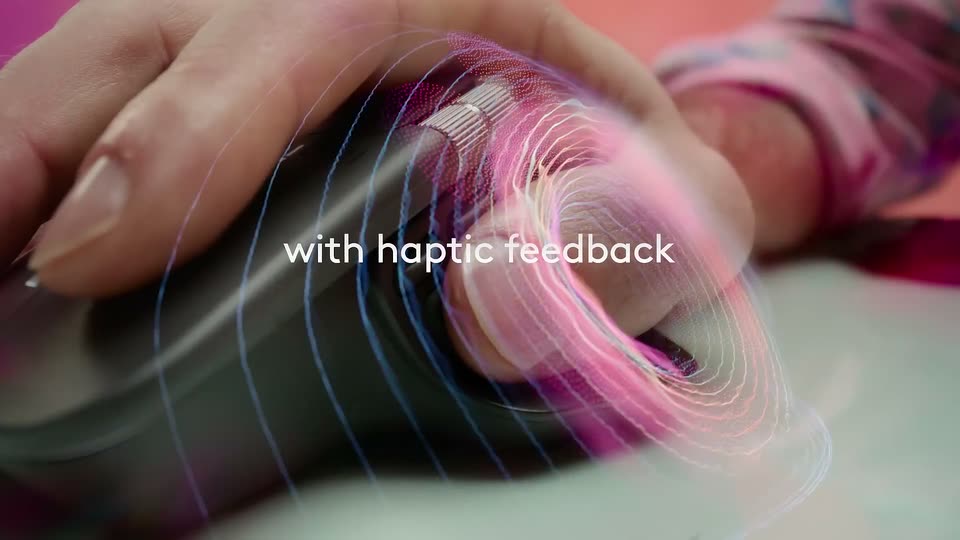
A close-up of a hand grips a black mouse, finger resting on the textured scroll wheel against a coral backdrop. Thin cyan and pink contour lines ripple outward from the wheel to suggest vibration. The white caption with haptic feedback holds steady in the center.
On-screen text: “with haptic feedback”
Camera: Push in
A dark carbon-textured device is shown in a tight 3D close-up, angled, with a glowing teal wheel at its center. Concentric dotted rings ripple outward from the wheel, shifting through teal, pink and orange. White text converges letter by letter across the middle.
On-screen text: “For supercharged performance”
Techniques: 3D mockup, Kinetic type
Camera: Push in
A bearded man in a pink shirt sits at a glass desk, working a mouse and trackpad. Behind him a pink and purple backdrop swirls with glowing bokeh particles. A caption scales in over the shot.
On-screen text: “For supercharged performance”
Techniques: Particles, Kinetic type
Camera: Push in
Extreme close-up of a finger pressing the large thumb button on a black wireless mouse. A white headline sits centered over the button while a small footnote line runs along the bottom edge. The finger pushes the button down.
On-screen text: “Save up to 33% of your time*”, “*with Actions Ring shortcuts and MX Master 4. Logitech Ergo Lab study (2025) with 37 MX Master mouse users tested across 8 desktop actions. Results may vary, as”
Camera: Push in
A blurred close-up of a center button with a cursor pulls back to reveal a ring of eight white circular icon buttons on a gray field, all snapping into focus. The cursor rests on the center X button as the ring settles.
On-screen text: “Save up to 33% of your time*”, “*with Actions Ring shortcuts and MX Master 4. Logitech Ergo Lab study (2025) with 37 MX Master mouse users tested across 8 desktop actions. Results may vary ify”, “0”
Techniques: Cursor demo
Camera: Pull out
A radial menu of white circular tool icons floats on a dark gray field. The cursor drifts from the center to the upper-right contrast icon, which fills indigo, while a small numeric readout slides in beside it.
On-screen text: “0”
Techniques: Cursor demo
Camera: Pull out
The camera pulls back from a close-up of a dark app screen with a radial cluster of round icon buttons to a pink desk. Two monitors show the interface, a node graph on the left and a particle face on the right, while small figurines and a yellow ball sit on the desk.
Techniques: UI zoom, 3D mockup, Parallax
Camera: Pull out
A finger rolls the pink scroll wheel of a dark mouse above a blurred screen of fast-scrolling text. A white caption slides across the frame and drifts up as it fades.
On-screen text: “Scroll 1,000 lines per second”
Techniques: Kinetic type
Camera: Static
A hand in a pink patterned sleeve grips a black gaming mouse on a glossy teal table against a pink backdrop, nudging it slightly. A white caption sits centered over the shot.
On-screen text: “8K DPI any-surface tracking”, “Scroll 1,000 lines per second”
Camera: Pull out
A macro close-up shows a hand gripping a black mouse with a silver scroll wheel against a blurred pink background. Fingers rest over the buttons and shift slightly, suggesting a click or move, while shallow focus keeps the hand sharp.
Camera: Static
A close-up 3D render of a black mouse side profile rotates slowly on a light gray background. The knurled metal scroll wheel and a recessed side panel holding a ring of small dots stay in focus as the body turns.
Techniques: 3D mockup
Camera: Static
A close-up of a black dotted mouse shell fills the frame, the camera gliding slowly across the textured surface. White text reads centered over the shell, with a small footnote line pinned to the bottom edge.
On-screen text: “Built to last*”, “*Improved stain resistance compared to MX Master 3S.”
Techniques: 3D mockup
Camera: Push in
A dark rippling 3D surface undulates, its waves shifting as a device edge and a dotted emblem emerge at the top, while a white caption stays fixed in the lower center.
On-screen text: “A new sense of mastery”
Techniques: 3D mockup
Camera: Static
A black wireless mouse floats at an angle on a plain light gray field, locked-off framing. The product name MX Master 4 sits centered over the body, then a soft violet glow blooms across the palm rest as the title clears.
On-screen text: “A new sense of mastery”, “MX Master 4”
Techniques: 3D mockup, Light sweep
Camera: Static
A dark glossy gaming mouse rests at an angle on a light gray background. Concentric rings in purple, teal and pink ripple outward from its right side, expanding and shifting hue.
Techniques: 3D mockup
Camera: Static
Eight Logitech devices, two keyboards, two mice, a webcam, a stylus, a control dial and an app grid panel, begin blurred at the frame edges, then settle into a top-down flat-lay and pull into sharp focus.
Camera: Pull out
A defocused 3D stack of keyboards and mice blurs out of frame, resolving to the MX wordmark centered on a plain light gray background. The logo then holds still, locked off, for the rest of the shot.
On-screen text: “MX”
Camera: Static
A dark gray MX wordmark dissolves into the lowercase logitech mark on a flat light gray field. Both marks stay centered and static while one fades out and the other fades in.
Camera: Static