0:28
OddsView - YC Launch
OddsView · Consumer · Mar 2024
Linear · Jul 2022 · 1:07 · Full motion · AI-annotated
Linear’s 1:07 launch film runs 11 scenes, about 6.2 s each. The product is on screen from the first frame and 1 feature is revealed. The call to action lands at 0:58 (86% in), over a voiceover. The video is a single-feature walkthrough that opens inside the app with a one-line promise and then follows the cursor through enable, post, Slack integration, and overview beats, linked by sliding side panels, zoom-in highlights, and crossfades between UI states. Its signature look pairs the dark near-black interface with floating app windows over a pink-to-blue gradient for the integration and end-card moments, held at a steady mid-tempo of about seven cuts per minute.
Is this your launch? to your site or press kit.
OddsView · Consumer · Mar 2024
Notion · Productivity · May 2026
GitHub · Developer tools · Nov 2024
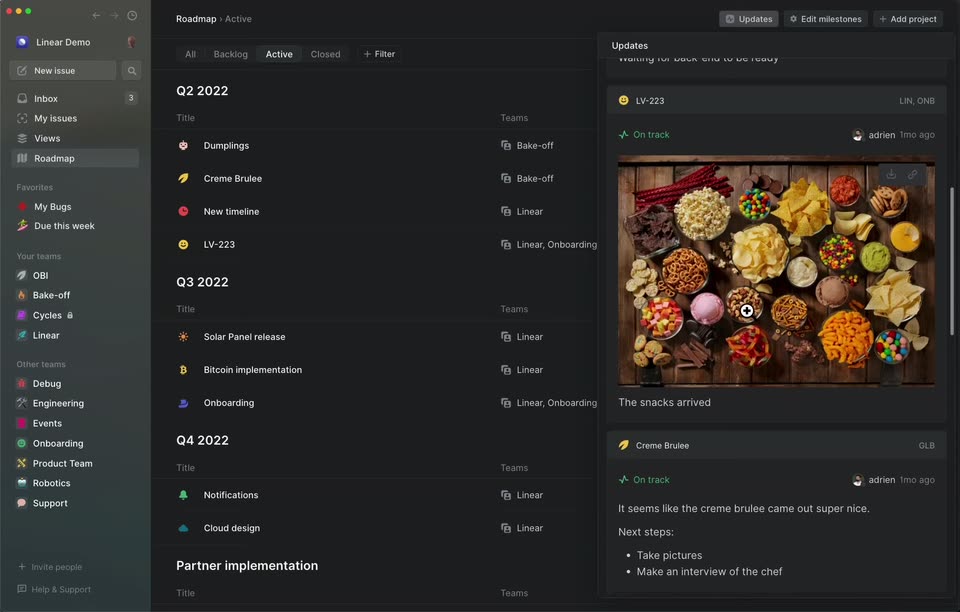
A dark Linear roadmap list appears with a fading dark circle in the center. The cursor clicks Updates top right, and a panel of status cards slides in from the right. The feed scrolls past text updates and an overhead snack photo, then a settings menu opens from the left.
Techniques: Cursor demo
Camera: Static
Fading in from a project feed, a dark settings page shows the Project updates panel. A cursor flips the enable toggle on, revealing a Reminders row, then opens the frequency dropdown to hover its options before the view crossfades to a timeline roadmap.
Techniques: Cursor demo
Camera: Static
A dark project timeline interface fills the screen, with a left sidebar and a center column of quarters and projects. A purple vertical line marks July 7 across the month grid. A mouse cursor glides from the empty timeline to the Build Giant Laser project pill on the right.
Techniques: Cursor demo
Camera: Static
A dark project page shows a backlog list and a properties panel. A cursor moves to the Updates button in the top bar, the frame zooms in as a blue ring highlights it, and a dropdown opens with a card illustration and the line Keep everyone in the loop.
Techniques: UI zoom, Cursor demo
Camera: Static
A dark project interface shows the Updates panel in its empty state. A cursor clicks New update, the panel switches to a composer, the cursor opens the status menu with three colored options, types a short note, and posts it as a new update card.
Techniques: Cursor demo
Camera: Static
A Slack window for the # product-updates channel scales in at center over a pink-to-blue gradient, then holds still. Inside, a Linear app message from Andreas Eldh reads Project Updates is back on track, with a rocket emoji, a quoted status line, and a replies count.
Camera: Push in
A dark task interface with a Todo row. A purple cursor clicks the bell icon top right, opening a notifications dropdown. The cursor then taps the personal notifications field, switching the selection from In Progress to Ignore.
Techniques: Cursor demo
Camera: Static
A dark settings interface fills the frame, with a left sidebar highlighting Slack under Integrations and a right panel of integration cards. A blue cursor drifts down past the Send project updates to a Slack channel card.
Techniques: Cursor demo
Camera: Static
A dark roadmap screen lists projects grouped by quarter. A cursor clicks the Updates button, opening a right panel of status cards, then hovers a health icon to pop up a card, then switches to the Projects page and reopens the panel.
Techniques: Cursor demo
Camera: Static
A dark Linear project view sits on a pink-to-blue gradient. The cursor clicks Updates, opening a panel with a note and a looping clip of a man in a tutu dancing with older people. The cursor clicks Post update; the white URL Linear.app/docs holds at the bottom.
On-screen text: “Linear.app/docs”
Techniques: Cursor demo
Camera: Static
A dimmed Linear interface with a comment thread holds a locked-off frame while the large URL Linear.app/docs sits at the bottom, then the whole shot fades to black.
On-screen text: “Linear.app/docs”
Camera: Static