0:29
High-Converting Job Search Launch Video | Tsenta
Tsenta · Oct 2026
Letterbook · Mar 2026 · 1:22 · Full motion · AI-annotated
Letterbook’s 1:22 launch film runs 32 scenes, about 2.6 s each. The product shows up at 0:22 and 8 features are revealed. The call to action lands at 1:15 (91% in). The film is built as a problem-to-proof arc: a fast montage of a support agent juggling inboxes and browser tabs, then sparse white-on-black taglines, then a feature tour where each capability is named by a corner pill and shown in clean or tilted 3D interface shots. Pacing is brisk with hard cuts and slow crossfades on black, a strict black-and-white palette punctuated by teal actions and yellow labels, and locked-off frames that let the UI do the work.
Is this your launch? to your site or press kit.
Tsenta · Oct 2026
Dream · B2B · Oct 2026
Turnstone · B2B · Jan 2026
Films whose music sounds like this one, voice left out
NVIDIA · Modern orchestral film score
Kling AI · Cinematic trailer music
Tactical Boar · Orchestral and choral cinematic epic
A Gmail inbox shows a support ticket while dark notification toasts stack and cycle in the top-right corner, the cursor clicking them closed. The view reframes to a close-up of the email, then pulls back to reveal the full browser window and sidebar.
Techniques: Cursor demo, UI zoom
Camera: Pan
A dark browser window fills the frame, two tabs open along the top edge. A white arrow cursor rests on the New Tab tab, and the address bar holds a Google icon beside a text caret. The page below stays black.
Techniques: Cursor demo
Camera: Static
A dark browser window shows two tabs and a typed address. The cursor slides from the New Tab to the plus button, then the page loads to the MongoDB homepage with its green webinar banner and top menu.
Techniques: Cursor demo
Camera: Static
A dark browser window fills the frame. A cursor moves to a tab and the address bar fills with zendesk.com, triggering a dropdown of search suggestions that drops down beneath the bar.
Techniques: Cursor demo
Camera: Static
A Chrome browser window displays the Zendesk homepage with its black announcement bar and white header. A white cursor glides from the active tab to the plus button at the top right as the page scrolls down to reveal a large headline.
Techniques: Cursor demo
Camera: Static
A dark browser window fills the frame, showing an address bar with a dropdown of autocomplete links. The address bar text stripe.com turns from plain to highlighted blue as the suggestion list refreshes. A mouse cursor rests at the top right.
Camera: Static
A browser window shows the Stripe homepage with several tabs open. A cursor hovers the Stripe tab at top right, raising a tooltip, while the large headline fills in from light blue to dark and the GDP counter ticks upward.
Techniques: Cursor demo
Camera: Pull out
A desktop browser cuts from the MongoDB homepage to a Freshworks sign-in page. The cursor moves down and hovers over the Resend activation email button.
Techniques: Cursor demo
Camera: Static
A dimmed Google account chooser, cursor resting on a Dawson Chen row, cuts to a data explorer screen. A search bar holds the email address and a list of support tickets fills the page.
Techniques: Cursor demo
Camera: Static
A dark dashboard opens on a logs screen of monospace entries, then shifts to an email activity list whose rows slide in with delivered badges and timestamps.
Camera: Static
A Gmail compose window in a browser fills the locked-off frame. A cursor glides across the toolbar, then a reply is typed into the box word by word while the message thread above stays still.
Techniques: Cursor demo
Camera: Static
A white sentence sits centered on a black background, holding still, then dissolves into a second sentence in the same position. Locked-off frame, slow pace, no movement other than the crossfade between the two lines.
On-screen text: “Customer support shouldn't be this hard.”, “So we made it dead simple.”
Camera: Static
A black screen holds a centered white line, then cuts to a second centered line. Both frames are locked off and static, with no motion or camera movement.
On-screen text: “So we made it dead simple.”, “Say hello to...”
Camera: Static
A light inbox list scrolls continuously, rows of draft emails and colored priority labels moving up the frame; a hand cursor icon hovers at the top left while the frame stays locked off.
On-screen text: “Say hello to...”
Camera: Pan
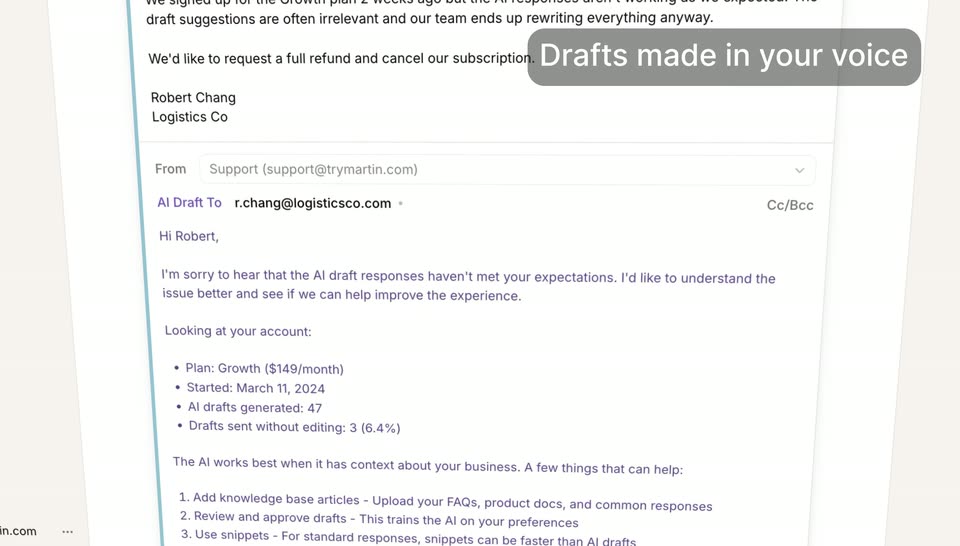
A dark gray rounded pill badge reading “Drafts made in your voice” slides in from the right edge over an email draft screen, settling in the top corner while the email body shifts up slightly.
On-screen text: “Drafts made in your voice”
Techniques: Kinetic type
Camera: Static
A tilted close-up of an email interface scrolls down past two AI-drafted replies, each headed by an AI Draft To line, while a white caption on a dark pill holds in the top right.
On-screen text: “Drafts made in your voice”
Camera: Static
A support email and an AI-drafted reply scroll slowly up the screen while the headline pill “Drafts made in your voice” drifts down in the top right, the two layers moving at different speeds.
On-screen text: “Drafts made in your voice”
Techniques: Parallax
Camera: Static
A blurred email draft sharpens as the view zooms in on the interface, then a cursor hovers a small white popup showing a source link and trash icon. A gray caption sits top right.
On-screen text: “Drafts made in your voice”
Techniques: UI zoom, Cursor demo
Camera: Static
A light email interface reframes leftward across a draft reply. A cursor hovers over a popover listing a read source, a MongoDB integration, and a drafted reply, then moves down to the Send button.
On-screen text: “Database & Docs Integration”
Techniques: Cursor demo
Camera: Pull out
A light email client view shows the end of a support message above a Reply, Forward, Add Note button row. A black cursor hovers on Reply while the frame scrolls up a few lines. A gray rounded caption reading Database & Docs Integration sits in the top right.
On-screen text: “Database & Docs Integration”
Techniques: Cursor demo
Camera: Pull out
A draft email in a mail client lists two Stripe charges and a refund action, with a dark gray Stripe Integration tag fixed at the top right. A white fade lifts and the view eases down a few lines.
On-screen text: “Stripe Integration”
Camera: Static
A tilted 3D email view of a billing reply; a cursor glides from the top right down to a refund row and clicks a checkmark toggle that fills teal, beneath a gray Stripe Integration label.
On-screen text: “Stripe Integration”
Techniques: 3D mockup, UI zoom, Cursor demo
Camera: Pan
A confirmation modal reading Approve Action? sits over a blurred email that sharpens into focus. The cursor glides onto the teal Approve button as a Command-Enter hint pops up above it.
On-screen text: “Stripe Integration”
Techniques: Cursor demo
Camera: Static
A screen recording of a knowledge base app shows a document list on the left and a troubleshooting article on the right. A hand cursor moves down the list and hovers over a highlighted entry, while a gray caption banner sits at the top.
On-screen text: “Internal & External Knowledge Base”
Techniques: Cursor demo
Camera: Static
The knowledge base interface fills the frame as the view zooms in. A white hand cursor glides down the sidebar list, hovering over article titles, while the article body stays still. A gray pill caption sits at the top right.
On-screen text: “Internal & External Knowledge Base”
Techniques: UI zoom, Cursor demo
Camera: Static
A settings interface shown tilted in 3D perspective, with a gray 'Automations' pill top right. A cartoon hand cursor opens a dropdown, picks 'Everyone of a role' and 'Agents only', then clicks the Save button.
On-screen text: “Automations”
Techniques: 3D mockup, Cursor demo
Camera: Pan
A screen capture of an issue thread. A short prompt is typed into the reply field, then a full draft paragraph appears in the box and the Send button turns teal. A dark pill reading Cmd+K to Write with AI stays at the top right.
On-screen text: “Cmd+K to Write with AI”
Camera: Pan
A tilted 3D view of a support ticket. A cursor ticks the auto-translate checkbox, the view zooms into the conversation, and the cursor clicks Reply as a confirmation pops up.
On-screen text: “Seamless Translations”
Techniques: Cursor demo, UI zoom, 3D mockup
Camera: Pan
A close-up of a light analytics dashboard showing four line-chart cards. A cursor clicks the inbox filter, opens the dropdown, and picks a specific inbox, and the chart numbers update.
On-screen text: “Analytics”
Techniques: Cursor demo
Camera: Static
A white tagline sits centered on black as feature labels fade in one by one around the edges, until the frame fills with overlapping text that dims in the final beat.
On-screen text: “The first AI-native support platform.”, “Omnichannel Support”, “AI Replies”, “Knowledge Base”, “Triage Tickets”, “Snippets”, “Translations”, “Stripe Integration”, “Analytics”, “APIs”
Techniques: Kinetic type
Camera: Static
A black screen holds a single centered line of white text that stays static for the whole clip. No animation, no camera move, no other elements enter.
On-screen text: “Built from the ground up for startups.”
Camera: Static
A black frame holds the centered white line “Try it today at letterbook.ai”, then it is replaced by the white Letterbook wordmark with a stylized L, which stays locked off.
On-screen text: “Try it today at letterbook.ai”, “Letterbook”
Camera: Static