2:28

Praxis AI Launch
Vortexify · B2B · Nov 2024
Turnstone · Jan 2026 · 0:51 · Full motion · AI-annotated
Turnstone’s 0:51 launch film runs 21 scenes, about 2.5 s each. The product shows up at 0:07 and 2 features are revealed. The call to action lands at 0:45 (88% in). The video alternates stark text cards on an animated silk backdrop with 3D laptop mockups of the product, following a claim-then-demo rhythm at a steady ~140 BPM. Its signature moves are the scramble and flicker text reveals, the slow diagonal light waves on the fabric, and the camera zooms that dive from the device into the interface.
Is this your launch? to your site or press kit.
Vortexify · B2B · Nov 2024
Tsenta · Oct 2026
ForecourtIQ · Mar 2026
Films whose music sounds like this one, voice left out
Fal · Electronic dance music, Breakbeat/Big Beat style
Boundless · Melodic dubstep, future bass
ORO AI · Electronic Dance Music (EDM)
A plain black card holds centered sans-serif text; the first line is set, then the second line appears beneath it, and both remain static.
On-screen text: “Every app is still”, “built for clicking”
Techniques: Kinetic type
Camera: Static
A soft white gradient with a moving diagonal light band carries dark gray words at scattered positions: “menus” and “built for clicking”, then “dashboards” and “endless workflows”. The words are replaced by the two-line line “but users want to talk to software”. The frame stays locked off.
On-screen text: “menus”, “built for clicking”, “dashboards”, “endless workflows”, “but users want to talk to software”
Techniques: Kinetic type, Light sweep
Camera: Static
Two lines of dark gray sans-serif text sit centered on a pale gray surface while a soft diagonal shadow drifts slowly across the background. The wording stays locked in place for the full shot.
On-screen text: “but users want to”, “talk to software”
Camera: Static
On a near-black field with a slow diagonal light wave, the white line “not learn it” holds centered, then the frame resolves to a small gray “t1_4” label in the same position.
On-screen text: “but users want to”, “talk to software”, “not learn it”
Techniques: Light sweep
Camera: Static
A dark, soft-focus backdrop with a curved gray highlight. A small gray word sits centered above a large white title that flickers through scrambled characters before resolving to its final form.
On-screen text: “meet”, “Crow”
Techniques: Kinetic type
Camera: Static
A white laptop mockup in 3D perspective shows an ERP dashboard, then the camera zooms into the screen as a bold black headline slides in on the left. A cursor hovers over the sidebar menu.
On-screen text: “Users no longer click through complex UI”
Techniques: 3D mockup, UI zoom, Kinetic type, Cursor demo
Camera: Push in
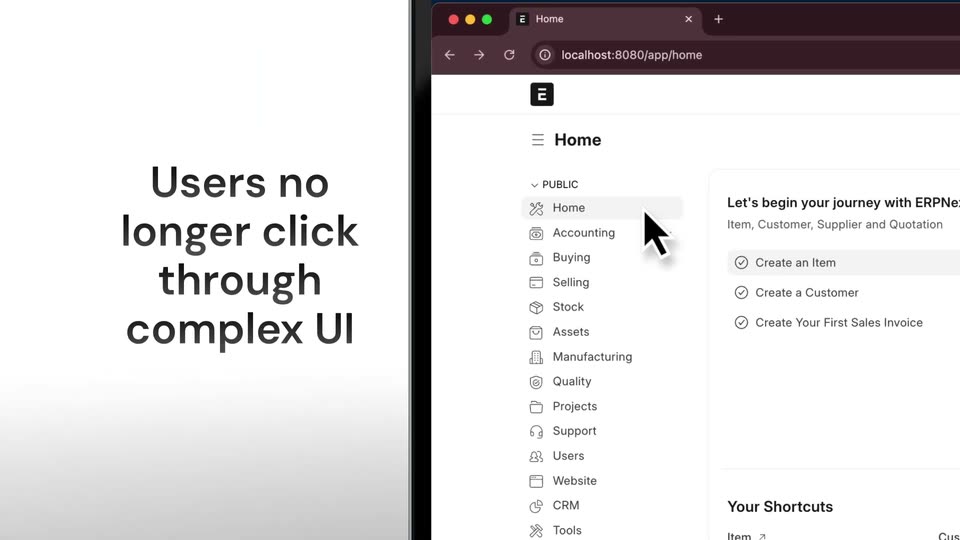
A white panel on the left holds a black headline while a browser window on the right shows the app sidebar. A cursor glides down the menu, pausing on Accounting, Stock and Users as the list scrolls.
On-screen text: “Users no longer click through complex UI”
Techniques: Split screen, Cursor demo
Camera: Push in
A laptop shows the ERPNext browser with a Gemini assistant panel; a magnified sidebar inset on the right highlights the Integrations menu, then the view settles on the full screen as a cursor moves to the chat input. A black headline reads across the frame.
On-screen text: “Users no longer click through complex UI”, “they simply ask”
Techniques: UI zoom, Cursor demo, 3D mockup
Camera: Pan
A laptop in 3D perspective shows a CRM screen with an assistant chat panel. The view reframes onto a floating input field as text is typed, 'how do i create a supplier item', while the headline 'they simply ask' fades out on the right.
On-screen text: “they simply ask”
Techniques: 3D mockup, UI zoom
Camera: Push in
A 3D laptop mockup shows a dimmed CRM screen with a white chat input. The typed question clears to a placeholder, a cursor arrow hovers, and a red stop button appears as the panel header reads Connecting.
Techniques: 3D mockup
Camera: Pan
A tilted phone mockup plays an assistant chat: a cursor glides down the thread as status chips and reasoning text type in, ending in a black reply bubble, while a large gray headline fades in on the right.
On-screen text: “and Crow doesn't just answer”
Techniques: 3D mockup, Cursor demo
Camera: Pan
A laptop on white shows the ERPNext app with an AI assistant chat. The shot opens zoomed into the screen, pulls back to reveal the device under a black headline, the assistant's reply bubble appears, then the frame tightens again.
On-screen text: “it takes action inside your product”
Techniques: UI zoom
Camera: Pull out
A 3D laptop mockup on a light background displays an ERP interface beneath a static black headline. The screen shifts from a home onboarding view to a New Supplier form as a chat assistant panel on the right types out messages and a cursor appears in the input.
On-screen text: “it takes action inside your product”
Techniques: 3D mockup, Cursor demo
Camera: Static
A dark smoky gradient drifts slowly behind centered white text. The line “for most companies” holds, then swaps to “rebuilding for AI takes” with “months” dropping in below, then to “sometimes years”.
On-screen text: “for most companies”, “rebuilding for AI takes”, “months”, “sometimes years”
Techniques: Kinetic type
Camera: Static
On a soft white gradient with a faint drop shadow, the word Crow scales up at center, then changes that fades in below it word by word in gray. The frame stays locked off.
On-screen text: “Crow”, “changes that”
Techniques: Kinetic type
Camera: Static
A laptop in 3D perspective shows the Crow dashboard as a bold headline fades in at left. The Files view cuts to the Actions view; the cursor clicks Select All, the tool checkboxes tick, then Save triggers a green success banner.
On-screen text: “Crow connects directly to your app's workflows and APIs”
Techniques: 3D mockup, Cursor demo
Camera: Static
A MacBook in 3D perspective on the right cycles through the Crow app's Actions, Deploy and Journey views as a cursor clicks down the sidebar, while a gray headline on the left fades out.
On-screen text: “Crow connects directly to your app's workflows and APIs”
Techniques: 3D mockup, Cursor demo
Camera: Pan
A tilted laptop mockup shows the Crown deploy page with a dark embed-script code block. A cursor glides across the interface toward the Deploy button. A large gray headline sits above the device on a light background.
On-screen text: “and deploys in 1 simple step”
Techniques: 3D mockup, Cursor demo
Camera: Static
Two lines of white text fade in on a black background, centered in the frame. The text reads 'the next-gen of software' and 'will be AI-first'.
On-screen text: “the next-gen of software”, “will be AI-first”
Techniques: Kinetic type
Camera: Static
A soft diagonal shadow falls across a light gray field. The dark gray headline “Crow is the fastest” sits centered, then the second line “way to get there” drops in below it. The headline holds, then dissolves to clear the frame.
On-screen text: “Crow is the fastest”, “way to get there”
Camera: Static
The Crow slash mark and wordmark rest on a pale, draped silk surface with soft shifting folds. The mark deepens from gray to black, then the URL usecrow.ai fades in beneath it while the fabric sheen drifts slowly.
On-screen text: “usecrow.ai”
Camera: Static