
0:27
Explore
00:00:00 / 01:42:02
- Length
- 1:42
- Scenes
- 47 · 2.2 s avg
- Product on screen
- 0:23
- Features shown
- 5
- Call to action
- 1:32 · 91%
- Voiceover
- No
- Views
- 9.6K on YouTube
as of November 24, 2026
Logical’s 1:42 launch film runs 47 scenes, about 2.2 s each. The product shows up at 0:23 and 5 features are revealed. The call to action lands at 1:32 (91% in). The video is built as a late-night narrative: a stressed worker, a text-message product reveal, then a fast montage of the dark command bar solving tasks across Gmail, Sheets and the browser, closing on a relieved user and a black end card. Its style contrasts warm, shallow-focus live action with crisp 3D-tilted UI and flat chat-bubble graphics, all tied together by the blue-to-purple Logical mark and a steady 140 bpm cut rhythm.
Footage neededEstimated needs: 9 capture groups — your screens or recordings · 1 official logo — reused across the film · 14 filmed passages — shoot, supply or replace · 2 graphic passages — draw or supply · 4 3D passages — build or supply
Is this your launch? to your site or press kit.
More like this



Similar soundtrack
Films whose music sounds like this one, voice left out
0:35

Concept THREE | Design Film 30" version
Hyundai · Progressive House
1:18

Inbenta Encore – Cinematic Product Story Video
Inbenta · Cinematic electronic, orchestral, and EDM
0:42

Unveil | Intelligent Eyewear | Samsung
Samsung · Electronic, EDM
Logical | The Proactive Desktop Copilot, scene by scene
· 47 scenes as text
01 · Problem · 0:00–0:01
A macro close-up of a scratched phone screen on a wooden surface starts out of focus, then racks sharp onto a dark notification banner reading Date, Today at 8:00 beside a white SAT 25 calendar tile, with a flashlight icon below.
Camera: Push in
02 · Problem · 0:01–0:03
A man in a beige jacket and striped shirt gestures with his hand while talking in a dim, wood-paneled room, the camera held close and slightly unsteady.
On-screen text: “Date”, “Today at 8:00”, “25”
Camera: Static
03 · Problem · 0:03–0:04
A close-up of a white interface holds still. The heading stays sharp above a rounded input box filled with softly blurred gray text, while three small pill buttons line the bottom edge.
Camera: Static
04 · Problem · 0:04–0:05
A locked-off close-up holds on a man with tousled dark hair who rests his head on one hand, frowning as he stares down at a laptop screen in a dim, warmly lit room. His strained expression stays fixed for the duration.
On-screen text: “Attach”
Camera: Static
05 · Problem · 0:05–0:06
A browser window displays Google Drive; a Google Docs editor overlay crossfades away, and a white cursor moves across the open tabs. The Drive view resolves on the Business Documents folder with a search bar and Ask Gemini panel.
Techniques: Cursor demo
Camera: Static
06 · Problem · 0:06–0:08
Extreme close-up of two hands tapping a silver laptop trackpad in warm, low light. A finger presses the pad twice while the camera holds a static, shallow-focus frame on the palm rest.
Camera: Static
07 · Problem · 0:08–0:08
A 3D-tilted help panel holds the prompt What can I help with above a blurred block of body copy that shifts, with three pill buttons Attach, Search and Study along the bottom; the Attach button scales in.
Techniques: 3D mockup
Camera: Static
08 · Problem · 0:08–0:10
Close-up of two hands typing on a dark keyboard in warm, low light. Shallow focus keeps the fingertips sharp while the surrounding keys blur into bokeh. The fingers press keys steadily in a locked-off frame.
Camera: Static
09 · Problem · 0:10–0:11
A man in a beige jacket sits at a desk at night, working on a dark laptop, seen through a window. A lamp glows on the right and a wine glass rests on the desk. The frame is locked off with only subtle head movement.
Camera: Static
10 · Problem · 0:11–0:12
A tight close-up of a browser window racks from soft blur to sharp focus, the address bar and a Business Documents tab snapping into clarity as a cursor rests near the tab.
Camera: Static
11 · Problem · 0:12–0:13
A dim, tight close-up of a browser window in low light. The address bar shows a lock icon and chatgpt.com above a row of blue bookmark icons and a Drive logo. The frame slowly zooms in on the bar.
Techniques: UI zoom
Camera: Push in
12 · Problem · 0:13–0:15
A man in a light sweater sits at a desk behind a laptop, hand pressed to his forehead. He lifts his head and stares at the screen with a wide-eyed, open-mouthed look. Warm lamp light on the right, a wine glass and magazines on the table.
Camera: Static
13 · Problem · 0:15–0:17
A white chat card fills the frame, then the view tightens onto the input box. A prompt types out, the line scrolling left as new words appear, a blue caret at the end. A blue Get started button and a row of dots rest below on light gray.
Techniques: UI zoom
Camera: Static
14 · Problem · 0:17–0:17
Locked-off close-up of a white text page with two lines of dark gray body copy, cropped at the left edge. A blinking caret types at the end of the second line as the word “the” flashes with a blue selection highlight.
Techniques: Kinetic type
Camera: Static
15 · Problem · 0:17–0:19
Extreme close-up of a finger tapping keys on a dark aluminum keyboard. The fingertip presses the C key, then slides right to press V, with a shallow depth of field blurring the surrounding keys.
Camera: Static
16 · Problem · 0:19–0:23
A man in a light jacket sits at a desk at night, facing a laptop with its lid toward camera. He watches the screen, then reaches to his right and lifts his phone into view. A warm lamp glows at the right edge, dark window behind.
Camera: Static
17 · Product intro · 0:23–0:27
Flat chat bubbles pop in one by one on a pale gray background, a typing-dots bubble marking new messages. Each message scales in large, then shrinks and slides up as the next arrives, ending on a gray bubble reading “be smart, use Logical” with the brand name in indigo.
On-screen text: “I can’t tonight”, “work againn?”, “mmhmmm”, “be smart, use Logical”
Techniques: Kinetic type
Camera: Pan
18 · Product intro · 0:27–0:29
Two flat chat bubbles sit on a pale background: a gray bubble reading “be smart, use Logical” with the word in purple, and a small blue reply bubble “mmhmmm” scaling in at the top right. The bubbles clear to a centered Logical app icon and purple wordmark sign-off.
On-screen text: “be smart, use Logical”, “mmhmmm”
Camera: Static
19 · Product intro · 0:29–0:29
A white app icon with a blue-to-purple folded-triangle mark sits beside the gray wordmark on a plain light background. The lockup scales down toward the bottom center as the wordmark slides out, leaving the icon alone.
On-screen text: “be smart, use Logical”
Techniques: Kinetic type
Camera: Static
20 · Demo · 0:29–0:31
Over-the-shoulder, locked-off view of a person typing on a laptop at a wooden desk. The screen shows a macOS desktop with stacked windows, a chat panel reading “What can I help with?”, and a dock of app icons; a phone with a chat thread rests at right.
On-screen text: “P5 00.1”
Camera: Static
21 · Demo · 0:31–0:32
A row of glossy app icons lines a dark red band. A black arrow cursor rests on the central white icon, a blue-purple gradient mark, which fades to a translucent ghost while the cursor holds still.
Techniques: Cursor demo
Camera: Push in
22 · Feature reveal · 0:32–0:37
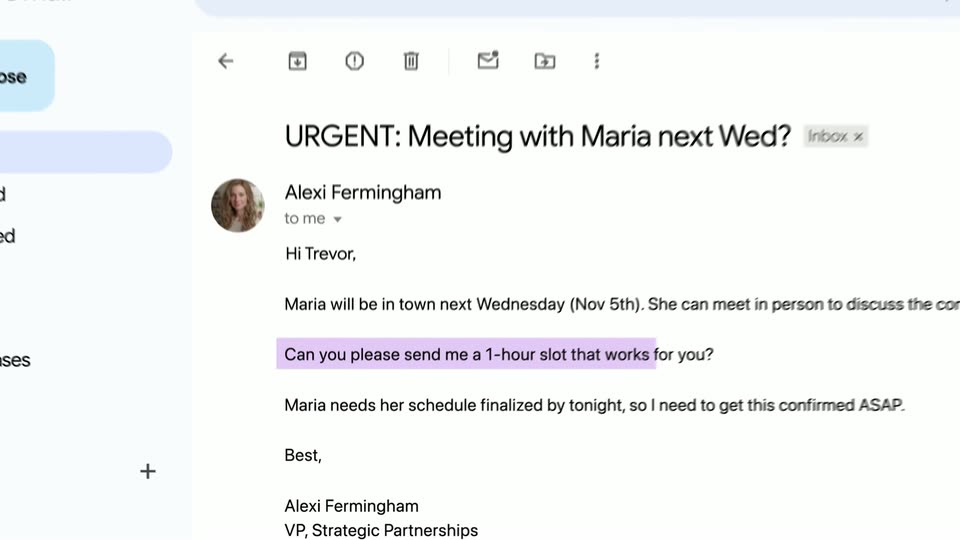
A macOS desktop with an orange gradient background frames a Gmail window open to an email from Alexi Fermingham. A dark Logical assistant bar hovers above it. The camera zooms into the email body, where one sentence highlights in purple.
Techniques: UI zoom
Camera: Static
23 · Feature reveal · 0:37–0:41
A Gmail thread sits beneath a dark Logical bar that slides in from the top. A cursor clicks the Check Availability button, then the view zooms into the bar as it shows a Searching calendar events status with a clock icon.
Techniques: Cursor demo, UI zoom
Camera: Pull out
24 · Feature reveal · 0:41–0:45
A dark chat modal titled Find Time in Calendar sits over a Gmail window. A reply types out line by line, then two meeting-slot cards with Schedule buttons fade in as a cursor moves to the first button.
Techniques: Cursor demo
Camera: Static
25 · Feature reveal · 0:45–0:48
A Gmail thread scrolls downward beneath a fixed dark Logical toolbar with action buttons. A cursor hovers over the message body as the sender details and company signature come into view.
Techniques: Cursor demo
Camera: Pull out
26 · Feature reveal · 0:48–0:50
A dark 'Logical' hint panel floats over a Gmail email. A suggested reply types out line by line while a cursor hovers, then a row of action buttons fades in along the panel's bottom edge.
Techniques: Cursor demo
Camera: Static
27 · Feature reveal · 0:50–0:55
A Gmail window fills the frame with a dark Logical toolbar pinned across the top. Four action buttons sit in the bar; two fade out, leaving two. Behind it the email thread scrolls into view and the cursor drifts down to the Reply button.
Techniques: Cursor demo
Camera: Pull out
28 · Feature reveal · 0:55–0:57
A spreadsheet application fills the frame, showing a commission table with eight client rows, stages, and dollar values in the upper left. The ribbon menu sits across the top. The view holds still with no animation.
Camera: Push in
29 · Feature reveal · 0:57–0:58
A dark assistant bar with the Logical logo and two action buttons hovers above an Excel sheet listing client deals and commissions. The view slowly zooms into the table, tightening on the first columns.
Techniques: UI zoom
Camera: Push in
30 · Feature reveal · 0:58–1:03
A dark AI panel floats over a spreadsheet and types a formula suggestion for cell I4. A cursor clicks Apply suggestion, the panel shrinks to a top bar, and the frame pulls back to reveal the filled New Commission column.
Techniques: Cursor demo
Camera: Pull out
31 · Feature reveal · 1:03–1:04
A Gmail window in 3D perspective floats over an orange gradient background. The inbox list shows two flagged emails, a cursor hovers, then the view switches to the opened email body.
Techniques: 3D mockup, Cursor demo
Camera: Push in
32 · Feature reveal · 1:04–1:07
A Gmail email window opens tilted in 3D perspective over an orange gradient, then flattens to frontal. A dark command bar with a yellow URGENT badge floats above it; the cursor hovers and the bar swaps to a Summarize Thread button as the window blurs.
Techniques: 3D mockup, Cursor demo
Camera: Push in
33 · Feature reveal · 1:07–1:09
A tilted 3D email client on an orange background stays out of focus while a dark “To-Do Detected” card with a green Accept button holds focus top right. The camera reframes onto the card as a cursor moves in and clicks Accept.
Techniques: 3D mockup, UI zoom, Cursor demo
Camera: Pull out
34 · Feature reveal · 1:09–1:09
A Gmail inbox sits on an orange gradient desktop with a dark floating command bar and a To-Do Detected alert card in the top right. A cursor hovers the green Acknowledge button while the frame pulls back slightly.
Techniques: Cursor demo
Camera: Pull out
35 · Feature reveal · 1:09–1:14
A dark search pill labeled Logical floats over a browser's address bar. A cursor clicks in, types a query about an email, and hits send; a status line reading Searching email history... slides in beneath as the view zooms in.
Techniques: Cursor demo, UI zoom
Camera: Push in
36 · Feature reveal · 1:14–1:15
A browser new-tab page with a floating AI chat panel titled Find Email About the DPA zooms in as a cursor moves up from the toolbar into the panel, hovering over the second email summary.
Techniques: UI zoom, Cursor demo
Camera: Static
37 · Feature reveal · 1:15–1:16
A dark chat panel titled “Find Email About the DPA” floats centered over a light browser window. It lists two email result cards under a completed-search note, with a cursor resting on the top card and a follow-up input bar at the bottom.
Techniques: Cursor demo
Camera: Static
38 · Feature reveal · 1:16–1:17
A Gmail email from Charles White sits on a Mac desktop. A dark rounded voice widget labeled Logical, with a How can I help? field, scales down from a larger ghosted size and settles centered above the email header.
Camera: Pull out
39 · Other · 1:17–1:20
A young man in a cream sweater sits at a desk at night behind a dark laptop, smiling at the screen. He raises both hands in a shrug, then looks down and resumes typing. A dim window and lamp frame the background.
Camera: Static
40 · Other · 1:20–1:22
A dark command bar and task list float over a flowing orange and purple abstract background. A cursor clicks the first task's green check, the mark doubles, the completed row slides to the bottom, and the panel shrinks to one row.
Techniques: Cursor demo
Camera: Pull out
41 · Other · 1:22–1:24
A man sits at a desk at night behind a closed dark laptop, eyes closed and head tilted back as he makes a small hand gesture. A warm lamp glows at the right edge, and a dark window with blurred foliage fills the background.
Camera: Static
42 · Other · 1:24–1:26
A flat chat view on a pale background scrolls upward as message bubbles scale and slide in: a gray 'be smart, use Logical' on the left, then blue 'nvm omw' and 'thanks Logical' with a face emoji on the right, ending centered on the last bubble.
Camera: Pan
43 · Other · 1:26–1:27
A blue chat bubble, cropped at the left edge, sits on a white field with white text and a yellow emoji. The emoji flips through a wink, a wide-eyed surprise and a frown while the bubble text shifts.
On-screen text: “be smart, use Logical”, “nvm omw”, “thanks Logical”
Techniques: Kinetic type, Morph
Camera: Static
44 · Other · 1:27–1:29
A man with spiky dark hair brushes his teeth in profile, holding a light wood-handled brush, then breaks into a smile while facing a bathroom mirror. The shot is a static medium close-up against beige walls, a wooden door and a window with blinds.
Camera: Static
45 · Other · 1:29–1:32
A man in a light shirt walks up a dim amber stairwell toward a door, seen from behind. He opens the door and steps through, the frame left empty as the door closes.
Camera: Static
46 · CTA · 1:32–1:35
On a black background, the words “Work smart with” fade in one by one while a blue-to-purple gradient mark holds the right side. The mark then slides left and “Logical” fades in beside it in gray, settling to white.
On-screen text: “Work smart with”, “Logical”
Techniques: Kinetic type
Camera: Static
47 · CTA · 1:35–1:42
On black, the Logical logo locks in at top while a white tagline reads Your apps understood, the middle word cycling to work and mind in purple gradient. The line then gives way to the URL trylogical.ai, and the logo scales up to a centered sign-off.
On-screen text: “Your apps understood”, “Your work understood”, “Your mind understood”, “trylogical.ai”
Techniques: Kinetic type
Camera: Static