1:13
Probe Launch Video (YC P26) | Unveil Studio
Probe · Oct 2026
Oumi · Nov 2026 · 3:29 · AI-annotated
Oumi’s 3:29 launch film runs 67 scenes, about 3.1 s each. The product is on screen from the first frame and 7 features are revealed. The call to action lands at 3:04 (88% in), over a voiceover. The video alternates between a single presenter on a red gradient wall and clean UI motion graphics on a pale dot grid, with black title cards and blue blueprint grids bookending the launch. Pacing is steady at about 117 bpm with roughly nine cuts a minute: locked-off talking-head shots carry the narrative, then each feature gets a black title card, a zoom-through interface demo and a short caption. Signature moves are the wireframe-to-solid logo trace, blur-to-focus type reveals, 3D-tilted dash
Is this your launch? to your site or press kit.
Probe · Oct 2026
isoquant · B2B · Aug 2026
Playdate · Hardware · Jun 2021
A white wireframe Oumi mark is traced stroke by stroke on a blue grid, then fills into a solid black square with white letters. Two centered lines of light-blue tagline text fade in beneath the logo.
On-screen text: “Oumi Fall Launch”, “The Al that builds your Al”
Techniques: Morph
Camera: Pull out
A white pixelated logo on a black square over a blue grid background cuts to a presenter in a black zip jacket against a red backdrop, speaking and gesturing to camera.
On-screen text: “盟”
Camera: Static
A bearded man in a black zip jacket speaks to camera, gesturing with open hands, against a red-to-pink gradient backdrop. A lower-third caption names him at the lower left. The frame stays locked on his medium shot.
On-screen text: “Manos Koukoumidis”, “COFOUNDER - CEO”
Camera: Static
On a red gradient backdrop, a man in glasses and a black zip jacket speaks to camera, framed from the chest up. A blue and white lower-third nameplate holds his name and title in the lower left. The frame is locked off; only his head and hands move.
On-screen text: “Manos Koukoumidis”, “COFOUNDER - CEO”
Camera: Static
A bearded man in a black zip jacket stands center frame against a red-orange gradient, gesturing as he speaks. A name lower-third with his title sits bottom left, then a two-line white caption, go from / renting Al, fades in on the left.
On-screen text: “Manos Koukoumidis”, “COFOUNDER - CEO”, “go from”, “renting Al”
Camera: Pull out
A bearded man in glasses and a black zip jacket stands centered on a red-orange gradient, gesturing with both hands while speaking. White text reads 'go from renting AI' on the left; 'to owning AI' appears on the right.
On-screen text: “go from”, “renting AI”, “to”, “owning AI”
Camera: Static
A bespectacled man in a black zip-up jacket stands against a solid orange backdrop, talking and gesturing with both hands. Static white text flanks him on each side for the first three seconds, then clears, leaving him alone in frame.
On-screen text: “go from”, “renting AI”, “to”, “owning AI”
Camera: Static
A bearded man in glasses and a black zip-up jacket stands centered against a red-to-pink gradient wall, talking to camera with small head shifts and steady eye contact.
Camera: Static
A man in a black zip jacket stands centered on a red gradient backdrop, gesturing with open palms as he speaks. On the right, two stacked captions fade in in sequence, then fade out.
On-screen text: “Rent AI”, “for what's common”, “Build AI”, “for what matters”
Camera: Static
A bearded man with glasses in a black zip-up jacket stands centered against a red-to-pink gradient wall, facing the camera. He speaks and gestures with both hands, palms open, as he delivers the line. The shot holds steady on his upper body.
Camera: Static
A man in a black zip-up jacket and gray pants stands center frame against a red-orange gradient backdrop. He faces left, then turns toward camera, gesturing with open hands as he speaks. Locked-off full-body shot.
Camera: Static
A bearded man with glasses in a black zip-up jacket stands against a flat red backdrop, speaking off to the left. The locked-off medium shot holds steady as he turns his head and lifts both hands into a small gesture.
Camera: Static
A man with glasses and a short beard, wearing a black zip-up jacket with a small white chest logo, stands centered against a red gradient backdrop. He speaks to the camera, gesturing with both hands, in a steady medium shot.
Camera: Static
A bearded man in glasses and a black zip-up jacket stands centered on a red gradient backdrop, speaking to camera. He raises both hands in an open shrug as the frame slowly pushes in on him.
Camera: Pull out
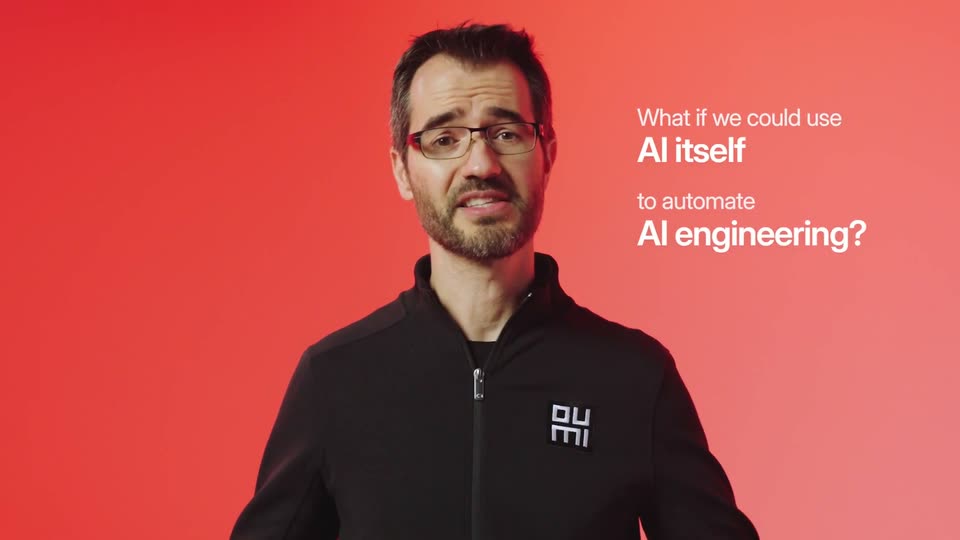
A bearded man in glasses and a black zip jacket speaks and gestures against a red gradient backdrop. White headline text builds on the right, first the opening two lines, then the closing two. The camera stays locked off on a medium shot.
On-screen text: “What if we could use”, “AI itself”, “to automate”, “AI engineering?”
Camera: Pull out
A man in a black zip-up jacket stands against a red gradient backdrop, gesturing as he speaks. A white headline on the right poses a question, then fades out as a pixel-art icon and the label FAiE, our Frontier AI Engineer agent, fade in beside him.
On-screen text: “What if we could use”, “AI itself”, “to automate”, “AI engineering?”, “FAiE”, “our Frontier AI”, “Engineer agent”
Camera: Push in
A man in a black zip jacket, gray pants and sneakers stands center frame against a red-to-white gradient wall. He faces left, gesturing with both hands as he speaks, then clasps them at his waist. Static full-body shot.
Camera: Static
A bearded man in glasses and a black zip-up jacket with a white square logo on the chest stands against a solid red-orange backdrop. He speaks while turning his head from side to side, then faces the camera directly in the final frame.
Camera: Static
A bearded man with glasses in a black zip-up jacket stands centered against a red-to-orange gradient backdrop, speaking directly to camera with small head tilts and blinks. The framing stays a steady medium close-up throughout.
Camera: Static
A bearded man in glasses and a black zip jacket stands centered against a red-to-orange gradient, speaking to camera with small head turns and hand gestures.
Camera: Static
A man in a black zip jacket, gray pants, and glasses stands in a studio with a red-orange gradient backdrop and white floor. He speaks in a static full-body shot, gesturing with both hands.
Camera: Static
A man with glasses and a beard, in a black zip jacket with a small white logo, stands centered against a red gradient backdrop. He speaks to camera and gestures with both hands in a static medium shot.
Camera: Pull out
A bearded man in glasses and a black zip jacket talks and gestures against a red-to-pink gradient. As he speaks, a white bulleted list fades in line by line on the right, then clears.
On-screen text: “AI agents that:”, “• reason”, “• use tools”, “• take actions”
Techniques: Kinetic type
Camera: Static
A man with glasses and a beard, wearing a black zip jacket with a small white chest logo, stands centered against a red-to-pink gradient backdrop. He faces the camera and gestures with both hands, palms up, as he speaks. Static medium shot.
Camera: Static
A thin gray line at center expands into a black square logo with white OU/MI letters, holds, then fades out. Two black sans-serif taglines fade in and out in turn on the white background: 'Empower your ML team.' and 'Build your agents on Oumi.' with 'agents' in blue.
On-screen text: “Empower your ML team.”, “Build your agents on Oumi.”
Techniques: Kinetic type, Morph
Camera: Static
On a pale gradient background, the dark gray headline sharpens from a blurred state, scales down and shifts to the top, while a white rounded card with a small circular icon fades in below it.
On-screen text: “Start with FAiE, your Oumi agent.”
Techniques: Kinetic type
Camera: Static
A headline caps a white “Ask FAiE” panel with a pixel robot icon on a pale gradient. The frame tightens on the input field as a prompt types out letter by letter, then a cursor moves onto the blue send button.
On-screen text: “Start with FAiE, your Oumi agent.”
Techniques: UI zoom, Cursor demo
Camera: Push in
A white chat panel fades in beneath a centered headline. A cursor taps send, the agent types a reply, and a five-step plan fills in row by row with green checks and tool chips. The view zooms into the plan as the cursor hovers the chips, then cuts to black.
On-screen text: “Start with FAiE, your Oumi agent.”
Techniques: Cursor demo, UI zoom
Camera: Push in
On a black field, the line 'New Agents' forms with 'New' in white and 'Agents' in gray as the earlier line 'New Datasets' fades out. The line then scales and turns gray while a white panel wipes up from the bottom edge to fill the lower half of the frame.
On-screen text: “New Datasets”, “New Agents”
Techniques: Kinetic type, Masking
Camera: Static
A white menu card fades in at center on a light dotted background, its four rows filling in one by one with icons and labels. A cursor rests at the lower right, then the card blurs as the full product dashboard resolves behind it.
Camera: Push in
A light tools dashboard lists four agent tools; a cursor hovers a row, then the view zooms into the Issue Refund tool, expanding a detail card with its JSON parameters. The screen then shows an implementation form where radio buttons toggle through Simulated, Endpoint and Interactive.
On-screen text: “Define tools your agent can call.”, “Simulate users, or call your real endpoints.”
Techniques: Cursor demo, UI zoom
Camera: Push in
The product interface opens on a harness settings panel, then the view zooms into the table showing the Name and Endpoint columns for three agent harnesses. The caption “Bring your own harness.” holds centered below the panel on a dotted background.
On-screen text: “Bring your own harness.”
Techniques: UI zoom
Camera: Pull out
A product interface titled Model Playground fills the frame, showing two chat panels side by side that run the same refund task against two models, with a left navigation sidebar. A dark gray headline reads “Compare models on real tool calls.” beneath the panel as the view slides up slightly.
On-screen text: “Compare models on real tool calls.”
Camera: Push in
A light chat panel on a dotted grid crossfades from an assistant confirming a refund to a second assistant issuing a simulated refund, ending on a red error badge. A static caption stays centered below the card throughout.
On-screen text: “Compare models on real tool calls.”
Camera: Push in
On a black background, white sans-serif text New Training slides into the center with a soft trailing echo. The word Judges then inserts in gray between New and Training, and Training drops to a second line, settling into a two-line lockup. The frame stays locked off.
On-screen text: “New Training”, “New Judges Training”
Techniques: Kinetic type
Camera: Static
A dark panel with the gray title New Training covers the top of a pale screen. The panel slides away to reveal a product interface with a Training methods card on the left and a list of rows on the right.
On-screen text: “New Training”
Techniques: Kinetic type, Masking
Camera: Static
A light product UI with a code editor and a Train a Model form sits behind a white card on the left. The card lists training methods, each line fading in in turn, while Supervised Fine-Tuning gains a blue highlight bar and a Private preview tag appears.
On-screen text: “Training methods”, “Supervised Fine-Tuning”, “On-Policy Distillation”, “Reinforcement Fine-Tuning”, “Direct Preference Optimization”, “Private preview”
Techniques: Kinetic type
Camera: Static
A product interface displays a sidebar with training methods and a main panel with a configuration form. A dropdown menu on the form selects 'Supervised Fine-Tuning' while the view zooms in slightly.
Techniques: UI zoom
Camera: Push in
Two white cards sit side by side on a pale dotted background. The blue selection highlight in the left list and in the right dropdown moves from 'Supervised Fine-Tuning' to 'On-Policy Distillation', and the right list scrolls up a few rows.
Camera: Static
A white callout card on the left lists training methods, with Reinforcement Fine-Tuning marked by a blue bar and a Private preview tag. To the right, the product dashboard displays metric charts and a Train a Model panel. The layout holds steady with a minor reframe.
On-screen text: “Training methods”, “Supervised Fine-Tuning”, “On-Policy Distillation”, “Reinforcement Fine-Tuning”, “Private preview”, “Direct Preference Optimization”
Camera: Push in
Two white cards float on a pale dotted background. The left card lists training methods and its blue highlight slides from Reinforcement Fine-Tuning down to Direct Preference Optimization. The right panel crossfades from a reward line chart into a chosen-versus-rejected conversation view.
Techniques: Masking
Camera: Pull out
A two-panel product interface sits on a dotted light background. The left card lists training methods, Direct Preference Optimization highlighted in blue, its text resolving from a blur into focus. The right panel shows a chat log with a tool call and two assistant responses, one green, one gray.
Camera: Static
A faint dot grid fills a light background as the centered headline reveals left to right with a trailing blur. The word agent shifts to blue once the line settles, then the frame holds still.
On-screen text: “Train the way your agent learns.”
Techniques: Kinetic type
Camera: Static
A sharp white “New” sits locked on the left of a black frame. To its right, two lines of dim gray sans words blur and cycle through Playground, Robots, Agents and Models, defocused so they read as a soft moving texture.
On-screen text: “New”, “Playground”, “Robots”, “Agents”, “Models”
Techniques: Kinetic type
Camera: Static
On a black background, the white word New sits left of a gray word that crossfades from Rubrics to Deployments. The new word brightens to white and slides left, centering the phrase New Deployments.
On-screen text: “New Rubrics”, “New Deployments”
Techniques: Kinetic type
Camera: Static
A product interface shows a Deploy Model dialog over a deployments table. The view zooms into the dialog's Base Model tab and dropdown list, then zooms back out to the full screen. A caption sits centered at the bottom.
On-screen text: “Deploy any model, base or tuned.”
Techniques: UI zoom
Camera: Push in
A tilted 3D mockup of an analytics dashboard with line charts and metric tiles sits on a light background. The camera zooms in toward the charts while the caption holds at the bottom.
On-screen text: “Watch every request.”
Techniques: 3D mockup, UI zoom
Camera: Push in
A Requests dashboard panel floats in 3D perspective on a dotted off-white backdrop. It rotates from a tilted angle toward the camera while a blue time-range band widens and a cursor traces the line graph. The caption Watch every request. sits below.
On-screen text: “Watch every request.”
Techniques: 3D mockup, Cursor demo
Camera: Pull out
A light analytics dashboard fills the frame, then the view zooms into the pink Refund Policy Compliance chart. A cursor drags the range brush along the bottom timeline, and the view zooms back out to the full dashboard. A caption sits centered below.
On-screen text: “Score live traffic with rubric judges.”
Techniques: UI zoom, Cursor demo
Camera: Pull out
A close-up of a failure-modes panel holds a colored response heatmap while a cursor presses the blue Generate Dataset button. A black rounded bar then wipes in to cover the grid, leaving the caption below.
On-screen text: “Turn failures into training data.”
Techniques: Cursor demo, Masking
Camera: Push in
On a black background, the white text “New Models” slides into the center with the second word offset lower, then swaps to the smaller gray “New Rubrics,” centered and still. The frame stays locked off throughout.
On-screen text: “New Models”, “New Rubrics”
Techniques: Kinetic type
Camera: Static
A dark upper band holds the gray title New Models over a white lower field. The title slides left and fades out, leaving a blank white frame.
On-screen text: “New Models”
Techniques: Kinetic type
Camera: Static
On a near-white field, two gray headers, Serve and Train, sit above three columns of black model names that resolve from a soft blur into sharp type. The middle and lower items settle last, then the whole grid blurs out as the scene ends.
On-screen text: “Serve”, “Claude Opus 5.5”, “Claude Sonnet 5.5”, “Claude Haiku 5.5”, “GPT-6 Sol”, “GPT-6 Luna”, “GPT-6.1 Terra”, “Gemini 4 Argon”, “Gemini 3.8 Flash”, “Grok 4.7', 'Mistral Large 4', 'Kimi K3.1 Pro', 'GLM-5.3 Prime', 'Qwen3.8 Max Prime', 'Inkling', 'Train', 'Qwen3.5', 'Gemma 4', 'Nemotron 3.5 Lightning', 'Qwen3.”
Camera: Static
A close-up of a laptop dashboard holds a floating deployment card whose status badge ticks from Working to Done. The view zooms out to reveal the full screen in 3D perspective as a phone mockup slides in on the right mirroring the card.
Techniques: UI zoom, 3D mockup
Camera: Pull out
A laptop and a phone in 3D perspective show a deployment dashboard with line charts on a pale background. A dark terminal in the foreground types a curl API request line by line, then a JSON response. Gray caption 'Wherever your team works.' fades in below.
On-screen text: “Wherever your team works.”
Techniques: 3D mockup, Kinetic type
Camera: Pull out
On a plain off-white field, a centered line builds word by word. 'One' sharpens from a soft gray blur into solid black, then 'more' and 'thing.' fade in to complete the phrase.
On-screen text: “One more thing.”
Techniques: Kinetic type
Camera: Static
Black text reading “One more thing.” sits centered on a plain off-white background. The text blurs and fades as a white diagonal panel wipes in from the right edge, closing the scene.
On-screen text: “One more thing.”
Techniques: Masking
Camera: Static
A dimmed product dashboard fills the frame with the line “One more thing.” centered over it. The overlay text fades out and the interface sharpens into focus beneath the title “Dark mode.”
On-screen text: “One more thing.”, “Dark mode.”
Camera: Static
A dark dashboard interface tilts in 3D perspective beneath a fixed white headline. The panel rotates edge-on, then settles into its light-mode version, still angled in space.
On-screen text: “Dark mode.”
Techniques: 3D mockup
Camera: Static
A short gray line at the center of a pale field grows into the black square Oumi logo. The headline fades in below it, 'agents' set in blue, then the URL appears and a small gray footnote lands at the bottom.
On-screen text: “Build your agents on Oumi.”, “platform.oumi.ai”, “RL fine-tuning is in private preview.”
Camera: Static
A bearded man in glasses and a black zip-up jacket speaks and gestures against a flat red backdrop, framed at the chest. A white caption is locked on the left. A closing tagline and URL appear at the end.
On-screen text: “The future of AI isn't just about using somebody else's intelligence.”, “Build your agents on Oumi.”, “platform.oumi.ai”, “RL fine-tuning is in private preview.”
Camera: Static
A man in a black zip-up jacket with glasses stands against a red gradient backdrop, speaking and gesturing with his hands. White text on the left carries his message, the second line fading in. The camera stays locked off.
On-screen text: “The future of AI isn't just about using somebody else's intelligence.”, “It's about building and owning your own.”
Camera: Static
A bearded man in glasses and a black zip-up jacket stands against a flat red backdrop, talking off-camera left in a locked-off medium shot. A four-line static caption sits in the frame.
On-screen text: “The future of Al”, “isn't just about”, “using somebody”, “else's intelligence.”
Camera: Static
A presenter in a black jacket stands before a red gradient backdrop while a helmeted rider glides a black electric scooter past him. The rider pauses and the presenter steps onto the scooter's rear deck, both facing the camera as the scooter rolls forward.
Camera: Pan
Two men in black tops stand on a scooter against a coral studio backdrop. The helmeted rider grips the handlebars while the man behind rests his hands over them, both turning to face the camera as the shot tracks left.
On-screen text: “T”
Camera: Pull out
Two men ride a gray electric scooter right across a red gradient studio floor, one standing behind the other. The live action frame then contracts into a centered rectangle over a blue blueprint grid.
Techniques: Masking
Camera: Static
A black square logo with white geometric glyphs starts centered on a blue grid background, then shrinks and slides left as “Register at” and the URL oumi.ai/events/fall26 blur in to its right.
On-screen text: “Register at”, “oumi.ai/events/fall26”
Camera: Static