0:26

Introducing Hana - A new canvas for interactivity - by Spline
Spline · Design · Apr 2025
UX Pilot · Oct 2026 · 0:27 · AI-annotated
UX Pilot’s 0:27 launch film runs 18 scenes, about 1.5 s each. The product is on screen from the first frame and 4 features are revealed. The call to action lands at 0:21 (80% in), over a voiceover. A fast-cut launch reel on a deep indigo field: brand morph, value prop, then a quick-fire parade of feature title cards (marquee, sliders, format cycling) cut to a 117 BPM hip-hop track. Signature moves are the 3D object wordmark morph, the orbiting icon ring, and lime outline accents that bookend the call to action.
Is this your launch? to your site or press kit.
Spline · Design · Apr 2025
Project Genie · Jan 2026
A dark purple frame holds the white wordmark UX PILOT Labs. The letters morph into a row of colorful 3D objects, one per character.
On-screen text: “UX PILOT Labs”
Techniques: Morph
Camera: Static
A tilted 3D wall of colorful image tiles, blurred at first, rotates flat toward the camera into a sharp front-facing grid on a dark background. The tiles, with a scanline texture, show flowers, a gold bust, a butterfly and a planet.
On-screen text: “UX”
Techniques: 3D mockup
Camera: Pull out
White all-caps text FREE TO EXPLORE sits centered on a dark indigo field. A ring of small line icons in rounded squares scales in around the text, forming a full circle, then fades out, leaving the text alone.
On-screen text: “FREE TO EXPLORE”
Camera: Static
A white headline reads 17 CREATIVE TOOLS at the center of a dark purple field. A ring of small purple rounded-square icon tiles orbits the text, rotating slowly clockwise; the tiles show symbols for text, shapes, a droplet, a grid, a book and a wand.
On-screen text: “17 CREATIVE TOOLS”
Camera: Static
A ring of light purple icon tiles encircles the white serif title 17 CREATIVE TOOLS on a dark purple field, then contracts inward and dissolves, taking the title with it.
On-screen text: “17 CREATIVE TOOLS”
Camera: Pull out
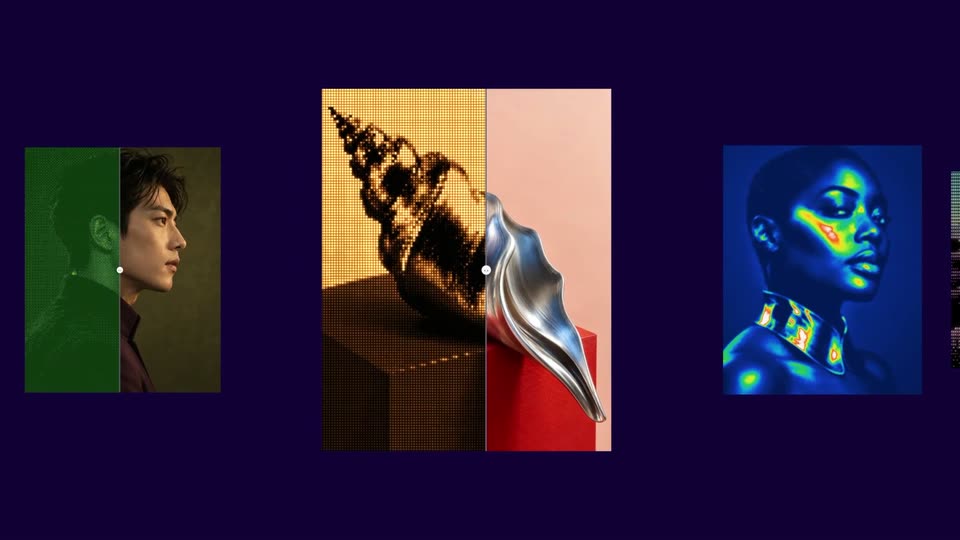
A row of vertical image cards, each split by a thin vertical line with a small white dot, slides leftward across a dark indigo background. The cards show a seashell, a woman's face, a desert dune, and a man's profile, passing one after another.
Camera: Pan
Three tilted image cards float on an indigo field, each split by a thin line with a white handle. Left card: a flower in cyan and lime; center: a man's profile in green duotone; right: a seashell in gold and pink. The handles glide right.
Techniques: 3D mockup
Camera: Static
A pale settings panel fills the frame against a dark purple background. The list of labeled sliders scrolls upward as a white hand cursor icon grabs the round knobs and drags them along the lavender tracks, adjusting each value.
Techniques: Cursor demo
Camera: Pan
A bold white headline TUNE LIVE scales up over a dark purple field while a light gray slider card holds below. A pointing-hand cursor drags the slider thumb to the right, extending the purple fill, as the Size label stays fixed.
On-screen text: “TUNE LIVE”
Techniques: Kinetic type, Cursor demo
Camera: Static
On a dark purple background, a bulb-style marquee title reads SPIN VARIATIONS above a thin horizontal line holding a row of small square thumbnails, one enclosed in a white box. The title is replaced by a plain white EXPORT TO while the thumbnails cycle through new images.
On-screen text: “SPIN VARIATIONS”, “EXPORT TO”
Camera: Static
On a dark navy field, white EXPORT TO holds on the left while a lime word cycles inside a rounded outline on the right: PNG, WEBP, HTML, CODE, then CANVAS. The outline box fills solid lime, the word inverts to dark navy, and a soft glow blooms around it.
On-screen text: “EXPORT TO”, “PNG”, “WEBP”, “HTML”, “CODE”, “CANVAS”
Techniques: Kinetic type
Camera: Static
A design-tool editor fills the frame: layers panel left, a dark canvas with a Relay login card center, properties panel right. A purple cursor clicks the heading, selecting it as the right panel switches to its text settings. Big added text then reads EXPORT TO, with CANVAS scaling in.
On-screen text: “EXPORT TO”, “CANVAS”
Techniques: Cursor demo, Kinetic type
Camera: Static
A design tool screen shows a butterfly artwork with a white sign-up card on the canvas. The left layers panel and right inspector panel update as the selection switches, highlighting different elements and showing their properties.
Camera: Static
A design tool workspace fills the screen, a dark web page mockup titled Fieldwork centered on the canvas between a layers panel on the left and a properties panel on the right. The canvas slowly zooms out, shrinking the mockup.
Techniques: UI zoom
Camera: Static
A vertical list of effect names, each paired with a small purple icon square, scrolls downward over a dark indigo background. Bold white lines alternate with smaller ones, the list looping continuously.
On-screen text: “CHROMATIC LIGHT”, “DITHER”, “LIQUID METAL”, “ASCII ART”, “OPTICAL MOTION”, “SPECTRUM FLOW”, “ETHEREAL VEIL”, “CREATIVE DIRECTION”, “MIRROR SHAPES”, “RETRO RHYTHMLOGO ORBITBRICK IMAGEWAVE REFLECTS”
Techniques: Kinetic type
Camera: Pan
A pixel robot icon in a rainbow-bordered square sits left of the white wordmark UX PILOT, with Labs beneath and a small URL. The lockup draws in over a dark blue pixel grid drifting with pink ink.
On-screen text: “UX PILOT”, “Labs”, “uxpilot.ai/labs”
Techniques: Kinetic type
Camera: Static
A pixel-art white icon sits inside three tilted neon squares in pink, green and purple, beside the white wordmark UX PILOT over Labs. The lockup holds on a blue-purple gradient with vertical glitch streaks at the left edge.
On-screen text: “uxpilot.ai/labs”
Camera: Static
A static end card on a dark indigo field. White TRY NOW sits centered above a lime-green rounded outline holding the monospace URL uxpilot.ai/labs. The frame holds without motion.
On-screen text: “TRY NOW”, “uxpilot.ai/labs”
Camera: Static