1:25
Explore
Google DeepMind - Step inside Project Genie: our experimental research prototype that l
Project Genie · Jan 2026 · 2:03 · AI-annotated
- Length
- 2:03
- Scenes
- 55 · 2.2 s avg
- Product on screen
- 0:00
- Features shown
- 4
- Call to action
- 1:54 · 93%
- Voiceover
- No
00:00:00 / 02:03:00
Project Genie’s 2:03 launch film runs 55 scenes, about 2.2 s each. The product is on screen from the first frame and 4 features are revealed. The call to action lands at 1:54 (93% in). The film bookends a field of circular fisheye windows that each frame a different generated world, and alternates dark prompt panels with full-bleed 3D gameplay vignettes. At a brisk ~112 BPM it cuts quickly between typed prompts, cursor clicks and short playable scenes, using centered white taglines and the recurring orb motif as its signature moves.
Footage neededEstimated needs: 5 capture groups — your screens or recordings · 13 filmed passages — shoot, supply or replace · 3 graphic passages — draw or supply · 25 3D passages — build or supply
Is this your launch? to your site or press kit.
More like this


Google DeepMind - Step inside Project Genie: our experimental research prototype that l, scene by scene
· 55 scenes as text
01 · Product intro · 0:00–0:00
A blue arrow flies down a 3D river canyon seen through a circular cutout; the camera pulls back to reveal many floating circular orbs in a dark void, each holding a different scene, as “Introducing” slides in over the central orb.
On-screen text: “Introducing”
Techniques: Masking, Kinetic type, Parallax
Camera: Pull out
02 · Product intro · 0:00–0:03
A black field of circular fisheye windows, each holding a different 3D rendered scene, surrounds a larger central circle. “Introducing” slides into the center, then the large title “Project Genie” settles in with a small outlined “EXPERIMENT” pill below.
On-screen text: “Introducing”, “Project Genie”, “EXPERIMENT”
Techniques: Kinetic type
Camera: Pull out
03 · Product intro · 0:03–0:10
Over a grid of circular world thumbnails, a large central circle shows the title, then shrinks to a wireframe globe as the tagline fades in. A cursor clicks “Create your own” inside the globe, and the camera zooms through the wireframe into a 3D grassy field.
On-screen text: “Introducing”, “Project Genie”, “EXPERIMENT”, “Google's research prototype”, “for playable worlds”, “Create your own”
Techniques: Kinetic type, Cursor demo, UI zoom
Camera: Push in
04 · Demo · 0:10–0:17
The Create screen sits in a dark 3D wireframe grid. The camera zooms into the prompt panel as text types into the Environment and Character fields, then a cursor moves to and clicks the white Create sketch button.
On-screen text: “Let's start by sketching your world”, “Research prototype. Results may vary. Sequences shortened throughout. Subscription required. Available in the U.S. only. 18+.”
Techniques: UI zoom, 3D mockup, Cursor demo
Camera: Push in
05 · Demo · 0:17–0:18
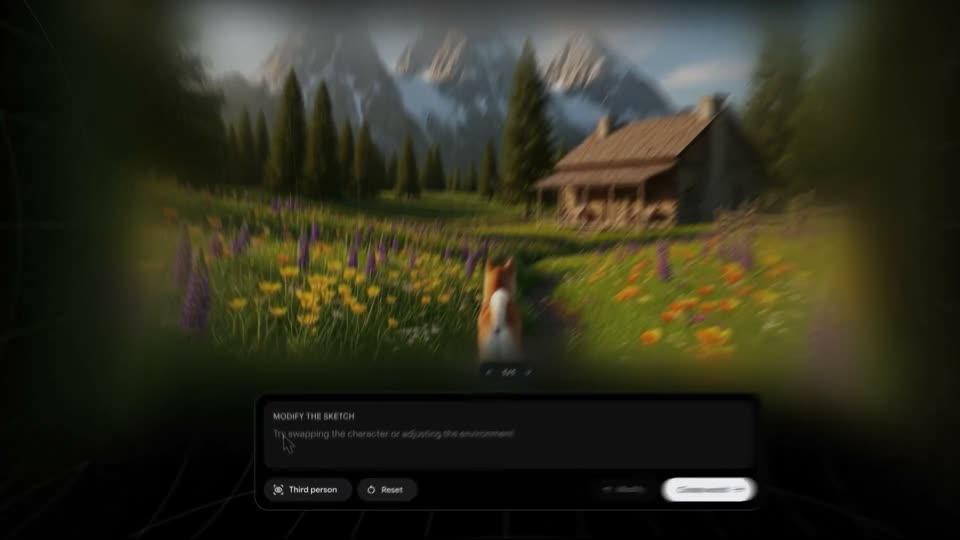
A dark prompt form with two text fields and a white action button sits over a black wireframe grid. The form scales down and lowers as a blurred 3D meadow with a cabin and a dog fades in behind it.
Camera: Pull out
06 · Demo · 0:18–0:19
A 3D rendered mountain landscape with a cabin and a fox sits in a dark interface panel; the bottom control bar and panel fade out, leaving the world filling the frame over a faint grid.
Camera: Static
07 · Demo · 0:19–0:21
A 3D alpine meadow with mountains and a log cabin fills the frame, softened by a green vignette. A small orange dog, seen from behind, walks a path toward the cabin as a white pill button reading Create world with a cursor hovers at center, its arrow pulsing.
Techniques: Cursor demo
Camera: Pull out
08 · Demo · 0:21–0:23
A heavily defocused outdoor scene: a green meadow fills the foreground as soft bokeh, with snow-capped peaks and dark conifers under a blue sky. The camera drifts slowly across the blur.
Camera: Pull out
09 · Demo · 0:23–0:26
A 3D mountain meadow with a wooden cabin and snow peaks. A white-and-orange dog runs along a dirt path away from the camera, which tracks forward through swaying lupines and wildflowers. Rounded key hints (WASD, arrows, SPACE) sit in the lower corners.
Techniques: Parallax
Camera: Push in
10 · Demo · 0:26–0:28
A woman with long dark hair is filmed from behind, her head filling the left foreground in soft focus. She faces a large monitor showing a game: a fox runs across a sunlit meadow toward a wooden lodge, snow-capped peaks behind. The shot holds steady.
Camera: Static
11 · Demo · 0:28–0:29
Close-up of two hands in a gray sleeve typing on a white keyboard set on a wooden desk, filmed from a low side angle. Fingers tap the keys in a steady rhythm as the shot holds steady.
Camera: Static
12 · Demo · 0:29–0:33
A corgi runs away from the camera across a grassy meadow, passing a wooden fence, toward pine trees and snow-capped peaks. Keyboard control hints sit in the lower corners. The camera tracks forward, the foreground fence and midground trees sliding past at different speeds.
Techniques: Parallax
Camera: Push in
13 · Feature reveal · 0:33–0:35
A product screen shows a 3D mountain valley with a cabin and a dog, framed by a dark vignette and a bottom control panel. The headline Remix your world fades in over the scene, a cursor hovers the Third person button, then the view zooms in with motion blur.
On-screen text: “Remix your world”
Techniques: Cursor demo, UI zoom
Camera: Push in
14 · Feature reveal · 0:35–0:39
A dark prompt panel hovers over a dim 3D grid floor while a prompt is typed into the field. The view then pans right to the Modify and Create world buttons as a mouse cursor glides onto Create world.
Techniques: UI zoom, Cursor demo
Camera: Push in
15 · Feature reveal · 0:39–0:40
A 3D valley with snow peaks, pines and a cabin; a pink balloon rabbit stands on a dirt path. A prompt pill labels the scene at top, WASD and arrow controls sit in the corners. The camera eases from a blurred push-in to a still frame.
On-screen text: “pink balloon animal rabbit”
Camera: Pull out
16 · Feature reveal · 0:40–0:42
A pink balloon rabbit stands on a blue inflatable lane inside a colorful bouncy house, the camera dollies forward past rounded pillars. The shot cuts to a treehouse platform with a ladder, where a small pink balloon animal waits under green leaves.
On-screen text: “pink balloon animal rabbit”, “to a bouncy house with”, “to a treehouse with”
Camera: Push in
17 · Feature reveal · 0:42–0:43
A pink balloon rabbit stands facing the camera in a sunlit wooden treehouse, a chat bubble hovering above its head and key-control icons in the lower corners. The camera dollies forward, pushing closer to the rabbit.
Camera: Push in
18 · Feature reveal · 0:43–0:45
A watercolor countryside road viewed from behind a pink balloon rabbit, with a yellow school bus ahead on the wet asphalt. The view creeps slowly forward. Gray key hints sit in the bottom corners and a gray pill hovers at top center.
Camera: Push in
19 · Feature reveal · 0:45–0:49
A red-suited climber ascends a narrow snowy ridge, the camera tracking from behind and swinging to a side view as the headline fades in and out. A sea of clouds fills the valleys below the distant peaks.
On-screen text: “Be any character”
Techniques: Parallax
Camera: Pull out
20 · Feature reveal · 0:49–0:50
Extreme macro of green leaves and a brown twig. A small red ant walks left across the leaf as the A key in a bottom-left WASD hint lights white. An arrow-key hint cluster sits bottom-right.
Camera: Push in
21 · Feature reveal · 0:50–0:52
A macro close-up follows a small orange ant on a brown twig between fuzzy green leaves. The frame stays tight with shallow focus, and translucent WASD and arrow controls sit in the lower corners.
Camera: Push in
22 · Feature reveal · 0:52–0:55
A grayscale 3D mountain range scrolls past as a dark eagle with a white feather bundle glides forward, banking left past a small figure on a rock. Keyboard hints sit in the lower corners.
Techniques: 3D mockup, Parallax
Camera: Push in
23 · Feature reveal · 0:55–0:59
A small figure carrying a large white box on its back walks across a green billiards table, nudging colored balls aside. The camera tracks from behind as a white caption holds centered. Keyboard hints sit in the lower corners.
On-screen text: “Interact with your environment”
Camera: Static
24 · Feature reveal · 0:59–1:02
A dark interface panel in close-up as the CHARACTER field types out a description of a blue rolling ball, character by character. A white Create sketch button with an arrow sits at the lower right, and a Reset control is partially visible on the left edge.
Techniques: Kinetic type
Camera: Static
25 · Feature reveal · 1:02–1:05
A glossy blue sphere bounces and rolls across white, fur-like terrain, dragging a blue streak behind it. The camera tracks the ball over the hilly landscape. Small keyboard hints, WASD and arrow keys with a SPACE bar, sit in the lower corners.
Techniques: Parallax
Camera: Push in
26 · Feature reveal · 1:05–1:06
A character in a blue wingsuit and yellow helmet flies along a snow-covered cliff, threading glowing blue rings as the camera tracks from behind and above. White key hints sit in the lower corners.
Camera: Push in
27 · Feature reveal · 1:06–1:08
A first-person hand holds a flashlight, its beam cutting through a dark night field to reveal a fox standing in the grass. The fox steps forward and lowers its head as the light holds on it. Keyboard control hints sit in the lower corners.
Techniques: 3D mockup
Camera: Static
28 · Feature reveal · 1:08–1:10
Two hands assemble small folded cardboard blocks on a worn wooden table as the lens racks from soft blur to sharp focus. A white headline sits centered over the action.
On-screen text: “Play worlds from your images”
Camera: Static
29 · Feature reveal · 1:10–1:10
Two hands work on a wooden table, one steadying a small cardboard base while the other lowers a folded cardboard cube onto it. White centered text reads “Play worlds from your images” and stays still.
On-screen text: “Play worlds from your images”
Camera: Pull out
30 · Feature reveal · 1:10–1:12
Over-the-shoulder shot of a person holding a phone over a wooden table, framing a small cardboard box. The phone screen shows an augmented view of the box with camera controls, and the person's thumb taps the shutter button.
On-screen text: “Play worlds from your images”
Techniques: Cursor demo
Camera: Static
31 · Feature reveal · 1:12–1:14
A workshop bench with a cardboard box figure and a white toy car sits before a tool wall, framed in a rounded card on black. A white arrow cursor and a click hand icon pop in on the right, then the view pans hard to the right.
Techniques: Cursor demo
Camera: Pan
32 · Feature reveal · 1:14–1:14
A tight close-up of a dark UI panel shows the heading ENVIRONMENT and body copy over two pill buttons. A small rounded thumbnail of a 3D makerspace interior blurs in from the left and snaps into place beside the buttons.
Camera: Static
33 · Feature reveal · 1:14–1:16
A dark UI card showing a world prompt and a small room thumbnail pans across the screen, reframing onto a Create world button where a white cursor hovers and shifts.
Techniques: UI zoom, Cursor demo
Camera: Pan
34 · Feature reveal · 1:16–1:17
A close-up of a dark interface panel shows a cursor resting on a white Create world button. The frame then zooms out with heavy motion blur, revealing a brown cardboard humanoid standing in a colorful 3D world.
Techniques: Cursor demo
Camera: Pull out
35 · Feature reveal · 1:17–1:19
A 3D workshop room with a wooden table holding scattered props, a small cardboard box figure centered, and a wall of hanging tools behind. The camera dollies forward across the table, the box and a blue scissor sculpture growing as the view advances.
Techniques: Parallax
Camera: Static
36 · Feature reveal · 1:19–1:20
A cardboard spider robot with thin legs scuttles across a wooden workshop table, passing cones, balls and a wooden car, while a tool-covered wall fills the background. The camera tracks it from a low angle.
Camera: Static
37 · Feature reveal · 1:20–1:22
A workshop table with ice cream cones and small props sits before a tool wall as a curved brown arm swings a wooden boot-shaped object through the air. The view cuts to a person holding a phone horizontally, its screen showing the same workshop shot.
Camera: Push in
38 · Feature reveal · 1:22–1:23
Over-the-shoulder view of a person holding a phone in landscape, photographing a cat on a rug in a bright living room. The phone viewfinder shows a street scene. The frame then becomes a white-bordered photo card that tilts and slides over the blurred room.
Techniques: Morph
Camera: Static
39 · Feature reveal · 1:23–1:34
A rounded photo of a sunlit living room with a cat fades in on black, then the frame dives into the image. First-person view: a 3D Siamese cat walks across the sofa toward the window as the camera follows; WASD and arrow controls sit in the lower corners.
Techniques: Morph, 3D mockup
Camera: Push in
40 · Feature reveal · 1:34–1:37
A dark rounded prompt card sits centered on a black background. A cursor drags a small portrait thumbnail into the card's top-left corner, then white text types out a prompt about generating a low poly 3D character, while an Image attachment chip stays at the bottom.
Techniques: Cursor demo, Kinetic type
Camera: Static
41 · Feature reveal · 1:37–1:38
A dark rounded card holds a sparkle icon and a loading label. A low-poly 3D woman in a yellow striped shirt fades into the card against a teal forest, the label clearing as the image resolves.
Camera: Push in
42 · Feature reveal · 1:38–1:39
A pixel-art jungle scene with a woman in a yellow striped shirt stands centered in a rounded card on a black background. The card slowly zooms in, filling more of the frame by the end.
Camera: Static
43 · Feature reveal · 1:39–1:40
A defocused teal field in a rounded rectangle expands to fill the frame, revealing a blurry figure in a yellow top against a dark blue background with soft lights at the bottom.
Techniques: Masking
Camera: Static
44 · Feature reveal · 1:40–1:43
A low-poly woman in a yellow striped shirt walks and turns inside a dark cave lit by glowing blue and green plants, keyboard control hints in the corners. The full-frame 3D view then reframes into a bordered window set on a wooden wall.
Techniques: Parallax, UI zoom
Camera: Pull out
45 · Feature reveal · 1:43–1:45
A 3D woman in a yellow striped shirt stands in a dark cave with glowing blue plants, then turns to face left. She fills a central window while other clips frame the edges: a pink shirt above, palm trees below, a tiled wall to the right.
Techniques: Split screen
Camera: Pull out
46 · Feature reveal · 1:45–1:48
A 3x3 mosaic of nine 3D character clips assembles, each cell showing a different person in a separate setting, from a beach path to a snowy slope. The underwater woman in the yellow shirt stays fixed at the center while the surrounding cells slide and scale into a stable grid.
Techniques: Split screen
Camera: Pull out
47 · Demo · 1:48–1:48
A first-person view from a snowmobile glides forward down a snow-covered city street at dusk, flanked by stylized neon-colored buildings, while the white text “Imagine worlds” stays centered over the scene.
On-screen text: “Imagine worlds”
Camera: Static
48 · Demo · 1:48–1:49
First-person view from a snowmobile, gloved hands on the handlebars, advancing down a snowy street lined with glowing trees and colorful buildings under an orange sky. The white tagline sits centered and static over the forward-moving scene.
On-screen text: “Imagine worlds”
Camera: Static
49 · Demo · 1:49–1:50
An isometric 3D playground diorama with small figures sits on a purple field, white text 'Create worlds' centered. The whole scene morphs into a snowy mountain with a red car and a huge moon as the text swaps to 'Imagine worlds'.
On-screen text: “Create worlds”, “Imagine worlds”
Techniques: Morph
Camera: Static
50 · Demo · 1:50–1:51
A red muscle car drives and hops across a rocky lunar surface, a banded gas planet and an asteroid ring fill the starry sky behind it. The white text Play worlds sits centered and static over the scene.
On-screen text: “Play worlds”
Camera: Static
51 · Other · 1:51–1:52
A circular window shows a red car on a cratered moon surface beneath a striped gas giant, then the camera pulls back to reveal a ring of additional circular windows, each framing a different 3D scene, on a black background.
Camera: Pull out
52 · Other · 1:52–1:53
A black canvas holds a scattered cluster of circular vignettes, each masking a different image. The largest, centered circle shows a red car on rippled sand beneath a striped planet, while smaller circles frame a cat, a leaf, a lake and abstract shapes. The layout stays static.
Camera: Pan
53 · Other · 1:53–1:54
A black field of glossy circular domes, each framing a different surreal image, drifts slowly; the central dome shows a red car on a desert plain beneath a planet.
Camera: Pull out
54 · CTA · 1:54–1:56
A staggered grid of circular 3D scenes fills a black frame. White text types in word by word over the water world: Start creating worlds of your own at.
On-screen text: “Start creating worlds of your own at”
Techniques: Kinetic type
Camera: Static
55 · CTA · 1:56–2:03
A black screen holds two centered lines of white text for the full duration, then fades to black. The frame is locked-off with no motion or camera move.
On-screen text: “Start creating worlds of your own at”, “labs.google/ProjectGenie”
Camera: Static